
admin

Passing objects to function

Java program to multiply two matrices – Ultimate way 2 success

Java Programs

Java program to multiply two matrices

Aim

To write a C++ program for finding the factorial for a given number using class and object.

Procedure

STEP 1: Include the necessary header files for the program.
STEP 2: Define a class named “factorial” to encapsulate the functionality of calculating the factorial of a number.
STEP 3: Declare the member functions with in the “factorial” class.
(i)”in()” function – to get the user input.
(ii) “calculate()” function – to compute the factorial for the given input.
(iii) “out()” function – to display the result.
STEP 4: Implement the member functions.
STEP 5: In the “main()” function, create an object named “x” for the “factorial” class.
STEP 6: Invoke the member functions using the object to get the input, calculate the factorial, and display the result.
STEP 7: Terminate the program.

Source Code(Class and object)

Output

class and object

Explanation

Class and Object: In object-oriented programming (OOP), class is a blueprint or structure of an object. In this program, the “factorial” class serves as a blueprint or structure that defines the properties and functions.

Class Definition: The “factorial” class is defined with member variables (“n” and “f”) and member functions (“in()”, “calculate()”, and “out()”). These member functions define the actions or behaviors associated with objects of the “factorial” class.

Implementation of Member Functions: (i) “in()”: Gets input from the user. (ii) “calculate()”: Computes the factorial of a given number. (iii) “out()”: Displays the result.

Objects: Objects are instances of classes. In the “main()” function, an object “x” is created for the “factorial” class. This object is used to invoke the member functions such as “in()”, “calculate()”, and “out()”.

We hope this article has helped readers learn how to write a C++ program to demonstrate function overloading, default arguments, and inline functions. This C++ practical program is  included in the I year BCA TANSCHE syllabus.

If you found this article helpful, consider sharing it with your friends. For more tutorials and content, subscribe to our YouTube channel and follow us on TwitterInstagramLinkedIn and  Facebook.

Share the Article

Java program to multiply two matrices – Ultimate way 2 success Read More »

Passing objects to function

Java program to print prime numbers – Ultimate way 2 success

Java Programs

Java program to print prime numbers

Aim

To write a C++ program for finding the factorial for a given number using class and object.

Procedure

STEP 1: Include the necessary header files for the program.
STEP 2: Define a class named “factorial” to encapsulate the functionality of calculating the factorial of a number.
STEP 3: Declare the member functions with in the “factorial” class.
(i)”in()” function – to get the user input.
(ii) “calculate()” function – to compute the factorial for the given input.
(iii) “out()” function – to display the result.
STEP 4: Implement the member functions.
STEP 5: In the “main()” function, create an object named “x” for the “factorial” class.
STEP 6: Invoke the member functions using the object to get the input, calculate the factorial, and display the result.
STEP 7: Terminate the program.

Source Code(Class and object)

Output

class and object

Explanation

Class and Object: In object-oriented programming (OOP), class is a blueprint or structure of an object. In this program, the “factorial” class serves as a blueprint or structure that defines the properties and functions.

Class Definition: The “factorial” class is defined with member variables (“n” and “f”) and member functions (“in()”, “calculate()”, and “out()”). These member functions define the actions or behaviors associated with objects of the “factorial” class.

Implementation of Member Functions: (i) “in()”: Gets input from the user. (ii) “calculate()”: Computes the factorial of a given number. (iii) “out()”: Displays the result.

Objects: Objects are instances of classes. In the “main()” function, an object “x” is created for the “factorial” class. This object is used to invoke the member functions such as “in()”, “calculate()”, and “out()”.

We hope this article has helped readers learn how to write a C++ program to demonstrate function overloading, default arguments, and inline functions. This C++ practical program is  included in the I year BCA TANSCHE syllabus.

If you found this article helpful, consider sharing it with your friends. For more tutorials and content, subscribe to our YouTube channel and follow us on TwitterInstagramLinkedIn and  Facebook.

Share the Article

Java program to print prime numbers – Ultimate way 2 success Read More »

function overloading

How to run java applet – Ultimate way 2 success

Java Programming

How to run Java Applet

Java Applet

A Java applet is a tiny application that is written in the Java programming language. They can be embedded as part of a web page. An applet is used to create dynamic platform-independent content such as animation, banners, GUIs (Graphical User Interfaces), and games for web pages.
Applets run in a sandbox environment to ensure security and are executed by the Java Virtual Machine (JVM), using:
(i) Web browser 
(ii) Appletviewer tool

To run Applet in a browser

We can embed the applet in an HTML file and execute it within a web browser. Nowadays, modern browsers do not natively support applets, but we can install a plugin to enable this functionality.
The CheerpJ Applet Runner extension is one such plugin for running Java applets on modern browsers such as Google Chrome, Microsoft Edge, Firefox, Safari, etc. It is free and easy to use. Moreover, it is completely private and secure.

(i)Create a java program(Sample.java)

1.Open any editor such as notepad or notepad++.
2. Create a folder named  “javaprogram” in D: drive(we can use any drive such as F, E, etc).
3. Type the following program and save it as “Sample.java”.

4. Open the command prompt window by typing the command “cmd” in the Windows search box.

Java Applet

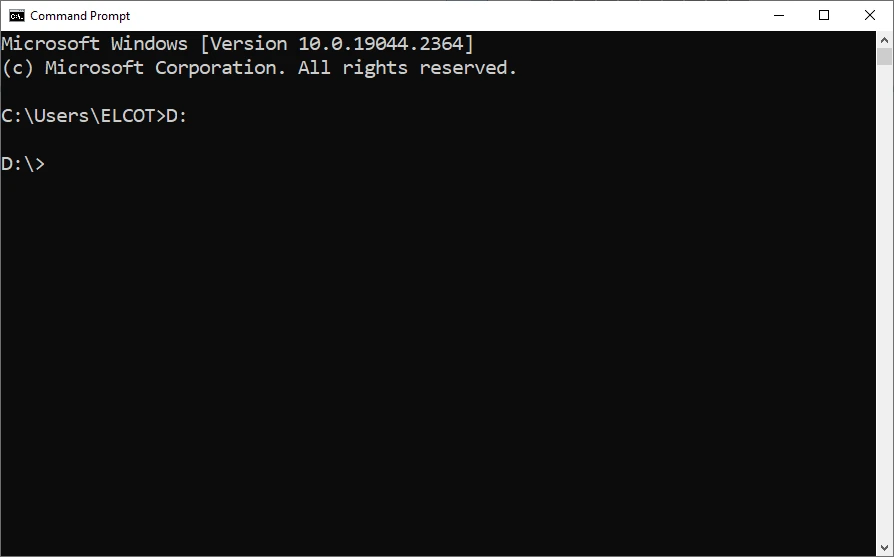
5. Change the current “C” drive into “D” by typing “D:” in the prompt (because the applet program is stored in the “javaprogram” folder, which is on the “D” drive. Moreover, enter the drive name where your program folder is stored).

applet

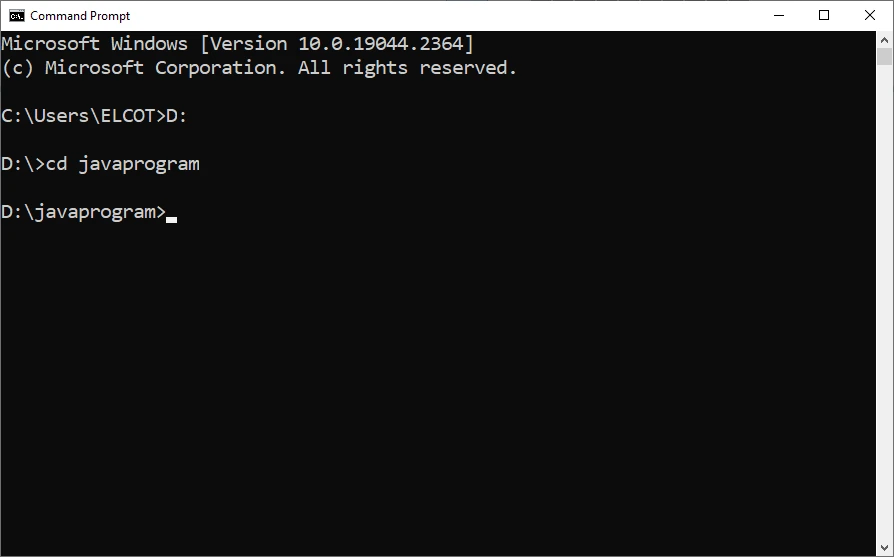
6. Change the current working folder as  “javaprogram”  by entering the command  “cd  javaprogram”.

img2 1

7. Set  the  java  path:
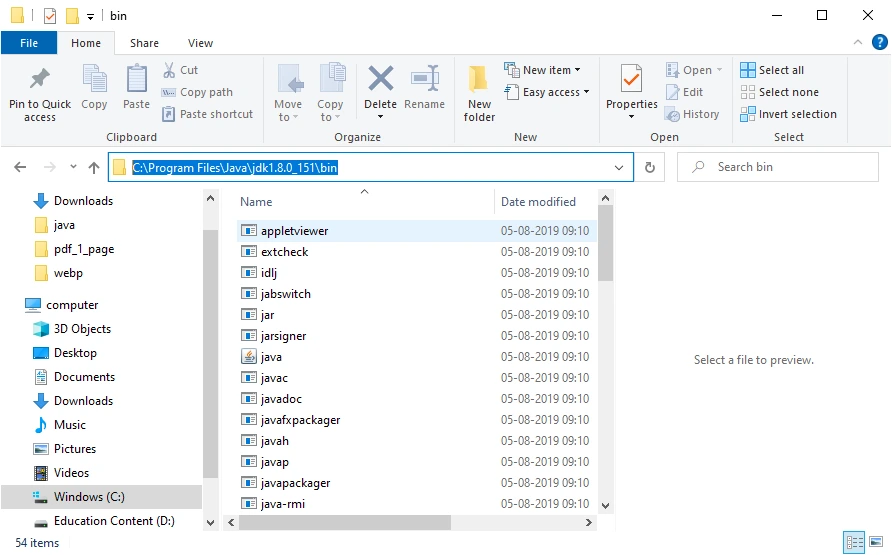
    (i)Navigate to the “bin” folder within the “jdk” folder. Select the path in the address bar. Right-click on the address and choose the “copy” option.

img3 2

    (ii) In the command prompt, enter the command “path” and paste the path in the prompt (Right-click in the title bar of the command prompt window, to paste the path).

img4 1

8. Now compile the applet by using the following command:

To run Applet using Appletviewer

1. Function Overloading : Function overloading enables the implementation of multiple functions with the same name but with different parameters.The programmer can distinguish the functions by number of parameters, datatype of parameters and return type.
In this program, the “area” function is overloaded within the “shape” class. There are three “area” functions:
(i) The first function with an integer argument (for calculating the area of a square).
(ii) The second function with two integer arguments (for calculating the area of a rectangle).
(iii) The third function with  a double argument (for calculating the area of a circle).
This allows the program to call the appropriate “area” function based on the number and types of arguments , passed by the user.

2. Default Arguments : Default arguments provide default values for function parameters, if  there is no argument value is passed during the function call. This default argument is defined by the programmer.
In the above program, the “area” function for calculating the area of a circle has a default argument for “pi” with a value of 3.14. If the user does not provide a value for “pi” when calling this function, it will use the default value of 3.14.

3. Inline Functions :  Inline functions are functions whose code is expanded at the time of the function call, rather than being executed through a function call mechanism.
In the above program, the “area” function for calculating the area of a square is declared as an inline function using the “inline” keyword. This means that the function call is replaced with the actual code of the function during compilation, which can result in faster execution compared to a regular function call.

We hope this article has helped readers learn how to write a C++ program to demonstrate function overloading, default arguments, and inline functions. This C++ practical program is  included in the I year BCA TANSCHE syllabus.

If you found this article helpful, consider sharing it with your friends. For more tutorials and content, subscribe to our YouTube channel and follow us on TwitterInstagramLinkedIn and  Facebook.

Share the Article

How to run java applet – Ultimate way 2 success Read More »
Passing objects to function

class and object in c++ – Ultimate way 2 success

C++ Programs

Class and Object in C++

Aim(Class and object)

To write a C++ program for finding the factorial for a given number using class and object.

Procedure

STEP 1: Include the necessary header files for the program.
STEP 2: Define a class named “factorial” to encapsulate the functionality of calculating the factorial of a number.
STEP 3: Declare the member functions with in the “factorial” class.
(i)”in()” function – to get the user input.
(ii) “calculate()” function – to compute the factorial for the given input.
(iii) “out()” function – to display the result.
STEP 4: Implement the member functions.
STEP 5: In the “main()” function, create an object named “x” for the “factorial” class.
STEP 6: Invoke the member functions using the object to get the input, calculate the factorial, and display the result.
STEP 7: Terminate the program.

Source Code(Class and object)

Output

class and object

Explanation

Class and Object: In object-oriented programming (OOP), class is a blueprint or structure of an object. In this program, the “factorial” class serves as a blueprint or structure that defines the properties and functions.

Class Definition: The “factorial” class is defined with member variables (“n” and “f”) and member functions (“in()”, “calculate()”, and “out()”). These member functions define the actions or behaviors associated with objects of the “factorial” class.

Implementation of Member Functions: (i) “in()”: Gets input from the user. (ii) “calculate()”: Computes the factorial of a given number. (iii) “out()”: Displays the result.

Objects: Objects are instances of classes. In the “main()” function, an object “x” is created for the “factorial” class. This object is used to invoke the member functions such as “in()”, “calculate()”, and “out()”.

We hope this article has helped readers learn how to write a C++ program to demonstrate function overloading, default arguments, and inline functions. This C++ practical program is  included in the I year BCA TANSCHE syllabus.

If you found this article helpful, consider sharing it with your friends. For more tutorials and content, subscribe to our YouTube channel and follow us on TwitterInstagramLinkedIn and  Facebook.

Share the Article

class and object in c++ – Ultimate way 2 success Read More »
function overloading

Function overloading in C++ – Ultimate way 2 success

C++ Programs

Function Overloading in C++

Aim(Function Overloading)

To write a C++ program to demonstrate function overloading with default arguments and inline function by finding the area of a square, circle, and rectangle.

Procedure

Step 1: Include the necessary header files for the program.
Step 2: Define a class named “shape” to encapsulate different shape-related functionalities.
Step 3: Define various public member functions with the same name “area()” with different parameters by overloading functions with default arguments and an inline function.
Step 4: Implement the member functions to calculate the area of a square, circle, and rectangle.
Step 5: In the main() function, create an object “s” for the class “shape”.
Step 6: Get the inputs from the user and pass them through the functions , by invoking the area() member functions using the object , to find the area of square, circle, and rectangle.
Step 7: Print the results.
Step 8: Terminate the program.

Source Code(Function overloading)

Output

Function overloading

Explanation

1. Function Overloading : Function overloading enables the implementation of multiple functions with the same name but with different parameters.The programmer can distinguish the functions by number of parameters, datatype of parameters and return type.
In this program, the “area” function is overloaded within the “shape” class. There are three “area” functions:
(i) The first function with an integer argument (for calculating the area of a square).
(ii) The second function with two integer arguments (for calculating the area of a rectangle).
(iii) The third function with  a double argument (for calculating the area of a circle).
This allows the program to call the appropriate “area” function based on the number and types of arguments , passed by the user.

2. Default Arguments : Default arguments provide default values for function parameters, if  there is no argument value is passed during the function call. This default argument is defined by the programmer.
In the above program, the “area” function for calculating the area of a circle has a default argument for “pi” with a value of 3.14. If the user does not provide a value for “pi” when calling this function, it will use the default value of 3.14.

3. Inline Functions :  Inline functions are functions whose code is expanded at the time of the function call, rather than being executed through a function call mechanism.
In the above program, the “area” function for calculating the area of a square is declared as an inline function using the “inline” keyword. This means that the function call is replaced with the actual code of the function during compilation, which can result in faster execution compared to a regular function call.

We hope this article has helped readers learn how to write a C++ program to demonstrate function overloading, default arguments, and inline functions. This C++ practical program is  included in the I year BCA TANSCHE syllabus.

If you found this article helpful, consider sharing it with your friends. For more tutorials and content, subscribe to our YouTube channel and follow us on TwitterInstagramLinkedIn and  Facebook.

Share the Article

Function overloading in C++ – Ultimate way 2 success Read More »
Disable PHP errors in wordpress

Disable PHP errors in wordpress website

Disable PHP errors in wordpress website

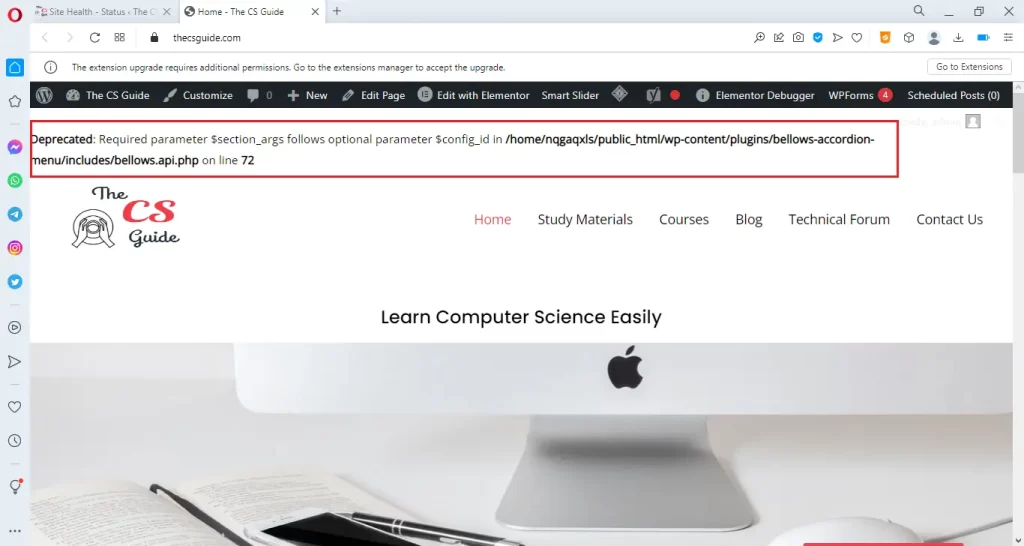
WordPress websites may display PHP errors as warnings which can be unpleasant to see. These errors are often caused by plugin or theme incompatibility. 

While these errors can be useful to developers for debugging purposes, they are unnecessary for visitors and can impact the functionality of the website. Encountering PHP errors and warnings can be frustrating for website owners. Fortunately, disabling these errors is a simple process.

In this quick guide, we will take you through the steps to disable PHP errors in WordPress, ensuring a smoother browsing experience for the visitors.

img1 3

If there is an error displayed like the above website then inform the respective theme or plugin developer to fix the issues. However, we can also disable these PHP errors. 

Disable PHP errors in WordPress website

Now, we can see how to disable PHP errors, notices, and warnings on the WordPress website.

In the configuration file  “Wp-config.php”, the following line makes the errors displayed on the website.

To disable  PHP errors in the website, we have to change the boolean value of the above function into “false”.

i. Access the Configuration file(WP-config.php)

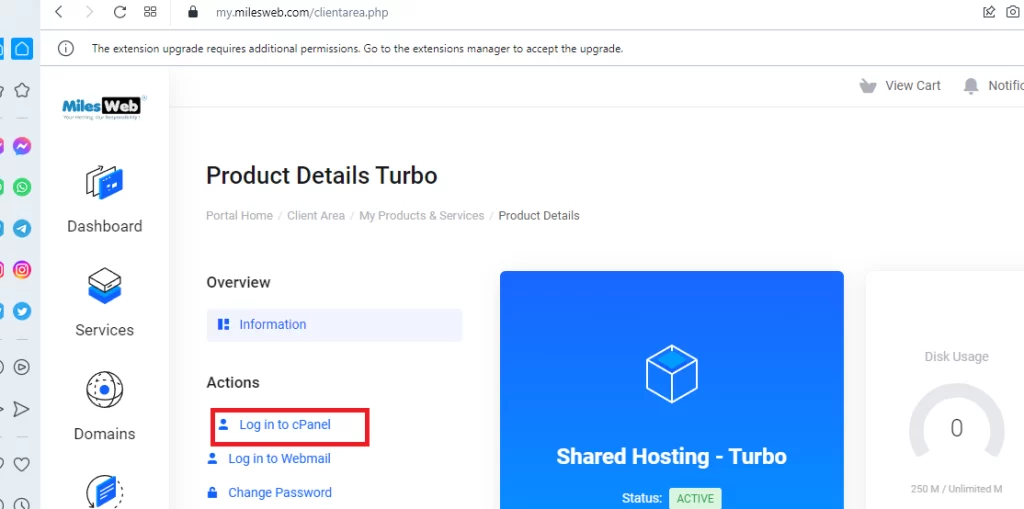
1. Go to the hosting service provider’s website. We have used Milesweb hosting service provider. Log into your account and then log in to the CPanel.

img 1

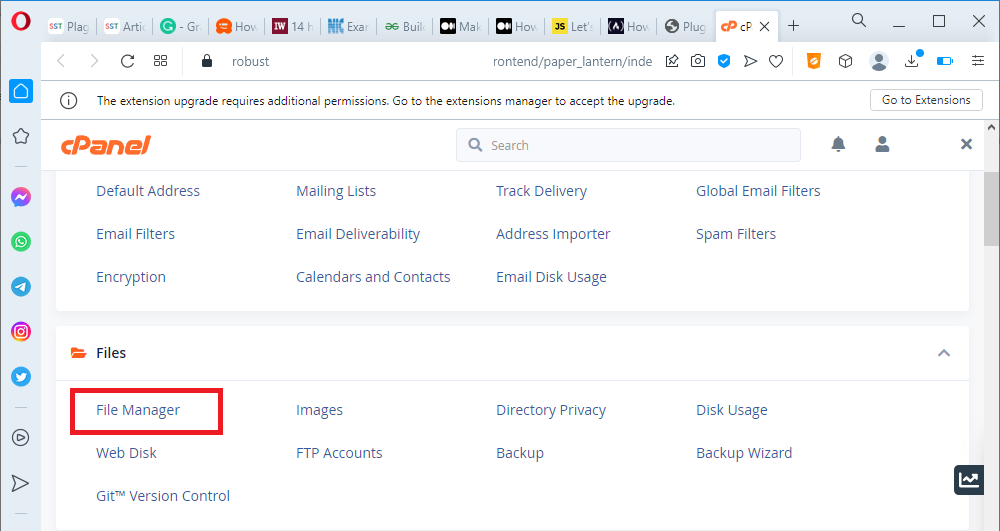
2. Open “File Manager” in CPanel.

img2 2

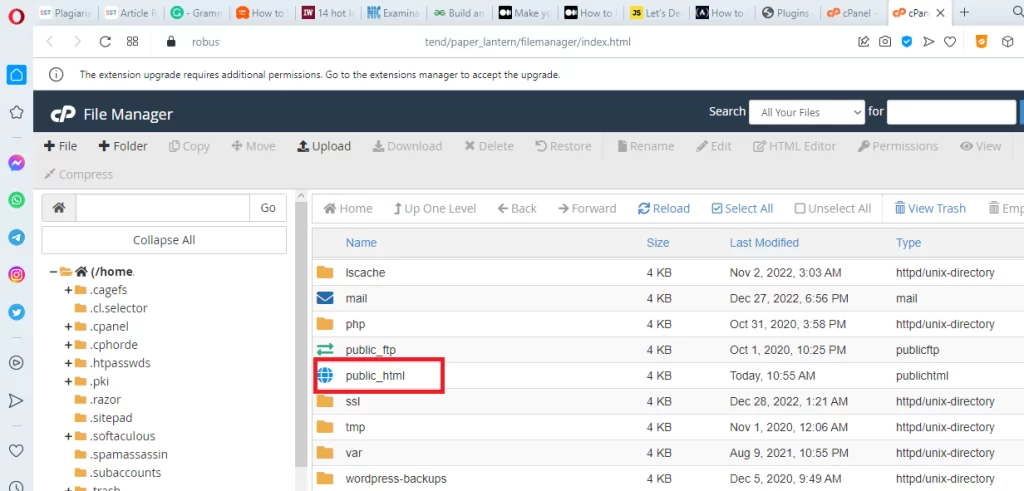
3. In  File manager, Open the “public_html” file.

img3 3

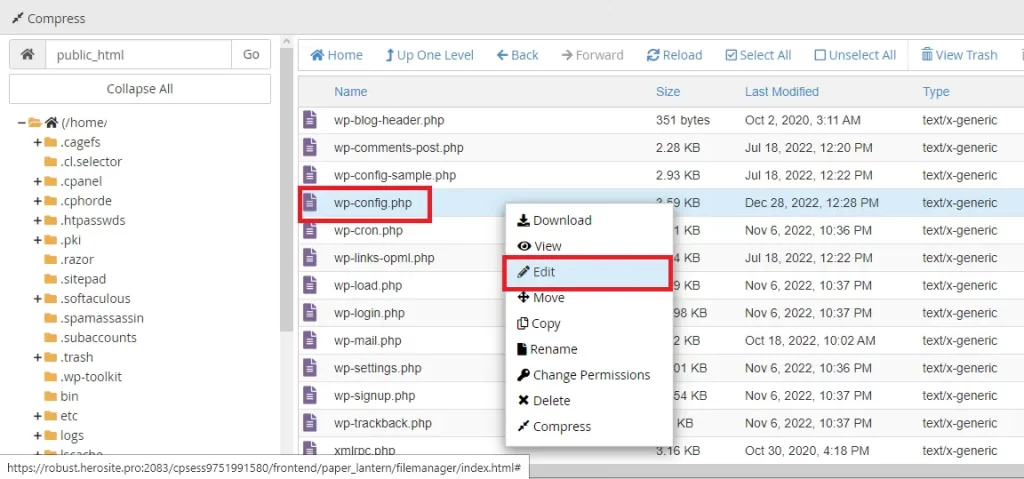
4. Right-click on the “wp-config.php” file and select  “Edit” option.

img4 2
ii. Change the Boolean value in configuration file

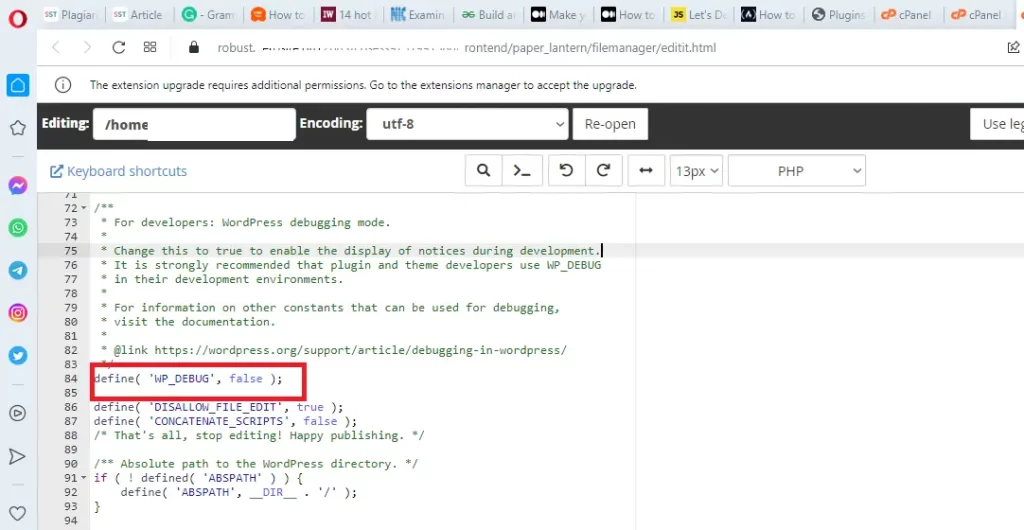
Search the following function, in the “wp-config” file and edit the boolean value “true” into “false” :

define(‘WP_DEBUG’, false);

img5 3

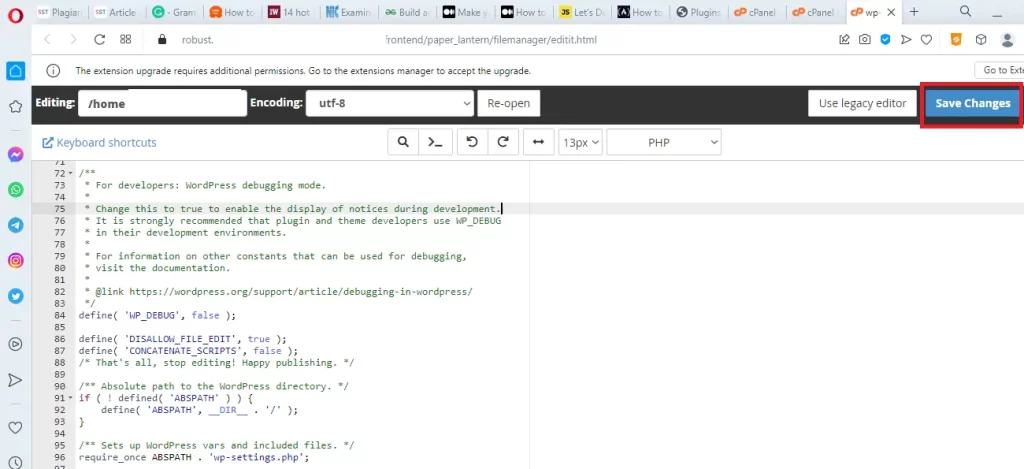
Finally, Click the “Save Changes” button to update the file.

img6

Reload or refresh the website. Now, the PHP errors are disappeared from the website.

Note:

We can also replace the function, define(‘WP_DEBUG’, true)  with the following code:

We hope this article makes the readers learn how to disable PHP errors in  WordPress website. If you like this article, Please subscribe our You tube channel for WordPress tutorials. Reach us on Twitter, Instagram, and Facebook.

Share the Article

Disable PHP errors in wordpress website Read More »

daniel fazio DzqeB43HfnE unsplash

How to run applet in browser

How to run applet in browser

Java applet is a tiny application that is written in the java programming language. They can be embedded as a part of a web page. 

An applet is used to create dynamic platform-independent content such as animation, banners, and games for web pages.

CheerpJ plugin

Nowadays, the modern browser does not support the applet so we can install the plugin in the browser. CheerpJ Applet Runner extension is one of the plugins to run java applets on modern browsers such as Google Chrome, Microsoft Edge, Firefox, Safari, etc.

It is free and easy to use. Moreover, it is completely private and secure and runs only on the client side. The plugin is developed by Leaning Technologies.

How to Use CheerpJ plugin in a browser

1. Download and Install the CheerpJ Applet Runner extension from the Chrome web store.
2. Restart the browser and Open the web page which is embedded with an applet.
3. Click the CheerpJ icon which is in the upper right corner of the browser to enable it.
4. Now the java applet is displayed in the browser.

Step by step process to run java applet program in the browser using CheerpJ Plugin

Before  downloading and installing the plugin, create an applet from the scratch.

i. Create the java file (Sample.java)

1. Open any editor such as notepad or notepad++.
2. Create a folder “javaprogram” in D: drive(we can use any drive such as F, E, etc).
3. Type the following program and save it as “Sample.java”

4. Open the command prompt window, by typing the command “cmd” in the search box.

first

5. Change the current “C” drive into D by typing  “D:” in the prompt(because applet program is stored in the “javaprogram” folder, which is in “D” drive. Moreover, enter the drive name where your program folder is stored).

applet

6. Change the current working folder as  “javaprogram”  by entering the command  “cd  javaprogram”.

img2 1

7. Set  the  java  path:
    (i). Move on to the “bin” folder that is in the “jdk” folder. Select  the path in the address bar. Right click on the address and choose the “copy” option.

img3 2

   (ii). In the command prompt enter the command “path” and Paste the path  in the prompt (Right click in the title bar of the command prompt window, to paste the path).

img4 1

8. Now compile the applet by using the following command:

     javac Sample.java

img5 1

If there is no error then the compiler will successfully create the class file(Sample.class).

II. Create the HTML file (Appletdemo.html)

1. Open any editor such as notepad or notepad++.
2. Type the following program and save it as “Appletdemo.html”  in  the “javaprogram”  folder.

III. Download and Install the CheerpJ Plugin

Share the Article

How to run applet in browser Read More »

Spread the code...