
iZotope Insight for macOS
The Intelligibility meter is where I often start when a dialog-heavy mix feels off. It quantifies what your ears are already telling you in terms of a percentage score, mapping clarity against the noise floor and spectral balance in real time. It’s a number you can chase, which is useful when you’re pushing a dense podcast or film stem through a bus with multiple processing chains.
Where Insight 2 sits in a session
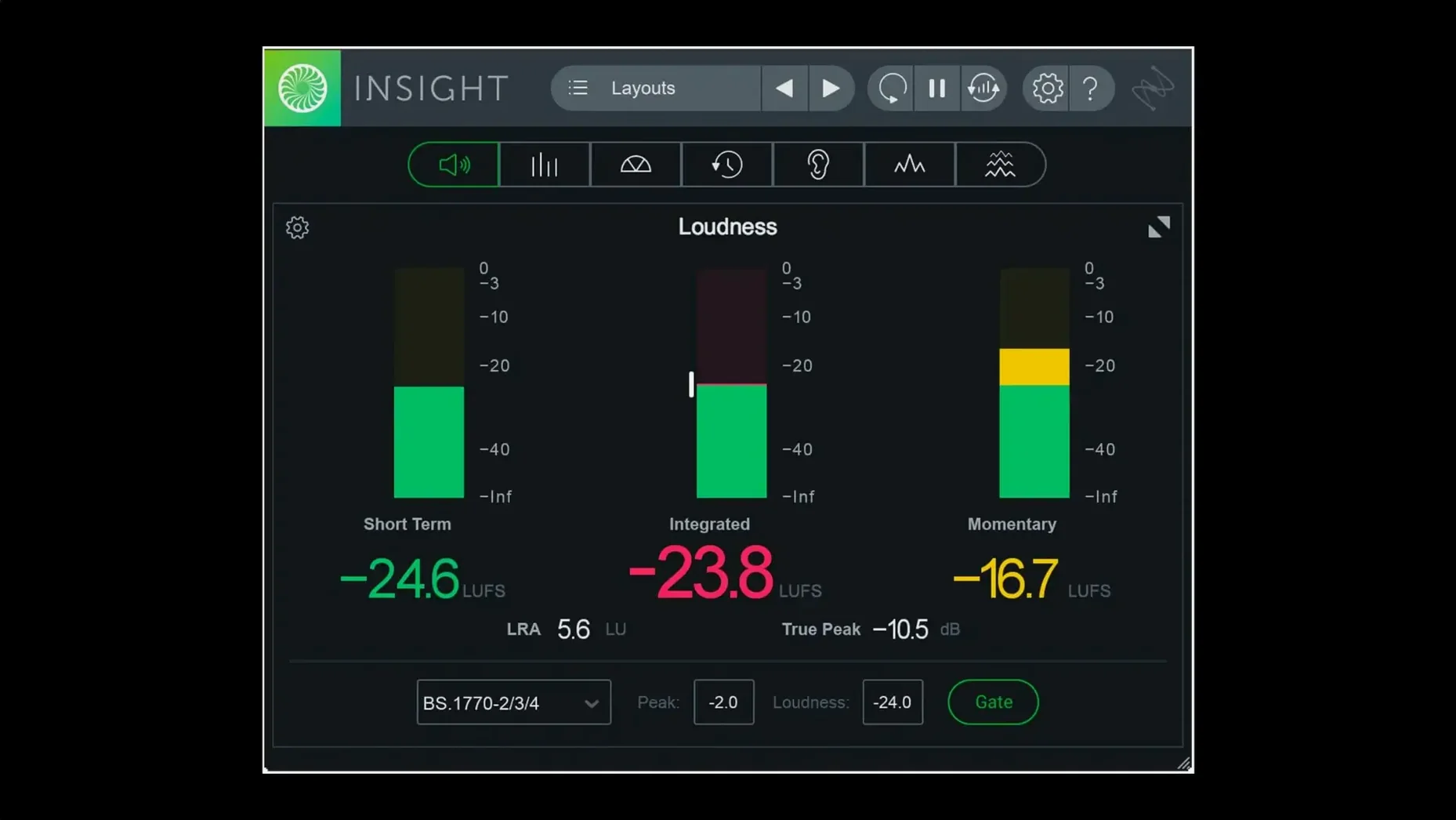
- Master bus analysis: The loudness history graph tracks short-term and integrated LUFS against current broadcast standards. You can route any post-fader signal here and watch the color-coded alerts flag true-peak overs before they hit your limiter.
- Track-level troubleshooting: The spectrogram and 2D/3D spectrogram views live on individual tracks. I drop it on a dialogue track to spot low-frequency rumble or on a snare to see exactly where ring is building up, then tweak the EQ and watch the ridge flatten.
- Surround and Atmos beds: With multichannel support up to Dolby Atmos 7.1.2, the surround scope visualizes spatial energy distribution. It’s a sanity check that your rears aren’t swallowing the center channel.
What the meters actually read
Insight 2 isn’t a single plug-in as much as a configurable meter suite. The preset manager, now split into Factory and Custom tabs, lets you assemble a window of only the meters a job needs. For a music master you might stack the loudness graph, sound field vector scope, and true-peak meter. For a game audio stem you’d swap in the short-term loudness and a spectrogram. It’s the same audio analysis engine underneath; you’re just choosing which visualizations to route any track or bus signal through. The .pkg installer is native arm64 for Apple silicon, and with version 2.4.0 that carries through to AAX in Pro Tools 2023.3+.
A quick walk through a dialogue check
Last week I was cleaning up an interview recorded in a room with a fridge cycling on and off. I dropped Insight 2 onto the dialogue bus, opened the preset manager’s Custom tab, and built a view with just the spectrogram and the intelligibility meter. The spectrogram showed a steady hum at 120 Hz with harmonics poking up every few seconds — that was the compressor. I notched those out and watched the intelligibility score climb from 82% to 94%. The color-coded alert on the true-peak meter never flickered, so I knew the cuts weren’t introducing overs. For a final sanity check I switched the routing to the master bus and ran the loudness history graph for a minute: integrated LUFS sat at -23.1, right where the EBU R128 spec wants it. The whole thing took maybe six minutes, and the visual feedback meant I wasn’t second-guessing my ears when the fridge noise got subtle enough to hide in the room tone.
Settings I change on first launch
Out of the box Insight 2 runs a default meter layout that’s fine for orientation but wastes real estate if you know what you’re looking for. I always hit three things immediately:
- Meter layout: Strip it down. Open the preset manager, clone the
Factorydefault into aCustompreset, and delete every meter you aren’t actively reading. A single loudness graph plus a true-peak bar gives you 90% of what a broadcast mix needs, and the smaller window tucks neatly next to your limiter plug-in. - True-peak scale: Right-click the true-peak meter and change the upper limit to +3 dBTP with yellow at -1 and red at 0. The default scale is wider than most delivery specs care about, and tightening it makes overshoots jump out faster.
- Spectrogram resolution: The 2D spectrogram defaults to a medium FFT size. For music I bump it up to 4096 for sharper frequency lines; for dialogue I drop it to 1024 and switch to the 3D view so transients read as quick vertical spikes instead of smeared energy. The trade-off is always time resolution versus frequency resolution, and Insight 2 lets you lean either way.
Where TC Electronic Clarity M stops and Insight pulls ahead
The closest cousin is TC Electronic Clarity M, but that’s a hardware desktop meter with a software counterpart that’s less configurable. Clarity M nails the at-a-glance loudness readout and feels more like a broadcast QC station; Insight 2 wins on flexibility — you can resize meters, pick only the ones you need, and drop it on any track or bus in a mix session, not just a dedicated meter feed. Clarity M is the dedicated loudness cop; Insight 2 is the whole analysis lab you assemble yourself.
Waves WLM Plus covers much of the same loudness and true-peak territory in a single, fixed-layout window. It’s lighter on CPU and simpler to set up, but it stops at loudness. There’s no spectrogram, no vectorscope, no surround scope, and no intelligibility metric. If all you need is a LUFS readout and a peak warning, WLM Plus does it with less screen clutter. If you need to chase a resonance, check stereo spread, or verify an Atmos downmix, Insight 2 is where those tools live under one roof.
Youlean Loudness Meter 2 is the scrappy free option, and it’s genuinely good for loudness and dynamics histogram work. It even handles offline loudness analysis if you feed it a file. But it’s stereo-only and the interface doesn’t scale as gracefully when you need multichannel analysis or real-time spectral views. Insight 2 pulls ahead the moment you move beyond a stereo music master into post-production, game audio, or any workflow where multichannel routing and per-track visual debugging matter.
- Native arm64 AAX support for Pro Tools 2023.3+ on Apple silicon Macs.
- Native arm64 install support for Apple silicon Macs.
- Preset manager now separates
FactoryandCustompresets into their own tabs.
- macOS Big Sur or later
- Apple silicon or Intel Mac
- AU, VST3, or AAX host
Comments 0
Sign in or create an account to leave a comment.
No comments yet. A codec, a slice, a machine — they appear after moderation.
More in VST Plugins
cd ../ iZotope Nectar
VST Plugins 545 MB
 iZotope Neutron
VST Plugins 928 MB
 iZotope RX
VST Plugins 3.6 GB Updated
 iZotope Tonal Balance Control
VST Plugins 264 MB
 Kalifornia Dynamic KD Alkane
VST Plugins 270 MB
 kiloHearts Ultimate & Slate Digital Bundle
VST Plugins 4.9 GB
 Komplete FX Bundle
VST Plugins 3.2 GB
 Komplete Kontrol
VST Plugins 785 MB