
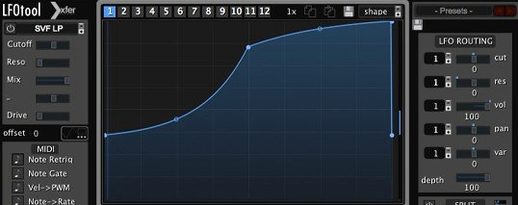
LFOTool for macOS
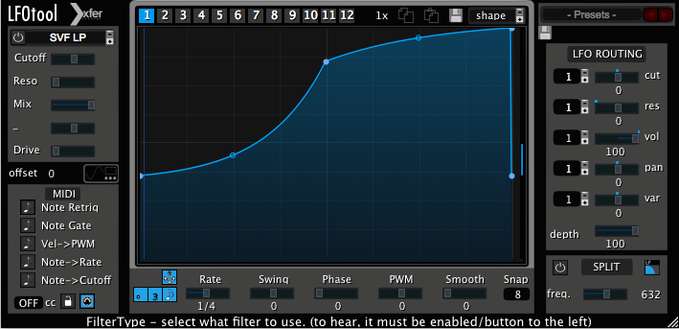
How do the filter graphs route the signal?
Point-and-curve editing is where LFOTool stops being a simple tremolo and starts acting like a modular brain. Each preset can hold up to 12 graphs, and you can run 4 of them simultaneously—typically mapped to Cutoff, Reso, and Pan. One graph might draw a sharp ducking curve simulating a sidechain-compressor pump, while a second slowly opens a low-pass filter over 8 bars.
All of this runs sample-accurate, synced to host transport. You set the rate in BPM with optional swing, or dial in a fixed hertz value for sound-design wobbles that ignore the grid. Because the engine is written in C++, the timing doesn't drift even under heavy automation.
What can it send besides audio modulation?
The MIDI CC output turns LFOTool into a modulation hub. Draw an envelope and route it to a software instrument's filter cutoff, an external hardware synth, or another effect plug-in on a different track. The graph you see drives real CC messages, so a tremolo shape can wobble a hardware Juno just as tightly as an internal soft synth.
Walk through a quick electro-house ducking setup
Say you have a pad track that needs to breathe against a four-on-the-floor kick. You could sidechain a compressor, but LFOTool gives you a cleaner shape. Here's one way to set it up in under two minutes.
- Load LFOTool as the last insert on the pad channel.
- Pick an init preset or clear the graph.
- Set the rate to 1/4 note, host-synced. You want one duck per kick hit.
- Draw a steep downward slope at the start of the bar—full volume to silence in about 30 ms—then a gentler rise back to unity by the third sixteenth. Leave the tail flat.
- Set the graph to control Volume. Turn off any filter graphs you aren't using.
- Adjust the envelope smoothing to 5–8 ms to avoid clicks without softening the transient too much.
- Save this as a preset named something like
PadDuck-Quick. - Assign a different graph slot to a subtle low-pass move if the pad still feels static. Run both graphs together.
Now copy the plug-in to other sustained elements—strings, reverb returns, background vocals—and tweak the curve shape per track. The kick itself never touches a sidechain bus; it just plays. The ducking is entirely envelope-driven, so there's no compressor release tail to fight.
Assign a MIDI controller to the depth knob before you do anything else
Set audition mode to a key you won't play
LFOTool's built-in audition oscillator is handy for hearing your curve before applying it to audio. By default the trigger note might clash with something in your project. Head to the trigger settings and assign audition to a note outside your working range—C-2 works well—so you don't accidentally fire a test tone during playback.
Nudge envelope points with modifier keys
Hold Shift while dragging a point to constrain movement to vertical only. Hold Alt to slow-drag for sub-pixel placement. These aren't documented loudly, but they make fine-tuning a cutoff curve far less fiddly. The point-and-tension editor rewards precision, and these shortcuts keep you from redrawing a whole graph because one node slipped.
Organize your graph slots by purpose
Even if you only use one or two graphs per preset, name the slots inside the preset. Call them things like VolDuck, LPto4k, Pan16th. When you come back to a project three weeks later, you won't have to solo each graph to remember what it does. The 12-graph per-preset limit sounds excessive until you start building transitional presets that morph across sections via MIDI note switching.
Mixing engineers tired of compressor sidechain artifacts
Electronic music producers tend to grab it first, but several types of Mac user get disproportionate mileage out of it.
Mixing engineers working in-the-box who are tired of compressor sidechain artifacts. LFOTool doesn't react to audio—it doesn't care if the kick is loud or soft, early or late. The envelope fires exactly the same every time. For dense pop mixes where the kick sample is consistent, this repeatability is a feature, not a limitation.
Sound designers building rhythmic motion into pads, drones, and textures. The ability to draw a 16-bar curve that slowly opens a bandpass filter while a second graph modulates resonance at a different rate creates movement that would take a stack of automation lanes to replicate. Exporting the MIDI CC stream to control another plug-in—say, a reverb's decay time—doubles the reach.
Hardware studio users with MIDI-controllable outboard gear. Route LFOTool's CC output to a hardware synth's cutoff or an outboard effect parameter, and your drawn envelope moves physical knobs. The C++ engine keeps timing tight enough that a sequence running through a hardware filter tracks sample-accurate to the DAW transport.
Post-production editors doing dialogue or foley work don't usually think of LFOTool, but a slow, irregular volume graph on a room-tone bed can fake organic air movement better than a static noise loop. It's a niche use, but it works.
Why I raise envelope smoothing to 8–10 ms immediately
- Envelope smoothing default: Bump it to 8–10 ms as a starting point. Zero smoothing creates clicks on sharp volume drops. You can always reduce it per-preset if you need a harder transient.
- MIDI CC output channel: Set a default channel and stick to it across presets. If you leave it unset, you'll debug "why isn't the hardware moving" sessions more often than you want.
- Trigger mode: Switch from Envelope to LFO or MIDI Note depending on whether you want free-running modulation or gated retriggers. I default to MIDI Note for ducking presets and LFO mode for filter sweeps.
- Graph colour assignments: Not a sound thing, but assigning distinct colours per graph makes the editor readable when four curves overlap on the same grid.
One instance idles at a fraction of a percent of CPU on Apple Silicon
The C++ foundation shows. On an Apple Silicon Mac, a single instance of LFOTool idles at a fraction of a percent of CPU—it's lightweight enough that putting it on eight individual tracks instead of one group bus doesn't worry the performance meter. On older Intel machines the story is similar; the plug-in doesn't run an FFT engine or convolution kernel, so it stays lean.
Sample-accurate sync has held through tempo ramps and time-signature changes in testing. No drift, no first-cycle jitter. The graph rendering at high zoom levels stays responsive even when you have four complex curves animating, and preset switching is instant—no loading spinner, no audio dropout.
Stability is uneventful, which is what you want from a utility plug-in. It loads in AU, VST3, and AAX hosts without complaining about validation, and I haven't seen it cause a DAW hang during project load even when a session contains two dozen instances. Memory use is negligible; the plug-in doesn't cache audio buffers beyond what the host allocates.
If you're searching for lfotool download or lfo tool mac to try it, the demo gives you a straight 15-minute session window, which is enough to build a few presets and decide if the workflow clicks. The plug-in file itself is a compact .dmg install—no sprawling sample library, no cloud authentication layer, just the component and VST3 bundles dropped into place.
- macOS 10.11 or later
- Intel or Apple Silicon Mac
- VST or AudioUnit-compatible host
Comments 0
Sign in or create an account to leave a comment.
No comments yet. A codec, a slice, a machine — they appear after moderation.
More in VST Plugins
cd ../ LANDR Vocal Bundle
VST Plugins 447 MB
 LANDR Mastering Plugin PRO
VST Plugins 365 MB
 KORG TRITON
VST Plugins 586 MB
 KORG Collection
VST Plugins 175 MB
 Komplete Kontrol
VST Plugins 785 MB
 Komplete FX Bundle
VST Plugins 3.2 GB
 kiloHearts Ultimate & Slate Digital Bundle
VST Plugins 4.9 GB
 Kalifornia Dynamic KD Alkane
VST Plugins 270 MB