
UJAM Beatmaker VICE for macOS
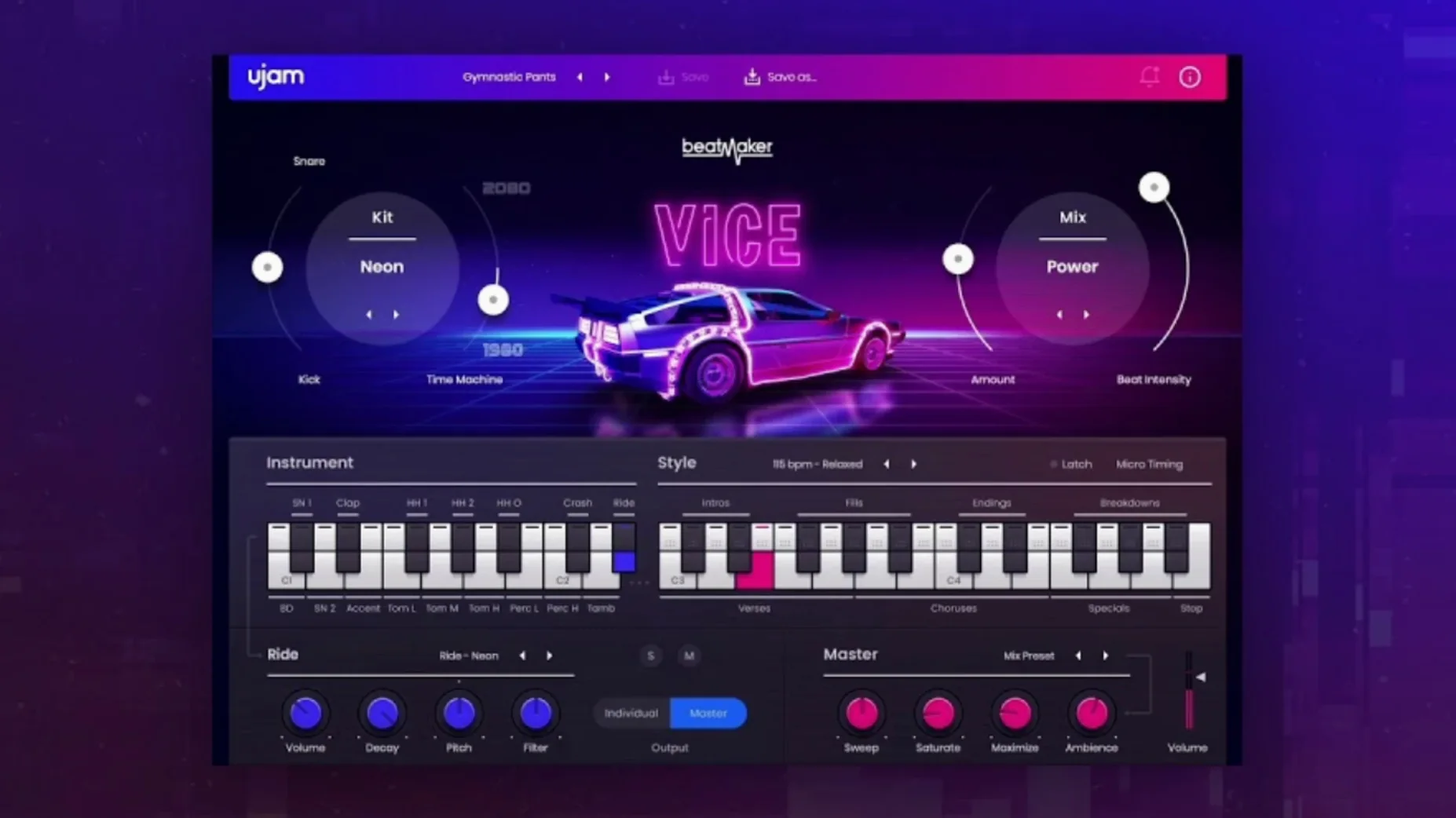
Synthwave producers, retro-pop songwriters, and anyone chasing the punch of an FM-era drum fill. UJAM Beatmaker VICE targets you directly. It’s not a sample pack dressed up with a pretty UI—it’s a sound-design playground built from the bones of classic Linn, Roland, Simmons, and Korg machines, processed with modern signal chains. If you've ever dug through an unverified ujam torrent looking for that specific gated-reverb snare, this plugin delivers it cleanly and legally.
The Mix panel is where the character lives. Sweep the Character knob left for a tighter, drier studio tone, or push it right to introduce the saturation and ambience of a 1980s outboard rack. The parallel compression slider underneath adds glue without burying the transients. It’s a fast way to move a beat from "demo loop" to "finished record" without leaving the plugin window.
Ten kits sit in the browser, each a complete drum machine re-imagining. The Kick controls go beyond simple level—sweep the Boom knob to extend the sub tail, or dial in Snap to control the attack click. The snare, clap, and hi-hat channels all get the same treatment, with independent tuning and decay per sound. A built-in multi-out routing option lets you process each drum in its own DAW channel strip if you want to go deeper.
MIDI drag-and-drop from the plugin into your DAW keeps the programming flexible; you can start with a preset pattern, then tweak the notes and velocity yourself. The resizable UI means it won’t look like a postage stamp on a 5K display. Available as VST 2, VST 3, AAX, and AU 2 on Intel and Apple silicon Macs running macOS 10.15 or later, it fits into any modern production setup without fuss.
What are the small conveniences people usually miss?
The pattern browser does more than click-and-load. Hold Shift while clicking any pattern and it queues up to play after the current bar finishes—no awkward mid-phrase jumps. It's a small thing that makes auditioning fills against a running arrangement feel musical instead of mechanical.
On the drum grid, right-click any pad to quickly swap it to a different sound from the same kit. Building a custom kit from the preset pieces takes about twenty seconds this way. Also: the velocity lane at the bottom of the MIDI editor is tied to the internal sound engine, so even before you drag the pattern into Logic or Ableton, you're hearing the actual dynamic response of the plug-in, not just a static preview.
The Ctrl+click reset on any knob snaps it back to the factory value. The Character and Boom controls in particular have sweet spots that are easy to overshoot, so the reset shortcut saves a lot of squinting at the screen. And if you're working from an earlier setup—maybe one you found while hunting through an old ujam mac torrent folder—the plug-in scans and maps kits automatically so you don't lose those sounds when upgrading to version 2.4.0.
A synthwave producer's first fifteen minutes
Picture a producer opening a new Ableton session. The brief is a title sequence for a retro-futuristic short film, and the reference track is heavy on gated snares and Simmons-style toms. They load VICE on a MIDI track, scroll to the Arena Kit, and immediately pull the Character knob to about 70%—enough to get that sheen without washing out the kick attack.
They dial the Boom up on the kick channel and shorten the snare decay by a few notches to tighten the groove. The built-in pattern "Driving Force" sits close to what they need, so they drag it into the arrangement, open the MIDI clip, and manually delete a few open hi-hat hits that clutter the chorus. Ten minutes in, the backbone of the cue is done. They route the clap to its own output, add a touch of ValhallaVintageVerb in the DAW, and move on to the bass line. The entire drum sound came from one plug-in instance, and nothing needed a separate sample layer.
The Time Machine control sits untouched at first, but after they revisit the verse with a darker mood in mind, pulling it counter-clockwise slightly degrades the fidelity in a way that mimics early 12-bit samplers. It's subtle enough that a ujam kaya torrent might not give you this level of intentional imperfection, but VICE builds it into the architecture.
Switch to Multi-Out for independent sidechain control
Three things right after your first load. First, open the master output section and switch to Multi-Out. The default stereo mix is great for sketching, but separating the kick, snare, and percussion channels gives you independent control over sidechain compression and bus processing in your DAW. It adds maybe thirty seconds of setup and pays off in every mix.
Second, set the Pattern Sync to "Host" instead of leaving it on internal clock. The internal mode is handy for quick previews, but host sync ensures fills and variations land exactly on the grid when your arrangement has tempo changes or rubato sections.
Third, resize the window at least once early in a session. The default size works on a laptop, but on a studio display at 150% scaling, the drum pads, mixer strips, and pattern list all stay readable without the cramped feel that plagues older fixed-size plug-ins. The setting sticks across sessions, so you only need to do it once per machine.
- macOS 10.15 or later
- Intel or Apple silicon Mac
- Plug-in formats:
VST 2,VST 3,AAX,AU 2
Comments 0
Sign in or create an account to leave a comment.
No comments yet. A codec, a slice, a machine — they appear after moderation.
More in VST Plugins
cd ../ uJAM Cinedream
VST Plugins 3.5 GB
 UJAM Symphonic Elements STRIIIINGS
VST Plugins 4.4 GB
 UnderTone Audio UnFairchild
VST Plugins 220 MB
 Valhalla DSP Bundle
VST Plugins 61 MB
 VocalNet
VST Plugins 669 MB
 VocalSynth 2
VST Plugins 259 MB
 Toontrack EZmix Bundle
VST Plugins 977 MB
 Toontrack EZkeys
VST Plugins 707 MB