

Toontrack EZmix Bundle for macOS
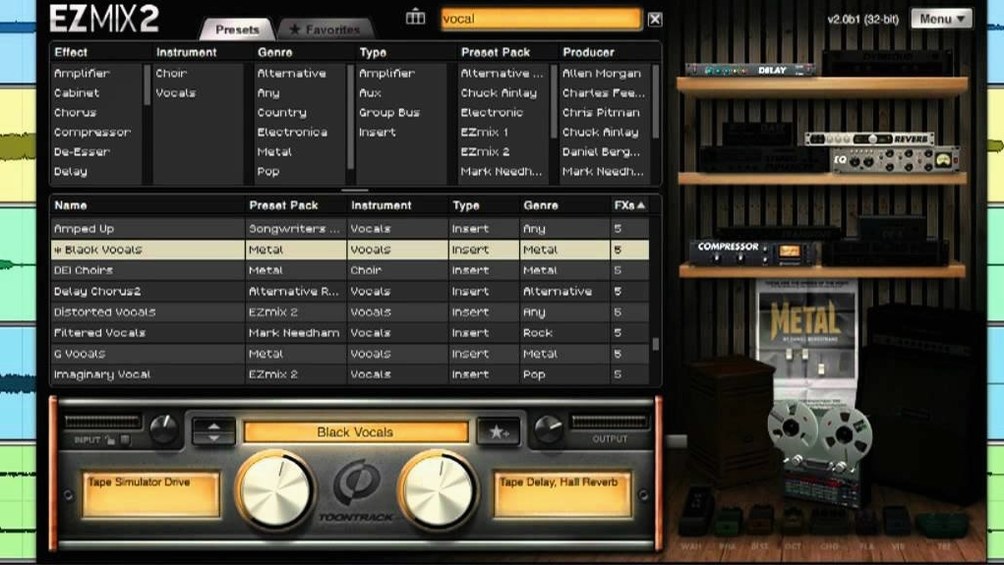
Home studio players and songwriters who want a polished mix without manually building every signal chain tend to gravitate toward EZmix 3. It packages mixing, mastering, and guitar or bass amp duties into a single plug-in driven by professionally designed presets. The bundle includes the EZmix 2 host environment, which carries over all earlier features and content wrapped in a redesigned interface.
| Version | 3.2.2 |
|---|---|
| Plugin formats | AU, VST3, AAX |
| macOS | 10.13 or higher |
| Architecture | Apple Silicon & Intel native |
When you first launch it, the sensible move is to open a vocal or guitar track and click through a few categories, because the preset chains are structured around real recording scenarios. Each slot loads a complete chain—compression, EQ, saturation, ambience—tuned for the source label on the tin. Version 3.2.2 is a maintenance update you will want installed from your Toontrack account, since it is the minimum version required to use any EZmix pack released from Q4 2025 onward.
Turn off high-latency mode when tracking through EZmix
The defaults are workable, but a few adjustments make the plug-in feel less like a black box. Open the settings pane (the gear icon) and set Latency mode to Low during tracking. The factory value prioritizes processing headroom, which is fine for mixing but adds a few milliseconds you will notice when playing through an amp sim. Switch it back to Normal once you start mixing; the extra buffer keeps CPU spikes in check on older Intel Macs.
Next, check Input Gain Compensation. It is off by default. Turning it on forces EZmix to level-match the processed and dry signals, so you hear what the preset actually does to the tone rather than being seduced by a louder output. It is the single setting that stops you from picking a preset just because it is hotter.
If you run the standalone host for practice, set the Sample Rate to match your interface in Preferences before loading any amp preset. Mismatched rates produce aliasing artifacts that sound like a faint, fizzy layer sitting on top of distorted tones—easy to blame on the cabinet model when the fix is two clicks away.
Audition any EZmix preset with a tap of the spacebar
Hover over any preset name and press the spacebar. EZmix plays a short preview clip through the loaded chain, so you can audition presets without arming a track or picking up an instrument. It is not mentioned in the main interface, but it saves constant clicking when you are hunting for a bass tone that sits right.
The preset browser supports incremental search by typing. Click the preset list, start typing "crunch," and it filters immediately—no search box to open, no Enter key needed. If you collect expansion packs, this is the fastest way to cut through hundreds of patches.
A less obvious trick: Command-drag the wet/dry mix knob to snap it to 50%. The knob normally moves in fine increments, which is precise but slow when you want a quick parallel blend. The same modifier works on the output level fader for a fast unity-gain reset.
In the standalone host, the tuner is hidden behind the small tuning-fork icon in the top bar. It is a strobe-style tuner with decent sensitivity, and it mutes the signal while active—handy when you are plugged in and need to check intonation without the amp sim humming through your monitors. People sometimes comb through the manual looking for a tuner that was staring at them from the toolbar the whole time.
Why the EZmix preset list shows up empty after installing
No presets appear after installation. The content packs (EZmix 2 core library and any expansions) live in a separate directory from the plug-in itself. If the preset browser shows an empty list, the app likely cannot see /Library/Application Support/Toontrack/EZmix. Running the standalone host once, then opening Preferences and pointing the Sound Library Path to the correct folder, fixes it. After rescanning, the presets populate immediately—no restart needed.
AU validation fails in Logic Pro. This sometimes happens after updating macOS without reinstalling EZmix. The quick fix: quit Logic, delete the AU cache file at ~/Library/Caches/AudioUnitCache/com.apple.audiounits.cache, then relaunch Logic and let it rescan. If the plug-in still fails, a clean reinstall from the disk image usually clears whatever code-signing flag tripped the validator.
Standalone host produces no sound. The host defaults to the first available output device, which is occasionally the MacBook speakers when you expect your interface. Check Preferences > Audio Device and confirm the output is assigned to your interface, not Built-in Output. While there, verify the buffer size; 128 samples is a safe starting point for amp sim practice without perceptible lag.
High CPU usage in Logic on Apple Silicon. An Intel-only AU validation tool can force EZmix to run through Rosetta even when the native arm64 build is installed. To check, right-click Logic in the Finder, choose Get Info, and confirm Open using Rosetta is unchecked. If Logic itself runs natively, EZmix follows suit and CPU usage drops noticeably—especially with the heavier mastering presets that chain multiple convolution reverbs.
Expansion packs from the ezmix bundle or an ezmix torrent are missing a few presets. The pack likely requires a newer build than what is installed. Version 3.2.2 is the minimum for any expansion released from Q4 2025 onward. If you grabbed an ezmix 3 free download that shipped with a slightly older revision, the new content simply will not show up until you update. The fix is straightforward: mount the latest disk image, run the installer, and let it overwrite the existing application bundle—your personal settings and library path survive the update untouched.
- Support for EZmix packs released from Q4 2025 onward requires version 3.2.2.
- macOS 10.13 or higher
- Apple Silicon or Intel Mac
$ man toontrack-ezmix-bundle | grep -A2 "?"
Does EZmix 3 replace EZmix 2?
The bundle includes EZmix 2, which contains all previous functionality and content inside a redesigned interface.
Why does version 3.2.2 matter?
Version 3.2.2 is the minimum build required for support of EZmix packs released from Q4 2025 onward.
What roles can it cover in a mix?
It works as a mixer, mastering tool, and guitar or bass amp, using preset effect chains built for specific instruments and channels.
Comments 0
Sign in or create an account to leave a comment.
No comments yet. A codec, a slice, a machine — they appear after moderation.
More in VST Plugins
cd ../ Toontrack EZkeys
VST Plugins 707 MB
 Tone Empire EDYN
VST Plugins 198 MB
 Tokyo Speirs RoundTrip
VST Plugins 186 MB
 UJAM Beatmaker VICE
VST Plugins 262 MB
 uJAM Cinedream
VST Plugins 3.5 GB
 T-RackS
VST Plugins 2.3 GB
 UJAM Symphonic Elements STRIIIINGS
VST Plugins 4.4 GB
 Synapse Audio The Legend HZ v2.0.2.R1
VST Plugins 472 MB