UJAM Symphonic Elements STRIIIINGS for macOS
Version 1.3.1 is a quiet maintenance update — no new features, just stability work that keeps the engine running smoothly on recent macOS releases. If you are opening the plug-in for the first time, there is a small ritual: launch it, close it, then launch it again. The second start is the one that sticks.
Want to shape strings with one slider?
- Building dense, modern string-section textures with very little programming effort.
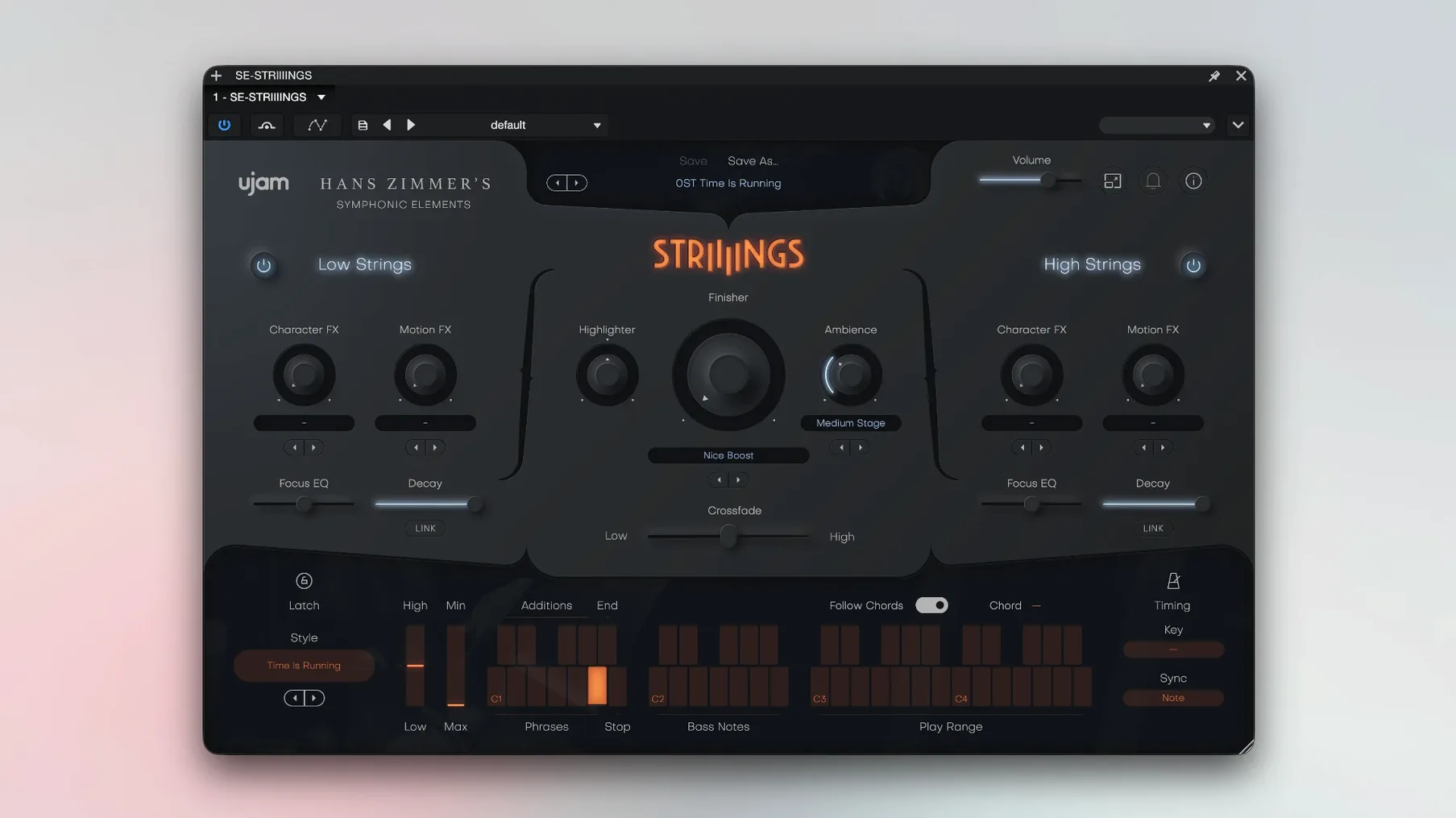
- Blending the High Strings section (violins and violas) against Low Strings (basses and celli) with the Crossfade control — a single slider that reshapes the ensemble weight in real time.
- Skipping patch-building entirely via more than 200 sound designer presets, which lean heavily into processed, production-ready tones rather than dry orchestral starting points.
- Dropping a rhythmic string hook into a cue using one of the 60 built-in styles, each of which is a self-contained phrase player triggered by a single key.
Why does it already sound like a scoring stage?
- The source material is Hans Zimmer’s string library, and the recordings already carry that room sound — you are not getting a close-miked, bone-dry set of samples.
- STRIIIINGS is the first entry in the Symphonic Elements series, so its feature set defines the baseline for the instruments that followed.
- It is a 64-bit-only plug-in; bridging to a 32-bit host is not an option.
- The minimum memory requirement is 4 GB of RAM, and while that is modest, a large session will push that number higher quickly.
What should you load instead of the default patch?
STRIIIINGS loads with a default patch that sounds big out of the gate. That is useful, but it can also mislead you into thinking every cue needs the full ensemble at full tilt. Try this instead on day one: pull the master volume back about 6 dB, then pick a preset from the Soft category and listen to what the Low Strings layer is doing on its own. Mute High Strings with the section toggle and just play octaves in the bass range — basses and celli alone often sit in a mix with less carving than the full stack.
The phrase player — those 60 styles — responds to velocity, but not in the way a piano library does. Velocity here usually controls accent shape and release tightness, not raw volume. If a rhythmic figure sounds too mechanical, vary your key velocity even when the pitch stays the same; two adjacent hits at different velocities can pull a phrase out of the grid. Also, each style uses only a handful of keys, so hit the octave above and below the trigger zone to find variation keys that switch articulation without changing the core pattern.
On the system side, the ~/Library/Application Support/UJAM/ folder is where the plug-in writes its preferences and cache. If the interface feels sluggish after a session switch, trashing the cache file inside that folder (the plug-in rebuilds it on next launch) often sorts out the lag. And the double-launch thing is real: the first start after a fresh install sets up the authorization handshake, and the second start loads the full sound bank. Skipping step two leaves you with a blank interface that passes audio but produces silence.
Did it get new presets in v1.3.1?
Version 1.3.1 is explicitly a maintenance release. No new presets, no UI rework, no additional styles. The work went into AU validation reliability on Apple Silicon machines and a fix for a long-standing issue where the plug-in would occasionally drop its authorization state after a macOS point update. If you had STRIIIINGS suddenly revert to demo mode after a 13.x-to-14.x jump on an M-series machine, 1.3.1 addresses exactly that.
Earlier in the 1.3 cycle, the developers tightened MIDI learn behavior so that CC assignments persist across session reloads in Logic and Studio One — a small thing that had been erratic since the 1.2 line. They also adjusted the internal gain staging of the reverb send, which used to clip internally on presets that stacked both sections at full Crossfade. You will not hear a different reverb algorithm; you will just stop hitting the red on the hidden bus.
What happens if you treat Crossfade like wet/dry?
The most common one: treating the Crossfade control like a wet/dry knob. It is not blending two signals in parallel — it is a weighted crossfade between two independent section engines, each with its own articulation mapping. At dead center, both sections play at full voice count, which can double your CPU load and create mud in the low-mids that no amount of EQ can fully untangle. If you are not deliberately stacking basses against violins, pick a side and commit.
Another recurring mistake is loading STRIIIINGS on a stereo instrument track, then wondering why the stereo image feels static. The plug-in outputs in stereo, but the High Strings and Low Strings layers are panned internally with a fixed width that does not respond to the DAW’s pan law. For a wider spread, instantiate two copies — one handling Low Strings panned slightly left, one handling High Strings panned slightly right — and automate their Crossfade sliders in opposite directions.
Beginners also tend to ignore the built-in reverb because it sounds "processed" on first listen, then reach for a third-party convolution reverb to make the strings feel more orchestral. The result is a wash: the internal room from the Zimmer sessions plus an external hall tail that fights the original early reflections. If you want a drier starting point, turn the internal reverb mix down to about 20%, then add your external reverb on a send, not an insert. The two spaces will blend more predictably that way.
- macOS 10.14 or later
- Intel or Apple Silicon Mac (native support)
- 64-bit host software only
- 4 GB of RAM
Comments 0
Sign in or create an account to leave a comment.
No comments yet. A codec, a slice, a machine — they appear after moderation.