VocalSynth 2 for macOS
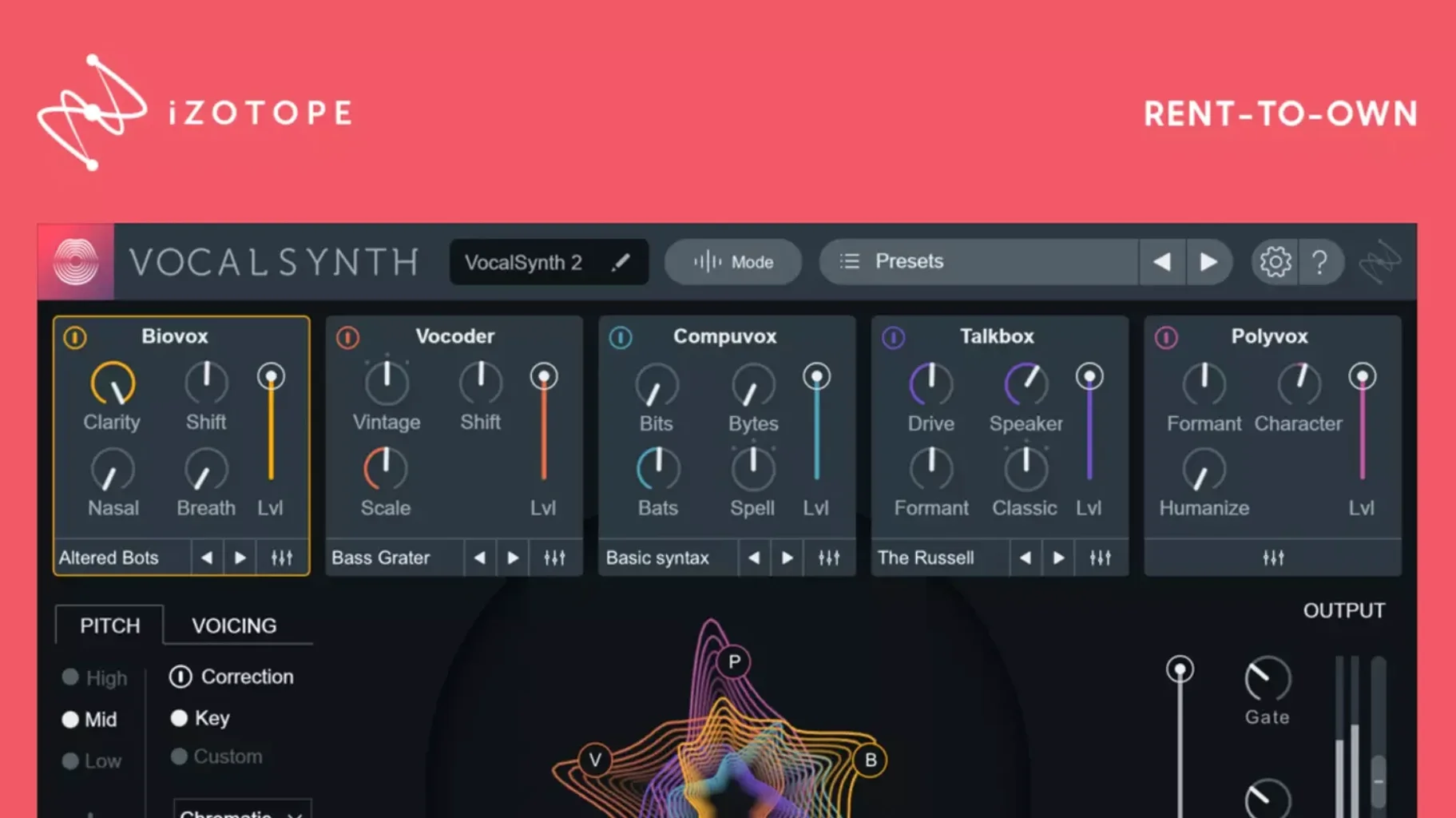
A vocal track sits flat in a dense mix. EQ alone can't fix it. You need texture, movement, and harmonic content that responds to the source instead of just layering on top. VocalSynth 2 approaches this as a modular biosphere, not a single effect. You pick and blend from five distinct engines — BioVox, Vocoder, Compuvox, Polyvox, and Talkbox — each generating its own harmonic profile from the dry input. The real shaping happens in how they interact.
An experienced user will live in the Anemone section, where you can drag modules to rearrange the signal path and set up parallel processing lanes. The stompbox-style effects strip below — chorus, ring mod, distortion, delay — feeds off that modular routing. Because VocalSynth 2 speaks iZotope's inter-plug-in protocol, parameter data flows into Neutron's masking view and Ozone's imager without manual MIDI mapping.
Version 2.5.0 brought the codebase to Apple silicon. On an M-series Mac, the vocoder and Polyvox engines run with essentially zero added latency, which makes the pitch-tracking feel immediate in a way Rosetta-translated vocoders can't match. The five modules don't just layer on top of each other; their blend controls let you morph between synthesis types per frequency band, so you can keep natural sibilance while replacing the body of a voice with a synthetic carrier.
For sound designers working across iZotope's ecosystem, placing VocalSynth 2 before Tonal Balance Control gives you real-time spectral feedback as you push formants and harmonics into new territory. It's that feedback loop between creative processing and analytical metering that turns a vocal plug-in into a precision sculpting tool.
Turning a whispered phrase into a polyphonic pad
Bedroom pop producers building a track around a single vocal take will find it indispensable. You can turn a whispered phrase into a polyphonic pad with Polyvox, then automate the wet/dry blend to let the natural voice poke through on the hook. The CPU hit stays modest because the five engines share a common analysis buffer — once the formant tracking runs, each module pulls from the same spectral data instead of recalculating it independently.
Post-production mixers working on game dialogue or animated content get a different kind of value. The Talkbox and Compuvox engines do more than robot-voice clichés. Dial back the bit-crush on Compuvox and add a narrow bandpass from the built-in filter, and you get a low-fi radio transmission that still preserves intelligibility. Since the plug-in reads vowel characteristics in real time, consonants cut through without the mushy artifacts that cheaper bit-crushers introduce.
One producer's late-night session
A synthwave producer has a verse vocal that needs to sit against a thick Juno bass and gated reverb snare. The raw take is clean but anonymous. They load VocalSynth 2 as an insert, set BioVox to around 40% blend with the formant shifted down a minor third, and route a sidechain signal from the kick into the stompbox ring modulator. The result: a vocal that breathes with the rhythm section, ducking into a metallic shimmer on every downbeat without touching the fader.
Next, they send the processed signal to a bus with Neutron's masking meter open. VocalSynth 2's inter-plug-in communication pushes its spectral footprint into Neutron's display, so the producer can notch the bass synth exactly where the vocal's new harmonic content is most active. No guessing — just a visible overlap that gets resolved with a narrow dynamic EQ cut.
ARM-native code drops the Rosetta translation hit
On an M1 Pro with a 128-sample buffer, running all five engines simultaneously adds roughly 2–3% CPU per instance. The native ARM code path introduced in version 2.5.0 eliminates the Rosetta translation layer, which is most noticeable when you stack instances across a full vocal arrangement — eight or nine tracks stay well within a comfortable buffer range at 44.1 kHz. The spectral display updates at screen refresh rate without stuttering, even when you sweep formant controls during playback.
Memory usage is predictable. A single instance allocates around 180 MB, and that figure barely scales with session complexity because the plug-in doesn't maintain a long processing history. What it does hold in RAM is the real-time vowel analysis buffer, which is fixed-size. If you're after izotope vocalsynth 2 for live vocal processing, the low and consistent latency makes it a viable insert on a live input chain — something you can't say about convolution-based vocal processors that introduce impulse response latency.
The authorization fix in version 2.6.1 addressed a specific edge case where updating from 2.5.0 would drop the license recognition, forcing a re-activation loop. That's resolved now, and session recall across iZotope's ecosystem has been stable in daily use — even with projects that bounce between Intel and Apple silicon machines via external drives.
- Fixed a case where existing authorization was not recognized for some users after updating from version 2.5.0.
- macOS Monterey 12.3.x or later (fully supported since version 2.5.0).
- Intel or Apple silicon Mac.
- AU, VST3, or AAX-compatible host.
- Interface language: English.
$ man vocalsynth-2 | grep -A2 "?"
Does VocalSynth 2 run natively on Apple silicon Macs?
Yes, native Apple silicon support was added in version 2.5.0, so it runs directly on M1, M2, M3, and M4 chips without Rosetta translation.
What inter-plug-in communication does VocalSynth 2 support?
It works with iZotope Neutron, Ozone, and Tonal Balance Control, allowing parameters to be shared and visualized across the mixing and mastering chain.
What was fixed in the VocalSynth 2.6.1 update?
Version 2.6.1 resolved a problem where some users updating from 2.5.0 found their existing authorization was no longer recognized.
Comments 0
Sign in or create an account to leave a comment.
No comments yet. A codec, a slice, a machine — they appear after moderation.