XLN Audio XO for macOS
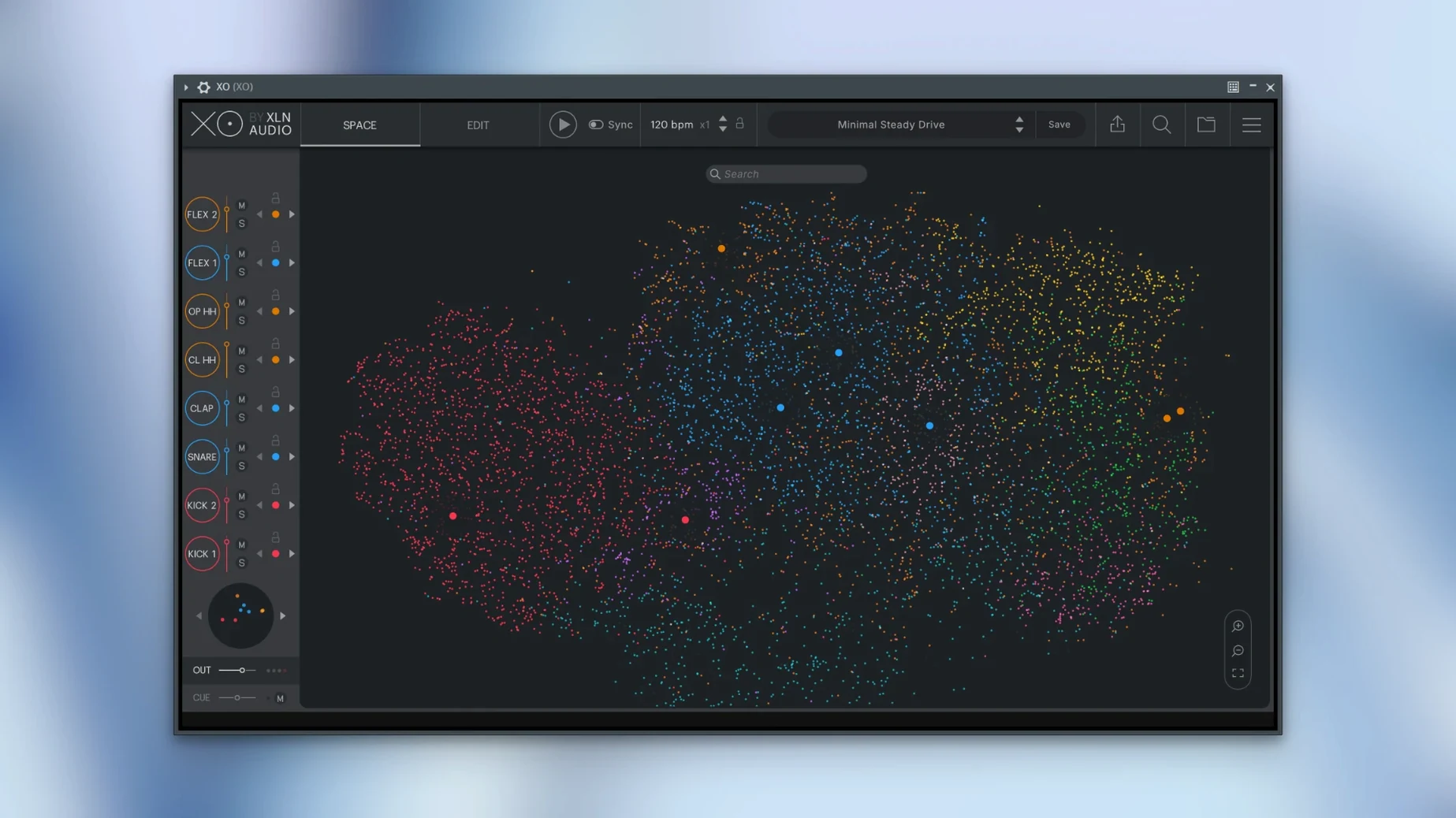
8,700 samples. That is the size of the factory library inside XO, and looking at a list that long would be a chore. The plugin sidesteps the problem by mapping all those one-shots into a galaxy of dots called the XO Space. Kicks clump on one continent, snares on another, hi-hats scattered along a ridge. Click a dot to hear it. Drag a marquee around a cluster to find twelve variations of a rim shot you never knew you had. The browser alone redefines what a drum plugin can do before you even sequence a single hit.
Eight slots, tilt EQ, and attack-delay on each hit
The 240 factory presets are fully editable kits dropped straight onto eight slots. Each slot holds a sample with its own pitch envelope, multimode filter, and two send effects. A tilt EQ and an attack-delay section sit right on the channel strip, so shaping the transient of a clap or darkening a hi-hat takes one knob turn rather than a detour to a separate mixer. From a mix perspective, having the tone controls per-channel means a beat can go from thuddy lo-fi to crisp and modern inside the same pattern.
How the sequencer feeds the DAW
XO’s built-in step sequencer runs independent lengths per lane—kick in three, snare in five, hats in seven—which pushes patterns into polyrhythmic territory without fighting the host transport. The Accent and Random controls per lane add velocity variation that keeps the groove from sounding locked to a grid. When the pattern is ready, you can drag the MIDI or bounce the audio straight into your DAW. Version 1.8.10 cleaned up audio export during host playback and fixed a bug where muted lanes still spat out MIDI notes, so the drag-and-drop handoff now works as expected in an AU, VST3, or AAX session.
Building a kick from nothing in under a minute
Open XO on an empty kit slot and hit Playground. The Space zooms out and every dot becomes a live preview as your mouse drifts across it—no clicking required. I drag a marquee around a dense cluster of low-end thumps, then tap the arrow keys to flick through candidates. When I land on a 909-style kick with a solid attack but a flabby tail, I pull the Sample End marker left to tighten the decay, then nudge the pitch envelope down a few semitones to fatten the body without muddying the sub. The tilt EQ on that channel gets a gentle boost toward the dark side, and the kick sits right where I want it before I have touched a single sequencer step.
I copy the pattern from the factory preset "Rust Belt" onto lane one—a four-to-the-floor pulse with Accent cranked on the downbeats. Lane two gets a rim shot from a neighboring cloud, lane three a shaker running a five-step pattern. I drag the MIDI into Logic, mute two lanes inside XO, and export audio for the remaining hits. The whole process—browse, shape, sequence, export—took less than a minute. The plugin never opened a file dialog.
Small things that reward repeat use
A handful of shortcuts took me months to notice, and they change how fast you can move. Command-click any sample dot to load it directly into the selected slot without leaving the Space. Option-drag a sample copies its channel settings—EQ, filter, sends—to another slot so you can audition the same processing chain across six different claps. The Groove Templates dropdown, tucked beside the sequencer, applies swing and humanization to all lanes at once; try the "Dilla-ish" template on a straight 16th-note hat pattern and watch the grid loosen up. The Hot Swap button on each slot locks the sequencer lane while you browse replacements, so the pattern keeps running and you hear every candidate in context. Finally, the Copy Kit command from the hamburger menu dumps the entire mapping—samples, tunings, levels—to clipboard, which makes building variations across a project folder trivial.
Who fits this plugin best
Beatmakers who build from one-shots rather than loops get the obvious win: the Space turns a flat folder tree into a performance instrument. Sound designers chasing drum layering benefit from the similarity mapping, because a search for "snappy transient" lands on a dozen candidates arranged by closeness, not by filename. Producers working inside Logic or Ableton who want a standalone browser that runs outside the DAW can launch XO as its own application, swap kits without loading a project, then drag MIDI back in when inspiration strikes.
Users who lean on splice-style libraries or large personal collections will appreciate that XO scans user folders and maps them into the same Space alongside the 8,700 factory sounds. The plugin indexes by spectral character, not by folder hierarchy, which means an old .wav pack from a decade-old hard drive becomes discoverable again without renaming anything. If you have ever searched for an XLN Audio XO free download just to test whether the browser workflow clicks, you already know the problem XO solves: too many samples, not enough time to find the right one. The cracked XLN Audio XO torrent scene certainly circulates builds, and version 1.8.10-2026.09.04-Complete is a mature release with the MIDI mute fix and the playback export patch baked in, making it the most stable starting point for anyone exploring the XLN Audio XO crack Mac route on an Apple Silicon machine running macOS 10.13 or later.
- macOS 10.13 or later
- Intel and Apple Silicon native
$ man xln-audio-xo | grep -A2 "?"
Can XO export patterns to a DAW?
Yes. You can drag MIDI from the sequencer into your host or bounce the audio directly to an arrangement track.
What plug-in formats does XO use on macOS?
It runs as a VST, AU, and AAX plug-in, and it also includes a standalone application that works without a host.
How does XO help find similar drum sounds?
The XO Space interface organizes the entire sample library by sonic character, placing similar-sounding hits near each other so you can audition clusters of kicks, snares, or hats visually.
Comments 0
Sign in or create an account to leave a comment.
No comments yet. A codec, a slice, a machine — they appear after moderation.