Xpand!2 for macOS
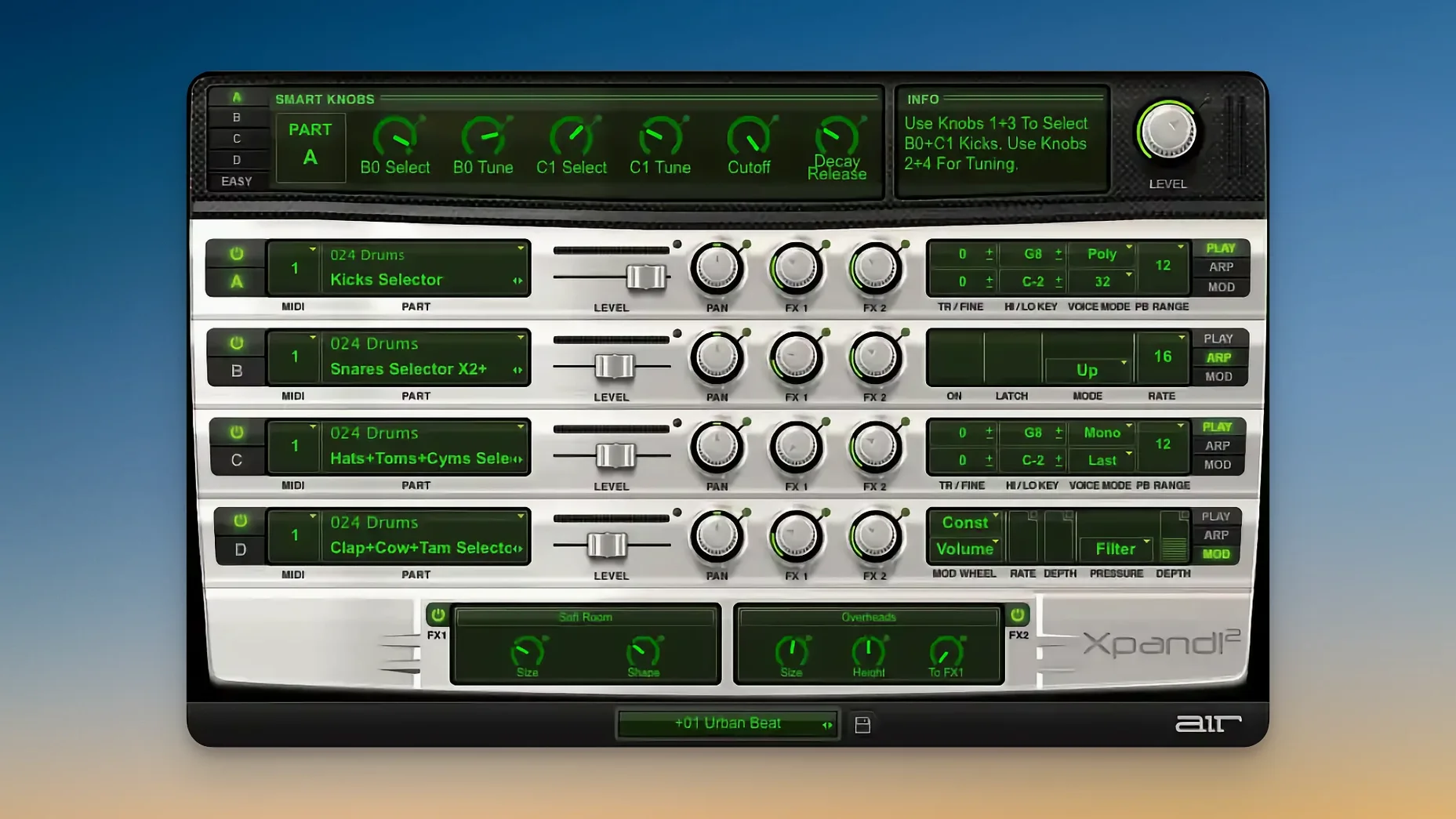
If you've spent time with a classic multitimbral workstation, Xpand!2 will feel like a familiar workspace compressed into a single window. Each patch is really four independent sound slots, each with its own MIDI channel, arpeggiator, and synthesis mode. You're not just layering — you're building a miniature ensemble, slot by slot.
How the four slots interact
The mixer-like layout gives each slot its own pan, level, and two effect sends. A monophonic bass pulse can sit on channel 1 with First priority, while a 64-voice wavetable pad unfolds on channel 2. The arpeggiator per slot means one slot can run a syncopated FM sequence while another holds a slow sample-based swell. Six smart knobs map to the most useful parameters for whatever patch is loaded, so tweaking cutoff, resonance, or envelope depth doesn't require diving into menus.
What the synthesis types bring to a mix
Subtractive synthesis handles the bread-and-butter analog-style tones — warm, with predictable filter behavior. FM synthesis adds metallic edges and bell-like attacks that cut through dense arrangements. Wavetable scanning introduces motion; a slow sweep can turn a static pad into something that breathes. Sample playback fills in the acoustic territory, from orchestral stabs to ethnic strings. Two effect processors per patch, pulling from 50 algorithms including Chaos Delay and a solid hall reverb, let you place each layer in its own space before the four slots sum together.
Why stop at one layer when you have four slots?
The most common stumble is treating Xpand!2 like a single-layer rompler — loading a preset, playing a chord, and moving on. That ignores the whole point of the four-slot architecture. A patch named Big Cinema Strings might sound fine out of the box, but it really comes alive when you mute slot three, change slot two to a different sample set, and let the arpeggiator on slot four add rhythmic motion underneath. Beginners also tend to leave all four slots on the same MIDI channel, which turns the plugin into a four-layer stack fighting for polyphony. Assigning each slot its own channel lets you control them independently from your DAW, which is where the multitimbral design earns its keep.
Another classic slip: ignoring voice priority on monophonic slots. If you set a bass part to Last priority when what you actually want is Lowest-note priority for a walking line, the voice stealing will trip you up every few bars. And a surprising number of new users never touch the Smart Knobs after loading a preset, assuming they're static. They're not — AIR mapped them to the most expressive parameters per patch, and a quick twist on knob five often reveals a filter sweep or envelope shape that transforms the sound.
Is the interface too tiny on a Retina screen?
The most reported headache is the plugin window opening at a microscopic size on modern Retina displays. The fix is simple but hidden: locate the scaling control at the bottom of the interface and drag it to a comfortable size — usually around 125% or 150% on a 27-inch 4K display. Xpand!2 remembers the setting per instance, so you only need to do it once.
Another snag: clicks and pops when you switch presets while notes are sustaining. This happens because the new patch loads with different voice allocations and effect routing, and the audio engine doesn't do a silent crossfade. The workaround is muscle memory — either stop playback before changing patches or send an All Notes Off MIDI message from your controller. If you're performing live, build your set so patch changes happen during silent bars.
Some users hit a wall where the plugin seems to stop responding to MIDI after heavy project editing. Nine times out of ten, the DAW has reassigned the slot MIDI channels — particularly common in Ableton Live after duplicating tracks. Open the Xpand!2 window and check that each slot's channel assignment still matches your expectation. If slot three mysteriously switched to Omni, that's your culprit.
On the installation side, the .pkg installer places the component files in /Library/Audio/Plug-Ins/Components/ for AU and /Library/Audio/Plug-Ins/VST3/ for VST3. If your DAW doesn't see the plugin after installation, the most common cause is an outdated Audio Unit cache. Running killall -9 AudioComponentRegistrar in Terminal forces macOS to rebuild its plugin registry, which resolves the issue without a full reboot.
Does it really load multi-gigabyte patches in under a second?
On Apple Silicon, Xpand!2 runs natively and loads surprisingly fast for a plugin that ships with a multi-gigabyte sample library. A typical four-slot patch with two sample-playback layers and two subtractive slots initializes in under a second on an M2 Pro. The interface never lags during parameter changes, and the HiDPI rendering stays crisp even when you rapidly resize the window.
CPU usage is modest by modern standards. A single instance playing a four-layer pad with both effect slots active sits around 3–5% on a performance core. Where you'll notice the load is when stacking instances: a 16-track project with Xpand!2 on every track can push a base M1 into audible buffer underruns at 64 samples. Bumping the buffer to 128 resolves it cleanly. The sample playback engine streams from disk efficiently — I've never seen a disk-overload warning, even with projects stored on external USB-C SSDs.
Stability is solid in Logic Pro, Ableton Live, and Studio One. The plugin occasionally misbehaves in hosts that sandbox AU plugins aggressively — if you're running a DAW under Rosetta 2 for compatibility with older Intel-only plugins, Xpand!2's native ARM binary can get confused about which memory space it's in. Running the host natively fixes this. Crash reports, when they do appear, usually point to a malformed preset file rather than the audio engine itself. Deleting any user presets you've added and letting the factory bank rebuild on next launch clears it up.
How do you turn a step into a rest with one key?
The arpeggiator per slot seems straightforward, but holding Shift while clicking a step in the pattern editor sets that step to a rest instead of a note — a shortcut that isn't documented in the main interface and saves endless menu-diving. Right-clicking any Smart Knob snaps it back to its saved value, which is faster than hunting for the preset recall button when you've twisted yourself into a corner.
MIDI Learn works globally, not per slot. Click the MIDI Learn button in the top bar, wiggle a hardware knob, and then touch the parameter you want to link. The mapping persists across preset changes until you clear it, which means you can set up a physical controller for the Smart Knobs once and use it for an entire session. Aftertouch routes to the modulation depth per slot by default, but you can reassign it to filter cutoff or effect send level by shift-clicking the destination label in the modulation matrix — another hidden modifier-click that speeds up sound design.
A workflow trick that saves time when building layered patches: set slot one to a sound you like, then Alt-drag (Option-drag on Mac) the slot to slot two. This duplicates all settings, including the arpeggiator pattern and effect routing. From there, swap the synthesis type or sample set on the copy, and you've got a related layer without rebuilding from scratch. The same modifier works for copying effects between the two processor slots within a single part.
If you're searching for the plugin online, you'll see it appear under phrases like xpand mac or xpand2 torrent — the naming is inconsistent across forums, but it's the same plugin. The xpand torrent and xpand 2 mac torrent search results often bundle older versions, so check that the build you have is the native ARM release if you want the performance behavior described here. A xpand 2 torrent from before late 2023 is almost certainly the Intel-only build running through Rosetta, which works but carries a 15–20% CPU penalty on Apple Silicon.
- macOS 13 or later
- Apple Silicon native support
- Plug-in formats: AU, VST3
$ man xpand-2 | grep -A2 "?"
Does Xpand!2 respond to MIDI expression controls?
Yes, it responds to Pitch Bend and Aftertouch, and supports MIDI Learn for mapping hardware controllers.
Comments 0
Sign in or create an account to leave a comment.
No comments yet. A codec, a slice, a machine — they appear after moderation.