
T-RackS for macOS
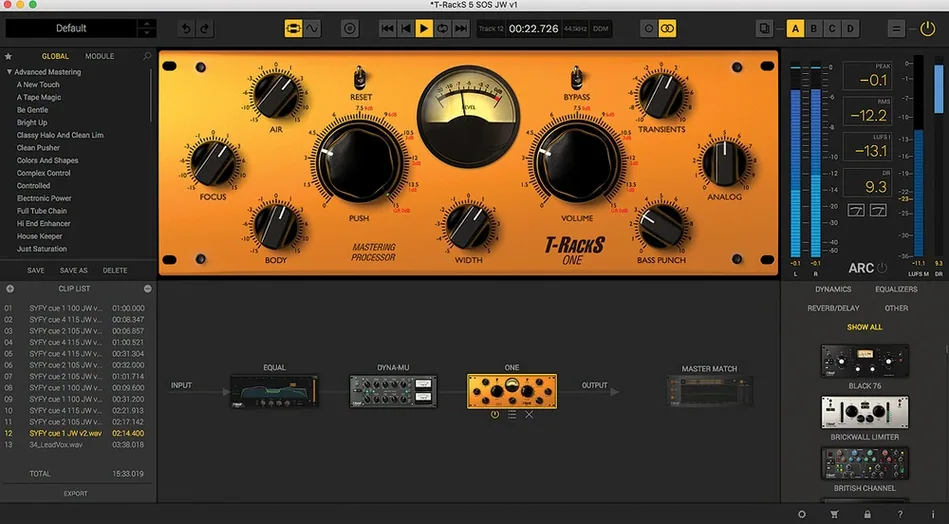
Four selectable dithering algorithms ship with T-RackS 6, and that tells you a lot about who it's built for. This isn't a one-click polish tool—it's a modular system that puts the same floating-point processing chain on the master bus, individual tracks, and the final export path. The current 6.3.2 build runs natively on Apple silicon and Intel Macs under macOS 10.15 Catalina, handing audio at up to 192 kHz / 32-bit float throughout.
| Detail | Spec |
|---|---|
| Version | 6.3.2 |
| Architecture | Apple Silicon native, Intel |
| Minimum OS | macOS 10.15 Catalina |
| Plug-in formats | AU, VST3, AAX (suite and individual modules) |
| Standalone | Mastering Console application |
The Module Manager is where experienced users will spend their time. You can run the full suite inside a DAW, or load individual processors—compressors, EQs, limiters—as separate plug-ins on any channel. When you move to the standalone Mastering Console, the workflow shifts to album assembly: sequencing tracks, embedding metadata, and exporting via the multi-format file writer. The redesigned interface keeps the signal path visible without veering into skeuomorphic clutter. For anyone building a mastering chain from discrete stages rather than a single all-in-one processor, the architecture makes sense—every module is the same code whether it's hosted inside the console or loaded directly in Logic.
Who clicks with T-RackS straight away?
Mixing engineers who already think in terms of discrete hardware chains tend to settle into the workflow within an hour. If you've ever patched a physical bus compressor into a mastering EQ by hand, the 16-slot serial/parallel grid feels like second nature. The same goes for post-production people who need to recall exact chains across multiple sessions—the Module Manager stores every parameter without forcing you to save a monolithic preset that drags in the whole suite.
Beatmakers and electronic producers get a different kind of value. Loading just ONE or Dyna-Mu as a single AU on the drum bus keeps CPU overhead low while adding character that stock DAW compressors rarely touch. The four new processors in version 6 mean you can shape a mix without ever leaving the IK ecosystem, which matters when you're auditioning changes quickly.
Home studio owners running older Intel Macs benefit too. The individual modules are surprisingly light on resources when loaded separately—a single instance of EQual barely registers on a 2018 Mac mini. You don't need an M-series machine to get work done here, though the Apple Silicon native build does wake up noticeably faster when you open a session with 40+ plug-in instances.
Audition noise-shaping curves during export
The dithering selector isn't just four preset buttons. Each algorithm exposes a noise-shaping curve that you can audition in real time while the export dialog is open—swap between MBIT+, TPDF, and the other two options while the waveform preview updates. Most people set it once and forget it, but swapping dithering types per track on an EP export can make the difference between a quiet fade-out that breathes and one that sounds like it's fighting the bit depth.
Right-clicking any slot in the chain brings up a copy/paste menu for individual module settings, not just whole presets. You can grab the threshold and ratio from one instance of Dyna-Mu and drop them onto another on a different project tab without opening either plug-in window. The album assembly view also lets you drag tracks vertically to reorder while playback is running, which is handy when you're checking transitions between songs and realize track three flows better after track five.
One workflow shortcut worth knowing: holding Shift while clicking a module's bypass button bypasses the entire chain from that point onward, not just the single processor. Useful for A/B testing whether the back half of your chain is actually helping.
Modular chain vs. Ozone’s assisted suggestions
Ozone from iZotope takes a more assisted route—its Master Assistant suggests a chain based on analysis of your audio. That's useful when you're learning, but it can steer you toward a sound that isn't yours. T-RackS 6 stays modular and hands-off; it won't suggest anything. The trade-off is that you need to know why you're reaching for a vari-mu compressor versus a clean VCA, but the upside is total control over the signal path. Ozone also bundles its modules more tightly, so you can't always grab just the exciter and skip the maximizer without loading the full plug-in.
FabFilter's Pro-L 2 and Pro-Q 3 are individual processors, not a full mastering suite, and they excel at surgical work—the spectrum display in Pro-Q is still the reference for visual EQ. But they don't offer the integrated chain thinking that T-RackS brings. You can certainly build a mastering chain from FabFilter plug-ins in any DAW; what T-RackS adds is the album assembly layer, multi-format export, and the ability to treat the entire project as one mastering session rather than a collection of plug-in slots. For a mix engineer finishing a 12-track release, that sequencing view alone saves an hour of bouncing and re-bouncing.
Waves bundles like the Abbey Road Mastering Chain lean harder into console emulation. They sound great on material that suits their color, but they're less flexible when you need to swap a tube stage for a clean solid-state limiter mid-chain. T-RackS doesn't emulate one specific desk—it gives you building blocks and lets you decide the flavor.
18% CPU with a 12-slot 96 kHz mastering chain
On an M1 Pro MacBook Pro with 16 GB of RAM, a 12-slot mastering chain running at 96 kHz hovers around 15-18% CPU in the standalone console. That's with Master Match X analyzing a reference track in the background. Drop down to five modules and the fan never spins up. The Intel build on a 2019 iMac runs warmer—expect the fans to become audible around the eighth module if you're also running a DAW—but audio dropouts are rare unless you're pushing 192 kHz with multiple instances of the convolution-based processors.
Stability is where the modular approach pays off. Because each processor can run as a separate AU or VST3, a crash in one module (rare, but I've seen it happen with ONE during heavy preset switching) doesn't bring down the whole chain. The standalone Mastering Console auto-saves a recovery session every few minutes, so even if the application quits unexpectedly, your album assembly and metadata are intact on relaunch.
Memory usage sits around 400-600 MB for the standalone app with a full chain loaded. Individual plug-ins in Logic Pro hover around 80-120 MB each. Not featherweight, but reasonable given the floating-point path and the oversampling some modules run internally. If you're on an 8 GB machine, you'll want to freeze tracks that use multiple T-RackS processors—but that's standard advice for any heavy plug-in workflow.
- macOS 10.15 Catalina or later
- Apple Silicon or Intel 64-bit processor
- 64-bit operating system
$ man t-racks | grep -A2 "?"
Can I use T-RackS modules individually in my DAW?
Yes. The suite installs both a full plug-in chain and individual AU, VST3, and AAX modules that you can insert on separate tracks.
Does T-RackS handle album assembly and metadata?
The standalone Mastering Console includes sequencing tools and metadata embedding, paired with multi-format export for final delivery.
What sample rate and bit depth does the processing engine use?
The internal floating-point path supports material up to 192 kHz and 32-bit float throughout.
Comments 0
Sign in or create an account to leave a comment.
No comments yet. A codec, a slice, a machine — they appear after moderation.
More in VST Plugins
cd ../ Synapse Audio The Legend HZ v2.0.2.R1
VST Plugins 472 MB
 Supertone Air
VST Plugins 408 MB
 Superior Drummer
VST Plugins 625 MB
 Strymon Plugin Bundle
VST Plugins 427 MB
 Steinberg SpectraLayers Pro
VST Plugins 3.9 GB
 Tokyo Speirs RoundTrip
VST Plugins 186 MB
 Tone Empire EDYN
VST Plugins 198 MB
 Spire
VST Plugins 158 MB