
Steinberg SpectraLayers Pro for macOS
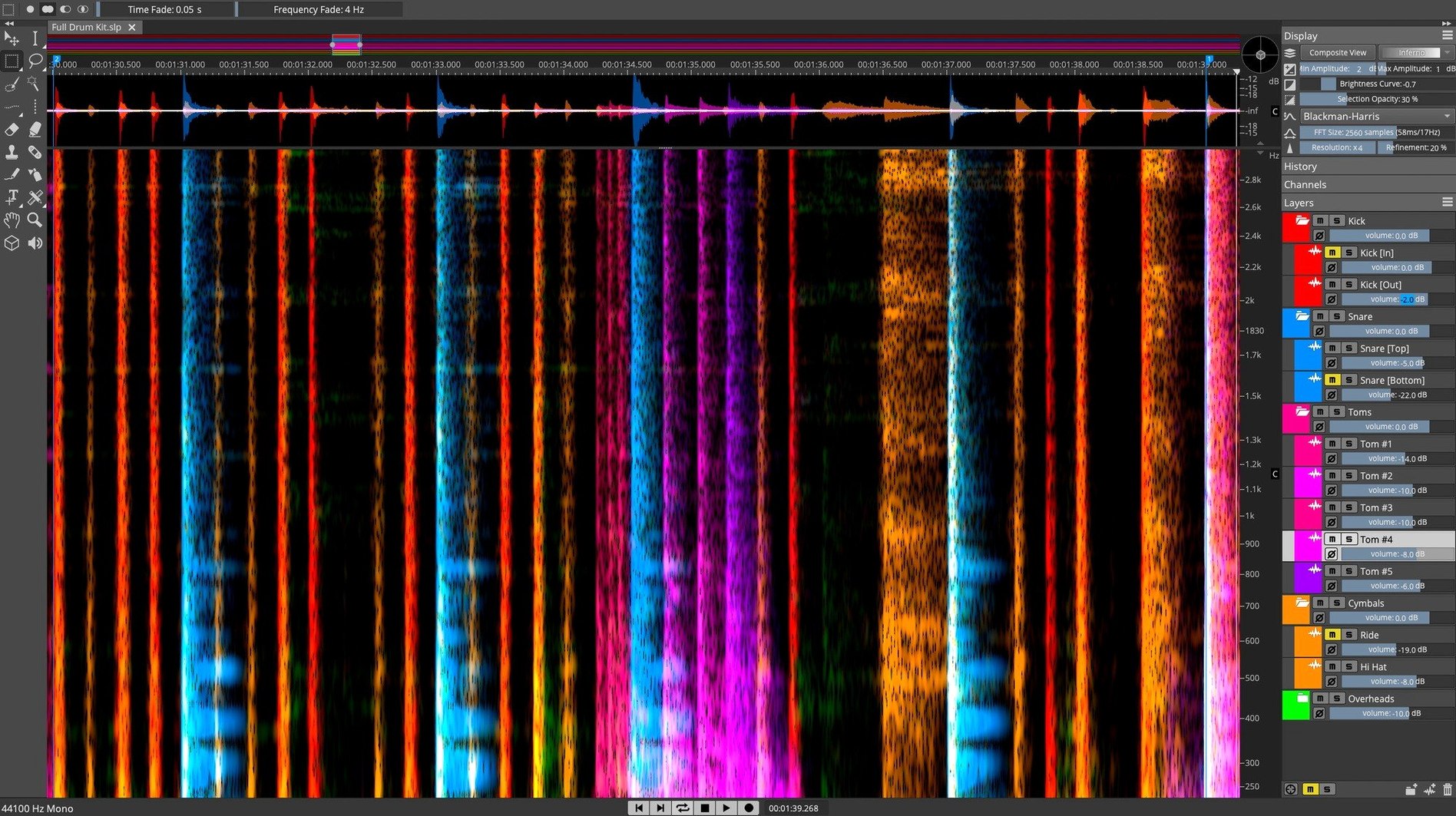
Restoration engineers, forensic audio people, and mixers who need to fix things other editors can't touch are the ones who end up in SpectraLayers. The workflow is less about mixing and more about surgery on the spectrum itself.
What does editing look like?
You work directly on a 3D spectral display, selecting frequency regions with brushes and lassos instead of slicing waveforms. The 13.0.20 build keeps manual tools alongside AI-driven processes, so you can grab a cough between two words or let Pattern Finder highlight similar events across the file.
Can it pull a voice out of constant room tone?
The Voice Denoiser isolates human voice from background noise, which is useful when a recording has constant room tone or air conditioning. De-essing exists in both manual and automatic forms, so sibilance can be tamed by hand or left to the detection routines.
Does it integrate with a DAW?
Yes. SpectraLayers runs alongside a DAW and other tools, which means you can bounce a problem region out, repair it spectrally, and bring it back without rebuilding the session.
What questions usually come up before installing?
People read the feature list and then ask the same few things, so here they are with short answers.
Does it need a DAW, or can I work completely standalone?
Standalone works fine. You open an audio file directly, do your edits, and save or export. The DAW integration comes in when you want to round-trip a clip from Cubase, Nuendo, or another host via ARA 2. If you never launch a DAW, SpectraLayers doesn't care.
Why is the installer a single multi-gigabyte download?
The disk image weighs a few gigabytes because it bundles everything into one 13.0.20-All-in-One installer. Once you open the .dmg you run the standard .pkg procedure—no separate content packs to track down. The installer places the application and its shared resources where they belong, and you're done.
Will it run natively on Apple Silicon?
Yes. The binary is universal, so M-series and Intel Macs both get native code. No Rosetta translation layer sits between you and the spectral display when you're scrubbing through a sixty-minute file at high zoom.
Is internet access required after installation?
Not for editing. The AI processes run locally on your machine. No cloud round-trips for stem separation or voice denoising, which keeps latency predictable and your audio on your own drives.
Why does the display feel snappy after that initial CPU spike?
SpectraLayers is not a lightweight tool, and it doesn't pretend to be. Loading a dense stereo file and computing the spectral view pushes the CPU for a moment, but once the data is in memory the display responds quickly—zooming and panning across frequency bins feels smooth even on an M1 machine with a 4K display attached.
Track-to-stems unmixing is where you'll see the heaviest processing. A five-minute mix can take a minute or more of sustained computation as the AI separates vocals, drums, bass, and the rest. The machine stays usable during that time; you can switch to other applications without beachballs, which suggests the processing threads aren't locking the main loop. On an M2 Max with 32GB of RAM, the same separation happens noticeably faster, but the app doesn't demand that much memory just to stay open—16GB is comfortable for most work.
Stability under 13.0.20 has been uneventful, which is what you want from a tool that handles long-form material. I've thrown two-hour recordings at it, applied chains of manual edits followed by Voice Denoiser passes, and not seen a crash. The Undo history holds up across dozens of operations, though I'd still save a snapshot before running Pattern Finder on a file with five thousand detected events just to stay safe.
Disk I/O matters more than you might expect. Working from the internal SSD keeps everything snappy; pulling files from a spinning external drive adds a slight lag when the app first constructs the spectral view. Once the file is loaded, that difference disappears.
Who needs spectral editing when a transient lands on a syllable?
It's not for everyone, and that's fine. The people who live in it tend to fall into a few groups.
Post-production dialogue editors face recordings where a door slam or a phone buzz lands right on a syllable. Waveform-level editing can't separate those, but spectral editing can, because the unwanted sound occupies a different frequency band. Being able to select it and attenuate without touching the voice above it saves ADR sessions.
Forensic audio people work with evidence recordings that are barely intelligible. The Voice Denoiser and manual spectral cleanup give them tools to pull speech out of engine noise, wind, and room reflections. Pattern Finder helps when the same type of interference repeats across the file—select one instance and it finds the rest.
Music producers and remixers who need stems from a stereo mix use the AI separation to get drums, bass, vocals, and other elements isolated. It's not magic—artifacts exist, especially on dense material—but for building remixes, creating acapellas, or studying arrangement details, it's more than usable.
Sound designers pushing raw field recordings into something else entirely treat the spectral display as a canvas. Grabbing a harmonic series and shifting it, isolating a single overtone, or extracting a transient from a complex texture are all operations that only make sense in spectral view.
If you mostly do music mixing where nothing needs surgical repair, you'll open SpectraLayers rarely. If you constantly face problems that won't yield to EQ and gating, you'll live in it.
Which FFT size setting matches your material best?
The defaults are reasonable, but a few tweaks make the workspace faster and more comfortable.
Set the FFT size to match your material. Larger FFT sizes give better frequency resolution at the cost of time resolution; smaller sizes do the opposite. For dialogue work, something around 4096 or 8192 samples gives a good balance where you can see individual sibilant events without the display looking smeared. For music with fast transients, drop it lower.
Adjust the color map. The default heat-map style works, but switching to a high-contrast palette makes quiet details visible without zooming the amplitude scale. Spend two minutes cycling through the options while looking at a file you know well—you'll settle on one that reveals more.
Configure external editor integration early. If you plan to round-trip from a DAW that isn't Cubase or Nuendo, set up the external editor paths in Preferences before your first session. It's a one-time step that prevents friction later when you want to send a clip out for spectral work and bring it back.
Increase the Undo limit. The default depth is fine for short files, but when you're doing hundreds of small brush strokes across a long recording, bumping the limit up to 50 or more keeps you from losing earlier states. Memory is cheap compared to redoing detailed cleanup.
Bind zoom and tool shortcuts. The lasso, brush, and harmonics selection tools get constant use. Assigning them to single keys instead of clicking through the toolbar makes the editing rhythm much faster. Same for vertical and horizontal zoom—mouse-wheel zoom is fine, but a key binding for "zoom to selection" saves constant scroll-wheel work.
- Installer release notes published for version 13.0.20.
- macOS 12 or later
- Intel and Apple Silicon supported
- Interface: English
$ man steinberg-spectralayers-pro | grep -A2 "?"
Is SpectraLayers Pro 12 crack safe to use?
Cracked versions fall outside the scope of this guide. The official 13.0.20 installer is a standard disk image with a normal installer procedure.
What macOS does SpectraLayers Pro need?
It requires macOS 12 or later and runs on both Intel and Apple Silicon Macs. The interface is in English.
Comments 0
Sign in or create an account to leave a comment.
No comments yet. A codec, a slice, a machine — they appear after moderation.
More in VST Plugins
cd ../ Strymon Plugin Bundle
VST Plugins 427 MB
 Spire
VST Plugins 158 MB
 Superior Drummer
VST Plugins 625 MB
 Supertone Air
VST Plugins 408 MB
 Sonic Academy KICK
VST Plugins 358 MB
 Sonarworks SoundID Reference
VST Plugins 718 MB
 Synapse Audio The Legend HZ v2.0.2.R1
VST Plugins 472 MB
 T-RackS
VST Plugins 2.3 GB