
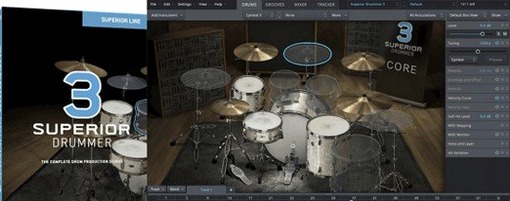
Superior Drummer for macOS
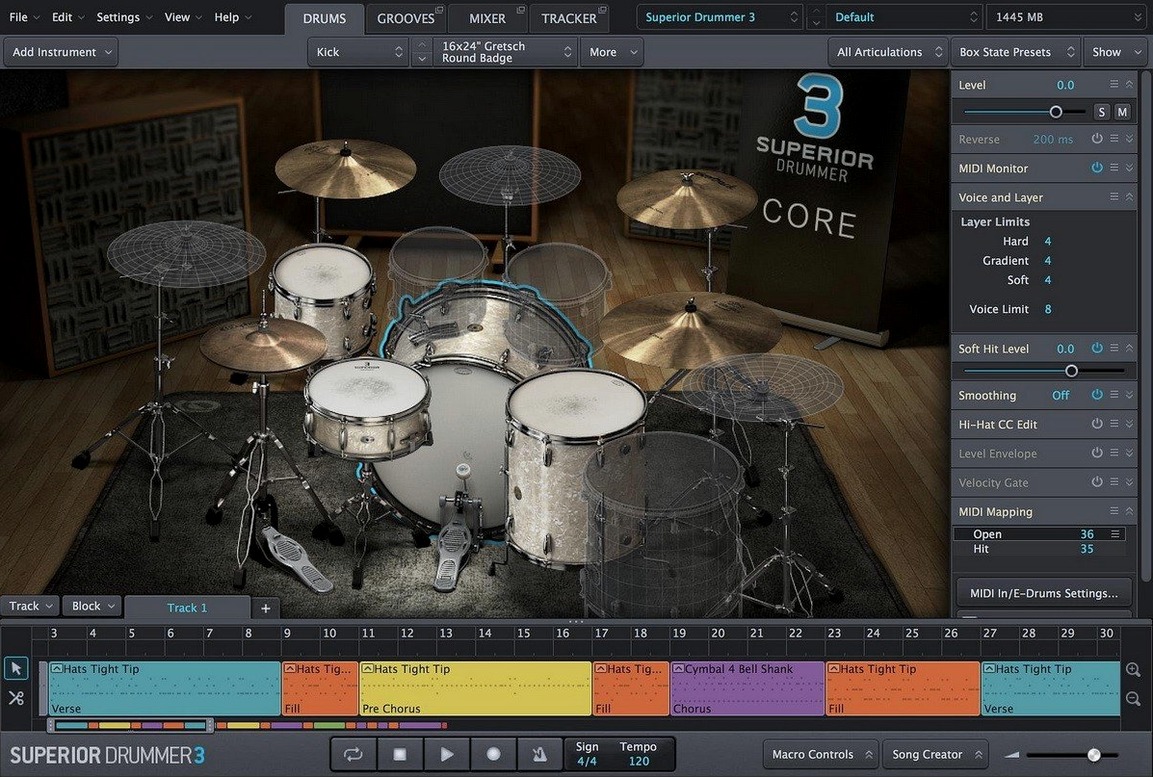
Drag a drum loop onto the tracker, and the audio-to-MIDI conversion picks out the kick, snare and cymbal hits and maps them to playable notes. That single feature shifts Superior Drummer from a sample player into a genuine percussive sound design environment. It ships with seven full kits recorded in a virtual studio that gives you control over mic bleed, room mics and direct signals.
How the built-in mixer shapes a kit
The internal mixer isn't an afterthought — it carries 35 effects covering EQs, compressors, gates, transient shapers and convolution reverb. Every drum channel routes through it, so you can dirty up a hi-hat with saturation while keeping the room mics clean, all inside the plugin. Because it runs as a 64-bit AU or VST3 on both Intel and Apple Silicon Macs, the whole processing chain stays inside one window instead of spreading across a DAW's mixer strips.
Why the audio-to-MIDI tracker matters
Drop in a reference groove, hit convert, and the tracker builds a MIDI map of what it hears. You can then swap the original sounds for any kit in the library, tweak velocities, or push the groove to a completely different time signature. It turns a static drum recording into editable performance data without manual transcription. Combined with the seven included kits and the deep mixer, the software behaves less like a basic rompler and more like a dedicated drum production room running inside a .component or .vst3 file.
Loading a blank kit instead of the default project on launch
Out of the box, Superior Drummer loads a default kit with the internal mixer set flat. That works for auditioning, but a few preference tweaks make daily sessions faster. Head into the settings pane and switch the default kit load behavior to Empty Project unless you genuinely start every session with the same Ayotte snare. It cuts the wait when you only need to browse a kick drum.
The buffer size for disk streaming defaults to a conservative value. If you run the library from an NVMe SSD — and you should, with 230 GB of samples — bump it down to 60 ms or lower. The playback engine preloads smaller chunks into RAM, and on Apple Silicon the difference in trigger-to-sound latency drops below what most finger-drummers notice. While you are in the audio settings, confirm the sample rate matches your DAW project. Mismatched rates force a real-time resample on every hit, and that eats CPU cycles for no sonic gain.
One last one: the macro controls on the main mixer view are mapped to velocity curves by default. Pull up the mapping panel and assign Velocity Curve to something gentler than linear if you play an e-kit with a light touch. The seven included kits respond to dynamics well, but the linear curve expects heavy-handed playing. A mild logarithmic bend brings the ghost notes on the snare into audible range without cranking the track gain.
Tapping a groove on your keyboard to find matching MIDI
The browser has a search field, but the real time-saver is the Tap2Find button tucked beside it. Tap a rhythm on the keyboard — any key — and Superior Drummer searches the groove library for MIDI patterns with similar rhythmic density. It is not a transcription engine. It compares onsets, not pitches. Still, when you have a feel in your head and no patience to scroll through folders named "Rock Straight 4/4," it narrows the list to grooves that move like the one you tapped.
In the mapper view, right-click any drum articulation and choose "Replace with similar" to cycle through alternate room mic positions or stick types without losing the MIDI note assignment. This works across all seven kits, so you can audition a maple snare from one kit against a brass snare from another without dragging fresh instruments into the slot. The articulation browser updates instantly, and the mixer routing stays intact.
Another overlooked shortcut: Cmd-click a mixer fader resets it to unity gain. Option-click a pan knob snaps it center. These are the same gestures a DAW mixer uses, but because Superior Drummer's mixer sits inside a plugin window, people often assume it ignores host conventions. It does not. The 35 effects respond to the same modifier keys — Option-drag on an EQ band adjusts Q without shifting frequency, exactly the way you hope it would.
The grid editor supports triplet quantization with a single key command. Hit Cmd-3 while a row of hi-hat hits is selected, and they snap to the triplet grid. The Grooves tab, meanwhile, lets you drag a MIDI block straight onto a DAW track. If you hold Shift during the drag, the groove expands to fit the tempo of the host. No need to bounce the internal sequencer first.
Why full kits load in 8 seconds from an external SSD
Loading a full kit from an external SSD takes roughly eight to twelve seconds on an M1 Pro MacBook Pro; on an older Intel i9 iMac with a SATA SSD, closer to twenty. Once loaded, switching between kit presets within the same library is near-instantaneous because the samples stay cached. The disk image install weighs in at over 200 GB, so plan your drive layout before you run the standard installer. The .dmg unpacks cleanly, and the plugin files land in the usual /Library/Audio/Plug-Ins/Components and /Library/Audio/Plug-Ins/VST3 folders without scattering support files across hidden directories.
During playback, the 35 mixer effects run on the CPU, not GPU, and the convolution reverb uses a single IR per instance by default. On a modern Apple Silicon Mac, a full kit with eight mic channels, bleed on, and four insert effects per channel hovers around 15–20% on one performance core. That leaves headroom for amp sims and synths. On Intel machines, the same setup can push a single core past 40%. The difference is the efficiency of the ARM-native code path — the plugin runs as a universal binary, so the system does not translate a single instruction.
Stability in Logic Pro and Ableton Live is uneventful, which is the best kind. Across long sessions with tempo changes, time signature shifts, and heavy automation, crashes are rare. The one fragility worth knowing about: if you move the sample library folder after installation, the plugin asks for a rescan. Let it finish. Interrupting the rescan leaves kit pieces grayed out and requires a full relaunch of the DAW. The audio-to-MIDI tracker, for all its sophistication, occasionally misidentifies open hi-hat hits as crash cymbals on sloppy source recordings. Cleaning up the transient markers in the tracker editor fixes most false positives in under a minute.
How 230 GB of raw samples feels next to mix-ready Addictive Drums
Calling up three names people often weigh against Superior Drummer — Addictive Drums, BFD, and EZdrummer — helps frame what the 230 GB and 35 effects actually mean in practice.
Addictive Drums 2 leans on heavily processed, mix-ready sounds. Its kits slot into a pop or rock track with minimal tweaking, and the interface surfaces kit piece tuning and envelope shaping faster than Superior Drummer's deeper mixer pages. However, the raw sample count per kit is lower, and the room modeling does not offer the same multi-mic bleed architecture. Superior Drummer gives you the close mics, overheads, room mics, and ambient channels as independent faders, which matters when you want the snare to push the room differently than the toms. Addictive Drums bakes more of that interaction into the preset.
BFD3 rivals Superior Drummer in sample depth and raw mic control. It also models bleed between drums and lets you route every mic to a separate DAW channel without leaving the plugin. Where Superior Drummer pulls ahead is the audio-to-MIDI tracker and the unified mixer with 35 built-in effects. BFD3's internal effects are solid but fewer, and its groove engine expects you to do most sequencing on the DAW timeline. If you regularly drag reference grooves into a tracker and want a conversion within seconds, Superior Drummer's workflow is more self-contained. BFD3 rewards engineers who treat the plugin as a raw drum recorder; Superior Drummer covers that territory but also serves producers who treat audio loops as starting points.
EZdrummer 3 is the most direct comparison because it shares the same developer. It is leaner, loads faster, and aims squarely at songwriters who need a finished drum sound with two clicks. Its library is smaller, the mixer is simplified, and there is no audio-to-MIDI tracker — only a tap-to-search function for the MIDI groove library. Superior Drummer takes the same recording sessions that produced the EZdrummer kits and gives you the multitrack raw material and the tools to mix it yourself. If EZdrummer is a finished drum room photo, Superior Drummer is the RAW file with all the adjustment layers intact. Some sessions call for one, some for the other. People searching for superior drummer mac often land here while considering whether the extra control justifies the drive space. The audio-to-MIDI conversion alone tips the decision if you work with loops regularly.
What people ask before they install
Streaming only the attack of each articulation to fit 8 GB of RAM
It does, as long as macOS 10.13 or later is running and the host is 64-bit. The disk streaming engine keeps RAM usage moderate by loading only the initial attack of each articulation. On 8 GB machines, a full kit occupies roughly 1.2–1.8 GB of memory. The bigger constraint is drive speed. A 5400 RPM external spinner struggles to stream the room and ambient mic layers without dropouts. An external USB 3.0 SSD handles it easily, and the disk image installer lets you place the library on any connected volume.
Can you use it as a standalone app or only inside a DAW?
Superior Drummer runs as an Audio Unit (.component) and VST3 plugin. There is no standalone application in the current version. Opening it requires a host — Logic Pro, Ableton Live, Reaper, Cubase, or any other 64-bit DAW that reads AU or VST3. If you need a standalone drum module for practice without launching a full DAW, EZdrummer fills that gap, but you lose the audio-to-MIDI tracker and the deep mixer.
How long does the installation actually take?
The .dmg download contains the plugin installer and the sample library. Running the standard installer copies the plugin files quickly; the bulk of the time goes to transferring the 230 GB library to its final location. On a fast internal SSD, count on 25 to 40 minutes. On an external USB 3.0 drive, closer to an hour and a half. The installer does not require repeated authorization steps — it is a straightforward step-by-step process that finishes in one pass.
Does the audio-to-MIDI tracker handle brush playing or only sticks?
The tracker was primarily trained on stick and mallet articulations, but it responds to the transient attacks in brush sweeps and snare drags as long as the recording is reasonably clean. The results need more manual cleanup than stick grooves — you will spend time adjusting sensitivity thresholds and deleting false triggers from the quieter brush textures. Once mapped, though, the MIDI data triggers the brush articulations in the library correctly, so a converted brush groove plays back through the appropriate samples.
- Version 3.4.4 is the current release.
- Superior Drummer 3.4.0 or later is required for any Superior Drummer 3 products released from Q2 2025 onward.
- macOS 10.13 or later
- Apple Silicon or Intel processor
- 64-bit host (AU, VST3 or AAX)
$ man superior-drummer | grep -A2 "?"
Does Superior Drummer run natively on Apple Silicon?
Yes, version 3.4.4 includes native ARM support alongside x86, so it runs on both Apple Silicon and Intel Macs without Rosetta translation.
Comments 0
Sign in or create an account to leave a comment.
No comments yet. A codec, a slice, a machine — they appear after moderation.
More in VST Plugins
cd ../ Supertone Air
VST Plugins 408 MB
 Strymon Plugin Bundle
VST Plugins 427 MB
 Synapse Audio The Legend HZ v2.0.2.R1
VST Plugins 472 MB
 T-RackS
VST Plugins 2.3 GB
 Steinberg SpectraLayers Pro
VST Plugins 3.9 GB
 Spire
VST Plugins 158 MB
 Sonic Academy KICK
VST Plugins 358 MB
 Sonarworks SoundID Reference
VST Plugins 718 MB