AirBuddy for macOS
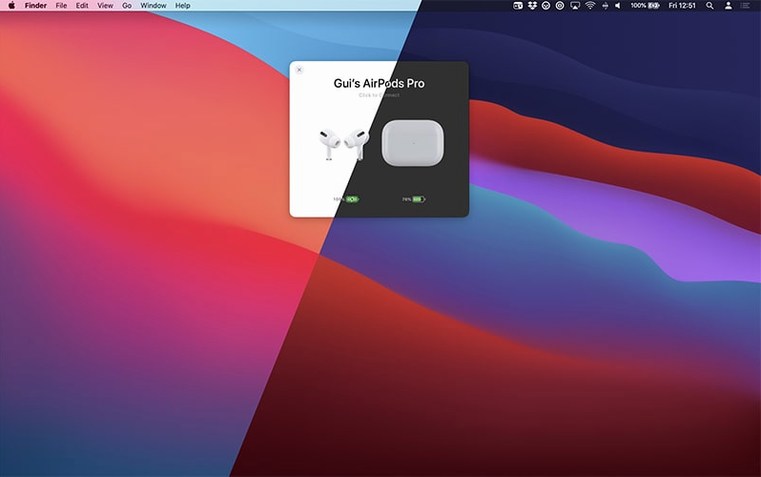
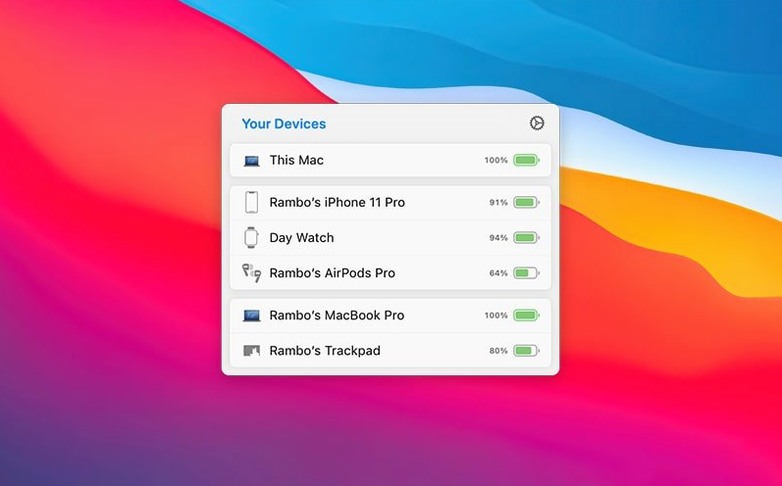
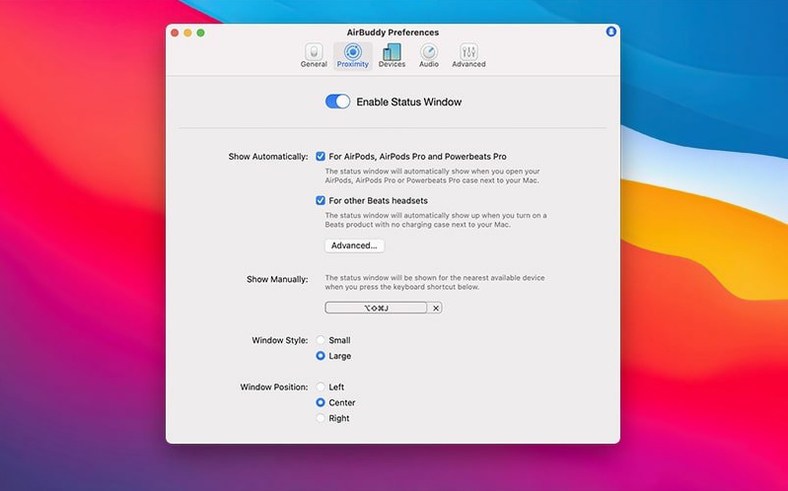
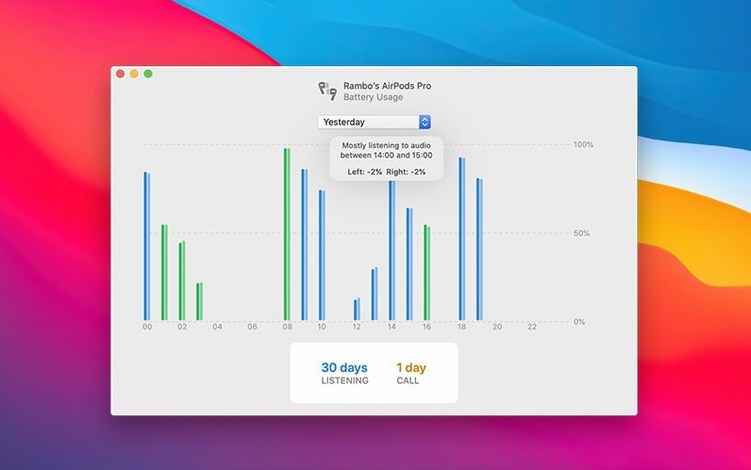
Apple's own Bluetooth menu shows a single aggregate battery figure for AirPods, which isn't much help when the left bud dies twenty minutes before the right one. AirBuddy puts the individual charge levels, plus connection and listening-mode controls, right on the desktop — the way the iPhone battery widget does, but for the Mac.
What macOS version and hardware do I need?
The current AirBuddy 3 build requires macOS 14 or later. The developer's beta release notes point to macOS 13 as the eventual floor when the final release ships, so anyone still on Ventura should keep an eye on that cutoff. Architecture-wise, the app is a universal binary — it runs natively on both Apple Silicon and Intel 64-bit Macs. If you’re on an M1, M2, or M3 machine, you get the full ARM-native experience without Rosetta overhead.
Click to connect and see charge levels for each earbud
Once installed, the app watches for nearby AirPods, Beats, and other W1/H1/H2 headphones and shows their case and per-earbud charge levels in a panel. You can click a device to connect it, switch listening modes on AirPods Pro (Transparency, Adaptive, Noise Cancellation), or tweak the volume and mic state — all without opening Bluetooth settings or Control Center. AirBuddy also includes a Magic Handoff feature that moves a Magic Mouse, Magic Trackpad, or Magic Keyboard between Macs signed into the same iCloud account. The menu bar icon is configurable: app icon, a compact battery indicator, or nothing at all if you prefer to keep the bar clean.
Status window populates in under a second on M-series Macs
The jump to version 3 brought a rewritten device discovery layer. In practice, that means the status window populates noticeably faster when you flip open an AirPods case — under a second on an M-series Mac, where the older 2.x branch sometimes took two or three. The beta channel has been iterating on the menu bar icon options; you can now collapse it down to a tiny battery ring with no app badge, which frees up menu bar real estate without losing the at-a-glance charge readout.
Another quiet fix that matters day-to-day: the app no longer fights for exclusivity when another Bluetooth audio manager (like ToothFairy or the system Control Center) has an active connection. Earlier versions could get into a tug-of-war over the audio route, especially with AirPods Pro switching between a Mac and an iPhone. The current release handles that handoff more gracefully, though it is still worth picking one connection manager and sticking with it during a work session.
Background daemon idles under 80 MB of RAM
AirBuddy runs a lightweight daemon in the background so the status panel appears without a cold start. On an Apple Silicon Mac, that daemon typically idles under 80 MB of RAM and barely registers on the CPU graph — I see it hovering around 0.1% when no devices are nearby and peaking at maybe 0.8% during a connection handshake. Intel machines show a slightly higher baseline, closer to 120 MB and 0.3% idle, which is still modest for a Bluetooth-aware utility that polls multiple device classes.
Stability has been solid on macOS 14.6 and the early Sequoia betas. Crashes in the 3.0-890 build are rare; the one reproducible edge case in the affinity beta-era releases involved waking a Mac from sleep while an AirPods Max was still connected. The process would sometimes hang until the headphones were manually disconnected. That path has been patched, and sleep-wake cycling with an Apple Watch and AirPods Pro in rotation now completes without the daemon restarting.
For anyone testing the airbuddy beta stream alongside other beta software — say, an adobe beta generative fill build of Photoshop — the two coexist fine, since AirBuddy does not inject into creative apps or touch the GPU pipeline. The only overlap worth watching is if both apps claim the system microphone; AirBuddy’s custom connection modes can toggle the mic source, and an Adobe app that auto-selects the AirPods mic during a voice recording might wrestle it back. Disabling the mic toggle in the connection mode settings sidesteps that entirely.
Case battery shows 0% or a dash until one bud is seated
A few patterns show up repeatedly in support threads and are easy to fix once you know the cause.
- Case battery stays at 0% or shows a dash. AirPods report case charge only when at least one bud is inside and the lid is open. If the panel shows per-bud levels but a blank case indicator, open and close the lid a couple of times while the Mac is awake — that forces a fresh advertisement packet.
- Magic Handoff can’t find the other Mac. Both machines need Bluetooth and Wi-Fi on, Handoff enabled in System Settings, and the same iCloud account. If the target Mac is on a VPN with a split-tunnel that excludes local traffic, Handoff packets may get dropped; pausing the VPN for a moment usually lets the peripheral transfer complete.
- Listening-mode switching lags or fails. AirBuddy sends the ANC/Transparency command the same way Control Center does — through the Bluetooth stack. If the AirPods are mid-transition between Mac and iPhone, the command can time out. The quickest fix is to lock and unlock the iPhone once, which stabilises the ownership handoff, then retry from the Mac.
- Menu bar icon not updating. After changing the icon style in preferences, the bar sometimes keeps the old icon until the next device event. Toggling Bluetooth off and on via the system menu bar forces a redraw immediately.
None of these are deal-breakers, just quirks of how Apple’s Bluetooth accessory protocol advertises state. Knowing the trigger makes them a five-second fix instead of a head-scratcher.
- macOS 14 or later
- Apple Silicon or Intel 64-bit Mac
Comments 0
Sign in or create an account to leave a comment.
No comments yet. A codec, a slice, a machine — they appear after moderation.