
Revoice Pro for macOS
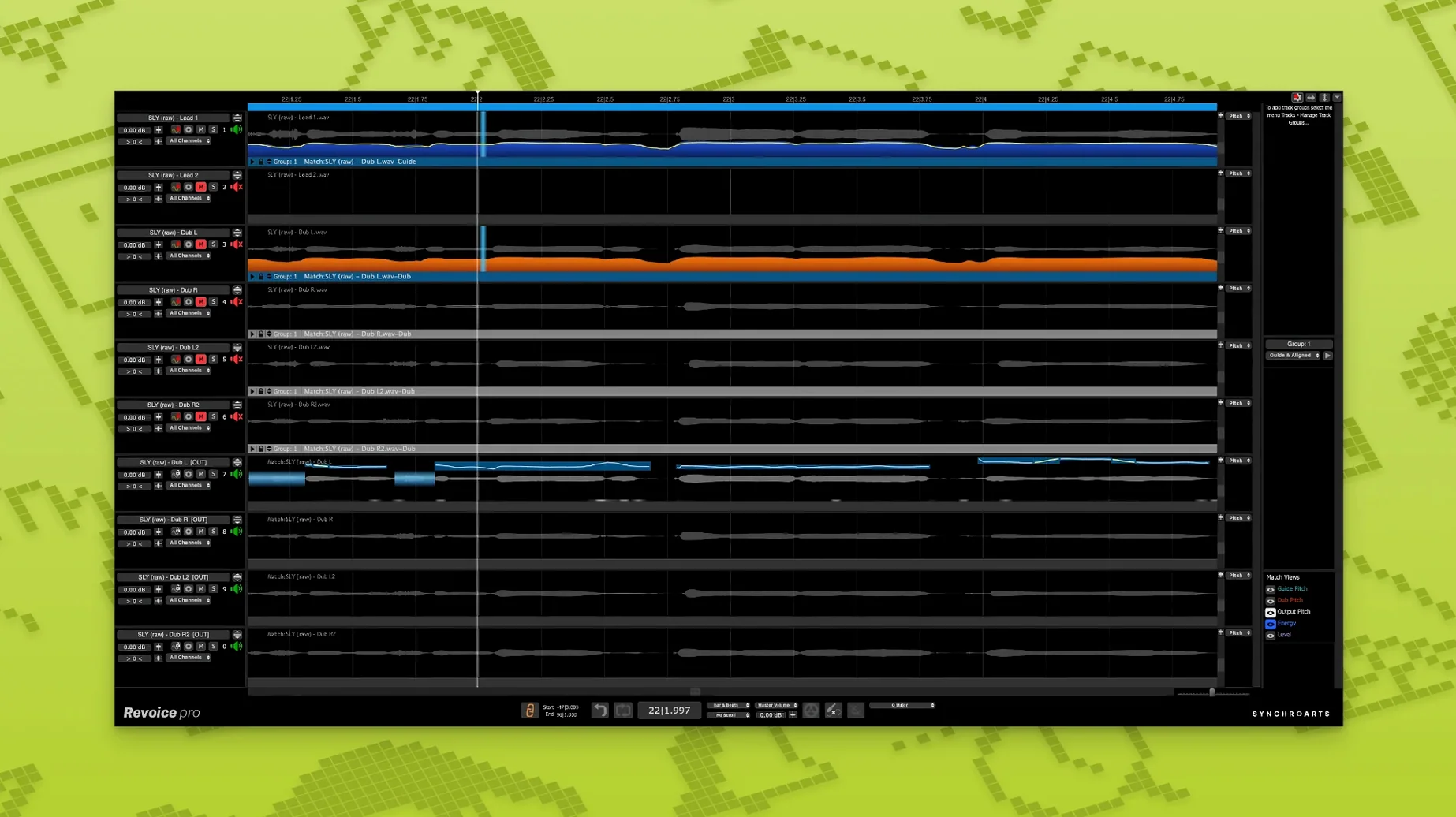
Three parameters sit at the core: time, pitch, and level. Revoice Pro treats them as independent signals, and that separation is what makes the alignment feel transparent instead of processed.
SmartAlign keeps breaths and consonants intact, not just grid timing
You feed in a guide track and a dub, and SmartAlign stretches or compresses the timing without touching the formants. The result isn't just locked to the grid — the breaths, consonants, and tail-offs stay intact. For doubles, you can nudge the timing slightly off the guide and add subtle pitch variation with SmartPitch, so the layered vocal reads as two performances rather than one copied track. The Shaper Tool lets you manually redraw pitch curves when the automatic correction overcorrects a scoop or a deliberate slide.
How the controls shape what you hear
The doubler doesn't just duplicate and detune. It creates a second signal where loudness, timing, and pitch deviate in small, human amounts. Because the processing works on the time domain and the frequency domain separately, you can widen a double's stereo spread without introducing chorusing artifacts. That matters when the arrangement is sparse and the vocal sits bare — any phase smear becomes obvious. SmartPitch on a harmony line matches it to the lead's pitch contour, but you can weight how tightly it follows, so a third-above harmony still breathes like a real take.
Phasey, thin doubles after alignment almost always come down to one oversight
Most people drop a guide and a dub into the stand-alone window, hit SmartAlign, and expect the doubled vocal to sit perfectly in the mix. The alignment lands, but the double sounds phasey and thin. Nine times out of ten, the culprit is not trimming the start of the dub to roughly match the guide's first transient. SmartAlign handles offsets, but a five-second gap at the front forces the algorithm to stretch silence, and the timing decisions that follow are all skewed. Trim first, then align.
Another common one: applying SmartPitch to a harmony that was tracked with a completely different mic distance. The pitch contour matches, but the loudness envelope carries the room tone differently, so the harmony peeks out or sinks back. Level-ride the harmony before you pitch-match it, even if it's just a rough pass with clip gain. The third beginner trap is running the doubler at full width on a mono lead vocal and printing it before checking the sum to mono. In a dense chorus that sounds huge in stereo, it can collapse to nearly nothing in the center channel.
Where it sits against VocAlign, Melodyne, and Auto-Tune
Synchro Arts also makes VocAlign, and the question comes up constantly: why use Revoice Pro instead? VocAlign tightens timing fast — drag, drop, render — and it's the better choice when you have forty stacked backing vocals and the clock is running. Revoice Pro gives you editable pitch curves, a doubler, and per-syllable control over how hard alignment pulls. If a producer sends you a verse double where certain phrases drift but others lock, you can leave the good bars alone. VocAlign is a one-shot ruler; Revoice Pro is a set of calipers.
Celemony Melodyne is the other comparison point. Melodyne sees every vocal as a collection of blobs with pitch, timing, and formant handles. For surgical correction of a single lead vocal, Melodyne is faster — the interface is the edit. Revoice Pro's advantage appears when you deal with multiple tracks that need to relate to each other. Matching the pitch of a stacked octave, aligning a double, and tightening a harmony to a guide are three separate operations in Melodyne. In Revoice Pro they're the same session, and the guide track is the single reference. Auto-Tune is real-time pitch correction first and foremost; it doesn't align timing, it doesn't double, and it doesn't match contour across tracks. Revoice Pro is a post-recording editor, not an insert effect.
A vocal producer's Wednesday afternoon
The lead vocal is comped. The singer tracked four doubles and a third-above harmony in a booth that got a little boxy around 400 Hz. The producer opens the stand-alone app, drops the comp onto the guide lane, and sends each double through SmartAlign with the time-warp tightness set around 75 percent — tight enough to lock consonants, loose enough that the tails don't sound gated. One double was recorded with the singer three inches farther back, so its loudness envelope is softer. A quick pass with the level rider inside the app evens it before SmartPitch pulls the pitch contour toward the lead. The harmony gets SmartPitch at about 60 percent follow weight; it matches the big moves but keeps its own vibrato. The boxy 400 Hz buildup across all the doubles is tamed with a narrow cut in the DAW — Revoice Pro doesn't do EQ — and the doubler adds a stereo spread to the two tightest doubles, checked in mono with the polarity flipped on one channel to confirm nothing cancels. The whole session, from raw tracks to printed doubles ready for the mix, runs under forty minutes. That's the workflow the app is built around: not replacing the DAW, but handling the one job it does better than anything else in the chain.
- Shaper Tool added for manual pitch adjustment.
- SmartPitch added for matching the pitch of doubles and harmonies.
- SmartAlign added for synchronizing takes with different start or end positions.
- macOS 10.14 or newer
- Intel or Apple Silicon processor
- AU, VST3, or AAX 64-bit host
$ man revoice-pro | grep -A2 "?"
Does SmartPitch only work on doubles?
No, it matches the pitch of both doubles and harmonies to the guide track's pitch contour.
What's the Shaper Tool for?
It's a manual pitch-adjustment tool for redrawing pitch curves when you want to keep or create specific vocal inflections.
Can it align takes that start at different positions?
Yes, SmartAlign synchronizes tracks with different start or end positions by processing the time parameter independently.
Comments 0
Sign in or create an account to leave a comment.
No comments yet. A codec, a slice, a machine — they appear after moderation.
More in VST Plugins
cd ../ RipX DAW Pro
VST Plugins 1.6 GB
 reFX Nexus
VST Plugins 72 MB
 Roland Cloud Legendary Series
VST Plugins 1.3 GB
 RC-20 Retro Color
VST Plugins 170 MB
 Roland ZENOLOGY Pro
VST Plugins 1.8 GB
 Safari Pedals Everything Bundle
VST Plugins 628 MB
 Sauceware Audio Scorch 2
VST Plugins 2 GB
 Scaler 3
VST Plugins 1.4 GB