
Serato Sample for macOS
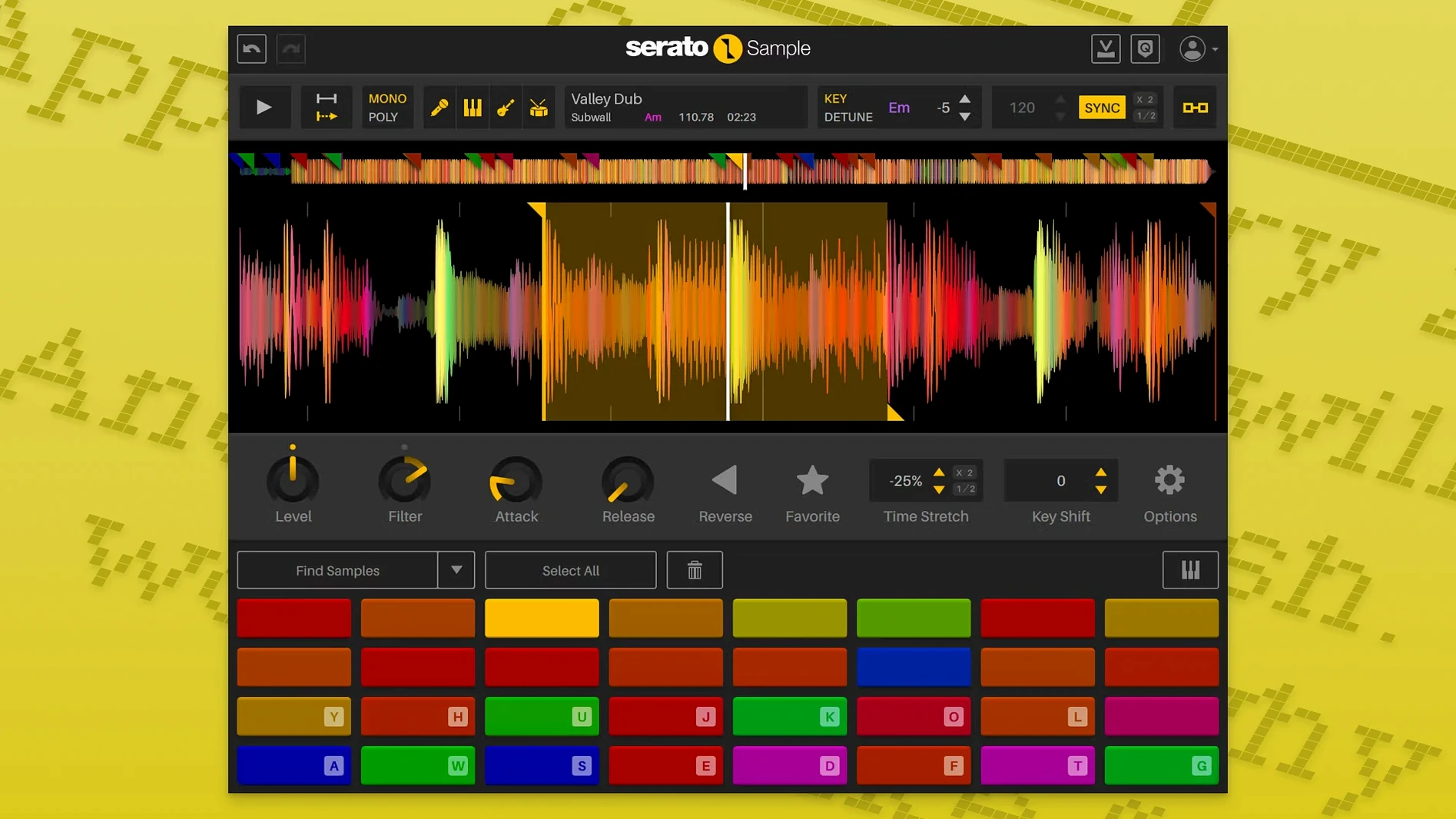
Stem On is the control that changes what a sampler is for. Flip it, and Serato Sample pulls a loop apart into vocal, drums, bass, and melody the way most plugins pull an EQ band. That split is not a preview gimmick: each stem has its own level parameter, so an old recording can lose its drums entirely or keep nothing but the bassline. The acapella, melody, bass, and drum stems stay aligned to the same clock, which means chops inherit the separation instead of fighting it.
Keyboard Mode puts the whole thing under your fingers. Once a sample loads and the BPM and key detection locks to the project, the slices map across the keys as playable triggers. Pitch-shifting and time-stretching follow the host tempo, so a phrase pulled from a 78 RPM rip sits in a 140 BPM session without sounding like it was dragged there. The detection is automatic but not pushy — it matches tempo and key, then stays out of the way while you work.
What makes the plugin feel native to a DAW rather than bolted on is the automation. Stem On and Stem Levels are exposed as host parameters, so a stem can appear or disappear at a specific bar without touching the mouse. Mouse wheel scrolling over parameters also works now, which is a small thing that removes a lot of friction during long editing passes. The build covers 64-bit Intel and ARM, so both Apple Silicon and older Macs run the same plugin without a translation layer.
Does it suit crate-diggers or stem explorers?
Serato Sample makes the most sense for two kinds of Mac users. The first is the crate-digger turned DAW producer: someone with a hard drive full of old funk 45s, obscure soundtracks, and YouTube rips who wants musical stems, not just sliced transients. These users stop loading five plugins to fake a stem separation and start doing it inside the sampler where the chops live. The second group is the quick-turnaround beatmaker who maps a sample across 16 pads and wants the bass to drop out on the verse without printing stems to separate tracks. For them, the Stem On automation is the feature that changes how they arrange.
Sound designers who mangle source material into textures get less out of the stem separation but still benefit from the Pitch 'n Time engine. Being able to stretch a sample across three octaves on a MIDI keyboard without the transients turning to mush is not something every sampler plugin handles well. Keyboard Mode makes it playable, and the beatgrid system keeps even unquantized phrases locked to the bar grid. If you work with drum breaks that drift off the grid, the beatgrid is the difference between a chop that grooves and one that needs constant manual nudging.
A day with an MPC-era beatmaker who moved in-the-box
Imagine someone who grew up on an MPC 2000XL, spent years building muscle memory for 16 pads and a jog wheel, then switched to a MacBook Pro and Logic Pro when hardware maintenance became a headache. They still think in terms of a sample assigned to pads, but they now work entirely in the box. Serato Sample is open on a stereo track, and a dusty soul loop from a 1972 record is loaded. The producer cares about two things: getting the vocal hook clean enough to sit on the downbeat, and killing the drums from the original so their own kick and snare pattern owns the low end.
Stem separation gives them the acapella stem isolated to a single pad. They drop the bass stem level to zero on the verse and bring it back during the chorus via automation — no audio printed, no duplicate tracks, just a parameter lane in Logic. The beatgrid keeps the loop synced at 88 BPM even though the original drummer rushed the snare on bar three. Keyboard Mode lets them play the "hey" from the vocal as a one-shot at three different pitches, and the time-stretch keeps it tight. This is someone who does not want to look at a manual; they want the sampler to act like hardware that happens to run as a plugin. Serato Sample sits closer to that experience than most software samplers do.
A workflow for isolating and replaying a vocal hook
Here is a specific task from start to finish: take a four-bar soul loop and turn the vocal phrase into a playable instrument that follows tempo changes.
- Drag the audio file from Finder onto the Serato Sample interface. The plugin detects BPM and key automatically — confirm they match the project settings in the top bar.
- Turn on Stem On. The interface splits the waveform into four color-coded layers: vocal, melody, bass, and drums.
- Pull the bass and drum stem level sliders to zero. Leave vocal at full and melody at about 30% for a little bleed that adds warmth.
- Switch to Keyboard Mode. The vocal phrase now maps across MIDI notes starting at C3.
- Play a few notes on a MIDI keyboard or the Mac's musical typing keyboard. The phrase replays at different pitches, but Pitch 'n Time keeps the timing locked to the host tempo — no chipmunk speeding or sludgy down-pitching.
- To capture a performance, record-arm the MIDI track and play the phrase as stabs in a new rhythm. The piano roll records the notes, so edits are non-destructive.
- If the arrangement needs the vocal to drop out for eight bars, open the host's automation lane for
Stem Onand draw a bypass curve, or automate the vocal stem level to fade it out gradually.
At no point in this workflow is there a bounce-in-place step. The stems stay live, editable, and reversible. That matters during mix revisions when the artist asks for "more of the string part" from the melody stem three days after the session was supposed to be finished.
Is your Mac running it natively or translated?
Out of the box, Serato Sample makes sensible assumptions, but a few tweaks improve the experience on a Mac. First, confirm the plugin is running natively: open Activity Monitor while the DAW is running and look for the process. If it says Intel next to a DAW that is Apple Silicon-native, the host may be forcing Rosetta 2, and Serato Sample benefits from running ARM-native when available. The .component (AU) and .vst3 files are universal binaries, so the host decides.
Inside the plugin, the first setting is the beatgrid sensitivity. If samples consistently lock to the wrong grid division — quarter notes when the phrase is in eighths — tighten or loosen the detection before chopping. The auto-detection is good but not psychic; material with rubato or loose drumming sometimes needs a nudge. Second, set the default stem levels to a template that matches how you work. If every session starts with killing the original drums, save that as a preset so Stem On does not require four slider moves every time. Third, if you use Keyboard Mode heavily, check the root note mapping in the plugin preferences — the default C3 start point might overlap with a bass instrument track, and shifting the sample range up or down an octave prevents MIDI collisions.
For automation-heavy workflows, enable the host parameter readout for Stem Levels early. Drawing automation for the bass stem to duck under a kick drum is easy, but only if the parameter is exposed in the DAW's lane list. Serato Sample exposes them by default in most hosts; in Logic, they appear under the Control section of the plugin parameter list rather than the main menu, which is worth knowing before you spend five minutes scrolling.
- Individual stem levels can be adjusted separately for acapella, melody, bass, and drums.
- Stem On and Stem Levels are exposed as host automation parameters for the DAW.
- Added support for AlphaTheta SLAB.
- Mouse wheel scrolling works on parameters when hovered.
- Added support for macOS Tahoe.
- macOS 11 Big Sur or later
- Intel or Apple Silicon Mac
- 64-bit host DAW
- Interface language: English
Comments 0
Sign in or create an account to leave a comment.
No comments yet. A codec, a slice, a machine — they appear after moderation.
More in VST Plugins
cd ../ Serato Hex FX
VST Plugins 105 MB
 Serum
VST Plugins 1.2 GB Updated
 ShaperBox
VST Plugins 111 MB
 Scaler 3
VST Plugins 1.4 GB
 Sauceware Audio Scorch 2
VST Plugins 2 GB
 Slate Digital Fresh Air
VST Plugins 40 MB
 Slate Digital Murda Melodies
VST Plugins 179 MB
 Safari Pedals Everything Bundle
VST Plugins 628 MB