

Slate Digital Fresh Air for macOS
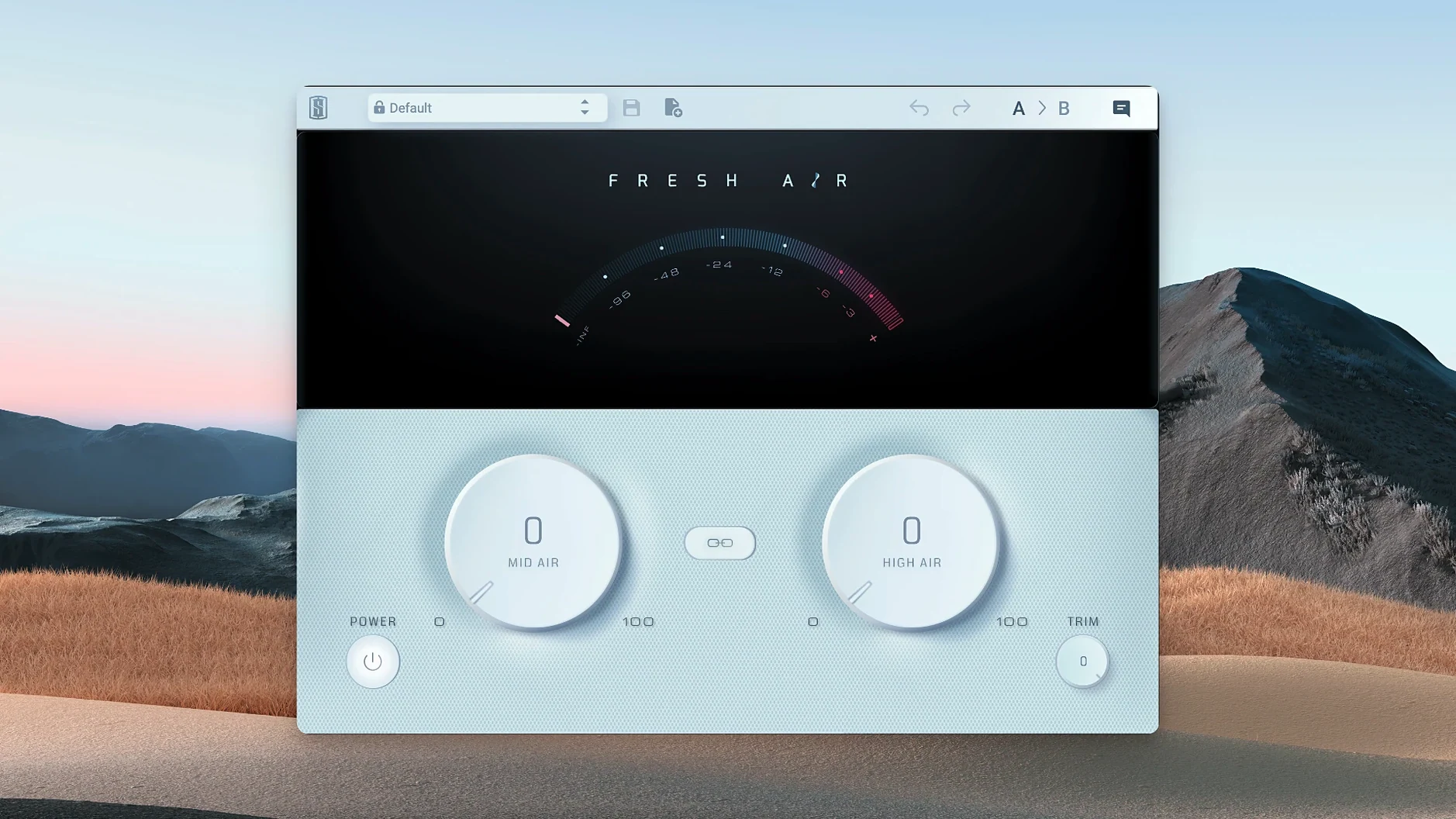
You know the feeling when a shelf boost on a standard EQ just gets brittle? Fresh Air takes a different approach. Instead of a static band, Slate Digital built it as a dynamic processor that reacts to the source, so the top end opens up without the harsh edge you'd normally chase with a de-esser afterwards.
What do the two controls actually do?
The interface keeps it dead simple, but each knob has a specific job:
- Mid Air — works on the upper-mid frequencies, the zone where vocals, snares and guitars cut through. It adds presence without pushing the boxy low-mids that clutter a mix.
- High Air — reaches further up, into the territory where cymbals, string harmonics and room tone live. The processing is level-dependent, so quiet detail rises while loud transients stay clean.
- Link button — engages linked control so you can raise or lower both parameters together, keeping the tonal balance you've dialed in while changing the overall intensity.
Dropping it on a vocal or mix bus for instant lift
You can drop it on a single track where a vocal feels closed-off or an acoustic guitar has lost its sparkle. It also makes sense on the mix bus for a subtle lift across the whole stereo field—what Slate Digital describes as a way to add air without piling on gain that later needs taming. The plug-in runs natively on Apple Silicon from macOS 11, so there's no Rosetta overhead in a modern DAW session.
Imagine a producer at 2 a.m., staring at a dense pop mix. The vocal feels present but not alive — there's no sense of the singer breathing into the mic. They drop Fresh Air on the lead vocal insert, set Mid Air to 4.5 and High Air to 3, and within eight bars the performance lifts out of the speakers without a single EQ move. The snare gets the same treatment on its own bus, just enough to let the wire brush strokes cut through the synth wash. This is the kind of low-friction fix that keeps a late-night session moving instead of spiraling into AB-testing six different EQs.
Why the Trim knob doubles as your level-matching sanity check
Once you've used it a few times, a handful of workflow tricks surface:
- Trim as a sanity check. The Trim knob isn't just makeup gain — it's a quick way to level-match while you work. Crank Mid Air and High Air to hear what the processor is adding, then pull Trim back until the perceived loudness matches the bypassed signal. What remains is pure tonal change, not a "louder is better" illusion.
- Link for parallel chains. The Link button shines when you split a signal and process the wet branch independently. Dial both controls on the parallel instance, engage Link, then drag down together until the blend feels glued. It's faster than matching two separate knobs by hand.
- Dual-mono on keys. On a stereo electric piano bus where the left hand has more body and the right hand carries the melody, two mono instances — panned and set differently — give you independent control that a single stereo insert can't match. It's not how most people first reach for it, but it solves an imbalance without multiband compression.
- Post-reverb placement. Try it after a reverb return, not before. A small High Air bump opens up the tail without making the dry source sibilant. The dynamic behavior grabs the decay differently than a static shelf on the reverb channel.
Rescuing an indie-folk guitar bus from woolly lows
You open a rough mix of an indie-folk track: fingerpicked acoustic, breathy vocal, light percussion. The guitar feels woolly against the vocal clarity. You start by inserting Fresh Air on the guitar bus.
You loop a section where the guitar plays solo for a bar. Mid Air goes to 3.5 — the pick attack sharpens, the low-mid mud recedes. High Air stays at zero for now; you don't want string squeak to jump forward. You toggle the plug-in bypass with your DAW's native key command, listening to just the guitar. The difference is small but surgical: the instrument moves from "blanket over the mic" to "sitting in the room with you."
Next, the vocal bus. You insert a second instance and push Mid Air to 5 while the singer holds a long note. At 5 it's too forward, so you back down to 3.8. High Air goes to 2.1, just enough to catch the breath texture on consonants. You leave Trim at unity — the level change is negligible, and you don't want to disturb the fader balance you set earlier.
Finally, you add a third instance to the percussion submix, just a shaker and a soft kick with a brush snare. High Air at 4 brings the shaker into the foreground without making it spikey. Link is on as you pull both controls down to taste, settling on Mid Air 1.2 and High Air 2.8. You save the session and note the CPU meter: three instances on an Apple Silicon machine barely register. No freeze, no commit — just playback.
Is it just an EQ with a nicer name?
Is it just an EQ with a nicer name? No. A static high-shelf EQ applies the same gain curve regardless of input level. Fresh Air's processing is level-dependent — quiet detail gets different treatment than loud transients, which is why it doesn't fall apart the way a fixed boost can on a vocal with wide dynamic range.
Does it need iLok hardware? The activation system supports iLok Cloud and machine-based activation alongside the physical dongle. You don't need a USB key plugged in if you go the cloud route, though an internet connection is required for the initial handshake.
Will it run natively on an M1 or M2 machine? Yes, version 1.0.9 is compiled for Apple Silicon from macOS 11 onward. You'll see it load without Rosetta translation in AU, VST3 and AAX formats.
Can I use it on the master bus without ruining my mix? Plenty of engineers do, but the trick is restraint. High Air above 2 on a full mix can pull up cymbal wash and room tone you didn't notice during tracking. Start low, bypass often, and check in mono — phase interactions get more obvious when the stereo field collapses.
- macOS 11 or later
- Apple Silicon native support
$ man slate-digital-fresh-air | grep -A2 "?"
What exactly is the Fresh Air plugin?
It is a dynamic high-frequency processor from Slate Digital that adds presence and air using two main controls: Mid Air and High Air.
Can I use it on the full mix or just individual tracks?
Slate Digital says it's designed for both—you can process individual tracks or apply it across the mix bus.
Comments 0
Sign in or create an account to leave a comment.
No comments yet. A codec, a slice, a machine — they appear after moderation.
More in VST Plugins
cd ../ Slate Digital Murda Melodies
VST Plugins 179 MB
 Slate Digital Storch Filter
VST Plugins 69 MB
 Slate Digital Submerge
VST Plugins 38 MB
 ShaperBox
VST Plugins 111 MB
 Serum
VST Plugins 1.2 GB Updated
 Sonarworks SoundID Reference
VST Plugins 718 MB
 Sonic Academy KICK
VST Plugins 358 MB
 Serato Sample
VST Plugins 612 MB