
Slate Digital Storch Filter for macOS
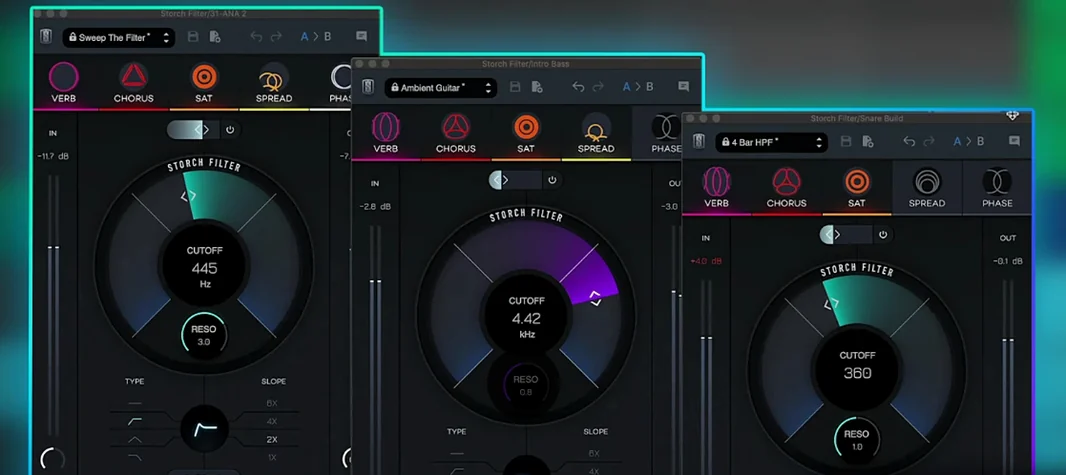
If you've used a stock autofilter and found yourself stacking three more plugins just to make it musical, Storch Filter is the opposite move: one insert that already contains the movement, character and space.
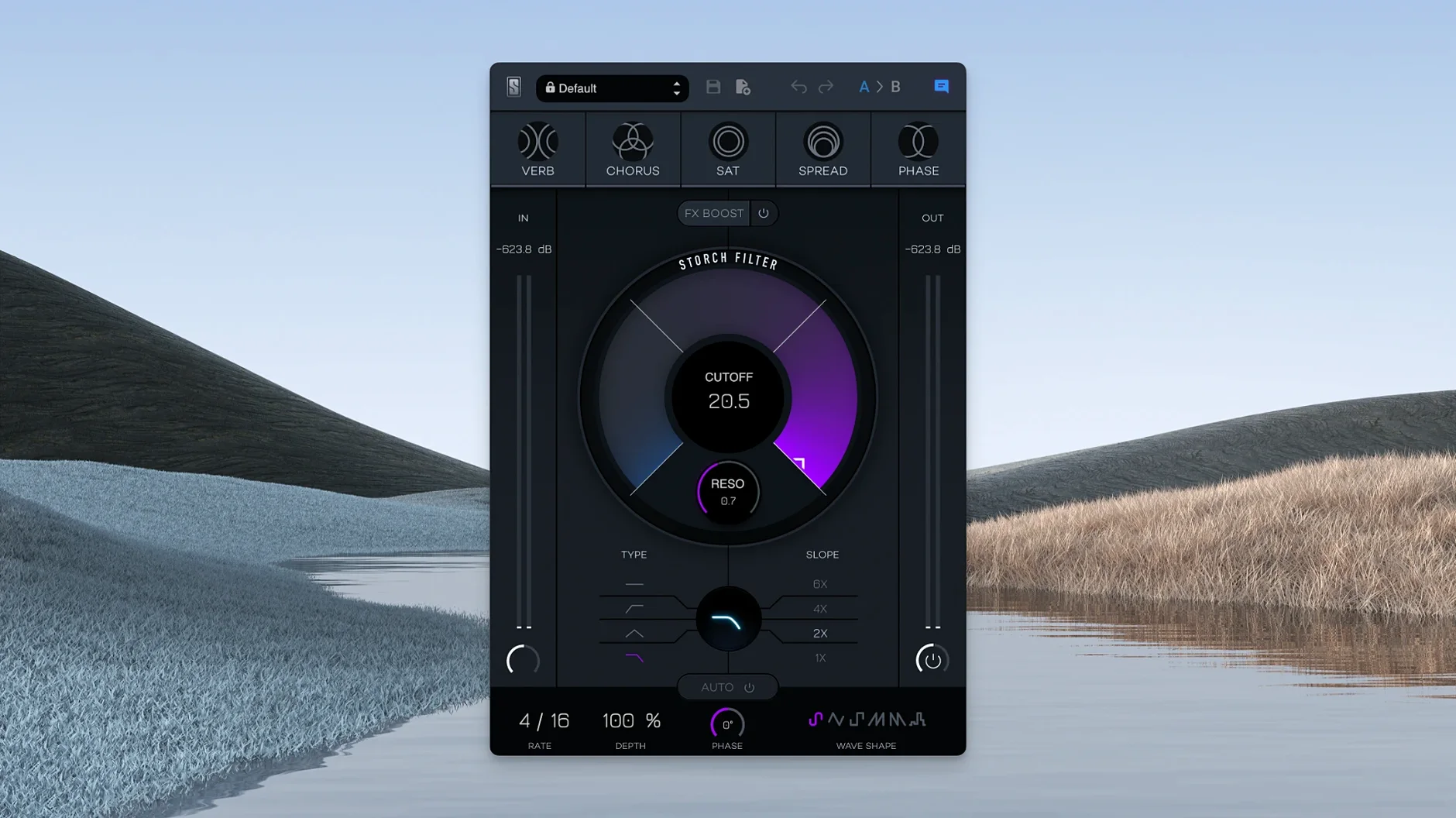
Autofilter — a filter with six LFO wave shapes for rhythmic or drifting cutoff movement.
Five built-in effects — the filter feeds a chain of processing that stays in the same window.
Scott Storch presets — starting points tuned by the producer, so the modulation maps to familiar song structures.
Apple Silicon build — version 1.0.6 runs as ARM code, no Rosetta layer.
On a vocal bus, it can push a phrase in and out of focus. On a drum group, the LFO becomes a timing element. On a synth track, the presets give you a finished movement pattern before you've touched a single knob.
How many instances can you run before your CPU spikes?
On an Apple Silicon Mac, Storch Filter loads almost instantly — a single AU or VST3 insert, no bridging. CPU usage stays moderate even when the autofilter is moving and all five effects are active. I've run eight instances across a 24-track session on an M1 Pro without hearing the fan, and Live's CPU meter barely twitched past 12%. The ARM-native build matters here; Rosetta-translated filter plugins can feel slightly spongy at low buffer sizes, but this one doesn't.
Stability under automation is clean. Drawing cutoff sweeps or switching LFO shapes mid-playback doesn't produce the clicks or brief dropouts I've sometimes heard from modulation-heavy plugins. The GUI redraws smoothly at Retina resolution, and resizing the window doesn't jitter or stutter — small things, but they add up when you're dialing in a filter across thirty minutes of tweaking.
Memory footprint is low. Slate's installers place the component in the usual /Library/Audio/Plug-Ins/Components folder and the VST3 alongside it; no background daemons, no license helper processes that linger after the DAW quits. That keeps session load times predictable.
Why start with only one effect and the filter?
A plugin that combines an adjustable low pass filter with five effects can tempt you to turn everything on at once. Don't — not yet. Spend the first session with only the filter and one effect. Try chorus on a clean guitar and ride the cutoff manually. Learn where the resonance breaks into self-oscillation; it's responsive, and the character changes when you push the FX Boost slider even slightly into the chain.
Second day: map the LFO to tempo. The six wave shapes behave differently at eighth-note versus half-note rates. Sine is smooth and predictable; the random shape on a hi-hat bus creates a filtering pattern that feels like an overdub rather than an effect. Save your own presets early — the factory ones from Scott Storch are built around song structure, but your own will reflect the tempo and key of the session you're actually in.
Also, test it on a send. Slate don't ship it as a separate "FX" version, but running an instance 100% wet on a return track with the dry/wet mix handled by the DAW gives you parallel filtering, which is huge for drum rooms and synth pads. The stereo widening effect behaves differently in a send context — less phase thinning than in an insert chain.
Which preset movements work on 808s and vocal chops?
Beatmakers and hip-hop producers get the immediate payoff. Scott Storch's name on the tin isn't decoration; the presets are weighted toward movements that work on 808s, keys and vocal chops. Drop it on a sample loop, pick a preset, and the filtering already dances with the groove. Less time drawing automation, more time arranging.
Mix engineers who do sound design on the side will use Storch Filter as a modulation router. The five effects aren't just seasoning — the phaser and saturation can reshape a bassline into something unrecognizable, and because everything is tied to the cutoff and resonance, one knob movement cascades through multiple processors. That's the opposite of a modular chain; it's a single control surface for complex timbral shifts.
Electronic producers who already use tools like slate digital virtual mix rack mac torrent downloads to build channel strips will find this slots in naturally. It's less surgical than an EQ, more performative. If you think of filtering as an arrangement tool rather than a correction tool, it becomes a writing partner.
Where do you switch the LFO rate from hertz to note values?
Open an instance and go straight to the LFO rate display. By default it shows in hertz; click it to switch to note values. For tempo-locked projects, synced rates save you from constantly adjusting when the BPM changes. Next, pull the FX Boost slider up slowly — it's not a dry/wet control, it's a gain stage into the effects chain, and setting it around 40–50% before you dial in the reverb or saturation prevents you from overloading the chain later.
Turn off the autofilter's retrigger option once. By default the LFO resets on each note-on, which is great for keys but less natural on vocals or sustained pads. With retrigger off, the modulation runs freely, and the filtering feels more like tape wow or a slow phaser sweep. Switch back when you need the rhythmic precision.
Last, save a default preset. Set the filter to a gentle high-pass with the LFO off, all effects bypassed except a touch of saturation, and save it as your user default. The next time you insert Storch Filter just to add a little grit, you won't have to click through five modules to get there. Small habit, big time saver across a mix.
- Build labeled 1.0.6 for the Mac version.
- macOS 11 or later
- Apple Silicon
- English interface
$ man slate-digital-storch-filter | grep -A2 "?"
Does Storch Filter run natively on Apple Silicon?
Yes. The listed architecture for version 1.0.6 is ARM, and it requires macOS 11 or later.
What does the autofilter section offer?
It includes six LFO wave shapes for modulating the filter cutoff, so movement can be rhythmic or continuous.
Comments 0
Sign in or create an account to leave a comment.
No comments yet. A codec, a slice, a machine — they appear after moderation.
More in VST Plugins
cd ../ Slate Digital Murda Melodies
VST Plugins 179 MB
 Slate Digital Submerge
VST Plugins 38 MB
 Slate Digital Fresh Air
VST Plugins 40 MB
 Sonarworks SoundID Reference
VST Plugins 718 MB
 ShaperBox
VST Plugins 111 MB
 Sonic Academy KICK
VST Plugins 358 MB
 Serum
VST Plugins 1.2 GB Updated
 Serato Sample
VST Plugins 612 MB