
Slate Digital Murda Melodies for macOS
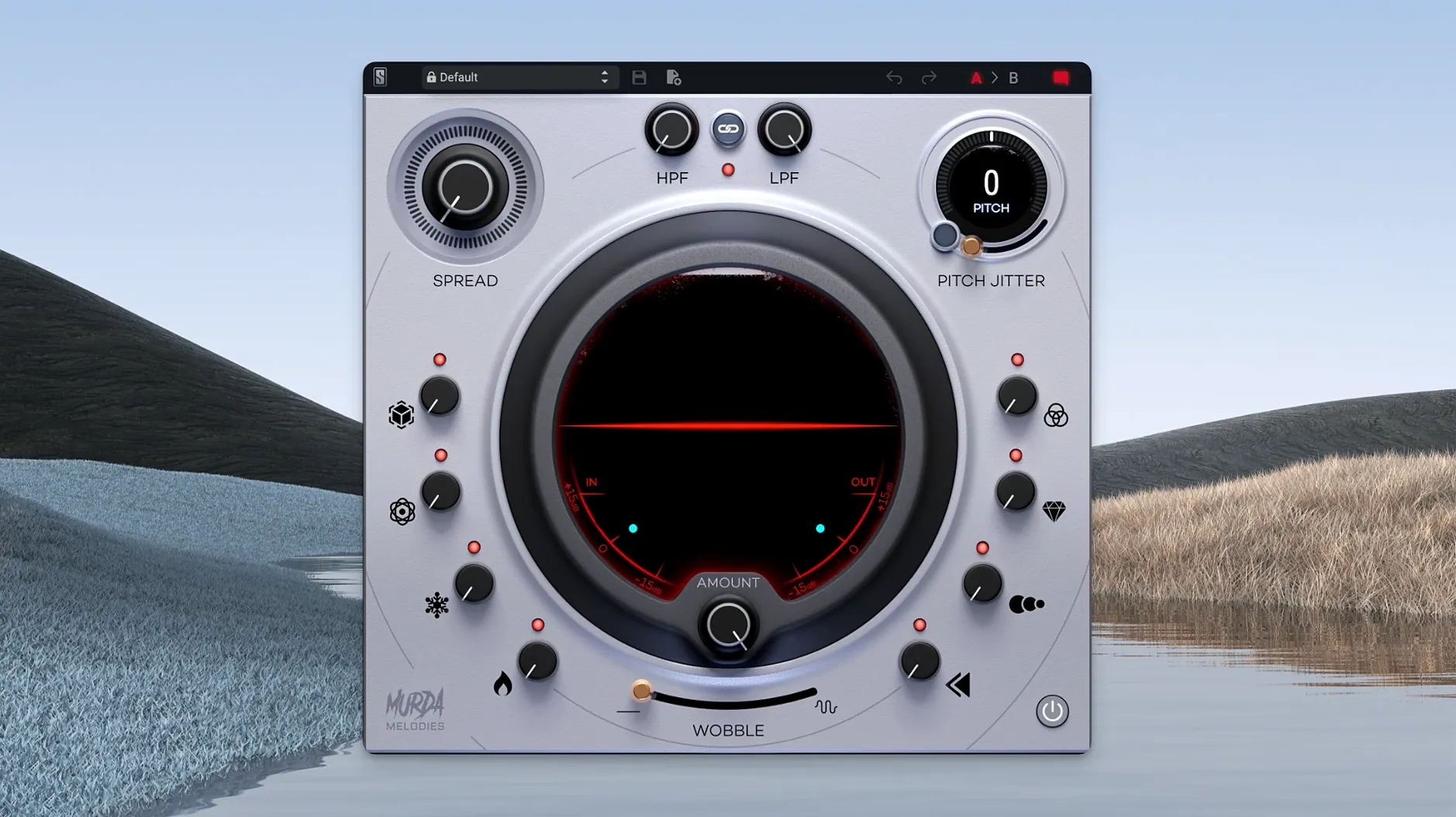
If you’ve spent time with a basic pitch shifter and thought “this needs more character,” Murda Melodies is what happens when that idea gets handed to a hitmaker. It’s not a general-purpose utility. It’s a focused multi-effects plugin for bending melodies, widening stereo fields, and running sounds through analog-modeled filters — all in a single window.
Turning dry synths into glitchy, wide, or haunting textures
- Turning a dry synth line or vocal chop into something glitchy, wide, or haunting.
- Hip-hop, trap, and R&B productions where texture matters as much as the notes.
- Quick inspiration — the 50+ presets from Murda Beatz and Slate Digital are real starting points, not afterthoughts.
The pitch shifter spans four octaves for sound design, not just correction
- The pitch shifter spans four octaves, so small moves sound subtle and big moves get into sampler-like territory. The range is there for sound design, not just light correction.
- The stereo widener is mono-compatible, which keeps low end intact across playback systems — useful when you’re pushing width on 808-heavy material.
- Native Apple Silicon support arrived in version 1.0.8, so it runs without Rosetta on M-series Macs.
Why your first session should run Murda Melodies on a send
Once the .pkg finishes and your DAW rescans, open Murda Melodies on a send rather than an insert for your first session. Drop it on an aux with a simple sine or square wave melody feeding it, then flip through the presets while the sequence plays. You’ll map the control set faster by hearing how each preset pushes the eight knobs in different directions than by reading about them. Keep the output of that aux channel at half volume — some of the reverse and delay combinations spike fast.
Second, build a bookmark preset with the pitch shifter at +12 semitones and the filter fully open. Save it. Now you can A/B what the plugin does to a sound against a clean octave-up, which makes the jitter and filter interaction much easier to dial in later.
Third, test the vinyl wobble on a hi-hat or shaker pattern before you use it on harmonic material. The wow and flutter modeling is more obvious on transient-heavy sources, so you’ll hear the circuit’s character without the pitch artifacts masking it.
Plugin missing after install? Check the standard component paths
Plugin doesn’t show up after install. Version 1.0.8 fixed the default install path, but if you moved your component folder manually before updating, the installer may place the .component, .vst3, and .aaxplugin files in the standard locations regardless. Check /Library/Audio/Plug-Ins/Components for the AU and the corresponding VST3 folder. If they’re there and your DAW still skips them, a full rescan — not just a refresh — tends to fix it.
High CPU when the stereo widener and reverse are both active. This isn’t unusual on Apple Silicon at small buffer sizes. The widener does mid-side processing before the reverse buffer grabs its window, so the chain stacks latency. Bump your buffer to 256 or 512 samples while tracking, or print the effect and disable the plugin on the live track.
Pitch Jitter sounds different on export than during playback. Some hosts handle the randomization seed differently between real-time and offline render. If the jitter artifacts feel baked differently after bounce, do a real-time print of the track once you’re happy with the take. Quick and repeatable.
Real-world scenario — beatmaker on a deadline
Saturday night, a producer is building a trap beat around a pitched 808 and a vocal chop lifted from an old R&B record. The chop is clean but static. She drops Murda Melodies on the vocal channel, pulls up preset 14 — a delayed reverse with a narrow filter scoop — and nudges the pitch down three semitones. The reverse tail now ghosts into the bar before the kick hits. She pushes the stereo widener to 40%, checks the low end in mono on a single Avantone cube, and the 808 still punches. The preset did 70% of the work; she spent ten minutes tuning the jitter and filter cutoff to fit the key. By midnight the rough mix is in the artist’s inbox. That’s the workflow the plugin was designed around — fast texture, not surgical correction.
Switch filter routing to post for a reverse or delay filtered tail
- Filter routing. The high-pass and low-pass are pre-effect by default. If you want the reverse or delay to feed into a filtered tail, switch the routing to post in the plugin’s settings pane. It changes the tail’s tonal shape completely.
- Pitch Jitter depth. The default is set for obvious warble. Pull it back to about 15–20% if you’re working on a lead vocal or a melodic instrument where you want subtle analog drift, not full cassette degradation.
- Delay sync. It ships in tempo-synced mode. For off-grid slapback or early reflections that don’t lock to the downbeat, unsync it and dial the time in milliseconds. 80–120 ms gets you into humanized doubling territory.
- Preset bank backup. The 50+ presets live inside the plugin bundle. Before you start overwriting, make a copy of the factory bank file — path is inside the app bundle at
/Library/Application Support/Slate Digital/Murda Melodies/Presets. Small step, saves regret when you want to return to preset 32 after you’ve mangled it into something unrecognizable.
- macOS 11 or later
- Apple Silicon native (via version 1.0.8+)
$ man slate-digital-murda-melodies | grep -A2 "?"
Does Murda Melodies run natively on Apple Silicon Macs?
Yes, native Apple Silicon support was added in version 1.0.8, so it runs without Rosetta on M1 and later Macs running macOS 11 or newer.
What kinds of effects are built into Murda Melodies?
It includes a pitch shifter with a 4-octave range, analog-modeled low-pass and high-pass filters, and a mono-compatible stereo widener — all designed for creating unique melodies and textures.
Comments 0
Sign in or create an account to leave a comment.
No comments yet. A codec, a slice, a machine — they appear after moderation.
More in VST Plugins
cd ../ Slate Digital Fresh Air
VST Plugins 40 MB
 Slate Digital Storch Filter
VST Plugins 69 MB
 Slate Digital Submerge
VST Plugins 38 MB
 ShaperBox
VST Plugins 111 MB
 Sonarworks SoundID Reference
VST Plugins 718 MB
 Sonic Academy KICK
VST Plugins 358 MB
 Serum
VST Plugins 1.2 GB Updated
 Serato Sample
VST Plugins 612 MB