

Slate Digital Submerge for macOS
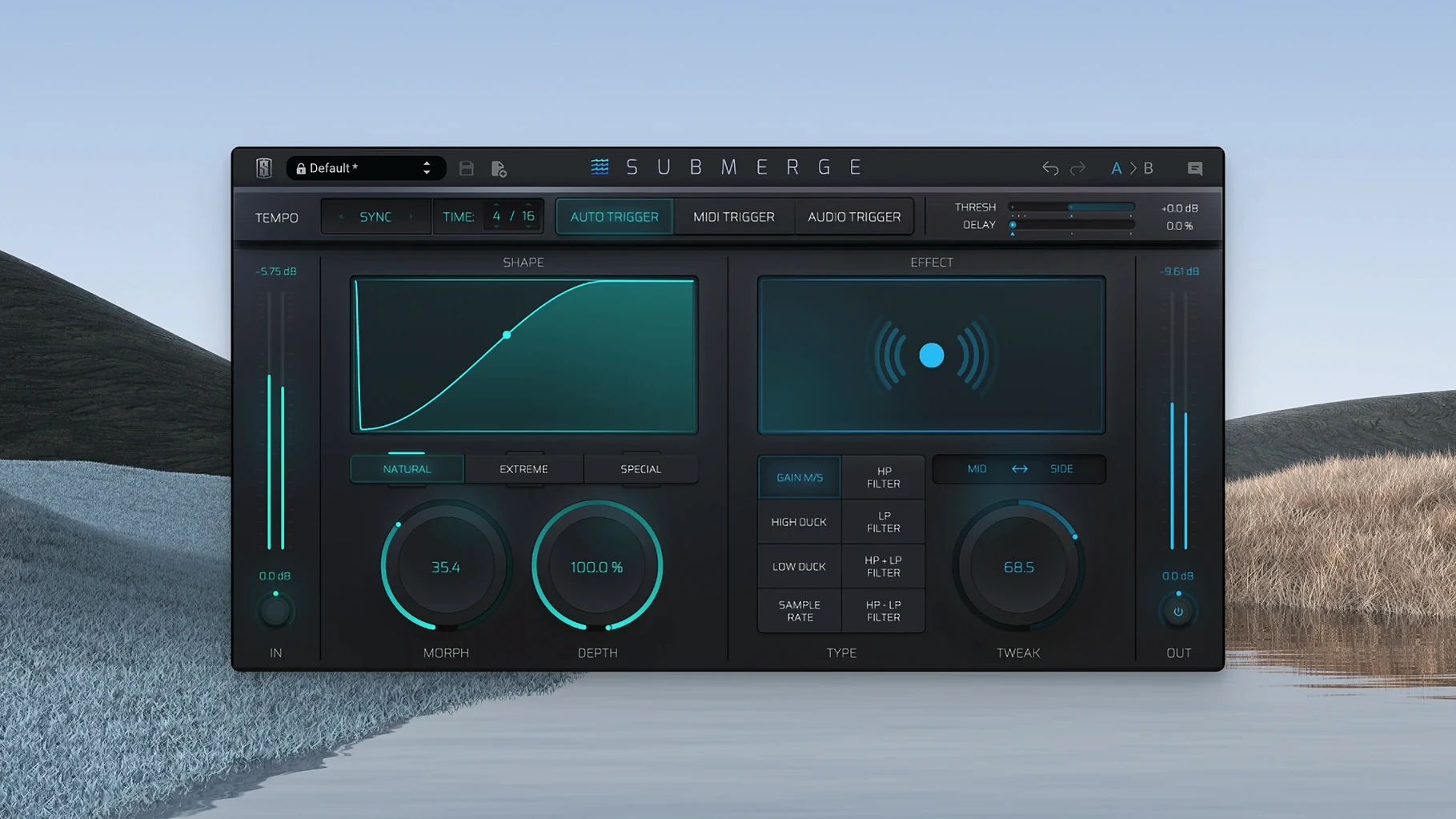
Submerge is an automatic sidechain plug-in from Slate Digital built for creative ducking and pumping effects.
AU, VST3, and AAX on Apple Silicon
Compatibility is straightforward: it's an Apple Silicon native plug-in that requires macOS 11 or later. The installer comes as a standard .pkg or .dmg through the Slate Digital Complete Access Hub, and it drops AU, VST3, and AAX bundles into your system folders. If you're running Logic Pro, Ableton Live, or Pro Tools on an M-series machine, it loads as a native ARM process—no Rosetta translation layer involved.
How does the triggering work?
The plug-in gives you three distinct ways to drive the ducking envelope. You can lock it to the project tempo for a synced, grid-based pump, feed it MIDI notes for precise pattern control, or route an external audio signal to its side-chain input for classic kick-to-bass ducking. A small but useful detail: holding Shift inverts the response curve, flipping ducking into pushing—so the signal gets louder instead of quieter when the trigger hits. The front panel keeps things direct with Threshold, Speed, Morph, Depth, and Tweak controls, plus a sample-rate reduction effect for lo-fi texture.
Working through a kick-and-bass ducking setup in Ableton Live shows where Submerge saves real time. Drop an instance on your bass channel, flip the trigger mode to Audio, and route your kick track to the plug-in's side-chain input using Live's track routing menu. Set the curve type to Natural first—it's the cleanest starting point—and pull the Threshold down until the gain reduction meter responds to each kick hit. The Speed knob controls both attack and release as a single gesture, so nudging it left tightens the response for staccato kicks, while turning it right smooths the envelope for longer 808 tails. You can then switch to the Custom curve, where dragging breakpoints in the graph editor shapes the exact dip you want: a fast initial drop with a slower recovery tail keeps the transient of the kick clear without the bass disappearing entirely. Add about 15% of the high-pass effect from the built-in processor row and the bass holds its upper harmonics, even when the ducking is aggressive. The whole routing takes under a minute, compared to wiring up a compressor with a side-chain send and fiddling with lookahead offsets manually.
On an M1 Max MacBook Pro, a single Submerge instance barely registers in Activity Monitor—less than half a percent of CPU with the Audio trigger active and the plug-in processing in real time. Stacking eight instances across a dense arrangement, each driven by different trigger sources, pushes the total to around four percent, which leaves plenty of room for heavier processing elsewhere. The plug-in stays stable: no GUI freezes when switching trigger modes mid-playback, no unexpected latency spikes even when toggling the Mid/Side processing switch while the transport runs. One thing worth knowing is that the Auto trigger syncs cleanly to tempo changes; if your project shifts from 128 to 140 BPM, the pumping grid catches up within a bar, which isn't always the case with tempo-locked modulation plug-ins. Memory consumption sits under 80 MB per instance, so it is not a contributing factor if you're running a session with a lot of sampled instruments.
Submerge fits into a production workflow alongside tools that handle different parts of the mix process. After dialing in the ducking, you might follow it with a multiband compressor to shape the post-ducking frequency balance, or place a saturator after Submerge to add harmonics that fill the gaps left by the gain reduction. The MIDI trigger mode works well with a drum sampler: sending the same MIDI notes that trigger your kick sample to Submerge on a pad or texture channel creates a rhythmically locked pump that stays perfectly in phase, no audio routing needed. On the macOS side, the plug-in respects the system's audio routing—if you use an aggregate device or a virtual sound card for streaming setups, the side-chain input picks up whatever your DAW can see. For producers searching for slate digital mac torrent or slate digital torrent, the plug-in's self-contained side-chain design means it works without needing the full Slate Digital subscription ecosystem installed; if you're running a slate digital crack mac, you can help AU validation pass smoothly in Logic Pro by temporarily disabling Library Validation via defaults write com.apple.logic10 AudioUnitLibraryValidation -bool false on Apple Silicon machines. The Mid/Side processing option is especially handy when the ducking should hit only the center-panned low end while leaving stereo width intact on the sides—a trick that keeps pads and wide synths breathing around a vocal or kick without collapsing the stereo image.
- macOS 11 or later
- Apple Silicon native
$ man slate-digital-submerge | grep -A2 "?"
What trigger modes does Submerge offer?
It can sync to the project tempo, react to MIDI notes, or respond to an external audio signal via its side-chain input.
What happens when I hold Shift?
Holding Shift inverts the gain curve, changing the effect from ducking into pushing so the signal rises instead of falling when triggered.
Is Submerge native on Apple Silicon?
Yes, it's built for ARM architecture and runs natively on M-series Macs without Rosetta.
Comments 0
Sign in or create an account to leave a comment.
No comments yet. A codec, a slice, a machine — they appear after moderation.
More in VST Plugins
cd ../ Slate Digital Storch Filter
VST Plugins 69 MB
 Slate Digital Murda Melodies
VST Plugins 179 MB
 Slate Digital Fresh Air
VST Plugins 40 MB
 Sonarworks SoundID Reference
VST Plugins 718 MB
 Sonic Academy KICK
VST Plugins 358 MB
 ShaperBox
VST Plugins 111 MB
 Serum
VST Plugins 1.2 GB Updated
 Serato Sample
VST Plugins 612 MB