
ShaperBox for macOS
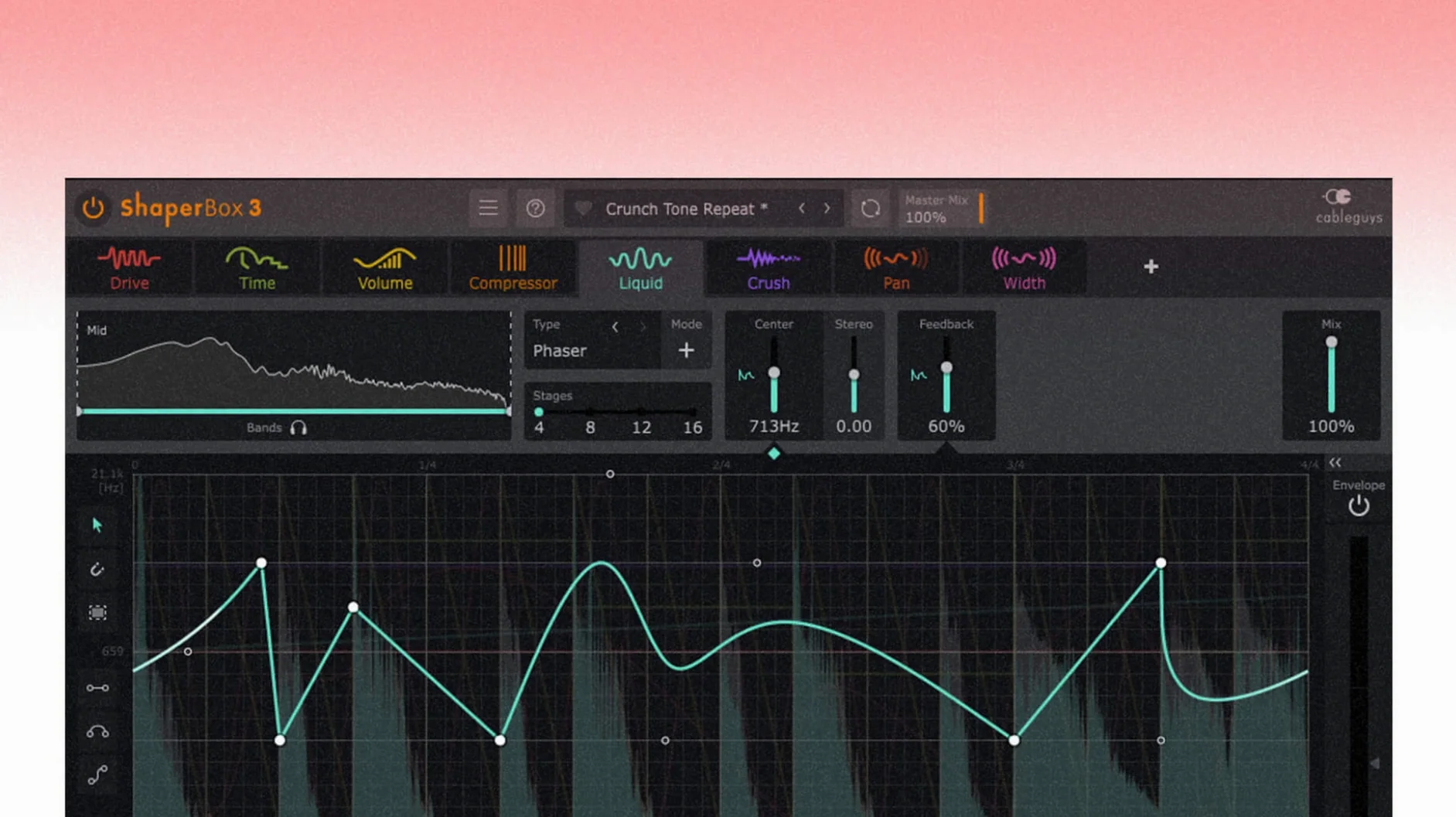
Producers and sound designers turn to ShaperBox when a track needs movement that a static EQ or compressor can't provide. It sits on individual channels—drums, synths, vocals—and on mix buses where rhythmic sidechain pumping or spectral shifts glue a group together. In a session, you might insert it right after a synth to carve its dynamics to a sixteenth-note grid, then drop another instance on the drum bus to duck the lows with an external trigger. That’s the core workflow: multiple ShaperBox modules stacked in series, each handling a different job without juggling six separate plugins.
Where do you place it on a drum track?
Typically as the first insert after any corrective EQ. Time-based effects like reverb or delay come after ShaperBox so they react to the already-shaped signal rather than blurring the triggers.
Can you duck just the sub-bass without darkening the highs?
Multiband processing splits the signal into low, mid, and high bands, so you can apply ducking only to the sub range while leaving the highs untouched. This keeps the bus punchy without dulling the top end.
What role does the LiquidShaper play?
LiquidShaper adds flanger and phaser effects that sync to the host tempo. It’s useful on synth pads and guitars when you want modulation that locks to the beat rather than free-running.
Can external audio drive the effects?
Yes. Audio Trigger functions can be enabled for any sound simultaneously, letting a kick drum trigger envelope shapes on a bass track for tight, frequency-specific sidechaining.
How would you shape a dull synth pad into a rhythmic pulse?
Start with a sustained pad that lacks motion. Insert ShaperBox on the track, then load the default patch and strip it back—bypass every Shaper except VolumeShaper. Set the timing to Straight 1/4 and draw a steep downward ramp that starts at full volume and drops to silence by beat two. The pad now breathes in quarter-note swells.
Next, enable the multiband crossover. Split the signal at roughly 300 Hz and 2.5 kHz. Copy the same volume curve to the mid band but soften the attack slightly—drag the first point a few milliseconds to the right. For the high band, flip the shape: draw a ramp that rises while the lows dip, so the air frequencies swell as the body recedes. The result is a pad that shimmers and pulses without a single automation lane in your DAW.
Now add TimeShaper on the next slot, set to Dotted 1/8. Grab a gentle stutter preset from the browser, then pull back the mix knob to around 35%. The repeats now catch the trailing edge of each volume swell. Finally, open LiquidShaper with a slow phaser curve synced to Free 1 bar—this adds a long, sweeping movement underneath the rhythmic chops. Save the entire chain as a user preset called something like “Pulse Pad Builder” and you've got a reusable starting point for any sustained sound.
Where should you start browsing among the 600 presets?
Drop ShaperBox onto a drum loop and spend ten minutes just with the browser. CableGuys packed in 600 presets, but they're not all showpieces—many are practical starting points. Filter by module using the tags at the top of the browser, not by scrolling through every patch. Need sidechain ducking? Click the VolumeShaper tag and audition only those presets. Looking for glitch fills? TimeShaper tag. The tagging system cuts the decision time in half.
Next, map the Audio Trigger input on VolumeShaper to your kick drum channel right away, even if you don't think you'll use it. The routing takes seconds: load ShaperBox on your bass track, open the sidechain menu in your DAW, and pick the kick channel. Inside VolumeShaper, enable Audio Trigger and watch the sidechain visual display—a waveform overlay appears behind your envelope shape, showing exactly where the kick hits land. This visual feedback teaches you how trigger timing interacts with your drawn curves faster than any manual.
Finally, check the Anti-Click Trigger Smoothing setting in VolumeShaper's options. With version 3.6.1, the oscilloscope drawing bug when this feature was active alongside MIDI or Audio Triggering has been fixed. Turn it on for any patch with fast attack times—it rounds the envelope corners imperceptibly and removes the tiny clicks that aggressive ducking can produce, especially on sub-bass material.
How do you bring static choruses alive with three instances?
You open a project where the chorus feels static. The drums hit hard, the bass is solid, but nothing moves. You reach for ShaperBox three times in the next twenty minutes.
First, on the drum bus. You load VolumeShaper alone, set it to Triplet 1/4, and draw a subtle duck on the low band only—about 3 dB of reduction with a soft knee. The kick now has space, but the hi-hats and snare snap through untouched because the mid and high bands are flat. The bus feels wider immediately, and you haven't touched an EQ or compressor.
Second, on a vocal ad-lib that sits buried in the second verse. TimeShaper this time, with a preset called something like “Eighth Echo Throw.” You switch the timing to Dotted 1/8 and drag the mix up to 50%. The repeats scatter the vocal fragments into the gaps between phrases. It’s not a delay effect—it’s a rhythmic reordering that makes the ad-lib feel like part of the beat. You automate the mix knob to 0% for the first verse so the effect only appears on the repeat.
Third, on the synth bus. LiquidShaper with a slow bar-long phaser. You enable Audio Trigger from the kick, so the phaser sweep resets on every downbeat. The synths now pulse in lockstep with the drums, and the whole chorus section gels. Three instances, no extra plugins, and the session moves forward.
Does it run natively on Apple Silicon without Rosetta?
ShaperBox runs in any DAW that hosts AU or VST3—Logic Pro, Ableton Live, Bitwig Studio, REAPER, and others. On an Apple Silicon Mac, the plugin loads natively without Rosetta overhead, which matters when you stack multiple instances in a dense session. On Intel machines, the 64-bit binary runs identically.
With Logic Pro specifically, version 3.6.1 fixes the cursor-disappearance bug that could happen after dragging a control. If you use Logic’s Smart Tempo or beat mapping, ShaperBox follows the host tempo faithfully, including tempo ramps—TimeShaper and VolumeShaper re-sync their grids on the fly.
Sidechaining integrates through each DAW’s native routing. In Ableton Live, you pick the trigger source from the plugin’s sidechain dropdown; in Logic, you use the sidechain menu in the plugin window header. Once routed, the sidechain visual display inside VolumeShaper overlays the incoming audio waveform on your envelope, so you can align curve points to transients by eye.
For sound designers working outside a DAW, ShaperBox also loads in AU host apps like Hosting AU or Plogue Bidule. You can process samples offline by routing audio through the plugin and capturing the output—useful for building a library of tempo-synced loops without recording automation passes.
The .dmg installer is straightforward: open the disk image, run the standard installation, and consult the included VR.nfo for activation details. Once installed, the AU component lands in /Library/Audio/Plug-Ins/Components/ and the VST3 in /Library/Audio/Plug-Ins/VST3/. macOS 10.15 Catalina and newer are supported, including Sequoia, on both Apple Silicon and Intel architectures.
If you're looking to try ShaperBox without delay, a shaperbox free download is available from various sources, and many producers search for a shaperbox torrent or shaperbox mac crack to test the full feature set. Some Mac users specifically look for a shaperbox mac torrent or a shaperbox 3 mac torrent to get version 3.6.1 running on their systems quickly.
- PitchShaper’s Formant Link, Density, and Grain Size are now exposed as automation parameters.
- Fixed an audio artifact that could occur when a MIDI note or Audio Trigger event landed on a silent input.
- Fixed a Logic Pro issue where the cursor vanished after dragging a control.
- macOS 10.15 or later
- Intel or Apple Silicon Mac
- Host DAW supporting VST3 or Audio Units
$ man shaperbox | grep -A2 "?"
Does ShaperBox run natively on Apple Silicon Macs?
Yes, ShaperBox 3.6.1 is a universal binary with native support for both Intel and Apple Silicon processors on macOS 10.15 and later.
What plug-in formats are included?
CableGuys distributes ShaperBox as VST3 and Audio Unit formats, covering all major DAWs on macOS.
Comments 0
Sign in or create an account to leave a comment.
No comments yet. A codec, a slice, a machine — they appear after moderation.
More in VST Plugins
cd ../ Serum
VST Plugins 1.2 GB Updated
 Serato Sample
VST Plugins 612 MB
 Serato Hex FX
VST Plugins 105 MB
 Slate Digital Fresh Air
VST Plugins 40 MB
 Slate Digital Murda Melodies
VST Plugins 179 MB
 Slate Digital Storch Filter
VST Plugins 69 MB
 Slate Digital Submerge
VST Plugins 38 MB
 Scaler 3
VST Plugins 1.4 GB