Astro Gold for macOS
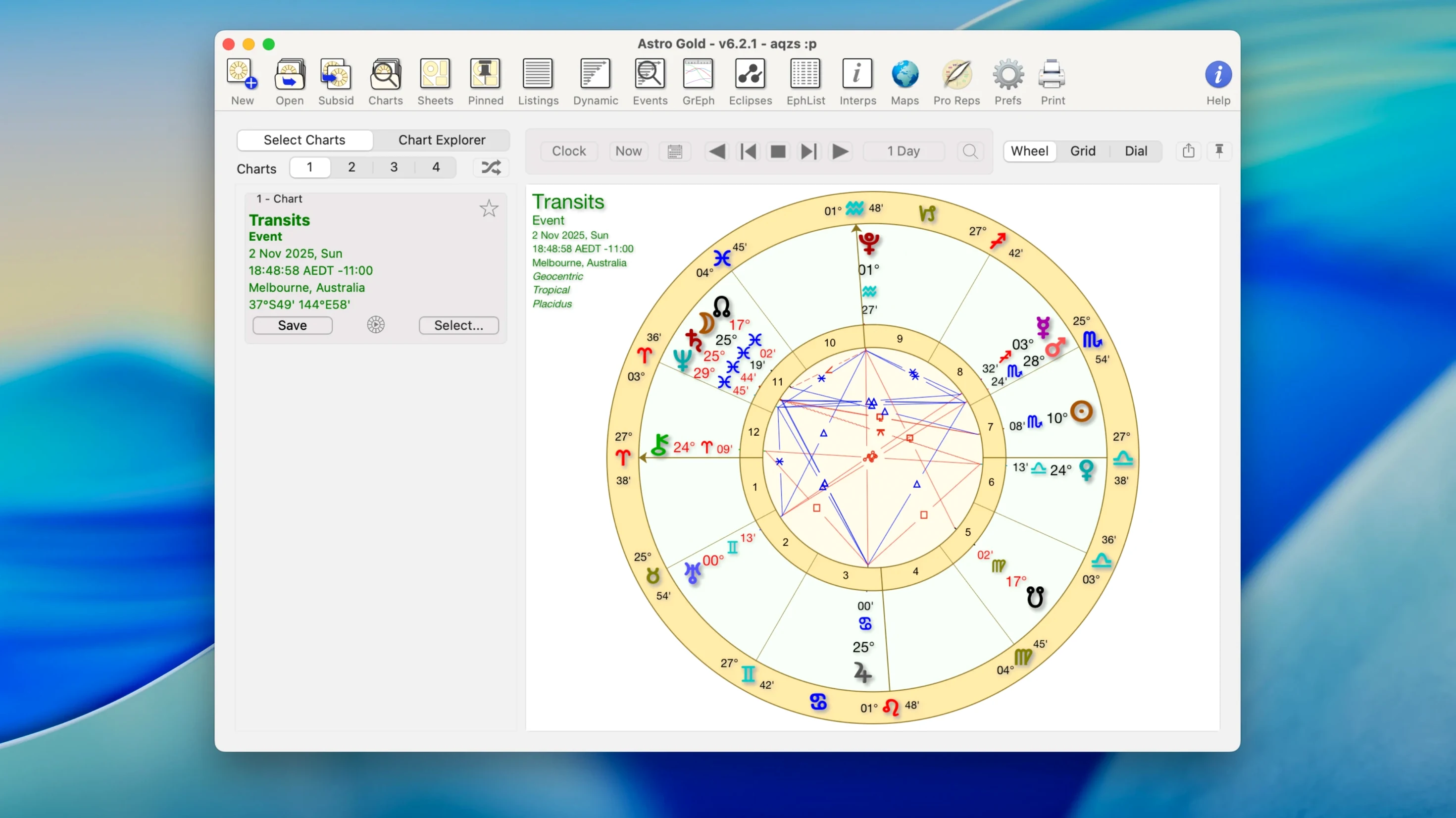
You open Astro Gold because a colleague mentioned their Saturn return kicked off a career shift, and you want to map the same cycle for yourself. You've got the birth data ready—date, time, place—and you set the default chart style to the square format before entering anything.
Plotting a Saturn return step by step
- Create a natal chart first. The data entry screen accepts precise coordinates, and the fixed star catalog means Spica or Regulus shows up on the wheel if they're close to a cusp.
- Select Saturn return from the returns menu. The software calculates the exact moment Saturn revisits its natal position and draws a bi-wheel with the transiting chart around the outside.
- Layer in progressions. Switch on secondary progressions to see how the progressed Moon interacts with the return Ascendant. You can add solar arc directions too—the arc opens in a separate tri-wheel view.
- Scan the aspect grid. Medieval and modern techniques coexist here; you'll spot traditional dignities alongside interpretations that draw on Chiron and Proserpina.
What you see when the chart renders
The square chart style grids the zodiac into a clean table, while the round style gives you the familiar wheel. Either way, planetary lines from astrocartography are only a tab away if you want to check where the return angularity peaks geographically. The software runs on any Mac from macOS 10.13 onward, with native code for both Intel and Apple Silicon builds, so calculation speed stays snappy even when you stack progressions, directions, and returns onto one screen.
Why your chart turns blank after an upgrade
One recurring hiccup is the chart rendering blank after an upgrade. The culprit is almost always a stale preferences file. Quit the app, head to ~/Library/Preferences/, locate com.cosmicapps.astrogold.plist and move it to the desktop. Relaunch Astro Gold, reconfigure your orbs and chart style, and the wheel reappears as it should.
Another sticky point: synastry bi‑wheels where the inner chart keeps defaulting to the wrong person. The software remembers whichever chart was last selected in the single‑chart view before you opened the synastry module. Open the natal chart you want on the inside first, then add the partner chart through the synastry dialog—the order sticks every time.
Relocation charts sometimes throw up longitude discrepancies when a city name pulls from an outdated atlas entry. The workaround is to enter coordinates manually in decimal degrees rather than picking from the dropdown list. Check the resulting angular cusps against a known ephemeris for that location; if the MC shifts by more than a few arc‑minutes, the manual entry solves it.
If transits feel sluggish with a dozen asteroids switched on, remember that Chiron and Proserpina add calculation overhead. Trim the asteroid list to the two or three you actually read, and the progression‑plus‑return tri‑wheel redraws in under a second, even on older Intel Macs.
What tropical–sidereal switching feels like now
Version 6.0 rewrote the chart rendering engine, and you notice it most when switching between tropical and sidereal zodiacs. The changeover used to require a trip into preferences and a full chart recalculation; now a toggle sits right on the main toolbar. That alone saves a few minutes per consultation if you work with Vedic clients alongside modern psychological natal work.
The fixed star catalog got a quiet expansion—more stars with proper motion calculations baked in, so a star's position at the native's birth date is accurate rather than approximating from a J2000 epoch. In practice, that means Spica shows up on the correct degree for a 1970s chart without you needing to adjust anything manually.
Astrocartography lines also became interactive in the 6.0 update. Click any planetary line on the map, and a pop‑up lists the exact latitude where that planet crosses the angles, which beats squinting at a static Mercator projection and guessing. The relocation chart module now links directly from that pop‑up, so you can generate a full wheel for the spot without re‑entering birth data.
Build 6.2.1 runs natively on Apple Silicon, and the difference is most obvious when you batch‑calculate solar returns for a decade at a time. The progress bar stays fluid where Rosetta‑translated earlier builds would stutter. All your custom orb sets and aspect filters migrate forward cleanly if you copy the preferences file from the old version's folder.
Why medieval traditionalists who use outer planets feel at home
Practising astrologers who blend medieval dignities with outer‑planet transits are the obvious fit—the software doesn't force you into one school, and the aspect grid handles traditional rulership schemes alongside modern rulership assignments without complaint. You can run a Firdaria period alongside progressed lunar phases on the same screen, and the calculation engine keeps up.
Students working through a certification programme benefit from the tri‑wheel view that layers transits, progressions, and solar arc directions onto a natal chart simultaneously. When you're trying to spot how a progressed New Moon coincides with a directed Ascendant hitting a natal Saturn, seeing all three rings at once makes the pattern jump out in a way that flipping between separate charts never quite does.
Astrocartography users who relocate frequently—digital nomads, academics on short‑term contracts—lean on the planetary lines map to narrow down which city activates a Jupiter or Venus line during a specific return. The composite and Davison chart modules then let you test how two people experience the relocation together, which relationship‑focused astrologers use heavily for couples considering a move abroad.
Anyone upgrading from web‑based chart calculators gets the offline reliability: no browser tabs, no internet dependency, and ephemeris data that sits on your drive. The .dmg install is straightforward—drag the app into /Applications/ and you're done—and the build footprint stays modest even with the full asteroid and fixed star datasets loaded.
- macOS 10.13 or later
- Intel or Apple Silicon Mac
- Interface language: English
Comments 0
Sign in or create an account to leave a comment.
No comments yet. A codec, a slice, a machine — they appear after moderation.