Camo Studio for macOS
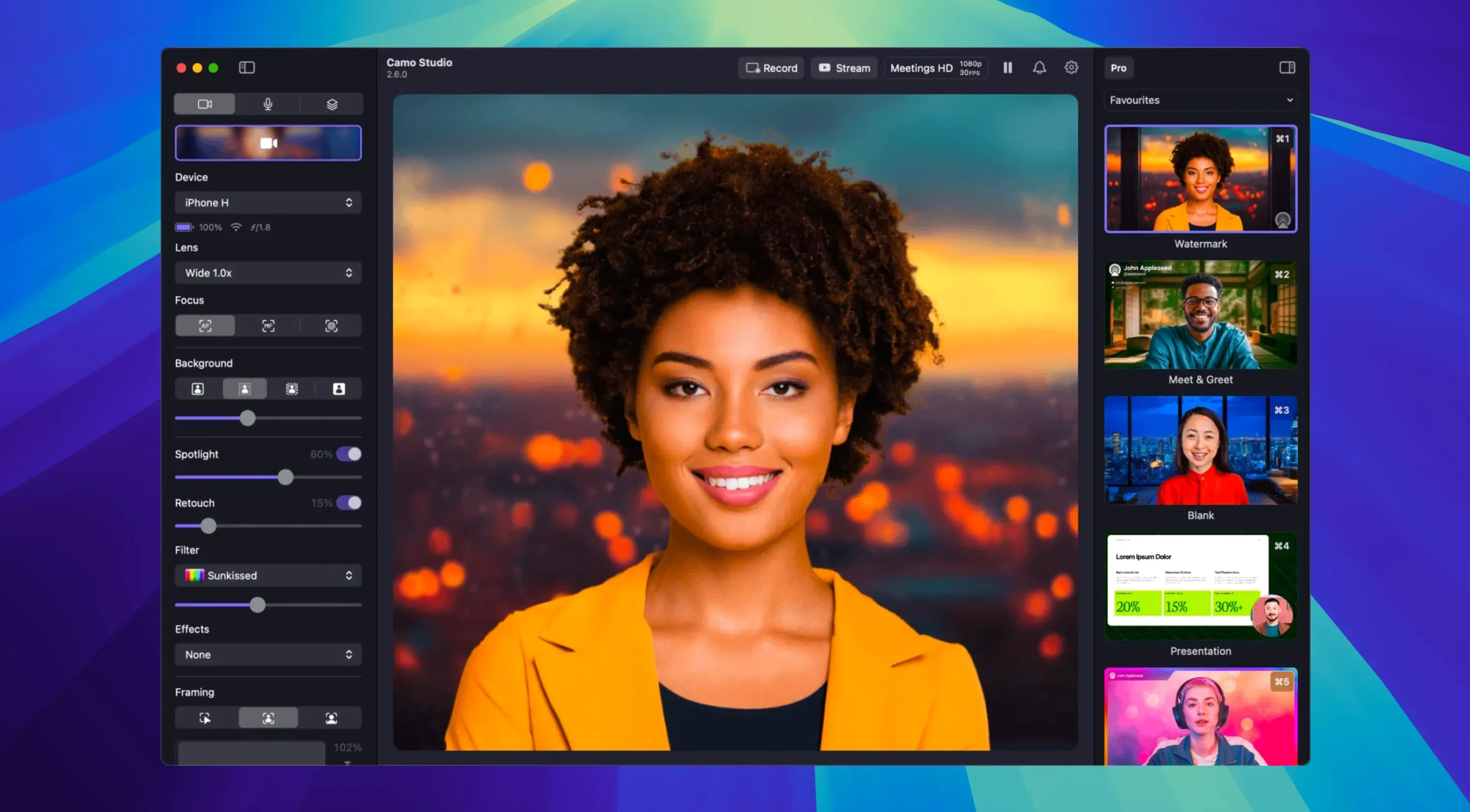
If you've used an iPhone as a webcam via Continuity Camera, you already know the leap in quality over a built-in laptop lens. Camo Studio from Reincubate takes that idea further, giving you direct manual control over the image pipeline — focus, exposure, white balance, and zoom — and wrapping it in a production-focused interface that runs natively on both Apple Silicon and Intel 64-bit Macs.
What does a "free license" actually include?
The free tier lets you use a connected phone as a high-quality webcam with basic controls and watermarked output. The higher resolutions — up to 4K UHD at 60 FPS — and features like Portrait mode for a bokeh effect and Video Call mode for lighting correction are part of the paid Camo Pro feature set, not the free license.
Does it work without extra drivers or virtual camera plugins?
Yes. Camo Studio presents itself as a standard system camera to apps like Zoom, OBS, and QuickTime. On macOS it uses a Core Media IO DAL plug-in that gets installed alongside the app — no manual driver fiddling required.
What's the capture pipeline on macOS?
The app receives a compressed video stream from the phone over USB or Wi-Fi, decodes it on the Mac using hardware acceleration where available, applies the selected effects and color adjustments, then pushes frames into its virtual camera output. Version 2.9.0 added dual-format streaming and recording, plus audio noise reduction that runs in the same processing chain before the signal hits your conferencing app.
Can it run alongside Continuity Camera?
Technically they can coexist, but only one virtual camera can be active in a given app at a time. If Camo Studio's virtual device is selected, Continuity Camera won't interfere — the operating system sees them as separate camera sources.
How does Camo Studio compare with other Mac webcam utilities?
The virtual-camera space on macOS has quietly filled up, but the contenders take genuinely different approaches. EpocCam by Elgato trades on simplicity: install the driver, connect your phone, and you get a clean 1080p feed with no manual controls to speak of. It's a point-and-shoot experience — useful if all you want is a better lens in Zoom, less useful if you need to lock exposure before a stream or dial in a specific white balance.
OBS Studio's Camera app sits at the other extreme. It gives you Scene construction and filter chains that rival desktop OBS, but the phone app does the heavy lifting locally and pushes a ready-made video stream to the Mac. Camo Studio flips that model: the phone stays dumb-ish, handling sensor readout and encoding, while the Mac app owns the processing pipeline. That means you can tweak a LUT, adjust AI face retouching, and toggle the virtual green screen without touching the phone at all — a real advantage if your phone is clamped to a tripod arm three feet away.
Iriun Webcam lands somewhere in between, with solid 4K support and a lightweight footprint, but the Mac interface is spartan. No overlays, no scene layers, no auto-framing that tracks your position in the shot. Camo Studio's stacking of a full production mixer — scenes with text and logo overlays, web overlay URLs, and the Portrait mode depth effect — puts it closer to a software vision mixer than a webcam utility.
Drag-and-drop .cube LUTs straight from Finder?
A few behaviors aren't shouted about in the interface but make daily use smoother once you know they're there:
- Drag-and-drop LUT import. You can grab a
.cubeor.3dlfile straight from Finder and drop it onto the Filters panel. No file-picker dance, no digging through menus. - Right-click reset on sliders. Double-clicking a focus or exposure slider returns it to auto, but right-clicking any manual control snaps it to the default value without toggling the auto/manual switch. Handy when you've nudged white balance too far and want a quick home base.
- Hot-plug phone switching. If you unplug one phone and connect another, Camo Studio re-detects the device and restores the last-used settings profile for that specific model. iPhone 15 Pro and a Pixel 8 can each have their own saved tuning without any manual profile selection.
- Audio noise reduction is per-source. Version 2.9.0 added noise reduction, and it applies independently to the phone's microphone input — not as a blanket system setting. If you switch to a desktop mic in the same session, the phone's audio chain keeps its own NR toggle state.
- Keyboard shortcuts for scene switching. Under the Scenes panel, assigning a number key to each scene lets you cut between a clean webcam view and a branded overlay layout with a single keystroke during a live call.
A product demo in twenty minutes with an iPhone 14 Pro over USB-C
It's early afternoon and a product demo is scheduled in twenty minutes. The phone — an iPhone 14 Pro — is already mounted on a small tripod behind the desk, connected over USB-C. Launching Camo Studio brings up the last-used scene: a clean feed with auto-framing enabled and a subtle warm LUT applied.
The first check is exposure. The morning light has shifted, so a quick right-click on the exposure slider snaps it to default, then a manual dial-in of -0.3 EV keeps the window behind from blowing out. Focus is locked to prevent the autofocus from hunting when a hand moves into frame holding a prototype.
The demo needs a branded layout, so switching to the second scene pulls in a semi-transparent logo overlay in the top-right corner and a web overlay that shows live system status from an internal dashboard URL. The web overlay refreshes on its own — no screen-sharing required, keeping the main feed clean for the product close-up.
A quick toggle of audio noise reduction in the sidebar cleans up the faint HVAC hum that the phone's mic was picking up. The virtual camera output is already selected in Zoom; no further configuration needed there. With five minutes to spare, a test recording is kicked off using the new dual-format streaming option — the session will be saved as both a high-quality local file and a compressed stream-friendly copy simultaneously.
During the call, switching back to the clean scene for a full-screen product shot is a single keystroke. Afterward, the isolated recording feature means the phone's video track and the desktop mic's audio track are saved separately, ready for a quick edit without the compression artifacts baked into the Zoom cloud recording.
Which apps see it as a standard camera the moment you select it?
Camo Studio's virtual camera plugs into anything that reads a Core Media IO device. Zoom, Microsoft Teams, Google Meet, and Webex all see it as a standard camera the moment it's selected in their video settings. OBS Studio and Ecamm Live can pull the feed directly, which opens up more complex production chains — Camo handles the phone input and color processing, OBS handles multi-camera switching and streaming to Twitch or YouTube.
On macOS, the virtual camera plays nicely with Shortcuts. You can build an automation that launches Camo Studio, activates a specific scene, and opens your conferencing app in sequence — then tie it to a Focus Mode trigger so your streaming setup fires up when you switch to "Work" mode. The app also respects the system microphone privacy indicator, so the orange dot in the menu bar appears whenever the phone's audio input is live, consistent with every other audio source on the Mac.
For post-production, the isolated recordings from version 2.9.0 split phone video and desktop audio into separate tracks that drop cleanly into Final Cut Pro or DaVinci Resolve. No demuxing, no extracting audio from a combined file — just drag both tracks onto a timeline and they're already synced. If you're using Camo Studio alongside OBS for a more elaborate stream, the dual-format recording means you get a high-bitrate master and a delivery-ready compressed file in one pass, which saves a transcoding step before uploading an archive to a video host.
- Dual-format streaming and recording — macOS can now simultaneously output and save in two formats during a session.
- Isolated recordings — separate audio and video tracks can be captured independently on macOS.
- Audio noise reduction — the Mac processing chain now includes noise suppression before the virtual camera output.
- AI agent control — macOS builds can receive commands from external AI agents for automated camera switching and scene adjustments.
- macOS: 12.3 or later
- Architecture: Apple Silicon and Intel 64-bit
Comments 0
Sign in or create an account to leave a comment.
No comments yet. A codec, a slice, a machine — they appear after moderation.