DynamicLake Pro for macOS
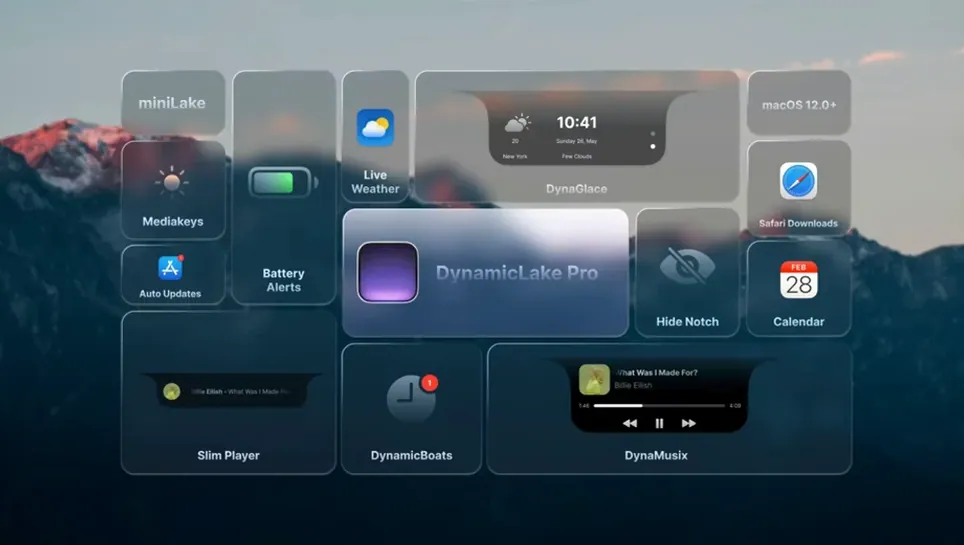
Students who split their screen between a code editor and a dozen other windows often use it to keep an eye on background events without switching apps. The tool adds a pill-shaped overlay to the menu bar that surfaces music metadata, connection toggles, and timers from the system Clock app.
How do I check what’s playing?
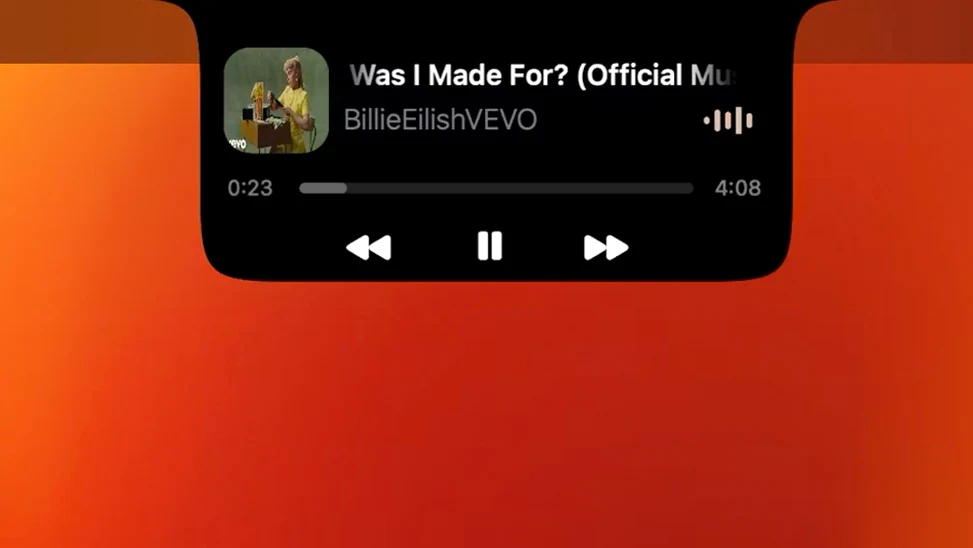
The DynaMusic module reads track and artist info from your media app and shows it inside the island. A small waveform animation runs alongside the text, which gives you a visual cue that playback is active.
See battery and device name the moment Bluetooth connects
DynaConnect fires a compact notification whenever a paired device joins or drops. You'll see the device name and its current battery percentage without opening System Settings.
Can it show my Clock app timers?
Yes. Any timer you create in the stock macOS Clock app pops into DynamicLake's overlay automatically. The countdown runs in the pill, so you can glance at remaining time while staying in your main app.
Open Preferences from the menu bar icon to toggle modules
Launch the app and it places a small icon in the menu bar. Click that icon, open Preferences, and you’ll find toggles for each module along with a few layout tweaks for the island’s position.
What’s it like in daily use?
On an Apple Silicon Mac, the island stays responsive even when several modules fire at once — a Bluetooth disconnect, a timer finishing, and a track change in quick succession render without visible stutter. Memory use sits modestly for an app that keeps this many hooks open: Activity Monitor typically shows it in the low triple digits of megabytes. On older Intel machines, the waveform animation in DynaMusic can add a little CPU load during long listening sessions, but nothing that breaks the experience.
Stability has been solid across version 1.8. The app avoids the common pitfall of overlay tools that hijack keyboard focus or steal clicks; you can keep typing in Xcode or a terminal while notifications slide in and out. If you live mostly in full-screen apps, the island still draws above them when a notification arrives, which is the behavior most students actually want.
Nudge the island’s position so it feels native
The defaults are sensible, but a few tweaks make the tool feel less like a demo and more like part of the system.
- Island position. The overlay defaults to the top center, but you can nudge it left or right from Preferences. If your menu bar already has a crowd of status icons, shifting the island a little off-center keeps it from covering them.
- Module toggles. Turn off DynaConnect if you rarely use Bluetooth peripherals — every disabled module reduces background chatter and screen clutter.
- MiniLake mode. This compact format shows only core info like playback or a timer. Enable it when you want the island to take up less visual space during long coding sessions.
- DynaKeys sensitivity. If you use the volume and brightness controls, check the step size in Preferences. The default increments are fine for most screens, but you may want finer control on an external monitor.
Timers from the Clock app appear automatically with no extra setup, which means a pomodoro session started from your Mac or iPhone syncs into the island without touching DynamicLake’s settings.
Why the overlay stays quiet during a Focus
DynamicLake plays well with Focus modes. When a Focus silences notifications system-wide, the island respects that and stays quiet, so the overlay doesn’t become a backdoor for interruptions. The app also follows macOS appearance settings — light and dark mode both render the pill correctly, which matters if you switch between them depending on the time of day.
For keyboard-driven workflows, DynaSwitcher ties into the same muscle memory as the built-in app switcher. Pressing Option+Tab brings up an app list in the island instead of the standard switcher, which is easier to read when you’re already looking at the top of the screen. DynaKeys covers volume and brightness without adding a separate menu bar icon, and it can toggle keyboard backlighting on MacBooks where that hardware is present.
The app also surfaces Airdrop activity, meeting alerts from Calendar, and battery notifications. That’s a lot of integration packed into one overlay, and the modular design means you can keep the pieces that match your routine and silence the rest.
What notch utilities miss that the island does
Notch-focused utilities for Macs with a camera cutout, like MediaMate or NotchNook, cover some of the same ground — music controls, compact notifications — but tie their behavior to the physical notch and often focus on one or two functions. DynamicLake targets the menu bar area on any Mac, including older models without a notch, and bundles several modules in a single package.
Standalone music widgets such as Sleeve or NepTunes offer richer artwork and library integration, but they don’t touch Bluetooth events, timers, or app switching. If you only care about what’s playing, a dedicated music widget may feel leaner. If you want one overlay that handles playback, connectivity, timers, and quick app switching, DynamicLake covers more ground in one place.
Compared to system-level notification tools, DynamicLake’s advantage is the visual consistency of the island format. Everything — incoming messages, Airdrop transfers, battery warnings — arrives in the same pill instead of scattered banners and alerts. For students who appreciate a tidier screen, that consistency is the main draw.
- macOS 11 or later
- Apple Silicon and Intel Macs
- Compatible with Russian, English, German, Hebrew, Spanish, Italian, Simplified Chinese, Korean, Portuguese, Slovak, Turkish, French, and Japanese
Comments 0
Sign in or create an account to leave a comment.
No comments yet. A codec, a slice, a machine — they appear after moderation.