
Fusion Studio 21 for macOS
What's the deal with Lottie animations?
Right inside your node tree, you can now drop a Lottie file and Fusion reads it natively. No transcoding, no pre-rendering — just vector animation that stays crisp at any resolution and plays well with the rest of your comp.
Who is this built for?
Compositors who live in a node graph. If the layer stack in After Effects makes you twitch, Fusion's flow is the remedy. It pulls double duty for 2D and true 3D compositing, plus VR, so motion graphics artists and VFX generalists both get a serious toolkit in one package.
What about animation control?
The curve modifiers got smarter this release — they auto-retime when you change a composition's duration. The spline and keyframe windows also gained vertical layout options, giving you more room to finesse curves without scrolling yourself into oblivion.
Any other hidden gems?
Text+ and MultiText nodes now have spell check, which saves embarrassment in client reviews. There is also native support for OGraf HTML graphics, and you can save a combined image as a reusable macro to keep complex setups tidy.
Neon swaps and drone comps from flat .exr plates
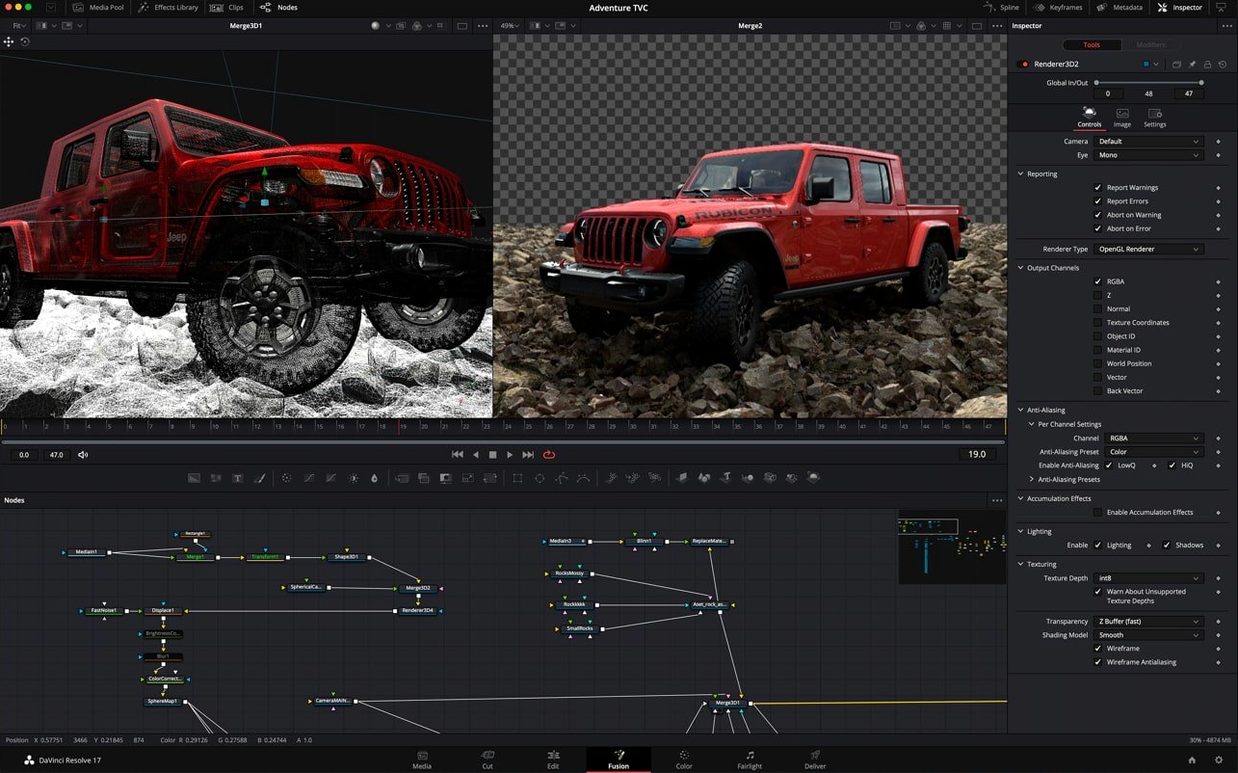
You open a shot of a city street — flat light, nothing dramatic. The director wants neon signs replaced and a drone comped into the sky. You drop the .exr sequence into the node editor, branch off a Luma Keyer to isolate the existing signs, and pipe the matte into a clean-plate branch where you build replacement text with Text+. The spell check catches a typo before you even render a preview — small thing, big relief.
Next, you switch to the 3D viewer. A basic cube stands in for a building until you import the actual drone model as an FBX. You place it in the scene with the on-screen manipulator, set an environment light to match the plate, and hit Fusion Renderer 3D for a quick test. The GPU fans spin up, and you get a decent half-res preview in seconds. You tweak motion blur samples, lock it down, and flag the comp for network rendering on two spare machines while you move to the next shot.
Taming node editor spaghetti with macros
One common headache is the node editor turning into spaghetti after a few merges. The fix is straightforward: select the nodes that make up a logical chunk — say, a keying chain — right-click, and choose Macro > Create Macro. You get a single tidy node with the controls you actually need exposed, and the guts stay clean.
Another is the viewer going black after you switch the renderer. Fusion 21 defaults to GPU processing, and on some Intel Macs with older AMD graphics, the driver can choke on a specific node. The quick workaround: open Fusion > Preferences > GPU and temporarily set processing to Metal or disable GPU for the problematic tool. You lose a little speed, but you keep working.
If cached frames stop updating after you move a keyframe, your disk cache is probably stale. Right-click the viewer and pick Purge Cache — the viewport refreshes and you are back in business.
OpenEXR with embedded cryptomattes straight from Blender or Maya
Fusion Studio slots into a pipeline smoothly because it speaks the same file formats your other tools do. You can export an OpenEXR sequence with embedded cryptomattes from Blender or Maya, load it straight into a Loader node, and the mattes appear in the channel list without extra setup. For motion graphics going the other way, saving a composition as a Lottie animation or an OGraf HTML graphic means your web team gets something they can actually use.
On the macOS side, the interface respects system-wide colour profiles so your viewer matches what you see in Finder previews. The network rendering uses Bonjour discovery — open the Render Manager, and any Mac on the local network running Fusion Render Node shows up automatically. No IP addresses to type, no configuration files to edit. Just tick the box next to the machine name and your render farm is online.
- macOS 14 or later
- Apple Silicon or Intel Mac
$ man fusion-studio-21 | grep -A2 "?"
How does it compare to the Fusion page in DaVinci Resolve?
A compositing page is included in DaVinci Resolve, but Fusion Studio is the standalone application with customizable panels and a full-screen workspace dedicated entirely to compositing.
What kind of acceleration does it use?
It uses GPU acceleration to keep interactive previews fast, even with heavy node trees and 3D scenes.
Can I sync animation to audio?
Yes, the keyframe waveform display lets you line up animated properties precisely against an audio waveform.
Comments 0
Sign in or create an account to leave a comment.
No comments yet. A codec, a slice, a machine — they appear after moderation.