
Ghost Buster Pro for macOS
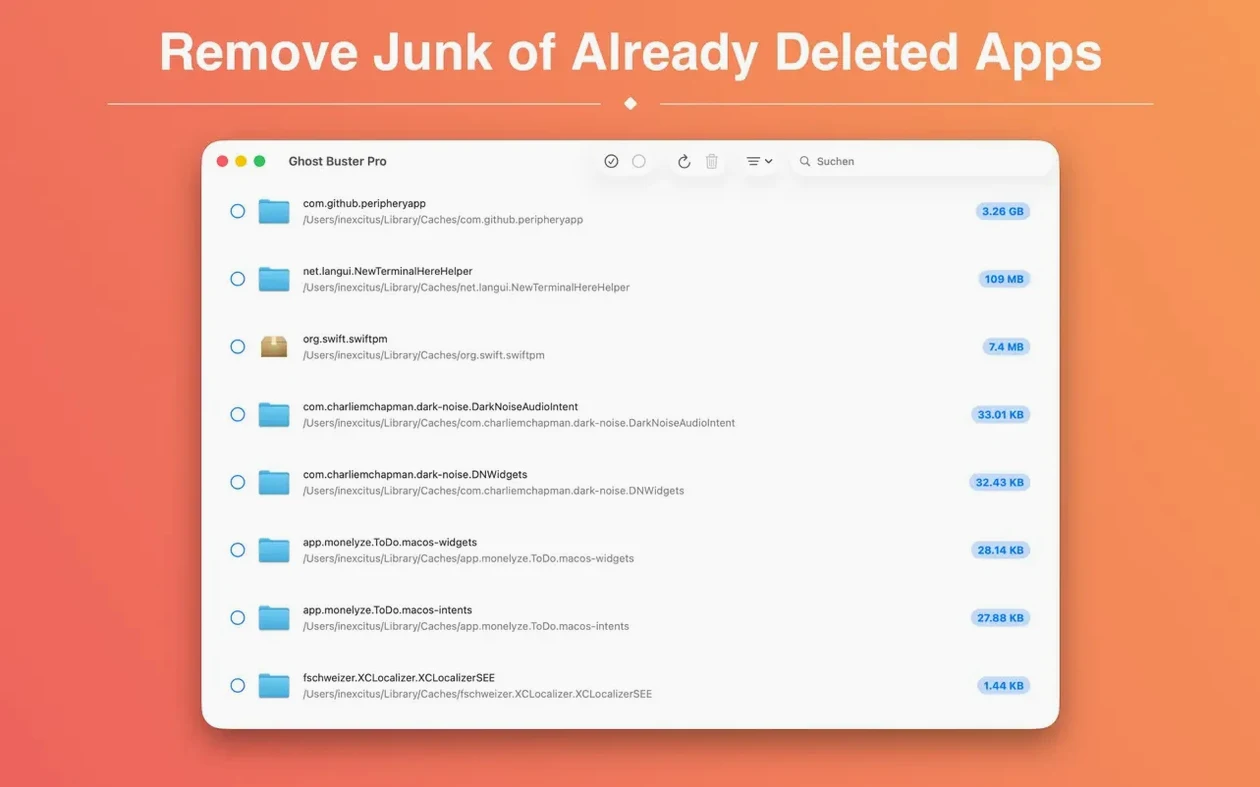
It is a tool for people who are particular about their Mac’s storage. When you drag an app to the Trash, the .plist preferences, caches, and support folders often stay put. Ghost Buster Pro hunts down those digital remnants.
Good for
- Clearing out preference files and caches from already-deleted software
- Reclaiming space taken by support folders that the original app left behind
- Running on both Apple silicon and Intel Macs
Keep in mind
- It scans for leftovers from apps you have already removed; it does not uninstall current applications
- The interface is currently localized in nine languages including German, Korean, and Simplified Chinese
What's a realistic cleanup workflow with Ghost Buster Pro?
Imagine you have been testing three different Markdown editors over the last month. You uninstalled all of them by dragging their icons to the Trash. Now you want the leftover support folders gone. Here is a concrete sequence that works well.
Launch the app. It starts scanning immediately — no setup wizard, no configuration screen. The main window populates with a list of app signatures it recognizes from previous installations. Scroll down to the first editor, say Typora. The entry shows a small disclosure triangle. Click it to expand the file list. You will usually see a ~/Library/Preferences/abnerworks.Typora.plist file, a ~/Library/Caches folder, and maybe a ~/Library/Application Support/Typora directory.
Select the items you want to remove. The checkbox logic is simple: check the parent app name to select everything, or expand and pick individual files. I tend to keep preference files for a few weeks in case I reinstall, so I uncheck .plist files and let the caches and support folders go. Click the Delete button. The files disappear — no confirmation dialog, so be certain before you click. That is intentional: the developer trusts you to review the list first.
Repeat for the other two editors. The whole job takes under a minute. One habit worth forming: right after a cleanup session, empty the Trash manually. Ghost Buster Pro moves files to the Trash rather than performing a secure overwrite, so the space is not reclaimed until you empty it. A quick Finder > Empty Trash finishes the task.
A useful ghost torrent of leftover data
Some apps scatter files across half a dozen Library subfolders. Video tools, for example, often leave .plist files in ~/Library/Preferences/ByHost/ in addition to the standard preference location. Ghost Buster Pro catches those. After uninstalling a screen recorder, I have seen it surface a cache folder inside ~/Library/Containers/ that weighed over 400 MB. That is the kind of forgotten data a manual search would probably miss — a useful ghost torrent sitting silently on the drive.
AppCleaner triggers on Trash, Ghost Buster Pro scans on demand
Three apps come up in the same conversation: AppCleaner, CleanMyMac X, and Pearcleaner.
AppCleaner works differently. It watches you drag an app to the Trash and then offers to remove related files at the same moment. Ghost Buster Pro works after the fact — it scans for leftovers from apps already gone. If you remember to use AppCleaner every time, you rarely need a retrospective scanner. If you forget, Ghost Buster Pro closes the gap. AppCleaner is also Intel-only via Rosetta on Apple silicon, while Ghost Buster Pro runs natively on both architectures.
CleanMyMac X is a broad maintenance suite: malware scanning, system junk, optimization scripts, and an uninstaller module. Ghost Buster Pro does exactly one thing. That narrow focus means it opens in under a second and does not run background daemons. CleanMyMac's leftover scanner is part of a larger paid package; it is more polished visually but heavier on system resources.
Pearcleaner is the closest in spirit — an open-source leftover finder for Mac. It searches similar locations and shows results in a clean list. Pearcleaner can also uninstall currently installed apps, which Ghost Buster Pro deliberately avoids. On the flip side, Pearcleaner does not surface as many sandboxed Container leftovers. Ghost Buster Pro seems to dig deeper into ~/Library/Group Containers/ and ~/Library/Containers/, which matters for apps from the Mac App Store.
Real-time search finds "Sketch" the moment you type it
A few details make daily use smoother than you might expect from such a focused tool.
The search field filters in real time. If you remember installing an app called "Sketch" but cannot spot it in the list, type sketch into the search bar at the top. The list narrows instantly. It matches partial strings, so sket works too. This is helpful when you have uninstalled dozens of apps and the full list feels overwhelming.
Sort order remembers your preference. By default, results appear in the order they were found on disk — roughly alphabetically by bundle identifier. Click the Name column header once for ascending alphabetical order, again for descending. The setting persists between launches. If you clean in batches, alphabetical order helps you spot duplicates or related apps grouped together.
Space estimates appear per item. Each file and folder in the expanded view shows its size on disk. This helps prioritize: a 2 KB preference file is negligible, but a 600 MB cache folder from a video editor is worth deleting immediately. The total space reclaimable appears at the bottom of the window, updating as you check and uncheck items.
No background scanning. Ghost Buster Pro does not run a helper process or launch daemon. It scans when you open it and stops when you quit. That means zero CPU usage between sessions. For a utility you might run once a month, this is the right behavior.
Can it remove leftovers from apps I already deleted?
Does Ghost Buster Pro delete files automatically without asking?
No. The app populates a list of detected leftovers but takes no action until you select items and click Delete. There is no automatic cleanup schedule, no background removal, and no feature that deletes anything on launch. You review the list, choose what to remove, and confirm by clicking the button. The deleted files go to the Trash, so you have a final safety net before they are permanently gone.
Will it remove files from apps I still use?
Ghost Buster Pro looks for files associated with applications that are no longer present in your /Applications folder or in ~/Applications. If an app is still installed, its support files are not listed. That said, if you moved an app to an unusual location or run it from a disk image, the scanner may not detect the installed copy and could flag its leftovers. Check the list before you click Delete — it is fast to scan and the correct habit.
Is Ghost Buster Pro safe on a Mac with multiple user accounts?
The app scans only the currently logged-in user's home folder: ~/Library/Preferences/, ~/Library/Caches/, ~/Library/Application Support/, and similar locations. It does not touch other users' home directories or system-level Library folders at /Library/. If several people share a Mac, each person should run Ghost Buster Pro under their own account to clean their own leftovers.
What does the “ghost buster pro mac” search usually surface?
People searching for ghost buster pro mac typically want to confirm it handles the sandboxed leftovers that Mac App Store apps leave behind. The answer is yes: the scanner covers ~/Library/Containers/, ~/Library/Group Containers/, and the standard un-sandboxed paths. Between those locations, it catches most orphaned files from both App Store and directly downloaded software.
- A new built-in help panel explains the scan logic and which items are genuinely safe to delete — useful when you're staring at a long list and wondering what you can click without regret.
- Every leftover result now includes an info button that tells you why the app flagged it, so you're not trusting a black box.
- Version 7.0.0 requires a Mac with Apple silicon. Intel Macs stay on the previous release, which still works fine.
- macOS 15.6 or later
- Apple Silicon (native) — Intel Macs should use Ghost Buster Pro 6.x
- 64‑bit only
$ man ghost-buster-pro | grep -A2 "?"
Does Ghost Buster Pro remove the app itself?
No, it only finds and deletes leftover files such as caches and preferences from apps that have already been uninstalled.
Can I use it with Family Sharing?
Yes, version 6.2.0 supports Family Sharing, so up to six family members can use the app under the same purchase.
Comments 0
Sign in or create an account to leave a comment.
No comments yet. A codec, a slice, a machine — they appear after moderation.