iBarcoder for macOS
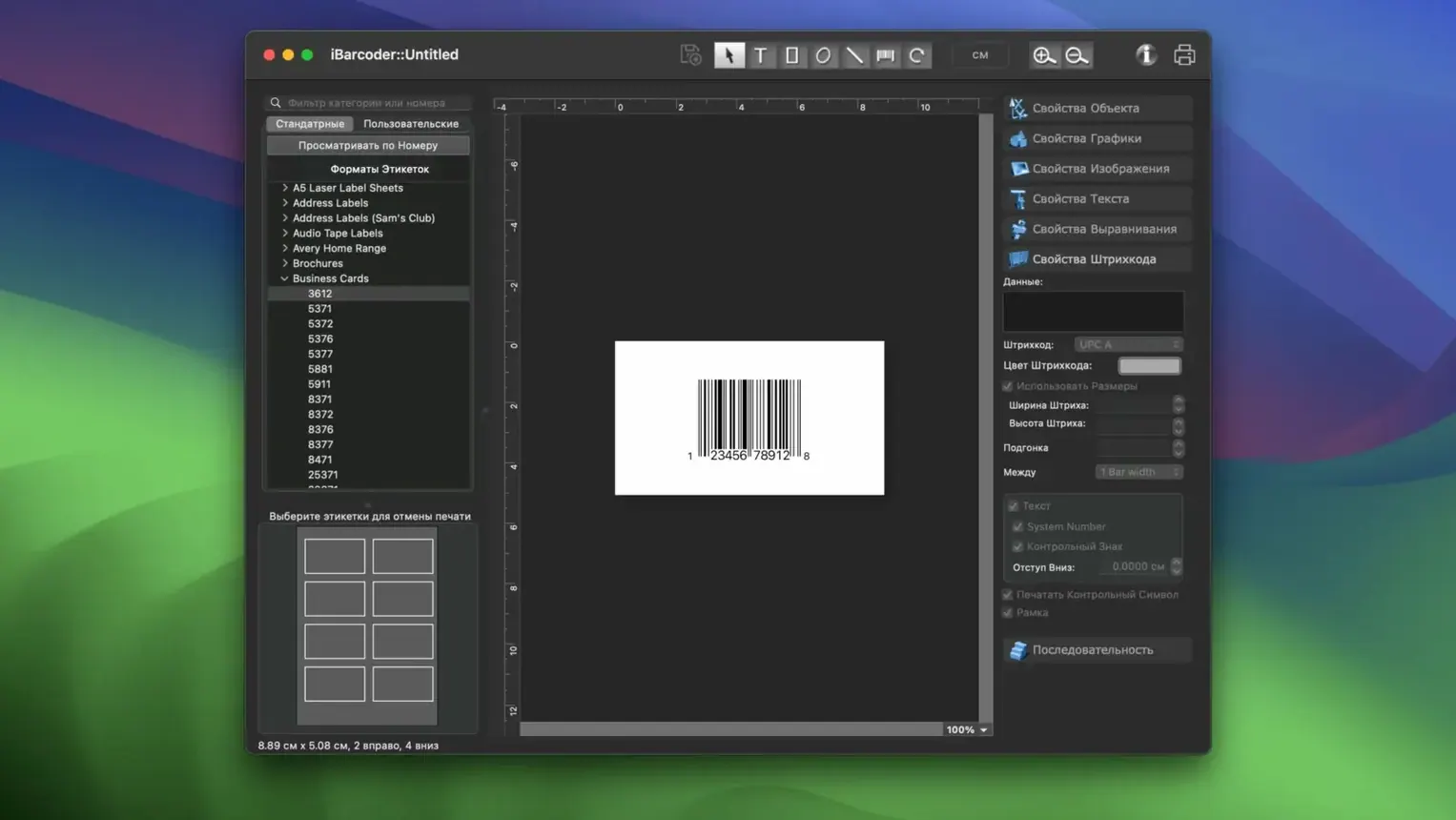
iBarcoder is a Mac utility that generates barcode labels, stickers, and tags from a single window. It handles inventory codes, product pricing, shipment tracking, URLs, and geolocations, exporting the results as clean vector or raster files.
Exports .png and .eps or drops straight into Photoshop
It writes individual or sequential barcodes straight to .png raster images and .eps vector files. You can also drop a barcode into a Photoshop document, which makes it fit naturally next to a design tool you might already have open.
Excel imports got smoother in version 3.18.6
Version 3.18.6 improved the Excel import path, so pulling in a spreadsheet full of product codes or tracking numbers is smoother than before. The app reads the data and lets you print or export the whole batch as labels, stickers, or tags without touching each one individually.
Does it print directly?
Yes. You lay out the barcode on screen and send it straight to a label printer or standard sheet-fed printer. No intermediate design app is required, though the exported PNG and EPS files work fine if you prefer to place barcodes into a layout tool later.
Generate QR batches from a Numbers CSV, then drop into layout
iBarcoder doesn't try to be a full desktop publishing suite, and that's exactly why it slots in cleanly. You can generate a batch of QR codes from a CSV you exported out of Numbers, save them as .eps, then drop those vectors into a Pages document for a product flyer. The app respects ~/Pictures/ and ~/Downloads/ as default save locations, so Finder tags and Spotlight indexing pick up exported barcodes without extra steps.
It also plays nicely with Quick Look. Select a generated .tiff or .png barcode in Finder, tap the spacebar, and you'll see the barcode without launching the app again. For shipping workflows, you can point iBarcoder's Excel import at a spreadsheet stored in iCloud Drive and the app reads it directly — no need to copy the file locally first.
On the printing side, the app talks to macOS's standard print panel. That means any printer you've already set up in System Settings — whether it's a Dymo label printer, a Zebra thermal unit, or a regular office laser — shows up without installing separate drivers or plug-ins. If you use Automator, you can even chain a folder action that watches for new .csv files and opens them in iBarcoder automatically, though setting that up requires a short AppleScript or shell script to bridge the two.
Barcode Producer targets print shops; iBarcoder skips the pre-press weight
Barcode Producer (Intelli Innovations) targets professional print shops. It generates EPS vectors with precise bar-width reduction settings and supports more niche symbologies like Pharmacode. But it's a heavier application that assumes you're doing pre-press work. iBarcoder gets you to a scannable barcode faster if you're not adjusting ink spread.
QR Factory (Tunabelly Software) focuses almost exclusively on QR codes. It does one thing nicely — styling QR codes with rounded modules, gradients, and embedded logos — but it won't touch Code 128, UPC-A, or Data Matrix. If your workflow includes anything beyond QR, iBarcoder covers that ground without asking you to switch apps.
Barcode Generator (a lightweight Mac App Store utility by Katsuya Endoh) is simpler than iBarcoder — single barcodes only, no Excel import, no batch mode. It serves quick one-off needs but doesn't scale to printing fifty inventory labels in one go. iBarcoder's sequencer and spreadsheet import make the difference when you move beyond a single code.
Stockroom managers reuse a Numbers sheet and Excel import weekly
Small-scale inventory managers — think someone running a stockroom with a few hundred SKUs — will use the Excel import and sequential numbering every week. They can maintain a Numbers sheet of product codes, export it as .xlsx, and feed it to iBarcoder for a fresh batch of shelf labels whenever stock changes.
Event organisers printing attendee badges with QR codes benefit from the bulk path too. A registration list exported from a Google Sheet becomes a stack of unique codes in minutes, saved as .png files that drop straight into badge templates.
Mac users who occasionally need a barcode but live in design tools — illustrators placing ISBN barcodes on book covers, for example — appreciate that iBarcoder hands them a vector EPS they can place in Illustrator or Affinity Designer without hunting for a barcode font or an online generator that spits out low-resolution JPEGs.
Shipping-heavy operations with mixed barcode needs — Code 128 for warehouse bins, QR for customer tracking links, Data Matrix for small electronics — get a single tool that handles all three instead of patching together separate utilities. Anyone looking for an iBarcoder Mac torrent that handles this range of symbologies in one download will find the app covers the formats most practical workflows actually need.
- Improved
.xlsxand Excel data import for bulk barcode generation — pulling a column of codes from a spreadsheet now requires less cleanup before the labels roll out.
- macOS 10.15 or later
- Intel or Apple Silicon Mac
- 20 MB free disk space
$ man ibarcoder | grep -A2 "?"
What barcode types can I make with iBarcoder on Mac?
It supports the common symbologies needed for inventory, product pricing, shipments, tracking, URLs, and geolocations, producing both individual codes and sequential runs for bulk labeling.
Can I use iBarcoder with my existing design software?
Yes. Exported PNG and EPS files drop into most layout tools, and it supports Photoshop image files directly, so a barcode can move into a design document without a format conversion step.
Comments 0
Sign in or create an account to leave a comment.
No comments yet. A codec, a slice, a machine — they appear after moderation.