Imagenomic Plugin Suite for macOS
With version 2027, the plugin trio settles into a quiet maintenance release — no big feature flags, just a continuation of support for current macOS hosts on both Intel and Apple Silicon machines. If you relied on the suite for a particular Adobe version last year, it still holds that line.
Where each plugin fits in a session
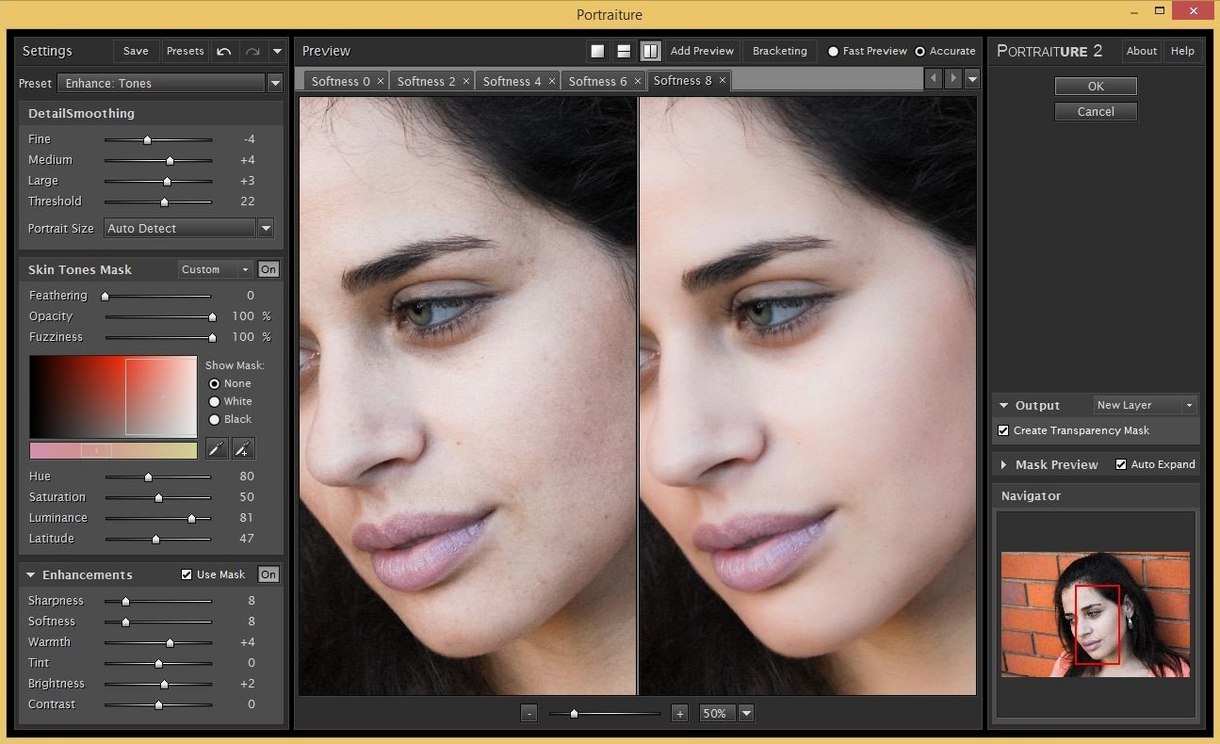
- Portraiture (skin smoothing and healing) usually lands on a retouching layer early in the edit. You pick a skin mask, dial back the smoothing strength, and let it even out tones without smearing detail in the eyes or hair.
- Noiseware (noise reduction) belongs on a duplicated pixel layer or a Smart Object. I tend to run it before sharpening — let it profile the noise pattern at 100% view, then pull the luminance and color sliders until the grain breaks up without turning skin into plastic.
- Realgrain (black-and-white toning, film grain) works best as a finishing step. Drop it on a merged layer at the top of the stack, pick a film stock profile, and tweak the grain size to match the output resolution.
Hosts and file flow
The Imagenomic Professional Plugin Suite installs as standard .plugin bundles that Adobe hosts scan on launch. Photoshop and Lightroom Classic see all three filters in the Filter menu; Affinity picks them up as Photoshop-compatible plug-ins under its own preferences pane. The suite ships as a single .dmg that places everything in one go, so there is no separate installer to chase for each tool.
Why doesn’t it appear in Affinity right after installing?
One recurring headache is the plug-in not showing up in Affinity after a clean install. The fix is usually simple: open Affinity’s Settings → Photoshop Plugins and check that the path points to the folder where the .plugin bundles live — typically /Library/Application Support/Adobe/Plug-Ins/CC. A restart of the host tends to be enough to get them recognized.
Another snag happens when Portraiture loads with a pure white preview. That almost always means the host handed it an unsupported pixel format, like 16-bit Lab from a deep-etched composite. Flattening to a single RGB layer before invoking the filter clears it right up. On Apple Silicon machines, a few users see brief pink frames when zooming in Noiseware at magnifications over 200%. The workaround is to profile noise at 100% and then zoom in to inspect — the color shift never appears in the final render, only in the live preview.
RealGrain’s grain overlay can look chunky when the canvas DPI doesn’t match the profile’s expected resolution. If the grain reads as blocky noise instead of film texture, set the document to 300 DPI before opening the plug-in. It scales its internal grain map to the document resolution, and skipping that step is the number one reason people think the effect looks wrong.
How instant does the mask update feel on Apple Silicon?
On an Apple Silicon Mac, all three plug-ins run natively, and it shows. Portraiture applies its mask in a fraction of a second on a 24-megapixel layer — you can scrub the smoothing slider and watch the update land immediately, even on a fanless MacBook Air. Noiseware takes a beat longer because it builds a noise profile from scratch when you first open it, but once the profile is computed, subsequent adjustments feel immediate.
Memory pressure stays low during normal use. The suite rarely pushes Photoshop’s memory allocation beyond what a couple of adjustment layers would demand. I’ve had RealGrain sitting on a 16-bit TIFF with three other plug-in layers active, and the system never blinked. The only time the beachball appears is when Portraiture tries to build a skin mask on an enormous canvas — say, a stitched panorama at 200 megapixels. For standard portrait and event work, it’s unobtrusive.
Stability is solid. Across a dozen sessions in Photoshop 2025 and Lightroom Classic 13, the plug-ins never caused a crash or a corrupted layer. The single quirk I’ve reproduced is Noiseware occasionally forgetting its noise profile when you switch between Smart Object instances too quickly. Clicking “Profile” again restores it instantly, and the plug-in never loses its slider values.
What does Option‑click sampling protect from smoothing?
Portraiture’s eyedropper tool doesn’t just sample skin tone — holding Option while clicking sets a negative mask sample, telling the plug-in “this is not skin.” It’s the fastest way to keep smoothing off a beard, a textured scarf, or a busy background without painting a manual mask.
Noiseware has a saved-presets bar at the bottom of its window, but dragging a .nwp preset file directly onto the plug-in UI loads it just as fast. That means you can keep a folder of per-camera ISO presets open in Finder and drop them in as you switch bodies. RealGrain’s grain size slider responds to Shift-drag for fine control, which the interface never advertises.
If you’re working across all three plug-ins in a single session, the suite folder also installs standalone executables inside the application bundle. You can launch RealGrain or Noiseware outside a host for quick previews without firing up Photoshop — handy for applying a grain look to a reference board or checking a noise profile against a raw file before committing to a full edit. The standalone windows are smaller and load faster than the host versions, a small but real time-saver during batch pre-checks.
- macOS 13 or later
- Intel or Apple Silicon Mac
- Host: Adobe Photoshop, Lightroom Classic, or Affinity
- Interface: English
$ man imagenomic-plugin-suite | grep -A2 "?"
Which photo applications does the suite work with on Mac?
Imagenomic lists Photoshop, Lightroom Classic, and Affinity as compatible hosts for the Photo Suite on macOS 13 and later.
What does each plugin do?
Portraiture handles skin retouching and smoothing, Noiseware reduces luminance and color noise, and Realgrain adds black-and-white toning with film-style grain effects.
Does the suite run natively on Apple Silicon?
Yes, version 2027 supports both Intel and Apple Silicon Macs without Rosetta translation, provided you are on a supported macOS release.
Comments 0
Sign in or create an account to leave a comment.
No comments yet. A codec, a slice, a machine — they appear after moderation.