Movavi Video Suite for macOS
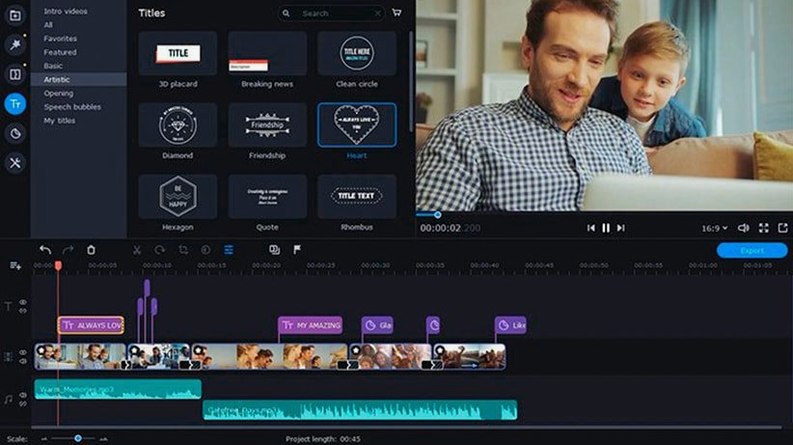
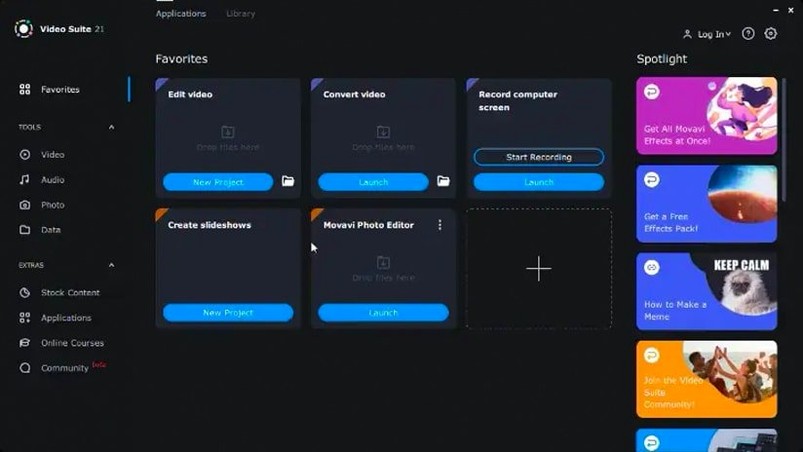

Version 22.4.1, dated August 24 2022, fixes an annoying shutdown bug that triggered while working with titles. It also refreshes the built-in music library with new tracks and updates the icon that marks applied effects, so you can see at a glance which clips have something on them.
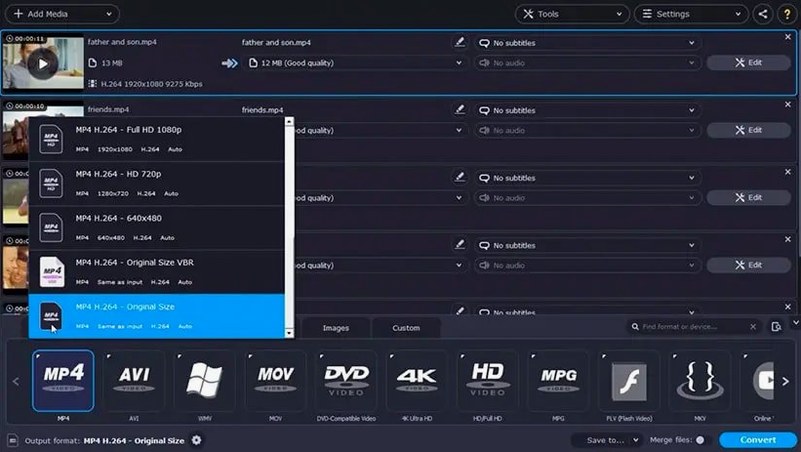
Movavi Video Suite bundles three tools that usually live in separate applications: a timeline-based video editor, a file converter, and a screen recorder. The editor handles basic cuts, transitions and effects without assuming you know what a keyframe is. The converter covers most common formats and lets you add subtitles during the process — useful if you are preparing a clip for a platform with different language requirements. It also queues multiple files for batch conversion, which saves time when you are churning through a folder of clips.
The screen recording module includes mouse cursor effects for highlighting clicks or drawing attention to a specific area during a tutorial. Everything runs under Intel architecture and requires macOS 10.13 or later, so it works on a wide range of older Macs that are still in service.
What does a typical session look like?
Say you need a short tutorial video for a colleague. You open Movavi Video Suite and head straight for the screen recorder. You check the capture area, toggle system audio on, and plug in a USB mic for voice-over. Before hitting record you enable a colored circle around the cursor — it makes pointing at menu items less ambiguous for whoever watches later.
You record a three-minute walkthrough, stumble once, and just talk through the mistake instead of restarting. After you stop, the clip lands in the editor timeline automatically. You trim the flubbed section, drop a fade-to-black transition where the intro ends, and drag one of the new music tracks from version 22.4.1 underneath the voice-over. The music sits at about 20% volume so it does not fight your narration.
The title tool — the one that no longer crashes in this build — lets you add a clean lower third with the topic name. You apply a subtle zoom effect to the final frame, then switch to the export tab. The H.264 preset looks fine, but you need subtitles in French, so you flip to the converter module, add an .srt file you prepared earlier, and let it bake the captions directly into the video stream. One app, no round-trip to a separate subtitle tool.
Who benefits most?
Movavi Video Suite makes the most sense for people who do a bit of everything but none of it at a professional broadcast level. If you regularly record screen demos, convert batches of footage between odd formats, and need to stitch clips together without learning a node-based compositor, the all-in-one approach cuts down on launch-and-quit friction.
Remote trainers and educators get a lot of mileage from it. The cursor effects and system audio capture turn a dry software walkthrough into something watchable, and the batch converter handles the inevitable pile of recordings that need to become smaller files before they go into a shared drive.
Users who work with footage from multiple sources — a phone, a DSLR, a screen grab — also come out ahead. The converter handles over 180 formats, and the wireless phone transfer feature means you can pull a clip from an Android device or iPhone without hunting for a cable. It is not a replacement for a dedicated NLE, but the kind of person who downloads a movavi video suite torrent usually wants one download that covers three jobs, not three separate installations.
Common snags and how to fix them
Gatekeeper blocks the installer
The downloaded file comes as a .dmg that macOS flags because it is not notarized. The fix is quick: mount the disk image, open Terminal, and run the app from inside the mounted volume. Press Enter when prompted, and the standard installation procedure continues normally. If you skip the Terminal step, you will just see a refusal dialog with no obvious way forward — a well-known setup quirk for anyone grabbing a movavi mac torrent for the first time.
No audio in screen recordings
If your exported screen capture is silent, check two things. First, the recorder's audio input selector defaults to "None" unless you explicitly pick a source. Second, macOS privacy settings sometimes block screen recording apps from capturing system audio; you may need to grant permission in System Preferences → Security & Privacy → Privacy → Screen Recording. The same panel controls microphone access, so verify both entries show Movavi Video Suite as allowed.
Conversion queue stalls on certain files
Some .mkv containers with unusual codec combinations can trip up the converter. The workaround is to enable hardware acceleration decoding in the preferences — it does not fix everything, but it improves throughput on H.264 and H.265 material. For stubborn files, splitting the queue into smaller batches often lets the problematic clip surface so you can isolate it and try a different output format.
Effects icon confusion
Version 22.4.1 updated the symbol that marks applied effects, and the change trips up returning users who expect the old indicator. If a clip looks like it has no effects but you remember adding one, check the effects panel — the new icon sits in the same spot, just with a different shape. Double-clicking the clip opens the properties where all active effects are listed, so you can confirm what is applied without relying on the icon alone.
People hunting for a movavi video torrent sometimes grab an older build where the title crash is still present. If the app quits every time you type in a title field, you are on a version earlier than 22.4.1 and the fix is to update.
- The program no longer shuts down unexpectedly while working with titles.
- New music tracks were added to the built-in library.
- The symbol that indicates an applied effect was updated for clearer visibility.
- macOS 10.13 or later
- Intel processor (x86-64)
- Interface languages: English
$ man movavi-video-suite | grep -A2 "?"
Can I convert more than one file at a time?
Yes. The converter queues up multiple files and processes them in one batch, with the option to add subtitles during conversion.
Does the screen recorder let me highlight mouse actions?
It does. You can enable cursor effects that emphasize clicks and movement, which is handy for software demos and tutorial recordings.
Comments 0
Sign in or create an account to leave a comment.
No comments yet. A codec, a slice, a machine — they appear after moderation.