
OmniPlan Pro for macOS
Most project tools fall apart the moment you need to see how time, people, and dependencies actually intersect. OmniPlan Pro approaches this as a scheduling problem: give it tasks, durations, and resources, and it works out what can happen when. Here's one realistic end-to-end pass.
How would I plan a small app release in OmniPlan Pro?
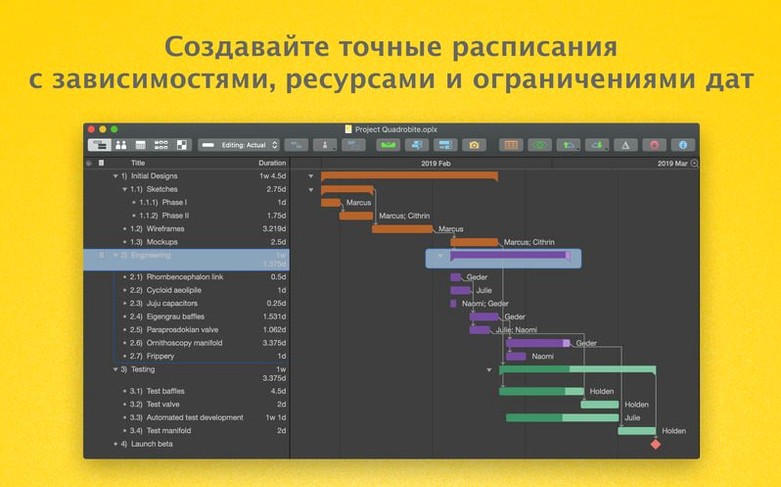
- Enter the work breakdown. Create tasks for design, development, testing, and documentation, each with an estimated duration.
- Link dependencies. Drag connections between tasks — testing can't start until the build is ready. OmniPlan draws these as a network diagram.
- Assign resources. Add your developers and testers. The app combines their available time with the task estimates and flags conflicts.
- Check the critical path. The critical path highlighting shows which tasks directly control the finish date. If design slips a day, the whole project slips.
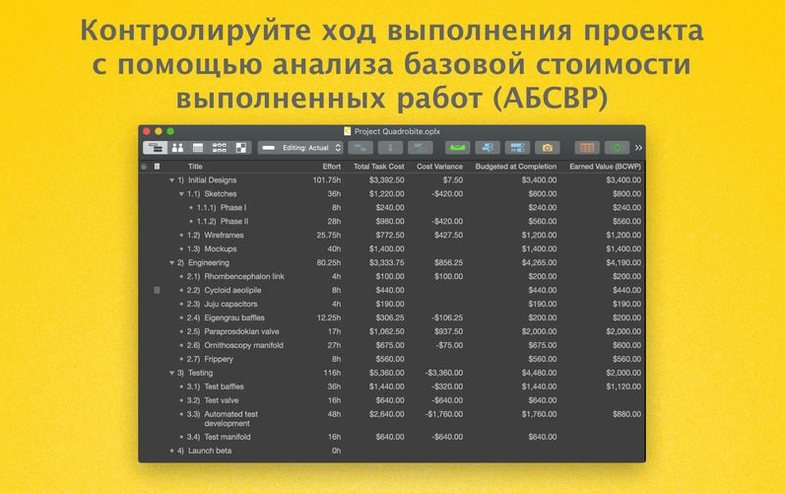
- Run an estimate. The Pro version's automatic effort estimation gives a second opinion on task durations based on workload and availability.
- Export for stakeholders. Send a PDF for review, CSV for further analysis, or ICS to get milestones into a calendar.
Where the Pro version earns its keep is in the what-if side. Change tracking records edits to the plan, and Monte Carlo simulation shows how likely the schedule is to hold. Microsoft Project import and export means the file doesn't have to live in a silo if someone else insists on MPP.
Opening and saving Microsoft Project MPP files
Can I open a Microsoft Project file someone sent me and actually work with it? Yes — that is one of the main reasons to go with OmniPlan Pro. The MPP import and export is built into the Pro tier, and it preserves task hierarchies, durations, dependencies, and resource assignments. It is not a rough conversion that loses half the structure. A schedule that started life on a Windows machine can roundtrip back with its logic intact.
Does it need an account or cloud service just to start? No. You can plan entirely offline with a local file — a plain .oplan document on your disk. The publishing and subscription features through Omni Sync Server or WebDAV are optional, and they exist for teams that want a shared schedule. Nothing phones home unless you set it up.
What about Apple Silicon — is it translated or native? The binary is universal, so it runs natively on both Apple Silicon and Intel Macs. No Rosetta layer for the ARM side, which matters once you start running Monte Carlo simulations on a schedule with hundreds of tasks.
Passing structured outlines to OmniOutliner and OmniFocus
OmniPlan Pro lives comfortably inside the Omni ecosystem when you want it to. Export to .ooutline and you can open a structured task list in OmniOutliner for a different kind of editing — less Gantt, more hierarchical text. Send a diagram to OmniGraffle and the work breakdown becomes a visual document you can style and annotate for a presentation. Neither direction is a one-way trip you'll regret.
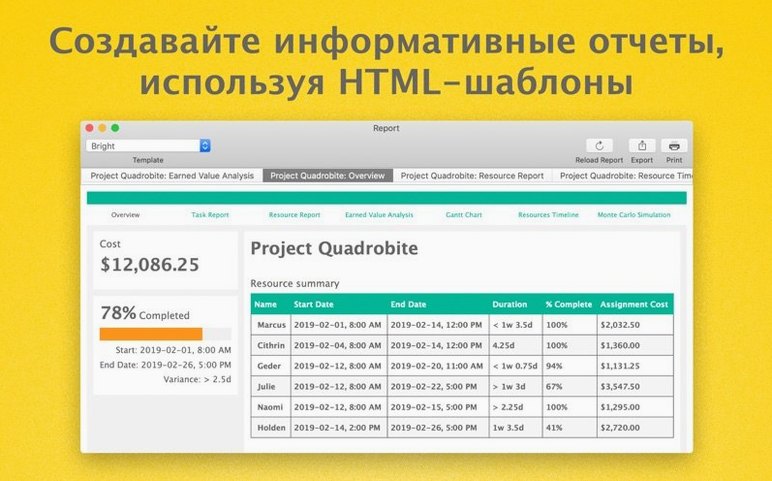
Outside the Omni world, the ICS export drops milestones and deadlines straight into Calendar. CSV export feeds into Numbers or any spreadsheet that needs the raw task data. The HTML report gives you a standalone snapshot you can hand to someone who will never install a project app. And AppleScript support means you can wire repetitive plan adjustments into a script triggered by a folder action, a launchd job, or a keyboard shortcut through something like FastScripts — Mac automation that fits a real workflow.
Start with a tiny real plan to trigger violation warnings
Start with a small, real plan, not a tutorial sandbox. Create five or six tasks with real durations, link two or three dependencies, and assign one overloaded resource. Watch how the violation warnings appear and how the leveling options respond. That single exercise teaches more about the scheduling engine than reading any documentation.
Turn on change tracking early, even on a solo plan. It records what you moved and when, so three days later you are not guessing why the finish date shifted by a week. Accepting and rejecting changes individually — a Pro feature — keeps the audit trail clean without reverting entire chunks of work.
Set your working calendar before you build anything substantial. Add public holidays and known absences under the calendar view, and OmniPlan will schedule around them. If a resource has a two-week gap, tasks assigned to that person simply land after the gap, and the Gantt chart reflects it without manual nudging.
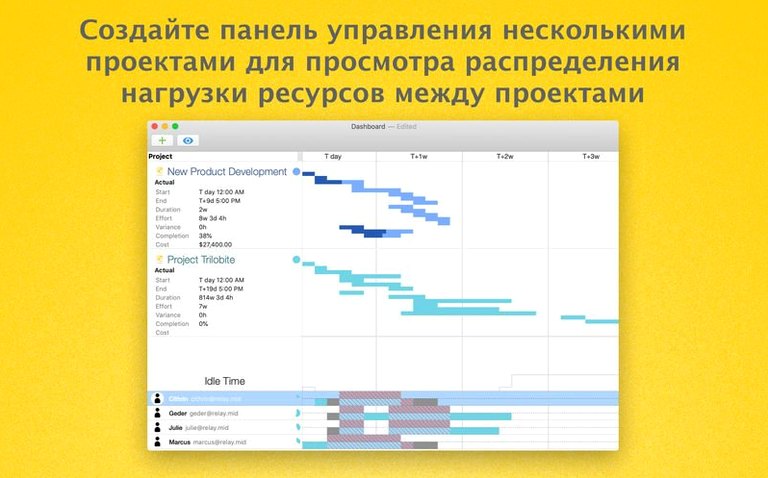
Resist the urge to open every view at once. Gantt plus the resource timeline is plenty for the first week. Network diagrams become useful when dependencies get tangled and you need to spot the knot visually. The multi-project dashboard — also Pro territory — makes sense only after you have more than one active .oplan file, but once you do, it is the fastest way to see which project is holding which resource hostage.
- Better compatibility with current macOS releases.
- Editing a task with many assigned resources is now noticeably faster.
- macOS 12 or later
- Runs natively on Apple silicon and Intel Macs
- Interface languages: English, German, Spanish, Italian, French, Portuguese, Dutch, Russian, Simplified Chinese, Korean, Japanese
Comments 0
Sign in or create an account to leave a comment.
No comments yet. A codec, a slice, a machine — they appear after moderation.