rcmd • App Switcher for macOS
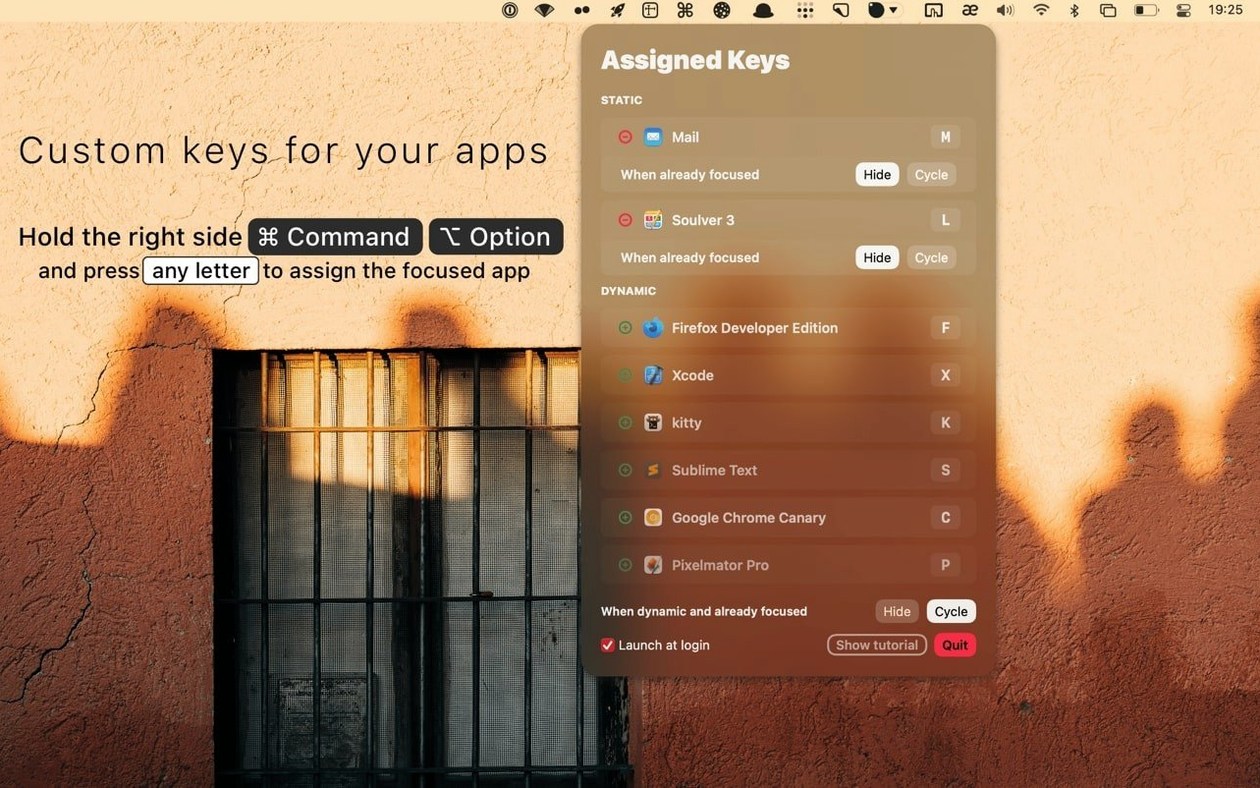
rcmd lands on any Mac running macOS 13 (Ventura) or newer, and it's a universal binary — so it runs natively on both Intel machines and Apple Silicon Macs without a hiccup. If your system meets that bar, you're all set.
The core idea is dead simple: you hold down the right Command key and tap the first letter of the app you want. That’s it. A heads-up display shows running apps with assigned keys while the trigger is held, and a dynamic algorithm learns which app you probably mean for each letter. If two apps share an initial, pressing the key again cycles through them.
Think of it as an extension to the stock Command-Tab switcher — one that lets you jump directly to a target without tabbing through a long row of icons. You can assign custom keys to favorites with Command-Option-letter combos, and you can disable specific keys in settings if they clash with other shortcuts. The trigger itself can be remapped to a different modifier combination if right Command isn’t your thing.
Good for:
- People who keep lots of apps open and hate hunting through Command-Tab
- Anyone who wants muscle-memory app switching without touching the mouse
- Mac users on macOS 13+ who prefer a lightweight, keyboard-driven workflow
Keep in mind:
- The interface is English-only
- You need to train yourself to use right Command instead of the left one (or remap it)
- App names starting with the same letter require an extra tap to cycle
Where rcmd fits into macOS
rcmd doesn’t replace any system component — it sits alongside the Dock, Mission Control, and the built-in Command-Tab switcher. When you hold right Command and tap a letter, it talks to the same window server that handles Spaces and focus. If the target app lives on a different desktop, rcmd asks macOS to switch spaces automatically, so the app pops up exactly where you left it. No extra configuration needed.
One thing I like: it plays nicely with full-screen apps. If you’re in a full-screen code editor and summon your browser with right-⌘ S, rcmd slides the browser in from its own space without breaking the full-screen transition animation. The same rule applies to Split View pairs — rcmd won’t yank you out of a split, it just shifts focus to the right screen real estate.
It also respects macOS’s “Hide others” behavior if you’ve configured an app’s HIDE setting. That means you can treat rcmd almost like a launcher that also declutters: one key combo brings an app forward, another tap hides it, and your desktop stays tidy. Combine that with the CYCLE setting per app, and you’ve got a switcher that adapts to how you organize windows — not the other way around.
What the collision-tightening update actually does
Version 3.5.5 tightened up the algorithm for same-letter collisions. Before, if you had Safari, Slack, and Spotify running, tapping right-⌘ S might sometimes pick the wrong one first. The new release weighs your recent app-switching patterns more heavily, so the app you actually want surfaces faster. In practice, it means fewer extra taps to cycle — for me, Safari comes up on the first press about nine times out of ten now.
Alin also refined the heads-up display behavior when you hold the trigger key longer. The overlay now dismisses more cleanly if you decide not to switch — a small change, but it cuts down on visual noise when you change your mind mid-gesture. And the custom-key assignment (Command-Option-letter) got more responsive on Apple Silicon under Ventura, where some users reported a slight delay in earlier builds.
Which per-app toggle setting to flip first
After you drag rcmd into /Applications and launch it, open its preferences and do a quick sweep:
- Hide vs. cycle behavior per app. For apps you frequently toggle (like Notes or a terminal), set HIDE to “on press again.” For apps with same-letter siblings, enable CYCLE so repeated presses rotate through them. This is the single biggest workflow tweak.
- Disable noisy keys. If some letters map to apps you rarely use, disable them in the key list. It stops rcmd from training the algorithm on dead ends.
- Remap the trigger. Right Command is fine, but if you use it for other shortcuts (or your keyboard lacks a right Command key), switch the trigger to something like Command-Option or Caps Lock in the modifier settings.
- Assign favorites early. Pick 3–5 apps you launch constantly and bind them with Command-Option-letter. Even if the app isn’t running, rcmd will launch it — effectively turning the switcher into a quick launcher for your core toolset.
- macOS 13 or later
- Apple Silicon or Intel Mac
$ man rcmd-app-switcher | grep -A2 "?"
Can I change the trigger key from the right Command key?
Yes, the trigger can be changed to another modifier combination in the app’s settings if the default right Command doesn’t fit your setup.
Comments 0
Sign in or create an account to leave a comment.
No comments yet. A codec, a slice, a machine — they appear after moderation.