Audiofile Engineering Fidelia for macOS
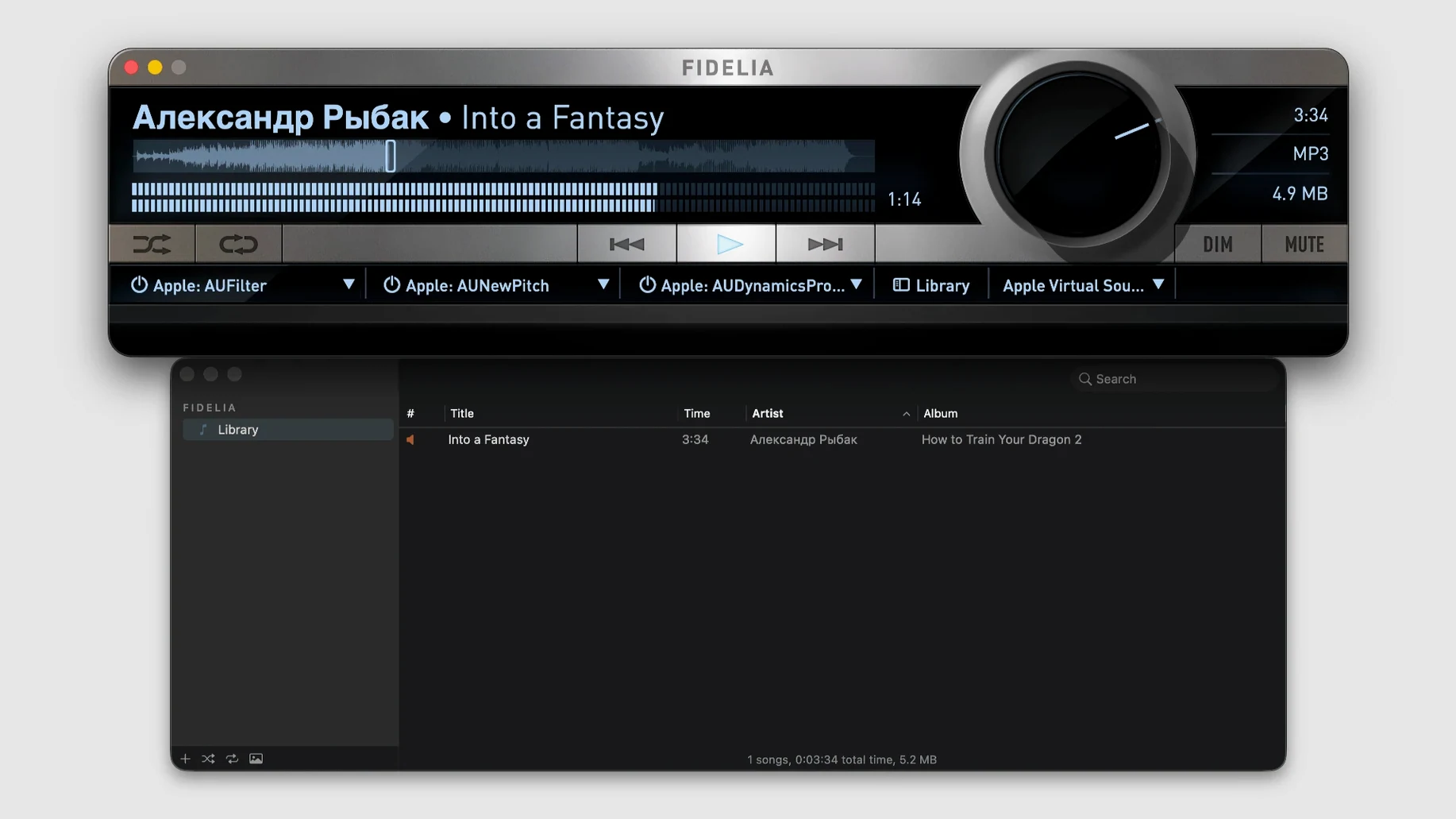
When you want your music library to sound exactly like the files on disk—no OS resampling, no hidden processing—that's where Fidelia makes its case.
Pro Dither — psychoacoustic noise shaping that pushes quantization noise into less audible frequencies when you reduce bit depth.
Three Audio Unit slots — you can insert third‑party effect plug‑ins directly in the playback chain, with the slots sitting between the file and your DAC.
Resampling engines — choose between linear‑phase (no phase shift, pre‑ringing) and minimum‑phase (no pre‑ringing, some phase shift) when sample rates don't match your hardware.
Gapless playback — consecutive tracks in a live album or DJ mix flow without silence between them, because the decoder sees them as one continuous stream.
DSF to Apple Lossless — the app converts DSD files to 24‑bit/176.4 kHz ALAC so they stay hi‑res in a more portable container. APE files get the same treatment, preserving the original sample rate and bit depth.
Local library plus network — Fidelia plays files on your Mac, streams from a shared library over the network, and pulls in tracks you own through the Music app's library sync.
Why is the library empty on first launch?
Fidelia doesn't scan your Music app library by default, so a fresh launch shows an empty window. Head to the Library menu and tick Sync with Music—it reads the same Music Library.musiclibrary database, pulling in local tracks and purchased items. If you keep FLAC or Opus albums outside the Music folder, drag them into the Fidelia window or set a watched folder in Preferences under the Library tab.
Another common snag: the bit‑perfect indicator stays greyed out. That means sample rate matching isn't engaged. You need to set the output device to a DAC that reports its supported rates to CoreAudio, then switch on Exclusive Mode in the output preferences. Without exclusive access, macOS still runs its resampler in the background, which defeats the whole point.
If Audio Units fail to load, check whether you're running native Apple Silicon plug‑ins inside the ARM build of Fidelia. Intel‑only Audio Units need the app running under Rosetta—right‑click the app in Finder, choose Get Info, and tick Open using Rosetta. The three slots are serial: the signal flows top to bottom, so putting a compressor before an EQ versus after changes what hits your ears.
Does the mini player keep Audio Unit processing?
The mini player (press ⌘M) floats above other windows and still hooks into the full audio engine—Audio Units, HeadSpace, dither, the works. You're not losing processing, just shrinking the chrome. While it's up, ⌥⌘M cycles through the five player sizes without opening the main window.
Customizable shortcuts live in Preferences under Keyboard, and you can bind keys to things like "toggle HeadSpace" or "next Audio Unit slot bypass" that have no default mapping. If you route multichannel material through the 48‑channel output mapping, label your channels in the Routing panel once and Fidelia remembers the names per audio interface, stored in ~/Library/Application Support/Audiofile Engineering/Fidelia/.
Importing DSF files in batches? Drop them onto the Dock icon rather than hunting through the File menu—Fidelia queues the conversion to 24‑bit/176.4 kHz ALAC and places the output next to the originals by default. The same drag‑and‑drop trick works for APE bundles.
How does its plug-in chain differ from Vox?
Placed next to Vox, the difference is plug‑in architecture. Vox plays FLAC, DSD, and streams internet radio cleanly, but its Audio Unit hosting is limited to a system‑wide wrapper, not an inline per‑track chain. Fidelia's three‑slot pipeline sits inside the player's own signal path, so you can save different plug‑in setups per album without touching system audio routing.
Audirvāna goes deeper on library management and streaming service integration, but its DSP is largely built‑in—a fixed set of filters and upsampling options. Fidelia opens the door to any third‑party Audio Unit you own, which makes it feel more like a modular rack bolted onto your library. If you already have a collection of, say, FabFilter or Valhalla plug‑ins, Fidelia pulls them straight into playback without a separate host.
Colibri is lighter, DSD‑friendly, and simpler to browse, but it doesn't touch the Music app library sync or offer HeadSpace‑style crossfeed. Where Colibri focuses on straight‑through transparency, Fidelia lets you shape the listening path with dither, resampling engine choice, and spatial processing—at the cost of a busier interface. The exclusive mode implementation in Fidelia also locks the DAC more aggressively, which matters if you're chasing bit‑perfect playback and tired of system alert sounds sneaking through.
- macOS 14 or later
- Apple Silicon or Intel 64-bit Mac
$ man audiofile-engineering-fidelia | grep -A2 "?"
Does Fidelia handle DSD files natively?
It imports DSF files and converts them to 24-bit/176.4 kHz Apple Lossless, so you get a hi-res PCM version rather than native DSD bitstream output.
Can I use my own plug‑ins with it?
Yes—three Audio Unit slots are built into the signal path, letting you load any third-party AU plug‑ins you have installed on your Mac.
Will it pick up my existing Apple Music library?
It can sync with the Music app library and play tracks you own, so you don't need to rebuild playlists or re‑import files.
Comments 0
Sign in or create an account to leave a comment.
No comments yet. A codec, a slice, a machine — they appear after moderation.