Cycling '74 Max for macOS
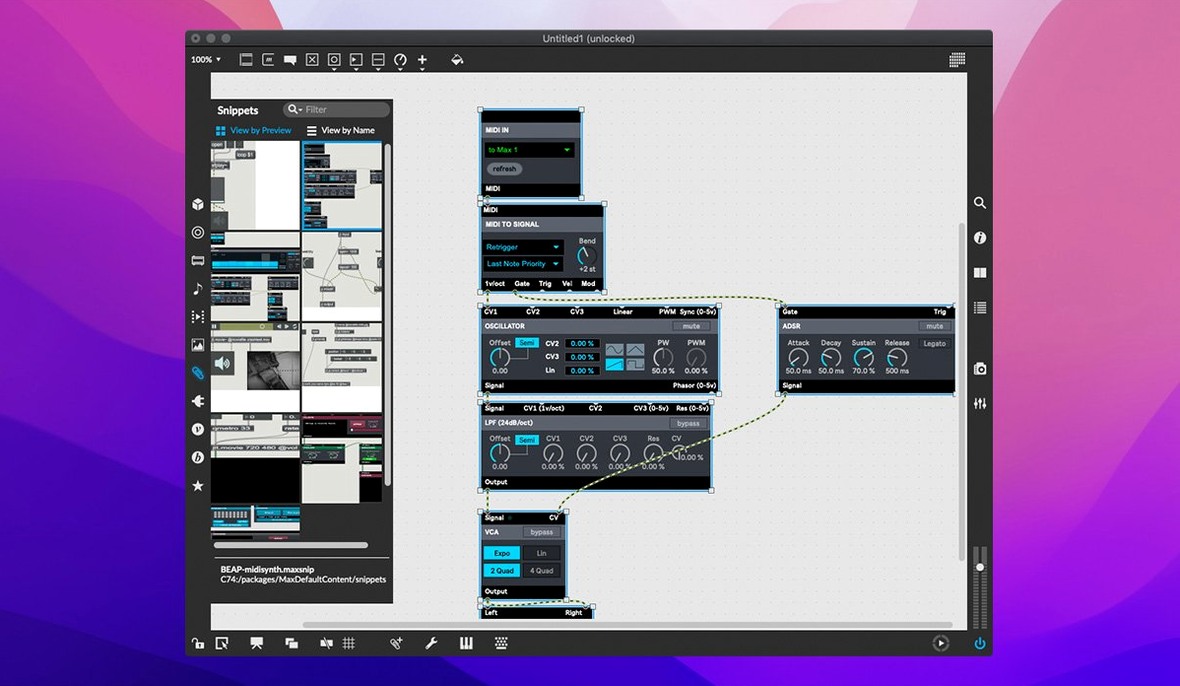
Build a custom synth
When a DAW’s built-in instruments feel too rigid, Max gives you the patch cords. Drag in oscillators, filters, and envelopes, connect them with virtual wires, and you’re building a synth that does exactly what you want — right alongside Logic Pro or Ableton Live.
Process live video with your audio
Max talks to your other media tools by playing QuickTime movies inside a patch, so you can trigger visuals from the same MIDI controller that drives your reverb sends.
Extend a production tool you already use
Because Max provides a cross-platform SDK and hundreds of modular UI widgets, you can prototype a missing utility — a custom MIDI router, a batch sample analyzer — and run it as a standalone app next to your regular toolkit.
How does Max compare with similar Mac environments?
People often ask how Max stacks up against Pure Data (Pd) and SuperCollider. They're all in the same family — Miller Puckette created Max and later co-developed Pd as an open-source project — but the editing experience diverges sharply. Pd feels closer to a raw canvas. You get the boxes and the patch cords, but the UI toolkit is minimal and polish comes from third-party externals. Max ships with hundreds of ready-made UI objects, an Inspector that shows live message traffic, and a patching environment that supports step-by-step undo right out of the box. If you want to get a polished standalone application onto a collaborator's machine quickly, the Max workflow is far more direct.
SuperCollider leans into code. Its language, sclang, is text-based and expressive for algorithmic composition, but visualising signal flow means reading code, not following patch cords. Max flips that: you see the graph. For someone coming from a modular synth or a pedalboard, Max's visual model maps more naturally onto the mental picture of the signal chain. The cost is that very large patches can become a sprawling tangle of wires, whereas SuperCollider keeps the complexity inside structured text files.
A sometimes overlooked sibling is Reaktor, which also uses a block-and-wire paradigm. Reaktor stays inside its own sandbox — you build instruments that live within the Reaktor plug-in or standalone host. Max, by contrast, can compile patches into self-contained applications through RNBO, talk to external hardware over serial ports, and integrate deeply with Ableton Live via Max for Live. That cross-boundary reach is Max's strongest differentiator: it acts less like an instrument builder and more like a general-purpose multimedia operating system you shape yourself.
Why your exported standalone is missing externals
- Patch works in the editor but not after exporting. When you bundle a patch as a standalone with RNBO or the earlier Application Builder, externals and dependencies don't always follow automatically. Open the build window, check the "Externals" tab, and add any third-party
.mxoor.mxeobjects your patch references. A quick test: export a bare-bones version first to confirm the export pipeline is intact, then add complexity. - MIDI input stops mid-session. macOS privacy settings can revoke input monitoring permission if the app doesn't request it clearly. Go to System Settings → Privacy & Security → Input Monitoring and verify Max.app is toggled on. If you're running Max from a Disk Image rather than the Applications folder, macOS may block audio or MIDI access silently. Always drag it to Applications, as the install notes say.
- Audio clicks and dropouts with many objects. Max 9.0.9 uses a scheduler that runs the control rate and signal vector size based on your audio settings. If you hear glitches on Apple Silicon, open Audio Status, switch the driver to Core Audio's "Built-in Output" at a 512-sample vector, and turn off "Overdrive" temporarily. Then re-enable Overdrive and gradually lower the vector until you find the sweet spot.
- Inspector crashes when editing a text field. This was a confirmed bug fixed in 9.0.9. If you're on an earlier build, the workaround was to close the Inspector, edit the object's attributes by typing directly into the patcher, then reopen the Inspector. With 9.0.9 the fix is baked in.
Does Max run natively on Apple Silicon?
Does Max run natively on Apple Silicon? Yes. The 9.0.9 disk image contains a universal binary. Activity Monitor will show "Apple" under the Architecture column. All bundled objects, RNBO 1.3.5, and the IDE are ARM-native; no Rosetta translation needed unless you're loading older Intel-only externals from third parties.
How much of a learning curve are we talking? Someone comfortable with modular synthesis can build a playable monosynth in an afternoon using the 40-plus interactive tutorials. The harder part is internalising Max's right-to-left message ordering and the difference between messages, signals, and scheduled events. The interactive help system — every object has a clickable working patch — cuts the trial-and-error time dramatically.
Will it work with my DAW? Directly, no — Max is a standalone environment. The bridge is Max for Live, which loads Max patches inside Ableton Live. If you use Logic Pro, you route MIDI and audio between Max and Logic through virtual ports like the IAC Driver or Soundflower-like loopback tools. It's one extra setup step, but once configured, it's stable.
Why your patcher behaves differently than a DAW mixer
The most frequent one is treating the patcher like a DAW mixer. They drag in twenty objects, connect them haphazardly, and wonder why nothing happens. Max evaluates messages in a strict right-to-left order across the patch cords. If you don't set a loadbang or a trigger object to sequence the initialisation, half the objects never receive their starting values. Get in the habit of placing a single loadbang → trigger at the top-left of the patch to fire setup messages down every branch in the correct sequence.
Another classic stumble: building a monster patch inside a single window with no subpatchers. When the screen looks like a bowl of colourful spaghetti, debugging a missing connection costs minutes, not seconds. Max's patcher object lets you encapsulate a section into its own window with clearly defined inlets and outlets. Treat it like breaking a codebase into functions. Your future self, staring at the patch at 2 a.m., will thank you.
Finally, ignoring the Max Console. The console window prints every error, every missing external, every type mismatch. Beginners often close it to save screen space, then post on forums asking why a patch doesn't load. Keep the console open and docked to the bottom of the Max window. It is your first debugging tool, before the Inspector and before the message tracer.
- live.banks gained button assignments for parameter banks.
- Bundled RNBO updated to v1.3.5.
- Fixed a crash in the Inspector when editing or closing a text field.
- macOS 11 or later
- Apple Silicon or Intel (64‑bit)
Comments 0
Sign in or create an account to leave a comment.
No comments yet. A codec, a slice, a machine — they appear after moderation.