Serato DJ Pro for macOS
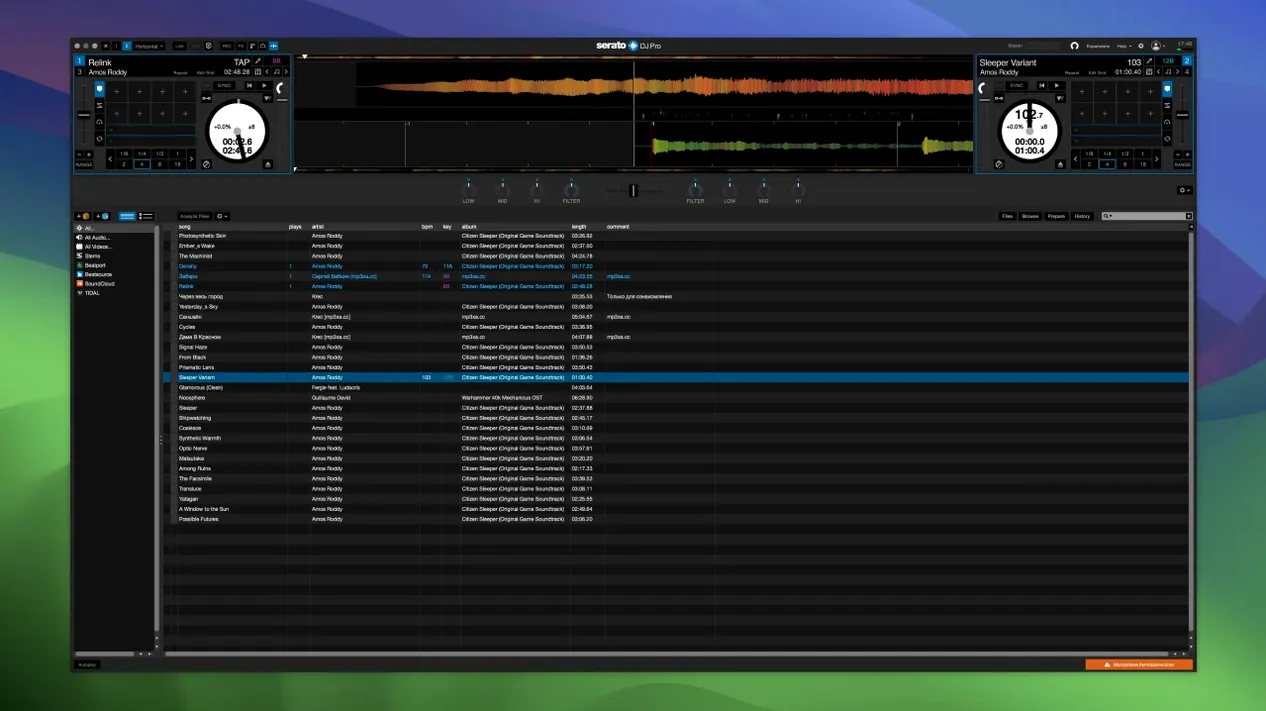
Version 4.0.5 is a maintenance release that keeps the core architecture stable while adding refinements to hardware integration, including the customizable Slip Release behavior. If you're looking at a file named something other than Serato DJ Pro 4.0.5.pkg, you're not getting the software from its source.
Native Apple Silicon and Intel binaries inside the installer
A legitimate copy of Serato DJ Pro arrives as a standard Apple installer package. Inside, you'll find native binaries for both Apple Silicon and 64-bit Intel processors, which means the application runs without Rosetta 2 translation on any supported Mac. The software itself is the professional hub of the Serato DJ suite, distinct from the entry-level Serato DJ Lite. Anything claiming to be a "Serato DJ Suite" bundle or a "full" version with a patched binary is a third-party repackaging—the developer ships one package for the pro application, with Stems controls for isolating vocals, melody, bass, or drums baked right in.
Requires macOS Monterey or newer
The current build asks for macOS 12 Monterey or newer. Once installed via the official .pkg, the app appears in your Launchpad like any other software. Bundled extras like the dedicated Suite installer aren't part of the developer's distribution model, so seeing a separate patch file is a strong signal the package has been tampered with. If you want to know about specific hardware compatibility, Serato's own downloads page lists supported macOS and Windows configurations in detail.
How fast and stable is it, really?
On an Apple Silicon Mac, the UI renders at display refresh with almost no frame drops during library scrolling or waveform zooming. The native ARM binary matters here — you avoid the memory overhead and occasional micro-stutter that Rosetta translation can introduce. I've watched Serato DJ Pro sit through five-hour sets without a single audio dropout, CPU sitting around 8–12% on an M1 Pro with two virtual decks and Stems active. That's not a benchmark, just an observation from normal use: key lock on four tracks, a couple of FX slots per channel, and Stems separation running in real time. The engine keeps latency low enough that scratching with a supported controller feels immediate, not like the software is thinking about it.
RAM usage tends to hover between 600 MB and 1.2 GB depending on library size and how many Stems you've analyzed. The first time you load a large crate, the analyzer queues up waveform and BPM data in the background, and you'll notice a brief spike in disk activity. After that, track loading is near-instant. The app isn't lightweight in the way a text editor is, but it's disciplined: it doesn't leak memory over long sessions, and closing decks frees resources predictably.
One stability detail worth knowing: if you're on a machine with both Intel and ARM slices available, the installer places a universal binary that macOS picks correctly. There's no hidden Rosetta fallback, and Gatekeeper won't complain if the package came directly from the developer's site. Crashes, in my experience, are rare and usually traceable to a controller firmware mismatch rather than the application itself.
Crates are stored as plain XML or SQLite in ~/Music/_Serato_
Serato DJ Pro doesn't live in a bubble. It reads your Music app library and any folders you point it at through the Files panel — those crates live as plain XML or SQLite databases inside ~/Music/_Serato_, which means you can back them up, sync them between machines with rsync, or exclude them from Time Machine selectively. The app respects macOS audio routing: you can send its output to a multi-channel audio interface, or loop it back through a virtual device like BlackHole if you're recording a set into another DAW.
On the MIDI side, any class-compliant controller shows up without drivers. If you run Ableton Link for tempo sync, Serato DJ Pro participates as a Link peer over the local network — no extra configuration, just enable Link in the setup menu and any other Link-aware app on the same Wi-Fi sees the beat grid. That's useful if you're running a hybrid setup with drum machines or a second laptop.
Spotlight won't index audio files inside a Serato library folder by default, but the crates themselves are searchable if you've added tracks from indexed locations. Quick Look works on any track previewed in the browser with a tap of the spacebar, which is a small macOS convention the developers kept intact.
Option-drag a track to skip auto-gain
Hold Option while dragging a track onto a deck and the software loads it without auto-gain adjustment — handy when you've already set your trim manually and don't want it overridden. Right-clicking the BPM display lets you cycle through tempo ranges for the analyzer, which is faster than opening preferences when you're flipping between a 70 BPM hip-hop crate and a 174 BPM drum and bass folder.
The Stems pad FX — Echoes and Brakers, for example — are not just toggle buttons. They respond to velocity if your controller pads send it, which means a lighter tap gives a shorter effect tail. That's not spelled out in the interface, but it's there. Another hidden gem: you can cue Stems components in headphones before bringing them into the live mix. Load a track, isolate vocals with one button press, and preview the acapella in your cue channel while the full track plays to the room. That one feature alone changes how you think about transitions.
Keyboard shortcuts mirror the hardware workflow. Command + F jumps to the search field, Shift + Command + Delete removes a track from a crate without deleting the file from disk, and the number keys map to cue points if your controller isn't plugged in. If you're preparing sets on a flight without hardware, the software remains fully navigable with just the built-in keyboard and trackpad.
Works without a controller in offline mode
Does it work without a controller? Yes. Serato DJ Pro runs in "offline" mode with two virtual decks and a crossfader you can drag with the mouse. You won't have tactile control over EQ or filters, but you can set cue points, analyze tracks, build crates, and test transitions. Some searches like serato dj pro mac full come from people hoping to avoid hardware entirely — that works fine for preparation, but performance without a controller is not the intended experience.
Will it clutter my Mac with background processes? No. The only background item it installs is a small helper for controller firmware updates, and that only runs when you initiate a firmware flash from within the app. There's no launch daemon, no menu bar agent, nothing that lingers after you quit.
What if I see something called "Serato DJ Pro Suite" or a separate patch? The developer ships one application: Serato DJ Pro. A file labeled Serato DJ Pro Suite 4.0.5 patch is not part of the official distribution. Similarly, searches for serato crack mac or serato dj pro 3.3.5 crack reflect older versions that people look for when they encounter activation roadblocks. The build described here, 4.0.5, is a clean installer — run it, open Launchpad, and you're done.
Can I trust a package named something like serato dj suite free download? That phrase describes a repackaging, not the product. The authentic file is a single .pkg with a straightforward name. If you're looking at a disk image stuffed with multiple installers and a patch folder, you're not holding what the developer ships.
Ready to mix in under three seconds with no splash screen
You double-click the app at 8:47 PM. The main window appears in under three seconds — no splash screen animation, no license nag, just the library browser and two empty decks. Your controller is already plugged in; Serato DJ Pro recognizes it during launch and maps all controls automatically. The status bar shows a green hardware icon, so you know the audio interface inside the controller is handling output.
You hit Command + F and type the first few letters of a track you've been opening sets with lately. It filters as you type. You drag it to the left deck — waveform renders, BPM locks at 124.0, key shows 2A. The track is already analyzed because you ran the analyzer on your entire library last week while making coffee. You load a second track on the right deck, something in 3A with a compatible key. Headphones on: you cue the incoming track, nudge the platter to align the downbeats, and bring the channel fader up slowly. The sync button is there, but tonight you're riding the pitch fader manually.
Halfway through the transition, you hit the Acapella pad for the outgoing track. The instrumental drops away, leaving just the vocal floating over the incoming beat. You tap Echo on the Stems pad and kill the channel — the vocal trails off in a rhythmic wash. The room doesn't notice the mechanics, which is exactly the point.
An hour in, you decide to record the set. You click the REC button in the toolbar, give the file a name, and choose AIFF. The recording captures the master output, pre-fader, at 24-bit. While it's rolling, you pull up a third track from a crate you built last month, preview it in the headphones, and set three cue points with the number keys. The record light stays solid the whole time — no glitches, no dropouts, just a growing audio file in ~/Music/_Serato_/Recording.
By 10:30 PM you've mixed through 40 tracks, recorded the set, and quit the application. CPU fans never spun up. The recording is ready to drop into Audacity for a quick trim. That's the workflow Serato DJ Pro is built for: fast, predictable, and transparent enough that you think about the music instead of the software.
Lucid Beatgrids engine
Version 5.0 introduces a new beatgrid analysis engine called Lucid Beatgrids. It gets downbeat detection right more often and follows tempo changes through a track automatically instead of forcing a single BPM across the whole file. When the tempo shifts, the BPM value now appears right on the waveform at the point of change — no more guessing where a track drifts. You can set the grid resolution to snap tempo changes by bar or by individual beat, and the new Set Grid Start and Set Beat / Set Bar tools let you manually clean up any grid that needs a human touch.
Cue Loops and streaming
Cue Loops tie a Hot Cue and a loop to a single trigger — hit the pad and you get both at once. Open Streaming support means you can pull from multiple streaming services in the same session without locking into one catalog. Tracks from Tidal and SoundCloud now show BPM and key data directly when the service provides it, and you can save tracks from supported streaming services to a favorites list through the context menu.
Library and workflow
An Explicit column tags age-restricted content. You can hide the Status and Type columns and control column visibility per crate. M3U import, a library protection feature, and a reset button for the played-tracks list round out the library changes. Serato iOS Transfer moves tracks, playlists, cue points, beatgrids, and metadata over to Serato DJ for iOS.
Performance and fixes
Startup time and search speed on large libraries are both improved. Updated drivers ship for several Pioneer DJ devices on macOS Tahoe. The release also patches crashes, memory leaks, UI glitches, track-loading errors, hardware connection dropouts, streaming-service bugs, and issues with stem separation, loop playback, cue-point handling, and metadata processing.
Note: macOS Big Sur 11 and earlier are no longer supported.
- macOS 12 or later
- Apple Silicon or Intel 64-bit
Comments 0
Sign in or create an account to leave a comment.
No comments yet. A codec, a slice, a machine — they appear after moderation.