Studio One for macOS
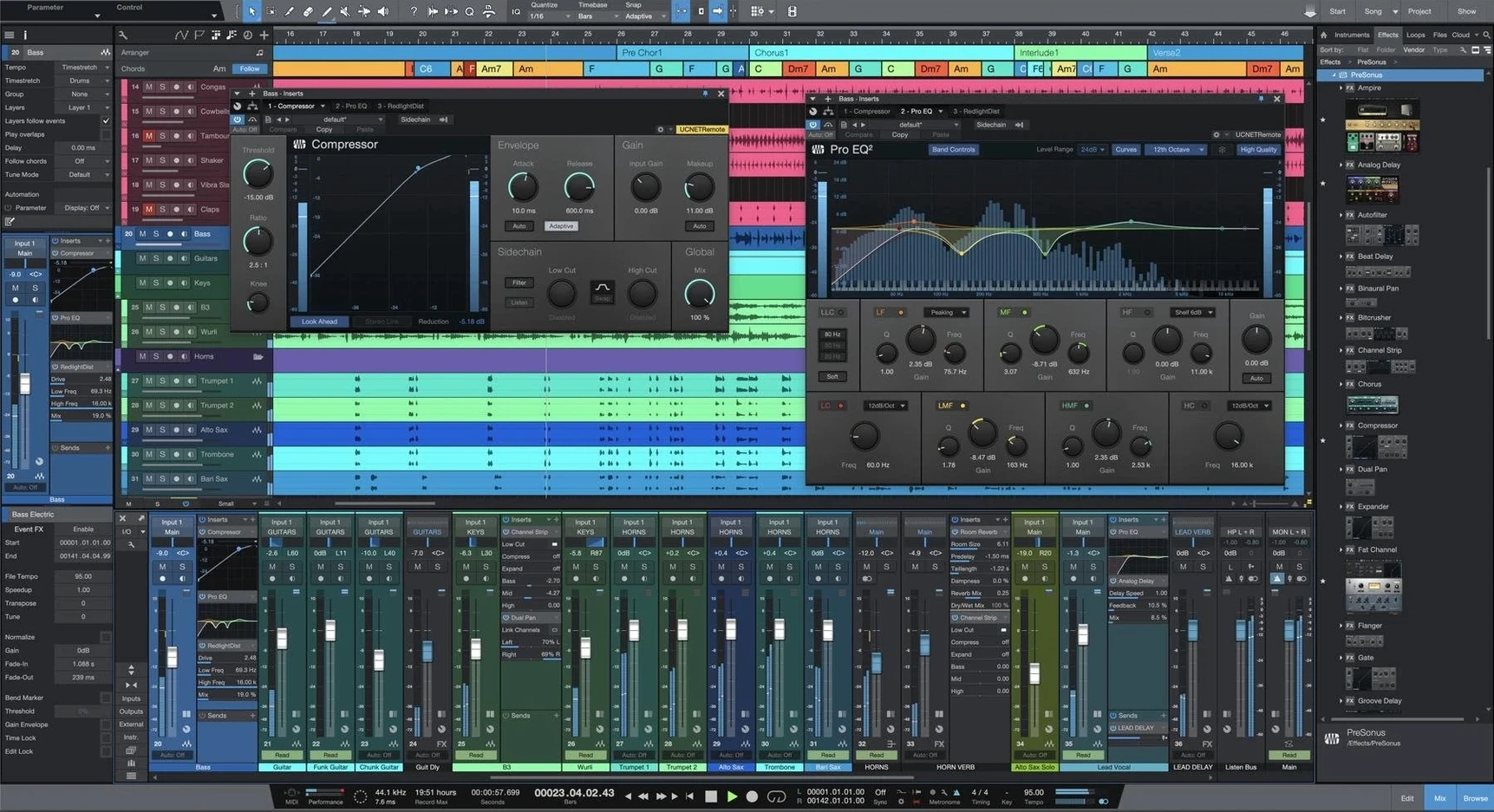
Studio One 7 runs on any Mac that can handle macOS 12.4 or later, so that's everything from Intel machines of the last several years through to the latest M-series chips. The app is a universal binary, running natively on both architectures without Rosetta 2 translation in the way.
At its core, Studio One is a digital audio workstation built around a single-window Song page. That's where you'll track, arrange, and mix, with unlimited tracks and buses to play with. It ships with a set of virtual instruments for synthesis, sampling, and rhythm programming, plus a collection of Native Effects plug-ins for processing. The whole thing is built for the full production pipeline, from recording right through to mastering, with performance tools for taking a set live.
Version 7 is fully backwards-compatible, so it'll open songs, projects, and shows from older releases without a fuss. The headline addition is AI-powered offline Stem Separation, which lets you pull apart a mixed stereo file into component parts. It also introduces advanced tempo detection for material where the tempo isn't locked to a grid, and Smart Templates that set up a session for you based on what you're trying to do.
If you work in a performance context, the Launcher now supports unlimited Scenes and Playlists, giving you a non-linear canvas for triggering clips and arrangements. It's a DAW that tries to cover the desk, the stage, and the mastering suite in one package, aimed at producers and engineers who want to stay in a single environment from idea to finished master.
Where drag-and-drop synth loading cuts out menu diving
If you're a producer who builds tracks from scratch with virtual instruments and samples, the drag-and-drop workflow removes a lot of friction. You're not digging through menus to load a synth or drop a loop onto the timeline. That alone makes it feel fast for beat-making and electronic production, especially with the Launcher now offering unlimited Scenes for clip-based arranging.
Mix engineers get the unlimited buses and the Native Effects suite right out of the gate. The Project page for mastering means you can handle an entire EP or album in one place without exporting to a separate mastering application. For someone doing stem mastering, the new Stem Separation opens up possibilities: receive a stereo mix from a client, pull it apart into drums, bass, vocals, and other elements, then treat each stem independently.
Live performers using a Mac on stage benefit from the Launcher's Playlists. You can trigger backing tracks, synth parts, and one-shot samples in a non-linear order, responding to the room rather than following a fixed timeline. If you're a singer-songwriter who also performs with tracks, this bridges the gap between studio DAW and live rig without learning a separate piece of software.
It's less of a natural fit for post-production audio editors who live in clip-based workflows with heavy video integration. Studio One can handle video, but that's not where its design emphasis sits. Similarly, if you only need to record two tracks of guitar and vocals and never touch MIDI or mixing, you'll be paying for power you won't use.
What the "Record and Mix" smart template builds for you
You launch the app and the Smart Template picker appears. You choose "Record and Mix," give the song a name, and set the sample rate to 48 kHz. Studio One builds the session: a handful of audio tracks, a basic reverb on a send, and a rough mix bus chain already in place.
You drag a drum machine from the browser onto the arrange window. It lands as an instrument track, pre-loaded with a kit. You tap out a pattern on your MIDI controller, quantize it to 16th notes, and duplicate the clip four bars at a time. A bass synth follows the same path — drag, drop, play, quantize, loop.
Now you plug in a mic and record a vocal take. The track arms automatically when you select it, so you hit record and lay down three passes. You use comping to stitch the best phrases into one take, dragging across regions to select the keeper from each pass. No separate track layers to manage; it's all visible on one lane.
With the arrangement roughed out, you open the Mix view. Each channel has its own fader, inserts, and sends. You add the stock FET-style compressor to the vocal, dial in a few dB of gain reduction, then pull up the Pro EQ to notch out some boxiness around 400 Hz. The drum bus gets a touch of saturation from a Native Effect plug-in.
You've got a stereo reference track you like, so you drag it in and the tempo detection analyzes it, mapping its tempo map to your session. Now your track grooves against the reference without manual warping. When the mix feels right, you switch to the Project page, add the song, sequence it with two other mixes for an EP, and set the track spacing. You render a DDP image for duplication, all without leaving the application.
Why your dock icon might launch an older version
The installer is a .dmg that places Studio One 7 as a new application. It does not overwrite an existing Studio One 5 or 6 installation, which is deliberate. But if you launch the wrong version from your Dock later, you'll wonder where the new features went. Remove the old app from the Dock and pin the new one to avoid the confusion.
On Apple Silicon Macs, the first launch can take longer than expected while macOS verifies the universal binary. This is normal for any large audio application and only happens once. If it hangs for more than a couple of minutes, a reboot usually clears whatever gatekeeper process is stuck.
Plugin scanning sometimes trips on older AU plug-ins that haven't been updated for ARM-native operation. If Studio One crashes during the initial scan, hold down the Option key while launching to open the plug-in manager in safe mode. From there you can disable problem plug-ins individually rather than pulling them all from your Components folder.
Stem Separation is an offline process, so it needs a chunk of free disk space for temporary files. On a Mac with a nearly full internal drive, the operation can fail silently. Offload some projects to an external drive before running it on a dense stereo file. The processing itself is CPU-intensive but runs in the background, so you can keep working in the Song page while it crunches.
If tempo detection misreads a track with rubato or half-time feels, manually tap the tempo with the Tap Tempo button while the track plays. That gives the detection algorithm a better starting point than analyzing from silence.
Does it overwrite my existing Studio One setup?
Does it replace my current Studio One version? No. Version 7 installs alongside any older release. Your existing Studio One 6 application stays untouched in your Applications folder. Songs you save in version 7 will open in version 7, but the older app remains functional if you need to revisit something without converting it forward.
Will my third-party plug-ins still work? If they're VST3 or AU format and compatible with your macOS version, they'll scan and appear. The application itself runs natively on both Intel and Apple Silicon, so plugins that are ARM-native will run without bridging. Intel-only plug-ins on an M-series Mac run through Apple's automatic Rosetta 2 translation inside the host process, which usually works transparently.
What happened to ReWire? Studio One 6 and 7 dropped ReWire support entirely. If your workflow relies on ReWire to sync with another application, you'll need to route audio between them using something like BlackHole or a hardware loopback instead. MIDI sync over IAC is still an option for clock.
Can I collaborate with someone on an older version? Version 7 opens songs from earlier releases without issue. Going the other direction is trickier: a song saved in version 7 will not open in version 6. You'd need to export stems or bounce tracks to share with someone who hasn't updated.
How F5 turns the browser into a one-stroke launcher
The browser's search field filters instruments, effects, loops, and files in one keystroke. Press F5 to focus it, type a few letters, and drag the result straight onto a track. It's faster than navigating folder hierarchies.
Hold Command while dragging an effect from one channel to another to copy it with all its current settings intact. Without the modifier, it moves the plug-in, removing it from the source channel.
In the piano roll, right-clicking a note and choosing "Select Notes of Same Pitch" highlights every instance of that note across the entire clip. Useful for adjusting hi-hat velocities or shifting all snare hits at once.
The Arranger Track sits above the timeline and lets you define sections like Intro, Verse, and Chorus. Dragging a section reorders the entire arrangement; tracks, automation, and all. It's easy to miss if you collapse the track height too far.
If you want to try the studio one 7 mac experience without committing to a full session, the Smart Template for mastering loads a Project page with the basic chain already routed. Drop in a stereo file and you're EQing and limiting within seconds of launch.
The Launcher's Playlists are not just for live performance. You can use them to sketch arrangement ideas by triggering different Scenes in real time, recording the performance as a linear arrangement on the timeline. It's a different way of building a track that suits producers who think in sections rather than left-to-right timelines.
- AI-powered offline Stem Separation for pulling apart mixed audio files.
- Advanced tempo detection for material with variable or ungridded tempo.
- Unlimited Launcher Scenes and Playlists for non-linear performance workflows.
- macOS 12.4 or later
- Apple silicon or Intel processor
Comments 0
Sign in or create an account to leave a comment.
No comments yet. A codec, a slice, a machine — they appear after moderation.