

Flicker Free for macOS
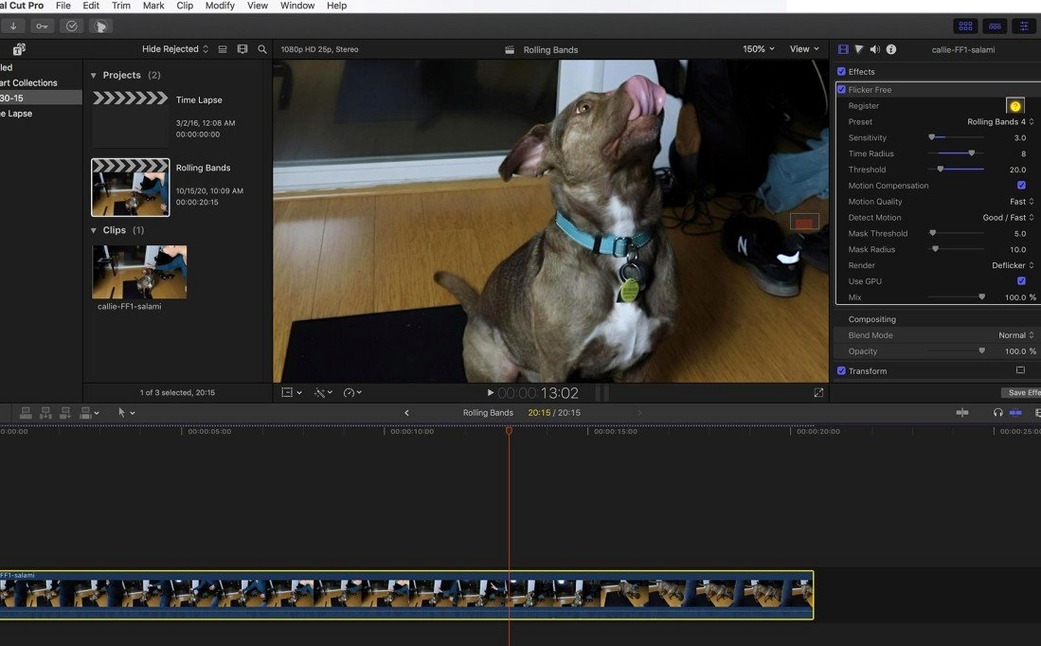
Flicker Free is a temporal video plugin that analyzes luminance shifts frame-by-frame to neutralize flicker without simply blurring the problem away.
Frame analysis — The engine examines surrounding frames while processing, calculating per-pixel adjustments to even out rapid brightness changes.
Time-lapse flicker — The same analysis logic targets the exposure inconsistencies that produce strobing in time-lapse sequences, treating each frame as part of a luminance stream rather than an isolated image.
Slow-motion artifact control — When high-frame-rate footage is slowed, unsynchronized shutter speeds interact with artificial lighting to create rolling dark bands. The algorithm detects and compensates for these periodic dips.
Monitor and screen flicker — The plugin is effective at removing the rolling scan-line bars that appear when filming computer monitors or LED walls, a scenario where simple frame-blending approaches usually fail.
Preset-driven workflow — Rather than building a fix from scratch, you pick a preset tailored to the flicker source, test it on a short rendered section, then apply the same profile across the full clip.
The first 48 hours with a deflicker tend to be the make-or-break window for anyone who's just installed it. Here's what I'd focus on.
Render a 10-second test slice before the full export
Start with a 10-second test region, not a full export. Pick a section where the flicker is obvious — ideally a mix of bright and shadow areas — and render that slice before you commit to a long queue. Flicker Free does its analysis during processing, so a short test tells you early whether the preset you chose is in the ballpark.
Second: resist the urge to stack fixes. If you apply the plugin and then add a curve adjustment on top, you're making the deflicker's job harder on the next pass. Put Flicker Free first in the effect chain, right after the source clip, so it sees the raw luminance values.
Third: name your presets. Once you land on settings that work for a specific lighting situation — say, sodium-vapor gymnasium lights or a specific model of LED panel — save the profile with a descriptive name. Six months later when you're in another edit bay with similar footage, you'll be glad you did.
One more thing that catches people off guard: the plugin processes temporally, meaning it looks at frames before and after the current one. That has a small but real consequence at clip boundaries. If you apply it to a clip that sits right against another on the timeline, leave a few frames of handle at the cut points. The analyzer needs that context; without it, the first and last few frames can show a different correction level than the rest.
Native ARM binary keeps timeline scrubbing smooth
On Apple Silicon, the plugin loads as a native ARM binary. There's no Rosetta translation step, and that shows in timeline responsiveness — scrubbing through corrected footage doesn't introduce the kind of micro-stutter you get from x86-only effects running in emulation. On Intel Macs the plugin remains perfectly functional, but you'll notice render times stretch out proportionally more on older hardware.
Memory usage is predictable rather than alarming. The temporal analysis holds a small rolling buffer of adjacent frames in RAM, so the footprint scales with resolution and bit depth but not with clip length. A 4K DCI timeline at 16-bit float might push a few hundred extra megabytes beyond the host application's baseline; 1080p projects barely register.
Stability-wise, the plugin has been well-behaved in my experience across the host applications it supports — After Effects, Premiere Pro, DaVinci Resolve, Final Cut Pro, Avid Media Composer, and any OpenFX-compatible host. Crashes tend to trace back to the host application's own GPU pipeline rather than to the deflicker itself. One practical note: if you're running multiple temporal effects on the same clip — a denoiser, a deflicker, and optical-flow retiming — render them in separate passes. Asking every plugin to analyze overlapping frame windows simultaneously is a recipe for sluggish timeline scrubbing.
Will it soften my footage?
"Will it soften my footage?" Not inherently. A bad deflicker works by averaging frames together, which acts like a temporal blur. Flicker Free adjusts per-pixel luminance values toward a local average without merging pixel data across frames. Detail that's present in the source stays present. The trade-off is that extreme flicker — the kind where entire frames go nearly black — can't be fixed without some visible compromise, because there simply isn't enough image data in those dark frames to reconstruct from. In those cases the plugin does what it can, but you'll see noise creep in.
"Does it work on footage that's already been graded?" It works, but as I mentioned earlier about effect order, you're better off deflickering before the grade. A colorist's power window or key might isolate a flickering region in ways that confuse temporal analysis. If the grade is baked into the clip and you have no choice, the plugin will still process it — just test more carefully.
"Can I use it on an adjustment layer, or does it need to go directly on the clip?" Directly on the clip. An adjustment layer composites everything below it into a single frame buffer, which strips the temporal context the plugin needs. You can nest the clip and apply Flicker Free to the nested sequence, but that adds a render step and may change how the host application hands off frame data. Clip-level application is the safest route.
Some editors find the plugin by searching for digital anarchy flicker free crack or flicker free plugin free download mac. Those searches come from people who've been burned by built-in deflicker tools and want to test whether a dedicated temporal solution actually solves their problem before committing. The version here, 2.1.6, handles the same flicker scenarios the product page describes: rolling bands from LED walls, time-lapse exposure drift, and the slow-motion lighting artifacts that show up when you push a Phantom Flex or Sony FS700 past 240 fps.
Dimmable LED panels create a slow diagonal roll across every clip
Picture a wedding videographer working an evening reception. The venue upgraded its lighting to dimmable LED panels — great for the couple's mood, terrible for the shutter. Every clip from the dance floor carries a slow, diagonal roll of dark bars that the built-in deflicker in their NLE can't touch without turning the footage into mush.
They bring a 30-second sample into their host application, drop Flicker Free onto the clip, and select the LED rolling bands preset. The first render — a 10-second test around the worst moment — shows the bars pulled down to near-invisibility while the texture of the bride's dress and the specular highlights on the disco ball stay crisp. Encouraged, they apply the same settings across the full two-hour reception timeline. Processing takes a while — temporal analysis at 4K is never instant — but the result is usable footage they'd otherwise have written off as a lighting casualty.
That's the scenario where a dedicated temporal deflicker earns its keep: one lighting type, one preset, and a batch of footage that would take days to fix manually with keyframes and masked adjustment layers. The same workflow scales down for a YouTuber dealing with a single flickering monitor in a talking-head shot, or up for a time-lapse photographer smoothing out an entire dawn-to-dusk sequence.
- Architecture: native Apple Silicon and Intel 64-bit (
ARMandx86) - Interface language: English
$ man flicker-free | grep -A2 "?"
Does Flicker Free work on older flickering footage that I shot years ago?
Yes, the plugin analyzes whatever frames are fed to it regardless of when the footage was recorded. Its deflickering logic targets luminance shifts in the material itself, so the age of the clip does not matter.
Comments 0
Sign in or create an account to leave a comment.
No comments yet. A codec, a slice, a machine — they appear after moderation.
More in Final Cut Pro Plugins
cd ../ FxFactory Pro
Final Cut Pro Plugins 68 MB
 Dehancer Pro
Final Cut Pro Plugins 382 MB
 Color Finale
Final Cut Pro Plugins 35 MB
 MotionVFX mInfographics
Final Cut Pro Plugins 8 MB
 MotionVFX mKBHD
Final Cut Pro Plugins 12 MB
 MotionVFX - mLowers Universal for FCP
Final Cut Pro Plugins 71 MB
 MotionVFX mModules
Final Cut Pro Plugins 5 MB
 Motionvfx - mTitle Cinematic
Final Cut Pro Plugins 5 MB