
AmpliTube for macOS
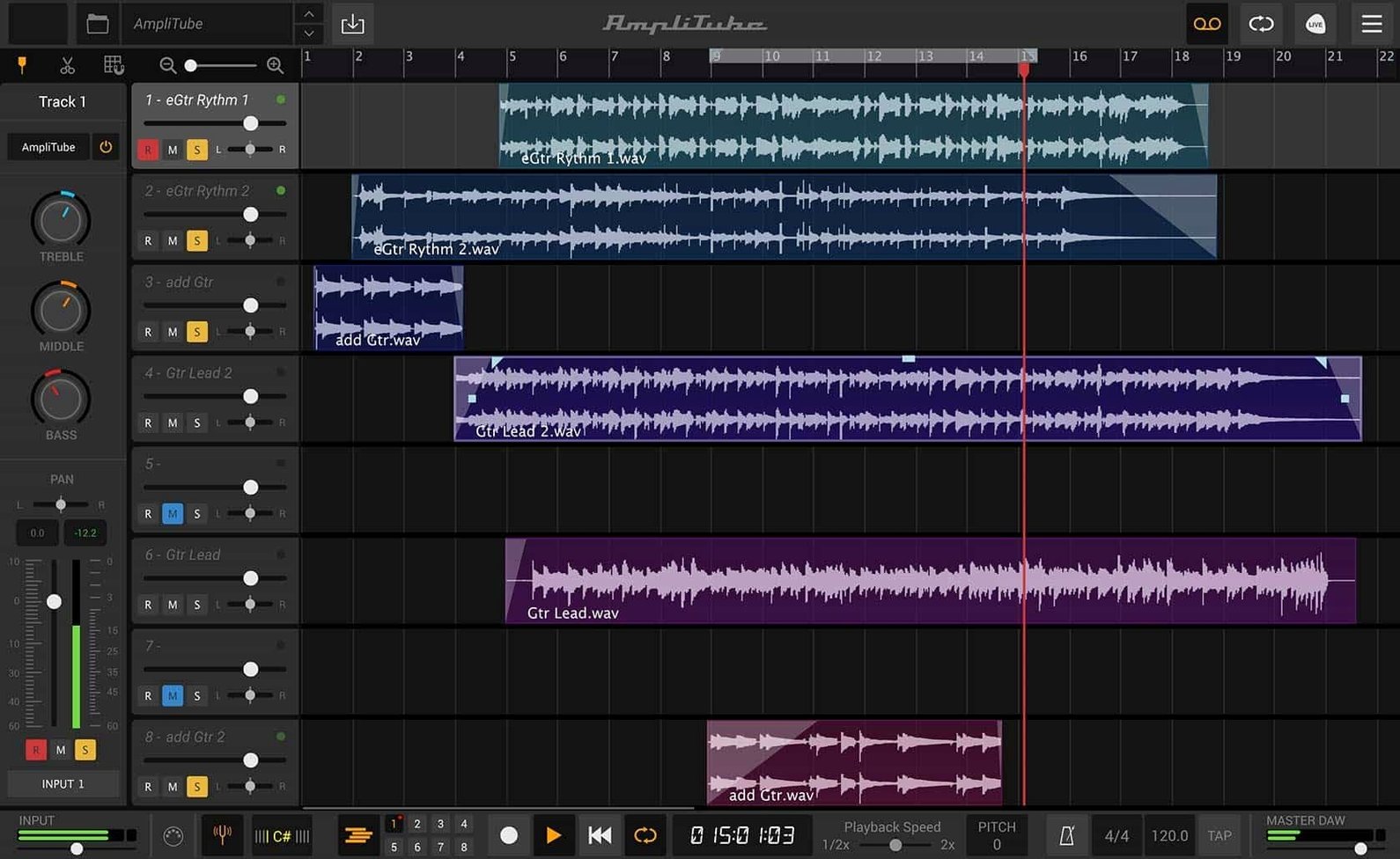
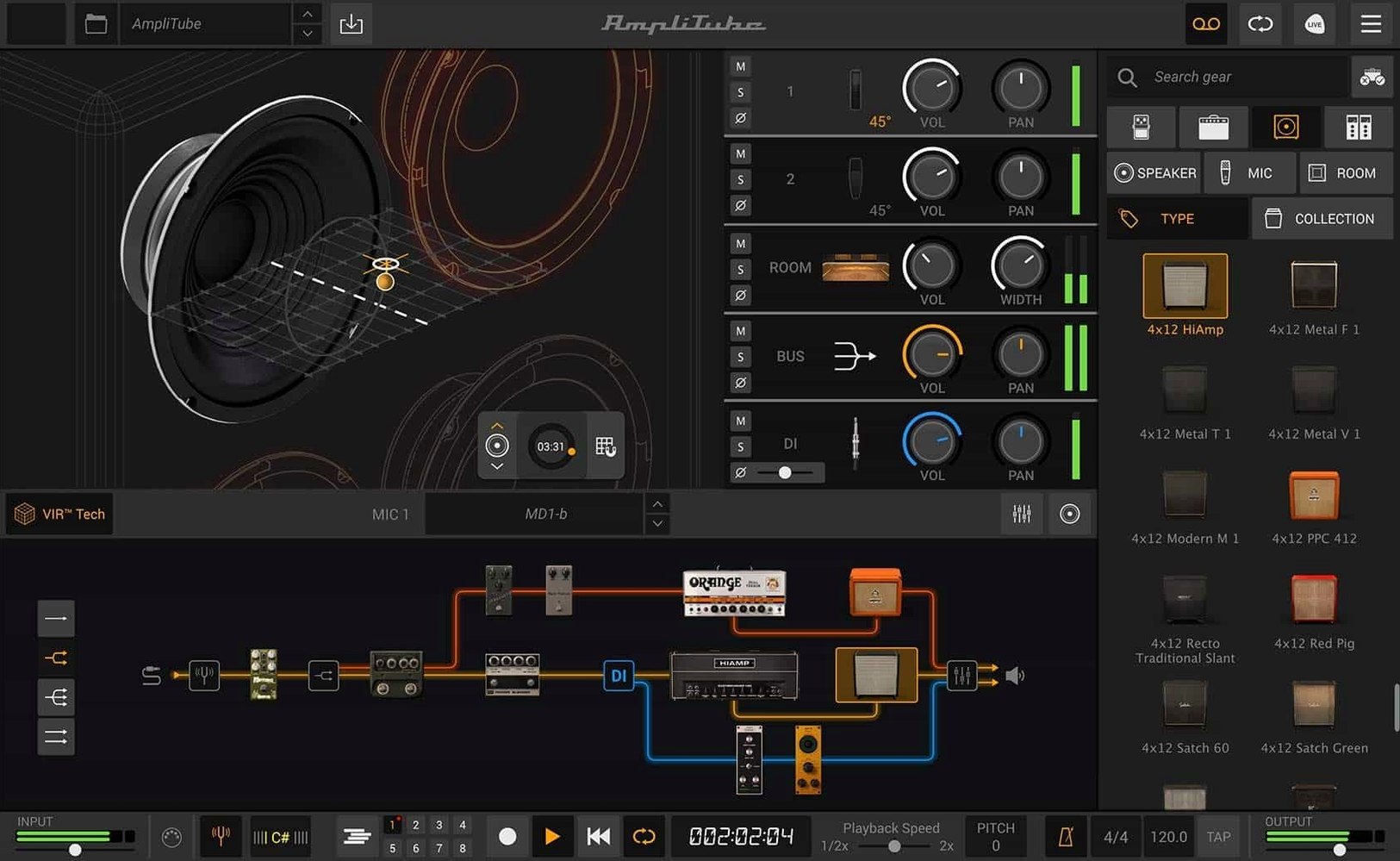
AmpliTube 5 is software that models guitar amplifiers, cabinets, and effects pedals on your Mac.
Craft a full rig without touching a cable
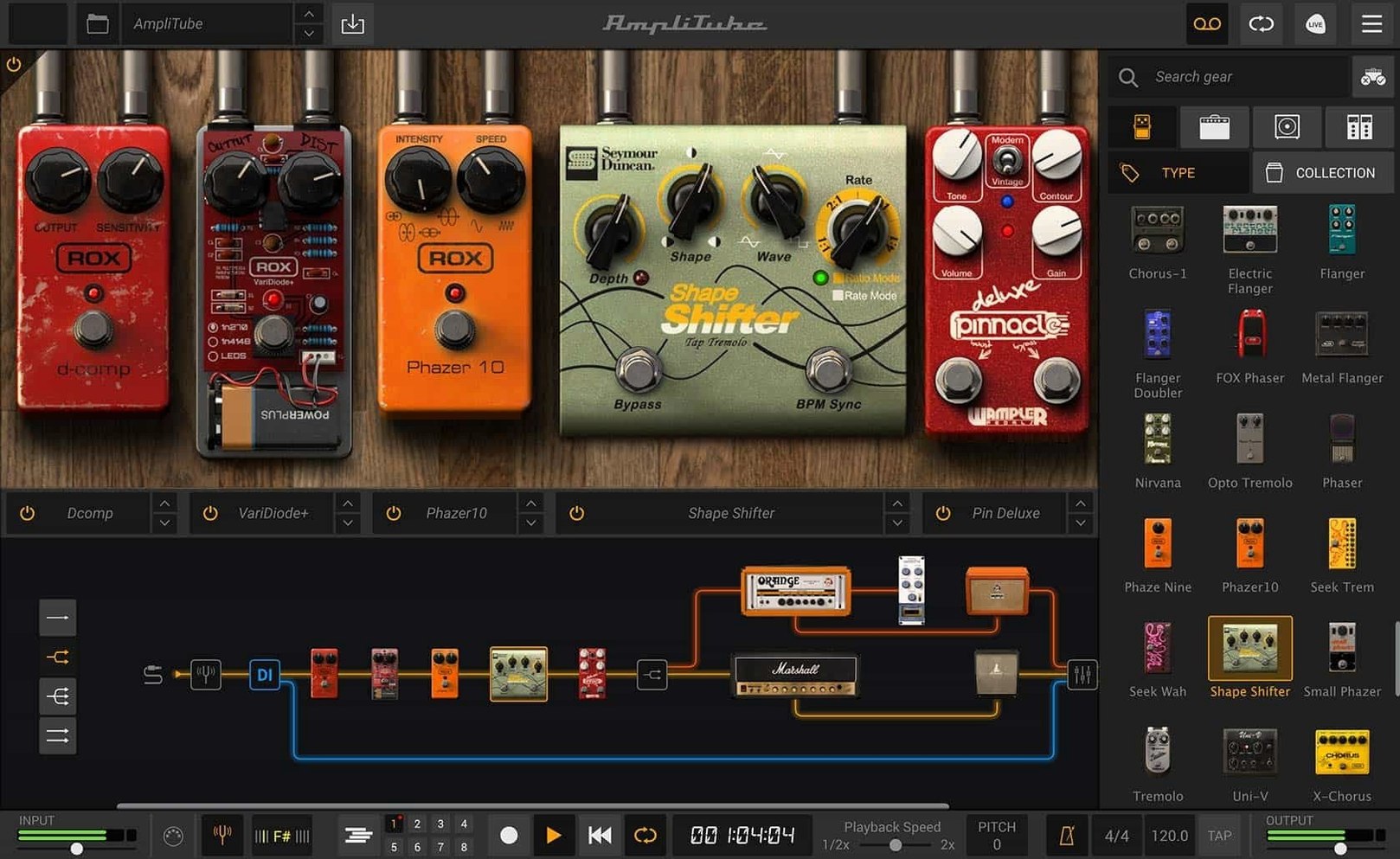
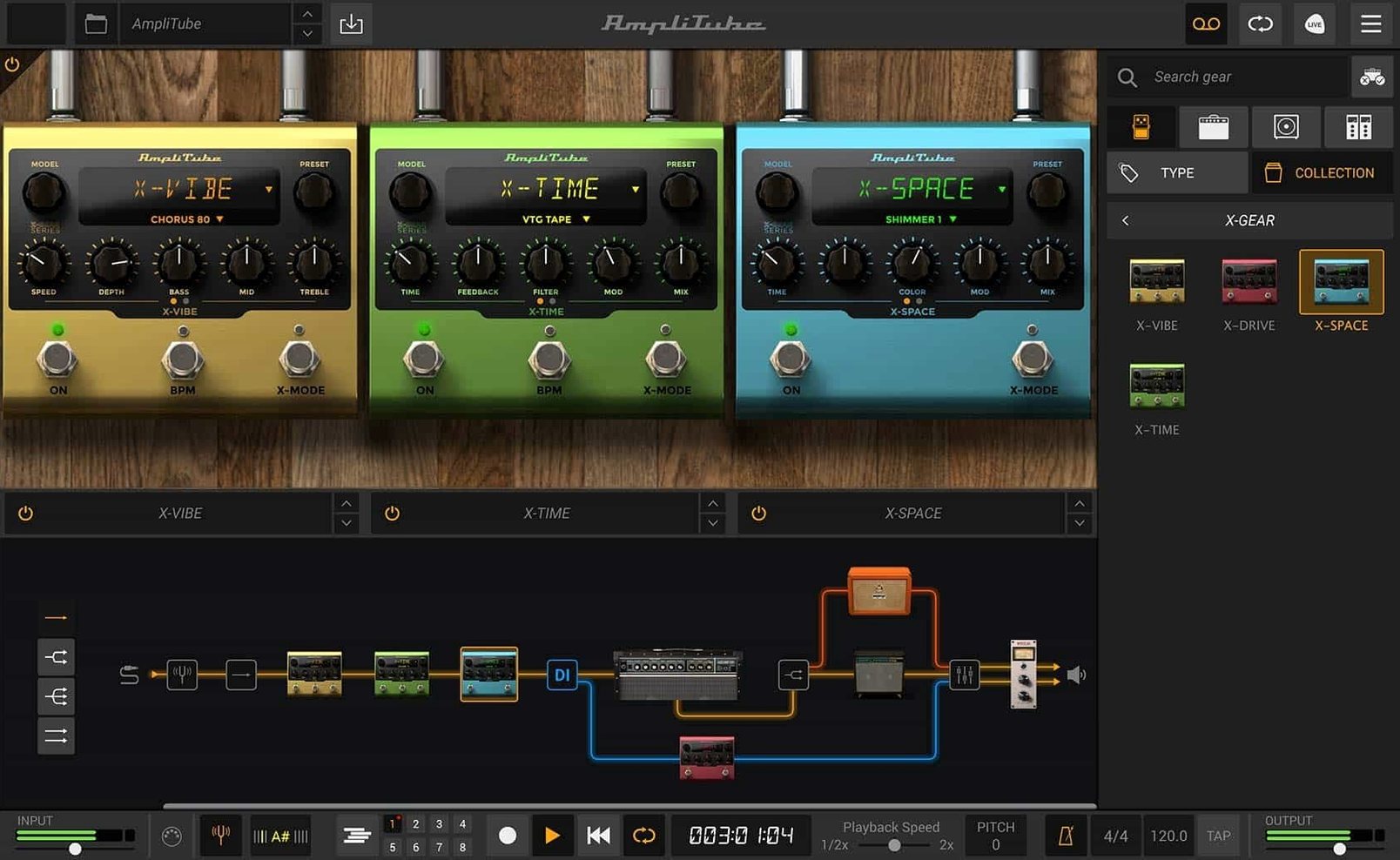
The signal chain supports drag-and-drop routing for up to 57 simultaneous gear models, so you can reorder stomps and racks as fast as you can drag a mouse.
Match the sound of a specific speaker cabinet
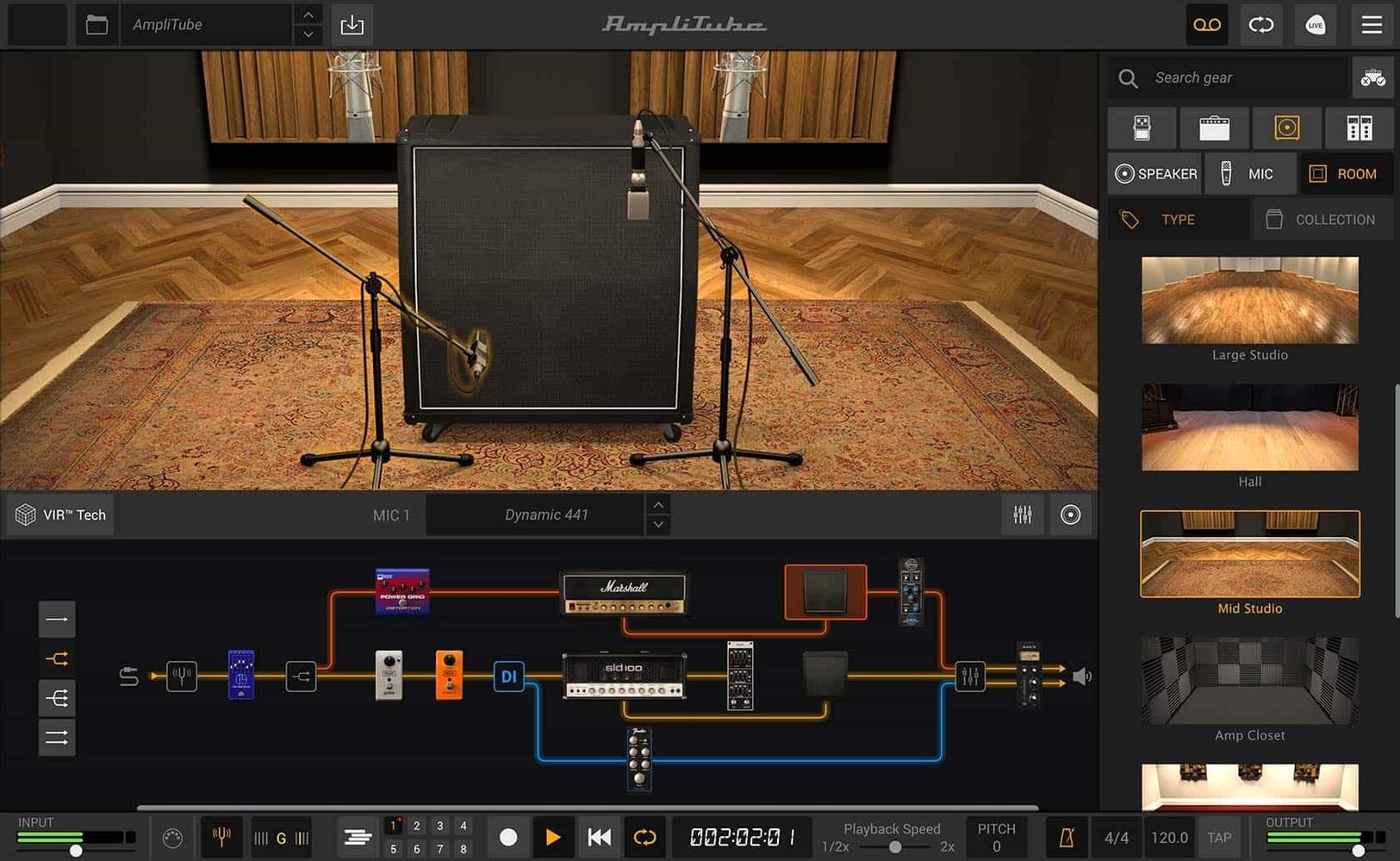
The cabinet section uses IK’s VIR technology to capture the acoustic response of a mic'd cab, and you can load custom IR files to pull in your own measurements.
Build a layered mix inside the plugin
A redesigned mixer with built-in effects lets you blend a direct signal with the processed amp signal right in the interface, without an extra send in your DAW.
Opening the standalone app—what meets you on the screen
You open the standalone app. The main window draws a virtual pedalboard across the bottom, an amp head above it, a cabinet to the right, and a rack of outboard gear filling the upper half. The first thing most people do is pick an amp. Click the amp slot, browse by collection or type, and drag something into place — say, the British Lead model. The interface rebuilds instantly.
Next, you pull three pedals from the stomp section into the signal chain: a compressor first, then an overdrive, then a modulation pedal set to a slow phaser. Each one lights up when you click it, revealing knobs that respond to mouse drags with numeric readouts in real time. You dial the drive back to 4.2, set the tone to 6.8, and the compressor threshold to -18 dB. No guesswork — every value is visible.
You move to the cabinet. The VIR panel shows a 3D representation of a mic'd cab, and you can slide the virtual microphone across the speaker cone while the sound changes continuously. You settle on a dynamic mic about halfway between the dust cap and the edge, angled 30 degrees. The low end tightens up immediately.
In the rack section, you drop a stereo delay and a plate reverb. You route them in parallel by dragging connection lines in the routing grid — the delay on one branch, the reverb on another, both feeding into the mixer. The mixer faders let you balance the wet signals against the dry amp tone. You save the preset as LeadPhaserWide and it appears in your user presets folder, ready for any session.
If you are working inside a DAW, the same process happens inside the plugin window. The AU or VST3 instance loads with the last state you saved, and the preset browser sits in the top bar, searchable by name or tag. A full rig from blank canvas to record-ready takes under two minutes once you know where everything lives.
One rig, two very different jobs
Take a bassist recording a demo at home. She tracks a clean DI through her audio interface, then inserts AmpliTube on the channel. She splits the signal in the mixer section: the dry DI stays clean and compressed, while the second path runs through an Ampeg-style bass amp and an 8×10 cabinet IR she loaded from her own collection. She pans the DI slightly left and the amp slightly right, then adds a touch of the built-in EQ on the master bus to roll off sub-bass rumble below 40 Hz. In fifteen minutes she has a punchy, layered bass tone that sits in the track without any external processing.
Later that week, the same bassist plays a small club gig with a laptop and a MIDI foot controller. AmpliTube runs as a standalone app. She maps three footswitches to preset changes: one for a clean verse tone, one for a driven chorus section, and one that engages a fuzz pedal and a noise gate in a single click. The CPU meter stays low enough that she runs a buffer of 128 samples without glitches. The mixer's built-in limiter catches any sudden spikes before they hit the PA. Same software, two completely different workflows — the rig adapts because the routing does.
Dragging a pedal between two others in one motion
Version 5 brought the drag-and-drop signal chain, and that alone rewrote the daily workflow. Before it, reordering pedals meant opening menus or right-clicking slots. Now you grab a pedal and drop it between two others in one motion. The routing grid underneath the main panel lets you see the entire signal flow at a glance, including parallel splits, which was buried in previous versions.
The VIR cabinet technology replaced the old cabinet section entirely. Instead of static impulse responses tied to a few mic positions, VIR gives you continuous movement of the virtual microphone across the speaker. You hear the difference in real time as you drag. For anyone who has spent hours blending multiple IR files to find the right phase relationship, VIR cuts that down to dragging a dot and listening — a task that takes seconds, not an afternoon.
The redesigned mixer put basic channel strip functions inside the plugin: per-channel level, pan, EQ, and effects sends. This means you can balance a multi-amp setup without touching your DAW's mixer. For live players, the mixer doubles as a monitor section where you can adjust the overall level and add a room reverb that doesn't print to the recording path when you are tracking through the standalone app.
A complex rig with 30 models and your session open times
On an Apple Silicon Mac, AmpliTube loads as a native arm64 binary. Plugin scans finish fast because the AU validation tool sees a clean universal binary. Session open times are dominated by preset loading; a complex rig with 30 models and four parallel IRs takes about three seconds to fully initialize on an M1 or M2 machine. Intel Macs running the x86_64 slice are slower to load large presets but run the DSP code without any Rosetta penalty.
CPU usage scales with model count and routing complexity. A basic rig — one amp, one cab, three pedals — sits around 8–12% on a single core of a recent Apple Silicon chip at a 64-sample buffer. Crank it up to a dual-amp setup with stereo rack effects, five pedals, and two VIR cabinets, and you might see 25–35%. Parallel routing does not double the CPU hit the way you might expect; the engine shares impulse response computations where it can. The mixer effects are lightweight — the EQ and dynamics are designed to run in the background without adding measurable latency.
Stability in daily use is solid but not flippant. The app rarely crashes during editing. When it does trip, it is usually during a preset change while the transport is running in a DAW, and even then the plugin recovers by reloading its state on the next playback start. The standalone app handles audio device changes gracefully — unplug an interface and it pauses, offers to switch devices, and resumes without restarting. Memory use for a typical rig hovers around 400–600 MB, which leaves headroom for other plugins.
Stacking a compressor after a high-gain amp and cranking both
One of the most common errors is stacking a compressor after a high-gain amp and cranking both. A distorted amp already compresses the signal heavily; adding another compressor downstream squeezes the dynamics into a flat, lifeless line. Beginners hear the volume drop and push the makeup gain, which raises the noise floor without adding punch. The fix: place the compressor before the amp, use a low ratio like 2:1, and let the amp's natural saturation do the heavy lifting.
Another trap is loading a custom IR without checking the level normalization. Third-party impulse responses can arrive with wildly different peak levels. Drop one into the VIR slot and it might clip the cabinet output on the first transient. The cabinet section has an input gain control — turn it down before loading an unfamiliar IR, then bring it up slowly while watching the output meter in the mixer section.
New users often ignore the mixer's DI channel entirely. They insert AmpliTube on a guitar track, dial in a tone, and move on. But blending a small amount of the direct signal — around 10–15% — can restore pick attack and string definition that heavy cabinet filtering removes. The mixer makes this a one-fader move, yet it sits unused in many sessions because people never scroll past the amp and cab panels.
Finally, some beginners treat the noise gate as a cure for all hum. A gate set too aggressively chops off note tails and makes sustained notes stutter. The gate in AmpliTube works best with a slow release and a threshold set just below the quietest playing. If the hum is from a real guitar with single-coil pickups, no gate can remove it without artifacts — the solution is to turn away from the monitor or fix the source, not to crank the gate threshold into the playing range.
- The signal chain now handles mixed DI signal with drag-and-drop routing, so you can blend a dry input alongside the processed path.
- A new cabinet section running VIR technology models the acoustic interaction between a speaker and its enclosure.
- The built-in mixer is redesigned with onboard effects, keeping basic leveling and processing inside the plugin window.
- macOS 10.15 or later
- Intel or Apple Silicon Mac
- 64-bit application
$ man amplitube | grep -A2 "?"
What plug-in formats does AmpliTube 5 support?
It ships asAU, VST, and AAX formats, so it drops into Logic Pro, Ableton Live, Pro Tools, and most other DAWs on macOS.
Comments 0
Sign in or create an account to leave a comment.
No comments yet. A codec, a slice, a machine — they appear after moderation.