HarborDrop for macOS
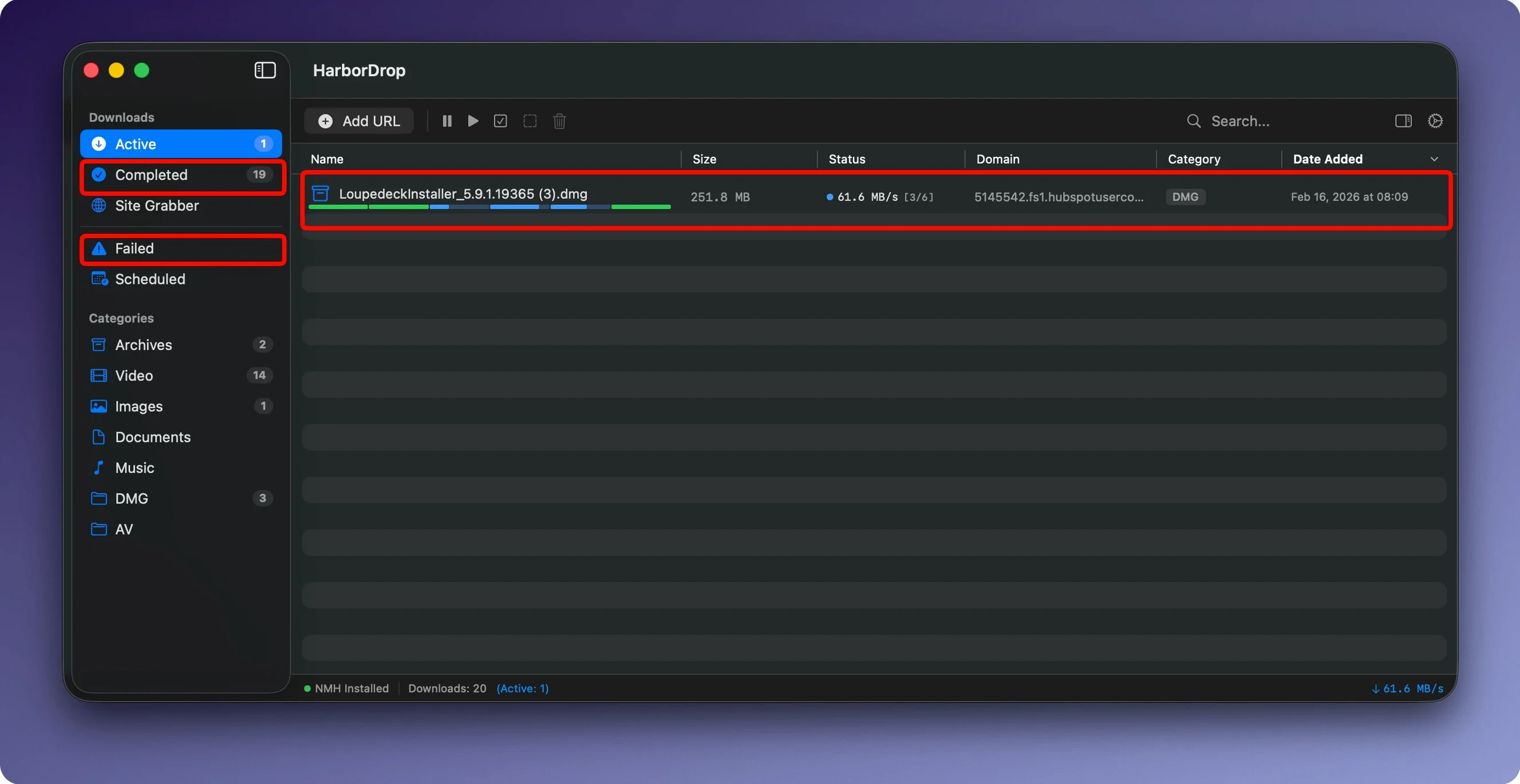
Version 1.4 didn’t ship a flashy changelog, but that’s fine — HarborDrop has quietly settled into a spot where it complements the tools you already reach for. It’s a download manager that doesn’t try to be a media library or a file converter; it grabs what you point it at and hands the result back to Finder, ready to pass into your existing workflow.
The browser extension is the natural entry point. It covers Chrome, Firefox, Edge, and Chromium-based Arc, so whichever side of the Blink/Gecko divide you live on, HarborDrop can intercept downloads directly instead of making you copy URLs around. Once a download kicks off, the app splits it into chunks — the segmented approach that keeps speeds up where servers allow it. HLS stream support means non-DRM video from supported sites lands as a single file you can watch offline without a browser tab staying open.
Where HarborDrop earns its keep next to tools like Hazel or Keyboard Maestro is the post-download automation. It can pop open the file’s enclosing folder in Finder the moment a transfer finishes, which sounds small until you’re juggling a dozen grabs and don’t want to dig through ~/Downloads by hand. There’s also a Shell script hook — point it at a script and it runs after the bytes land, so renaming, moving to a watched folder, or triggering a transcoding queue becomes part of the download itself.
It’s a macOS-native app (Intel and Apple Silicon) that needs Monterey or later, and it ships in English, German, and Korean. No activation dance required. If your browser’s built-in downloader feels like a suggestion rather than a tool, HarborDrop fills the gap without trying to replace everything around it.
a video researcher’s morning
Imagine someone pulling together reference clips for a documentary. They’re bouncing between a few video platforms, grabbing interviews and b‑roll — none of it DRM‑locked, just large files that Chrome would handle one at a time. HarborDrop sits in the menu bar; the extension catches each stream link as they browse. They queue six clips before lunch, walk away, and come back to a folder of .mp4 files already sorted by domain, because they set up a site‑based folder rule the day before. No manual renaming, no clipboard juggling.
Set your chunk count in preferences first
When you first launch the app, spend ten minutes in the preferences pane. It’s not flashy, but that’s where the mechanics live. A few moves that pay off early:
- Check your segment count. HarborDrop defaults to six chunks per download. On a fast connection hitting a server that throttles per‑connection, dropping to three segments can actually finish quicker. Test it with a known large file from a CDN you use regularly.
- Point the download folder somewhere deliberate. Instead of
~/Downloads, pick a dedicated directory like~/HarborDrop. The automation scripts work cleaner when they know exactly where fresh files land. - Install the extension in your main browser only at first. Arc, Chrome, Firefox — pick one. Get the interception behaviour comfortable before spreading it across every browser you have open. It avoids the “which browser grabbed that link?” confusion.
- Try a tiny automation. Write a two‑line Shell script that copies the finished file to an “archive” folder and set it as the post‑download hook. Even something that small teaches you how the script‑passing works — the full file path arrives as an argument, so
$1is your friend.
Why segment uploads stall on slow connections
the extension doesn’t intercept links
Most often this is a permissions gap. After installing the extension, right‑click its toolbar icon and check that it has “access to all websites” rather than “only on click.” Some Chromium builds reset this after updates. Also: HarborDrop needs to be running before the browser opens for the handshake to work cleanly. If you launched them in the wrong order, quit both and start the app first.
HLS streams land as tiny text files
The browser extension captures the .m3u8 playlist, but HarborDrop can’t follow it if the stream is DRM‑wrapped. Non‑DRM HLS works fine; if you consistently get a small playlist file instead of video, the source is likely encrypted. Try a different, openly‑served stream to verify the setup — the app isn’t broken, it’s just hitting a locked door.
shell scripts don’t execute
macOS Gatekeeper can block scripts that HarborDrop tries to run, especially if the script was downloaded from the internet. Run xattr -d com.apple.quarantine /path/to/your-script.sh once in Terminal, then test again. Also make sure your script is chmod +x — HarborDrop won’t fix permissions for you. The log file inside ~/Library/Logs/HarborDrop/ usually tells you exactly what failed.
downloads slow down after the first few seconds
Some hosts detect parallel chunking and rate‑limit the connection. If you notice a burst of speed that then flatlines, dial the segments back to one or two. HarborDrop remembers the setting per‑download, so you can keep high segments for CDNs that like it and drop down for pickier servers. There’s a tendency to assume “more segments equals faster,” but the network stack doesn’t always agree.
The dock icon also doubles as a quick drop target — dragging any URL from a browser or text file straight onto it starts a download without the extension. Handy when you want to grab a file from a link someone sent in a chat and don’t want to open a full browser window just for that.
- macOS 12 (Monterey) or later
- Apple Silicon or Intel Mac
- Browser extension requires Chrome, Firefox, Edge, or Arc
Comments 0
Sign in or create an account to leave a comment.
No comments yet. A codec, a slice, a machine — they appear after moderation.