
Arturia Analog Lab V for macOS
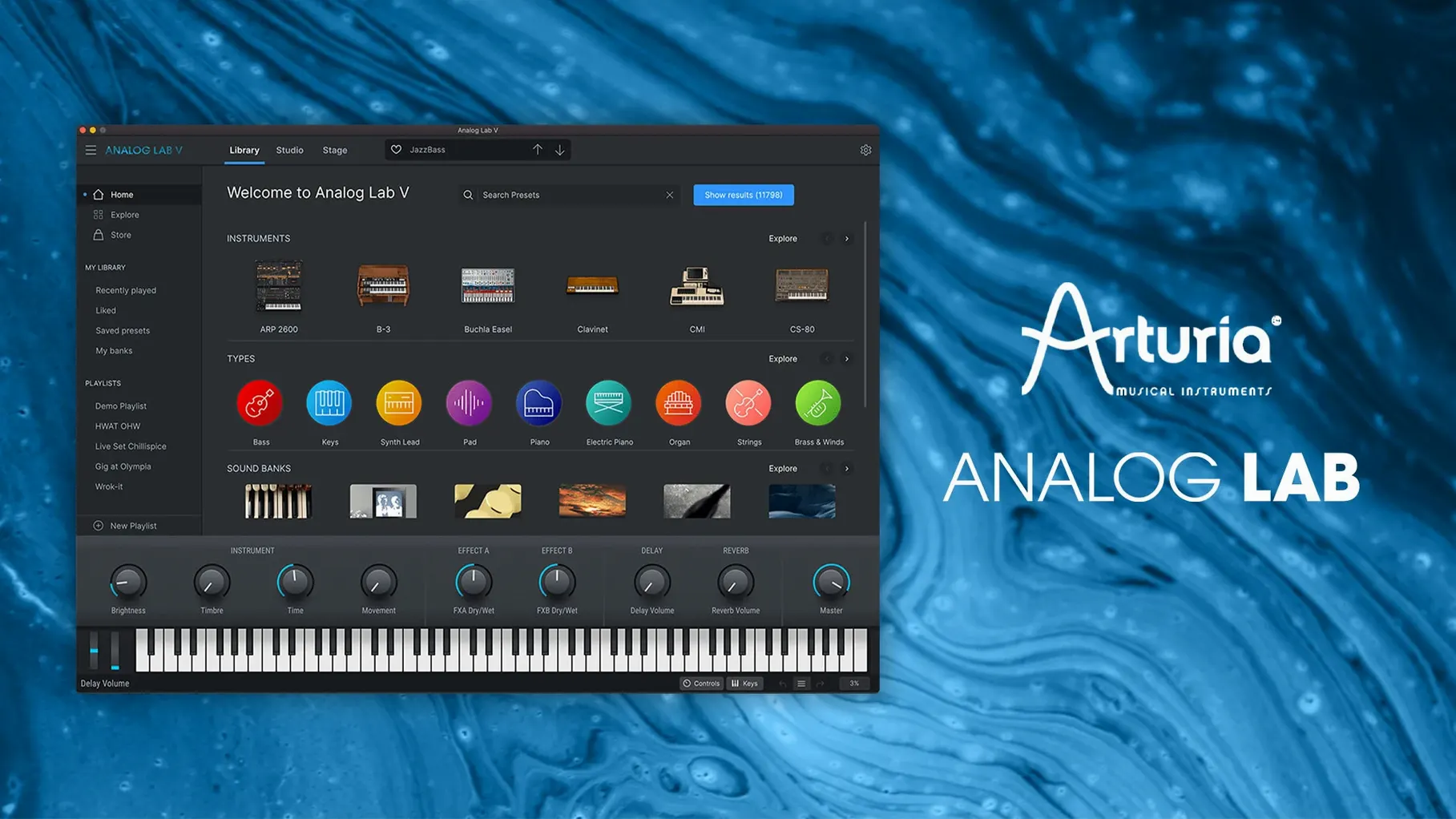
The Macro section is where Analog Lab V stops feeling like a preset player. Four controls per patch—sometimes a filter cutoff and an envelope amount, sometimes a wavetable position and a shimmer reverb mix—let you push a sound somewhere the original designer didn't. It works because the mappings aren't generic; Arturia ties each knob to parameters that actually matter for that specific patch.
- Every preset exposes four macro knobs and four macro faders on a dedicated panel, so you adjust timbre, movement, and space without opening a full synth interface.
- The browser groups sounds by instrument, type, and style; the "Similar" tab cross-references timbral qualities, which is useful when a pad is close to what you need but not quite.
- Standalone mode runs outside a DAW, which makes it practical as a sketchpad or a live keyboard rig.
- Plug-in formats cover
Audio Units,AAX,VST2, andVST3, so it slots into Logic, Pro Tools, Ableton, and Bitwig without translation layers.
What you hear in a mix is the Arturia modeling engine underneath—the same DSP that powers the individual V Collection instruments. The macros just give you the fastest lane to the parts that change a sound's role in an arrangement.
Need a sound in seconds, not after tweaking oscillators?
A few groups fall into Analog Lab V naturally, and for different reasons. The first is the producer who needs a sound now—not after twenty minutes of oscillator tuning. Scrolling through a category, auditioning with a single click, and twisting a macro until the pad sits behind a vocal is a working method that doesn't break flow. These users tend to live in the Browser, rarely touching the full instrument views even when they have a V Collection license sitting alongside.
Live performers are the second group. Loading the standalone app and mapping the eight macro controls to a controller's physical knobs turns a laptop into a preset machine with just enough real-time shaping to keep a set interesting. No menu diving on stage. The fact that the same patch recalls its macro assignments every time means muscle memory actually builds across rehearsals.
Sound designers get something different: a starting-grid. Flipping through the "Similar" tab from a patch that's 80% right often lands on a variation that sparks an idea. They might never touch the macros—instead they pull the patch into the full instrument, tweak oscillator sync or mod routing, and resave. Analog Lab becomes the index, not the destination.
A quieter group: keyboard players coming from hardware workstations. The patch names, the categorization by instrument family, the immediate knob response—it maps to decades of muscle memory from turning on a Roland or Korg board and hitting a category button.
Details you'll miss until someone points them out
The browser search field does partial matching across patch names and instrument names. Type juno and you get every patch sourced from the Jun-6 V, even if "Juno" isn't in the patch title. It works for sound designers too—jmj pulls up patches inspired by Jean-Michel Jarre's palette.
Holding Command while clicking a macro knob snaps it back to the saved value. On a patch where you've pushed the filter too far open and lost the character, that one shortcut undoes the mess without reloading the whole preset. The same key works on the macro faders.
The standalone app remembers your last MIDI controller mapping across sessions. If you assign Macro 1 to a physical knob on an Arturia KeyLab or any generic controller, that binding sticks—even after quitting and relaunching. It's stored per-controller, not per-patch, which means one mapping session covers every sound you load.
Right-clicking a preset in the browser adds it to a user playlist without opening it. You can build a setlist for a gig, a shortlist for a mix session, or a "maybe" pile while you browse, then work through the playlist later. The playlists live as simple .labx files inside your user folder under ~/Library/Arturia/Analog Lab V/playlists/, so backing them up is just a file copy.
The latency setting in the Audio/MIDI preferences panel affects standalone mode only—the plug-in defers to your DAW's buffer. If you're playing live through the standalone app, dropping to 128 samples or lower makes the keyboard response feel immediate; the same patch inside Logic at a 512-sample buffer will feel slightly more distant but won't tax the CPU during a dense mix.
An hour with it, narrated
You open the standalone app first, not your DAW. The point is to find sounds without the pressure of an arrangement waiting. After the splash screen, the browser lands on the last patch you played—a Prophet-style brass that worked in yesterday's session. You ignore it and click Type: Pad.
The list reorders. You scroll with the arrow keys, auditioning each pad with a few chords from the MIDI controller. Nothing grabs you—too much motion, too dark, too polite. You click the Similar tab on a patch called "Warm Swell," and the browser refreshes with eight related timbres. The fourth one, "Granular Dusk," adds a slightly grainy texture that sits behind the chord rather than inside it. That's closer.
You switch to the Macro panel. The first knob is labeled Texture—it blends between the raw wavetable and the granular layer. You pull it to about 11 o'clock, reducing the grit. Macro 3, labeled Space, controls a reverb send that's too cavernous at its saved position; you dial it back to a third. The pad now breathes without dominating. You save the modified version as a user preset with Command+S, giving it a name that means something in the context of the track you haven't started yet.
Now you launch the DAW. An empty project, 120 bpm. You load Analog Lab V as a VST3 instrument on a new track, open the browser, and navigate to My Presets. The edited pad is there. You drop a simple chord progression into the piano roll—four bars, minor key—and hit play. The pad fills the space convincingly, so you leave it and reach for a bass sound.
Back in the browser: Type: Bass, Style: Modern. You audition ten patches in under a minute, landing on a sub-bass preset from the Mini V model. The Macros panel offers Drive, Cutoff, Release, and Sub Level. You shorten the release so the bass doesn't smear across chord changes and nudge the sub level to sit above the kick drum you haven't programmed yet. By the time the basic harmonic sketch is down, you've spent more time playing than sound-designing, and that's exactly the balance the tool is built for.
Someone who uses it differently
Consider a sound designer working on a game soundtrack who needs a library of short, tonal impact sounds—something between a percussive hit and a pitched stab. They're not browsing by Type or Style; they're hunting by instrument family because they know the SEM V's dual filters can produce a narrow, resonant burst that cuts through a dense ambient layer.
They open Analog Lab V inside their DAW, filter the browser to Instrument: SEM V, and click through every patch in the list—not listening for musicality, but for attack transients. A patch called "Filter Knock" has the right snap but rings too long. They hit the Macro panel: Decay gets shortened to a value near zero, Resonance tightens the ring, and Filter EG Amount shifts the pitch envelope so the hit starts high and drops fast, creating a percussive arc. The patch is unrecognizable from its saved state.
They save it as a user preset, then repeat the process on a dozen more patches across different instrument models—ARP 2600 V, CZ V, Modular V—building a custom folder of hybrid impacts. Over an afternoon, Analog Lab V has functioned not as a preset library but as a raw material lode, with the macros acting as a fast sculpting set they touch before ever opening a full synth interface. When the game's audio engine calls for 60 unique impact variations, the folder is ready, and every sound stays recallable because user presets are stored with their macro positions intact.
Deep sampling platform or a curated preset machine?
Native Instruments Kontakt and Analog Lab V solve opposite problems. Kontakt is a deep sampler platform—you load an instrument library, and underneath you get multi-mic mixing, articulation switching, scripted legato transitions, and an effects rack. It's the tool you reach for when a string arrangement needs convincing portamento or a drum kit needs round-robin samples with velocity layers. The trade-off is cognitive: building a multi-instrument Kontakt setup takes deliberate sound-selection and template planning. Analog Lab V gives you a single patch at a time with eight immediate controls, and the browser pushes you toward the next sound faster than any Kontakt library browser manages. For a composer scoring to picture who needs a sampled orchestral flute, Kontakt wins. For a producer building a synth-pop track who needs a CS-80 brass patch and a Solina string machine in the same ten-minute window, Analog Lab V is the shorter path.
u-he Diva is a single synthesizer with an obsessive analog-modeling engine—oscillator drift, per-voice component variation, and three selectable filter models per voice. It sounds extraordinary. But Diva is a synthesizer you program; its preset library is a starting point, not the whole product. Analog Lab V's relationship to its presets is the inverse: the preset is the unit of work, and the macros refine it. If you want to design a bass patch from raw oscillators and hear how the Jupiter-style filter resonance behaves at different cutoff slopes, Diva is the instrument. If you want to scroll through 200 bass presets from a dozen modeled synthesizers and tweak the one that fits, Analog Lab V is the browser that makes that possible. Many producers run both—Diva for sound design sessions, Analog Lab V for writing sessions—and drag patches between them via the DAW track.
Xfer Serum is a wavetable synthesizer with a visual modulation system and a huge preset-sharing community. Its wavetable editor lets you draw harmonics or import custom waveforms; its LFO system can modulate almost any parameter as a complex, drawn shape. Serum does one synthesis type with extreme depth. Analog Lab V covers dozens of synthesis types—subtractive, FM, wavetable, granular, physical modeling—across different instrument engines, but at a surface level. The wavetable patches in Analog Lab V come from Pigments and from Arturia's modeled synths, and you can shape them with four macros at a time, but you cannot import a custom wavetable or draw an LFO curve. For a sound designer building evolving bass music patches, Serum's depth is essential. For a keyboard player covering synth parts in a live show, Analog Lab V's breadth across instrument types is the more practical fit.
- Added patch compatibility for the new MiniFreak V soft-synth.
- Added support for AstroLab 2.0 hardware.
- Improved the update handling so the library stays in sync with less friction.
- Strengthened connection stability when talking to attached devices.
- Made file transfers to AstroLab more reliable.
- If you own an AstroLab, Arturia recommends installing this Analog Lab release before updating the keyboard firmware.
- macOS 11 (Big Sur) or later
- Apple Silicon or Intel 64-bit Mac
$ man arturia-analog-lab-v | grep -A2 "?"
Does Analog Lab V work with projects that used the older Analog Lab?
Yes. The plug-in still carries the Analog Lab V name and loads in existing sessions without changing sounds or routing.
What plug-in formats does Analog Lab V support on macOS?
It runs asAudio Units, AAX, VST2, and VST3, alongside a standalone application.
Comments 0
Sign in or create an account to leave a comment.
No comments yet. A codec, a slice, a machine — they appear after moderation.
More in VST Plugins
cd ../ Arturia Augmented BRASS
VST Plugins 2.3 GB
 Arturia Efx AMBIENT
VST Plugins 285 MB
 Arturia Emulator II V
VST Plugins 700 MB
 Arturia FX Collection
VST Plugins 16.1 GB
 Arturia Mellotron V
VST Plugins 2.1 GB
 Arturia MiniFreak V
VST Plugins 468 MB Updated
 Arturia Pigments
VST Plugins 1.8 GB
 Analog Realism Sphinx 101
VST Plugins 82 MB