

Cableguys Snapback for macOS
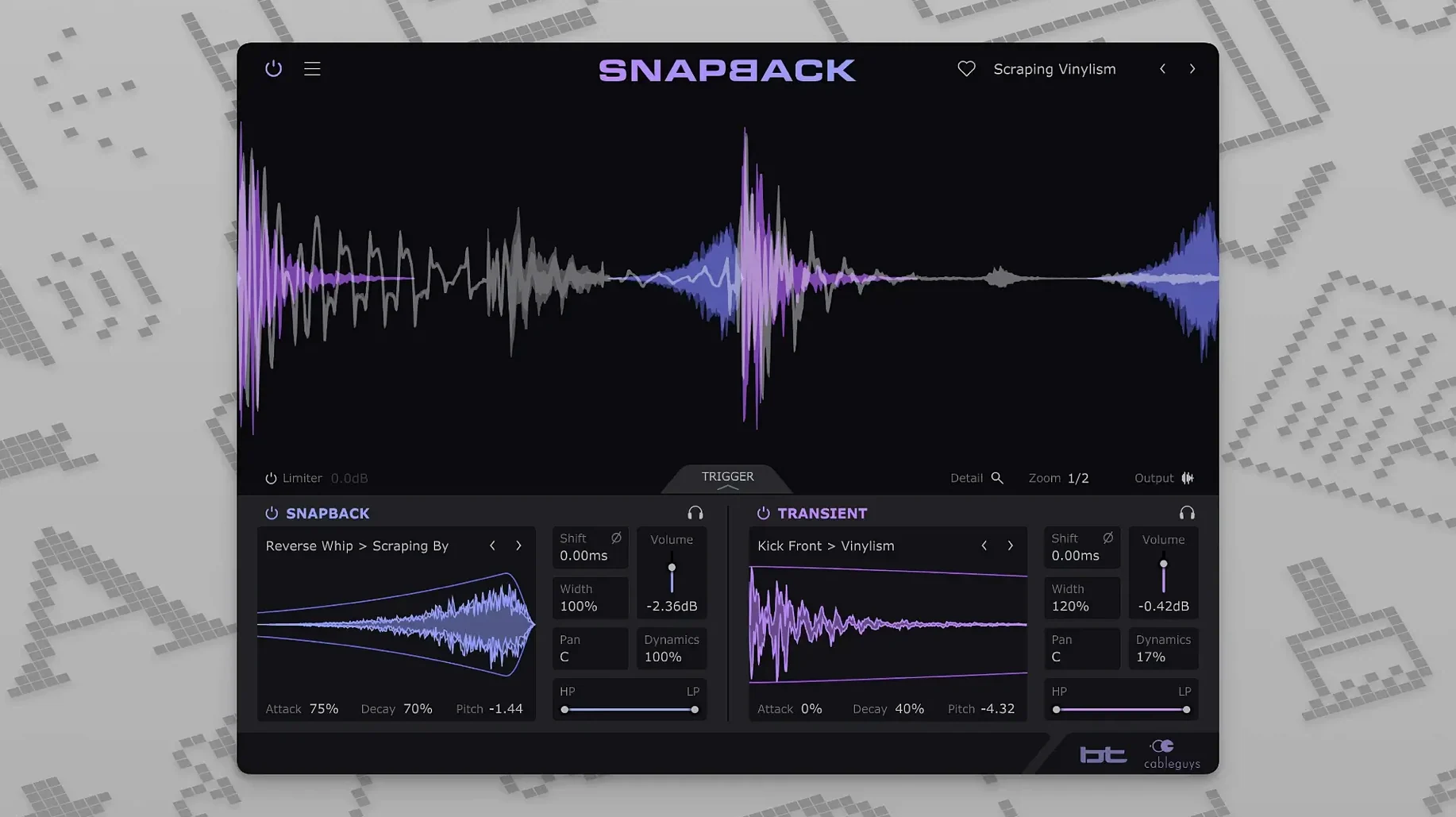
Mixing drums often means chasing transients by hand — nudging a sample a few milliseconds forward, then back, then giving up and accepting a slightly flammed kick. Snapback is built for that specific annoyance. It listens to a drum track, detects each hit, and snaps one or more added samples to the same moment in time.
Does it reinforce kick and snare without manual layering?
- Kick and snare tracks — add attack or body without manually aligning a second layer.
- Drum buses — reinforce the whole kit with a consistent transient character.
- Percussion tracks — layer shakers, tambourines or claps onto an existing performance and keep the timing tight.
What you can adjust once it is loaded
After a sample is in place, the plugin gives you real control rather than a static one-shot layer. Envelopes shape how the sample enters and fades, filters trim the frequency range, and the phase adjustment helps avoid low-end cancellation when you layer another kick. A useful detail is that samples can be placed before the transient, not just after it, which changes the perceived attack without shifting the original hit.
Why do I reach for the phase invert button first?
Out of the box, Snapback works. But a few tweaks turn it from a quick layer into something that sits in a mix without fighting you. The first thing I reach for is the phase invert button — it is small, easy to miss, and fixes more problems than any other single control. When you layer a kick sample over a kick track, some amount of low-end cancellation is almost guaranteed. Flip the phase and listen; one position will sound noticeably fuller. Do this before you touch any EQ.
Next, open the envelope section and pull the decay down. The default decay is generous, which works for long 808 tails but turns a snare layer into a washy mess. Shortening it to match the natural length of the original drum keeps the hit punchy and the mix clean. While you are there, dial the attack just a few milliseconds up if the layered sample has a sharp click you want to soften — the transient of the original drum still carries the impact.
If you work with live drum recordings, switch the detection sensitivity away from its default. A loud hi-hat bleeding into the snare mic can trigger false layers. Raising the threshold slightly tells Snapback to ignore the bleed and lock only onto the snare hits. The waveform visualizer shows exactly what it is hearing, so you can see the threshold line relative to the incoming signal and set it with your eyes as well as your ears.
Why start with the built-in 200-sample library?
When you are still learning how Snapback reacts to different material, a few habits save time. Start by loading a single sample from the built-in library rather than dragging in your own collection immediately. The included 200-plus samples are already trimmed and gain-staged for the plugin. You get a feel for how the alignment behaves without wondering whether your own sample has a sloppy start point or an extra 6 dB of gain throwing off the detection.
If you produce in Ableton Live, place Snapback on a return track and send your kick and snare to it. This is not the obvious first move — most people insert it directly on a channel — but a return lets you blend the layered sample in parallel and process it independently with an EQ or a transient shaper afterward. In Logic Pro, the same idea works with a bus send. You keep the original drum untouched and mix in the reinforced signal to taste.
For beatmakers working with sampled breaks, try this on the first day: load a break onto an audio track, insert Snapback, and pick a tight closed-hat sample from the library. Set the detection to react only to the snare hits by filtering the sidechain input — the built-in filters let you focus the detector on a specific frequency range. The result is a break where every snare gets a crisp, consistent hat layer without a single manual edit.
How does the Reverse button save me from printing and aligning by hand?
Version 1.1 brought two concrete additions. The Reverse button is the one you will feel immediately. Flipping a sample backward before it hits the transient creates a sucking, reversed-lead-in effect that used to require printing, reversing, and aligning by hand. Now it is one click, and it stays perfectly locked to the hit every time. On snare buildups or transition fills, this alone justifies the plugin.
The expansion from 16 to 256 addressable MIDI ports matters if you run a large template with multiple instances of Snapback spread across tracks. Before 1.1, hitting the 16-port ceiling meant some instances stopped responding to MIDI triggers. In a dense production session with drum layers on a dozen channels and MIDI notes firing from a controller or a sequencer track, the old limit could break the workflow silently — the plugin just would not trigger. Now it scales far beyond what a single project is likely to throw at it, so you can set up MIDI-triggered sample fire on as many tracks as your DAW allows.
How lightweight is it on an M-series Mac?
Snapback runs native on Apple Silicon and Intel, and in daily use it behaves like a lightweight utility rather than a processor-heavy effects chain. On an M-series Mac, a single instance adds negligible CPU load — I have seen it hover around one to two percent on a busy drum track, even with the waveform visualizer updating in real time. You can comfortably run instances on every drum channel in a project without pre-rendering or freezing tracks.
Latency is low enough that you can track through it or keep it active while playing in MIDI parts without feeling a disconnect. The detection itself introduces no audible delay; the alignment happens fast enough that the layered sample feels like part of the original hit, not a separate event trailing behind it.
Stability has been uneventful, which is the best kind of stability for a plugin that sits on time-critical drum tracks. Across AU, VST3, and AAX formats, I have not seen it drop alignment mid-session or lose its place after a tempo change. If your DAW supports plugin delay compensation — and every major host on the supported list does — Snapback reports its latency correctly, so the layered output stays sample-accurate with the rest of the mix.
On older Intel machines still running macOS 10.13, the plugin stays within its modest footprint, though the visualizer will get slightly less smooth when the session gets large. Turning the waveform display off — a small performance switch in the interface — reclaims those cycles if you need them. For most users on modern hardware, that will never be necessary.
- 1.1: adds a Reverse button for flipping sample playback.
- 1.1: MIDI port addressing expands from 16 to 256 ports.
- macOS 10.13 or later
- Apple Silicon or Intel 64-bit Mac
- VST 2, VST 3, AU or AAX host DAW
$ man cableguys-snapback | grep -A2 "?"
Which plug-in formats does Snapback support?
It runs as VST 2, VST 3, AU and AAX, and works on both ARM and x86 64-bit Macs.
Comments 0
Sign in or create an account to leave a comment.
No comments yet. A codec, a slice, a machine — they appear after moderation.
More in VST Plugins
cd ../ Bogren Digital Ampknob BDH 66o6 Plus
VST Plugins 253 MB
 Blue Cat Audio Blue Cats PatchWork
VST Plugins 587 MB
 Black Rooster Audio The ALL Bundle
VST Plugins 3.5 GB
 BABY Audio Humanoid
VST Plugins 39 MB
 Arturia Pigments
VST Plugins 1.8 GB
 Arturia MiniFreak V
VST Plugins 468 MB Updated
 Arturia Mellotron V
VST Plugins 2.1 GB
 Arturia FX Collection
VST Plugins 16.1 GB