Cymatics QUAKE for macOS
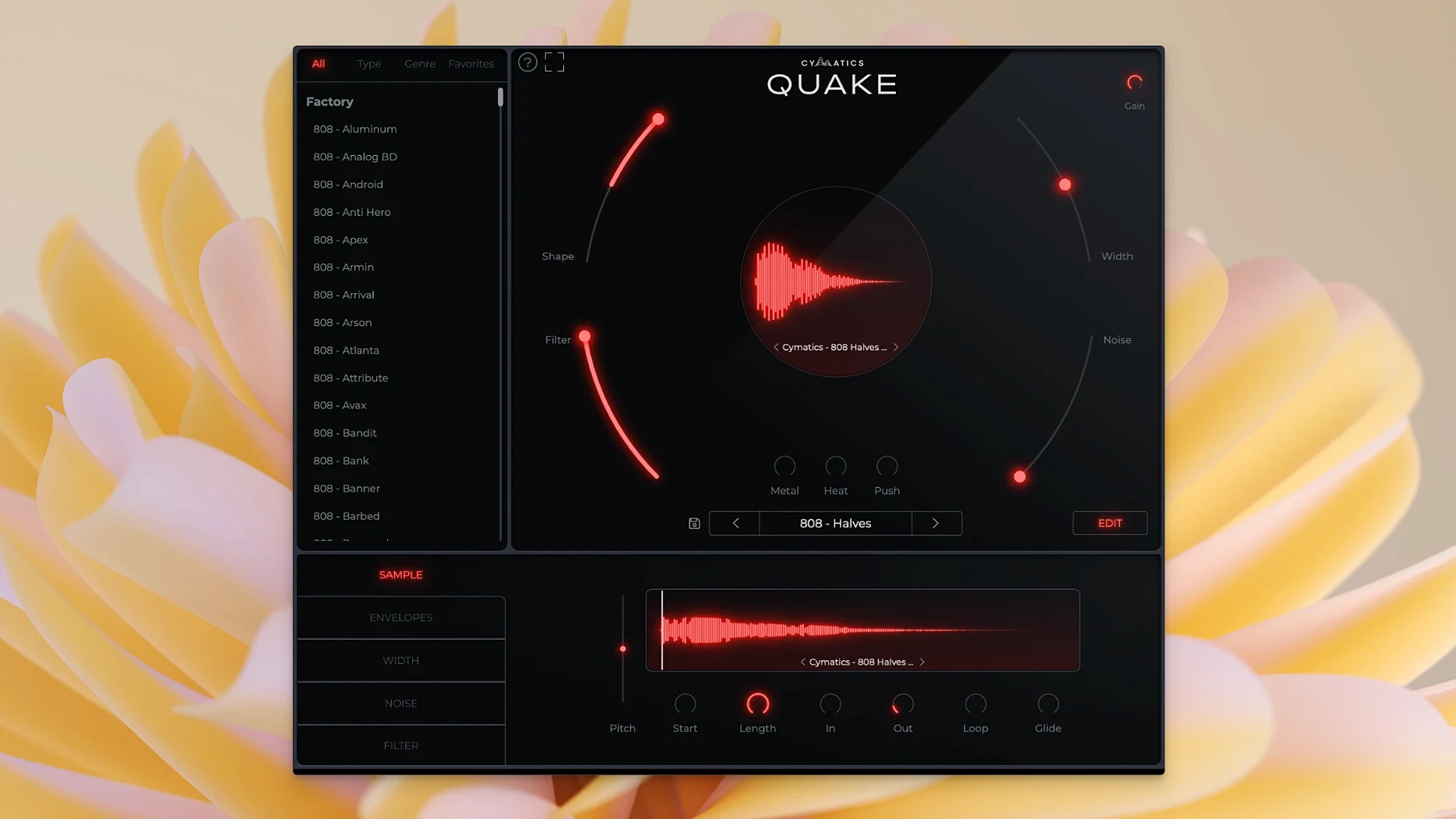
QUAKE is a bass engine plugin built for designing bass and 808 sounds from the ground up rather than triggering pre-baked samples. It sits on MIDI tracks as a standalone instrument, typically feeding a dedicated bass bus where you shape the low end further with your usual channel strip tools.
Building 808s from scratch with the Shape control
- Building 808s with full control over tone and envelope via the Shape control
- Dialing in stereo width on a bass part without losing mono compatibility
- Carving out unwanted low-mid mud with the Filter section before the sound hits your mixer
- Browsing a categorized preset library when you need a starting point fast
It’s a synth, not a sample pack
- It is a synthesizer, not a sample pack—every preset is fully customizable
- The plug-in runs as a virtual instrument, so you load it on an instrument track, not an audio track
- Version 1.0.0 targets Intel and Apple Silicon Macs from macOS 10.14 onward
Producers who start every bass part from a blank instrument track
QUAKE makes a lot of sense for producers who build their low end from scratch on every project rather than dragging in the same 808 one-shot folder. If you regularly open a blank instrument track for bass duties, the workflow fits right in. Beatmakers working in genres where the 808 is the emotional center of the track—trap, drill, certain branches of modern R&B—tend to click with it fastest, because every major control is a single knob turn away instead of buried behind mod-matrix menus.
Sound designers who treat bass layers as a craft rather than a slot to fill get a lot out of the Metal, Heat, and Push stages. Those three controls stack different saturation characters, and the way they interact means you can build a distortion chain without leaving the plug-in window. That alone suits anyone who wants a bass sound to arrive already textured before it ever touches a bus processor.
It is less of a natural fit for producers who prefer acoustic bass instruments or who rely on ROMpler-style bass libraries with dozens of articulations. QUAKE does not model upright bass, electric bass, or anything in the physical modeling realm. It lives squarely in synthesized territory. If your template already has a go-to subtractive synth with a patch library you know cold, QUAKE overlaps with that workflow some—though the immediacy of the genre-sorted preset menu might still pull you in when a deadline is tight.
Does it replace my sample library?
Does it replace my sample library? Not exactly. QUAKE is a synthesizer that generates sound from oscillators and processing stages, so it complements a sample library rather than mirroring it. You can absolutely design sounds that rival a processed 808 sample, but the approach is synthesis-first. If you currently rely on dragging .wav files into an audio track, switching to QUAKE means switching to a MIDI workflow. Some producers end up using both: samples for quick layering, QUAKE when they need a bass that follows the pitch and velocity changes of their MIDI performance without stretching artifacts.
What plug-in formats does it ship as? On macOS the installer provides AU and VST3 components. It loads as a virtual instrument, so you point your DAW to an instrument slot, not an effect insert.
Will it run on an older Intel Mac? Version 1.0.0 supports x86_64 and ARM, with a macOS 10.14 floor. On a 2015 MacBook Pro it should work, though heavier preset patches may push the CPU a bit depending on how many voices you stack.
Can I use my own samples inside it? No. QUAKE does not have a sample-import slot or a wavetable import feature. All sound generation happens within its internal engine. If you need to blend an external sample with a QUAKE patch, you do that on separate tracks in your DAW.
Beginner slip-ups worth knowing about
One common mistake is loading QUAKE on an audio track and wondering why no sound comes out. It is an instrument plug-in, so it needs a MIDI track or an instrument track depending on your DAW's routing conventions. In Logic Pro, that means a software instrument channel strip. In Ableton Live, you drop it onto a MIDI track, not an audio track. In FL Studio on Mac, it loads as a generator in the channel rack.
Another early trap is ignoring the Width control entirely on 808 patches. New users sometimes crank Width to full, get a huge-sounding bass in headphones, then play the track back on a mono Bluetooth speaker and lose half the low end to phase cancellation. A safer habit: keep Width modest while you are building the core of the track, then widen only after checking the mix in mono. The control is useful, but it trades solidity for space, and on sub frequencies that trade-off is unforgiving.
The Filter section also gets overlooked by people who treat QUAKE like a preset machine. Even when a preset sounds close to what you want, a quick nudge on the filter cutoff can pull out rumble that clashes with the kick drum. Beginners sometimes reach for an external EQ instead, which works, but the internal filter is pre-distortion in the signal path—cutting there shapes how the saturation stages react, which gives a different result than EQ after the fact.
Finally, stacking Heat, Metal, and Push all at high values because each one individually sounds good often produces a fuzzy mess in a dense mix. Each stage adds harmonics, and three saturated layers piled together can eat headroom fast. A better approach: push one stage hard for character, use the other two lightly for texture, and let the bass breathe a little.
Moving bass design into one window instead of chaining processors
Since this is the first public release, the main practical shift for anyone using QUAKE is moving bass sound design into a single dedicated window rather than chaining three or four separate processors. The control set is deliberately compact—no modulation matrix, no ten-tab interface. For daily work, that means less time hunting through tabs and more time turning the seven main knobs until the bass sits right.
The preset library ships organized by genre, which changes the browsing experience compared to hunting through a generic synth preset menu. If a drill session needs an 808 with a short decay and aggressive midrange, you go straight to the Drill category instead of auditioning every bass patch in alphabetical order. That alone reshapes how quickly you can test ideas against a reference track.
The dual-architecture build means Apple Silicon users run natively without a Rosetta translation layer. In practice that translates to lower CPU overhead on M-series machines, though the exact difference depends on voice count and DAW buffer settings. For Intel users, the x86_64 binary runs directly on older hardware, so no compatibility bridging is needed on either side of the architecture split.
Presets being fully customizable rather than locked romplers means that version 1.0.0 functions as both a preset browser and a sound design sandbox. The same patch you pull up for a quick idea can evolve over the course of a session into something that barely resembles the starting point, which suits the way bass parts often morph during arrangement changes.
- macOS 10.14 or later
- Intel and Apple Silicon native support
- Interface: English
$ man cymatics-quake | grep -A2 "?"
What is the difference between QUAKE and a sample pack?
QUAKE generates its sounds through synthesis rather than playing back audio recordings, so every preset is fully customizable—you can tweak the tone, envelope, and stereo width directly inside the plug-in instead of being locked into a static sample.
Comments 0
Sign in or create an account to leave a comment.
No comments yet. A codec, a slice, a machine — they appear after moderation.