elastiquePitch for macOS
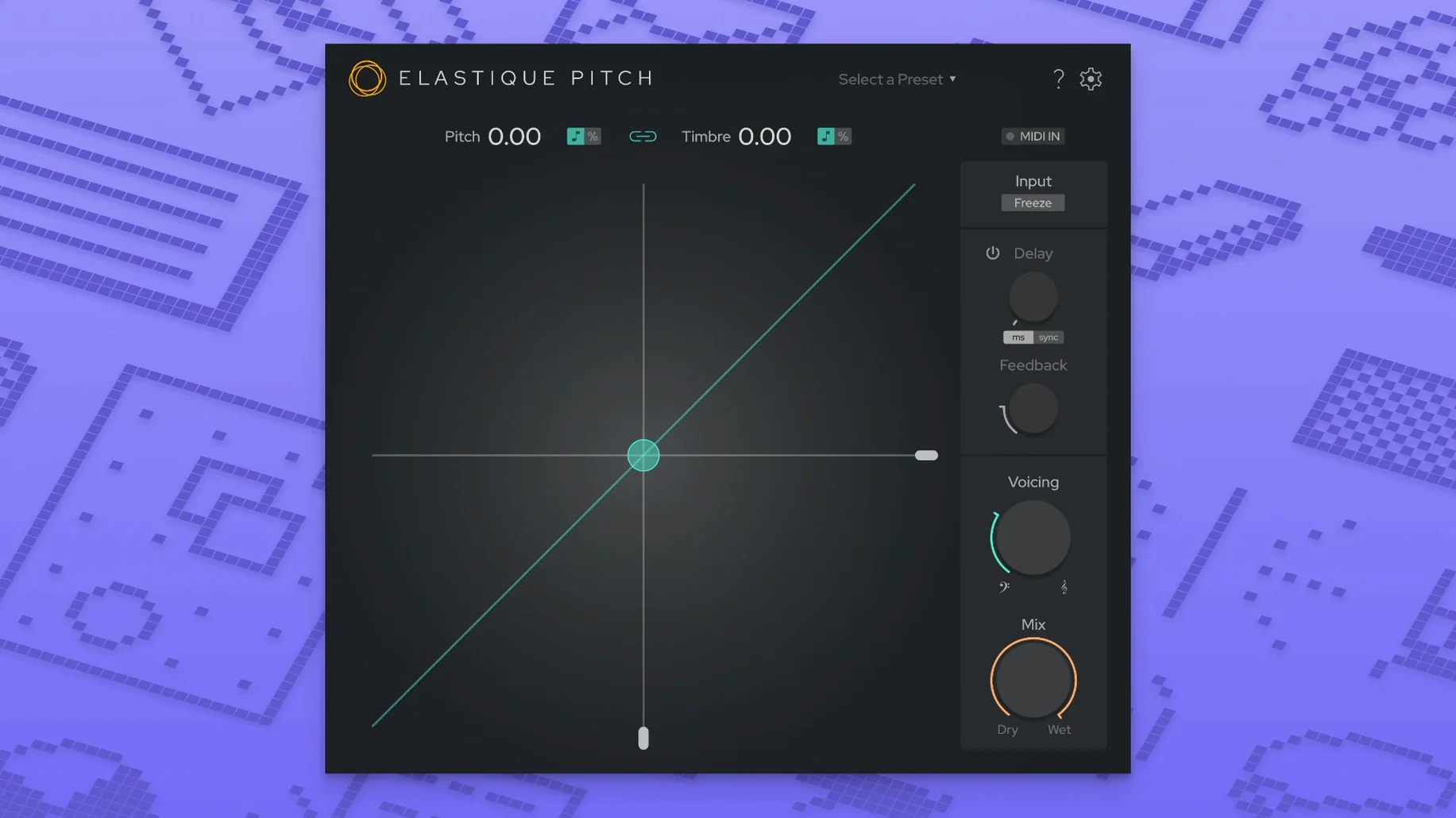
You drop a vocal take onto a track and the key is half a step off from the instrumental. Loading elastiquePitch across that track lane lets you nudge the pitch up in real time without stopping playback. The corrected voice locks into the mix while you keep the transport rolling.
On a return bus, the plug-in does a different job. A short pitch-shifted echo fed from a send adds stereo width to a lead without crowding the center. The formant control stays independent, so you can push the pitch up an octave for a shimmer effect while keeping the vocal character human rather than chipmunk.
For post-production work, the same ÉLASTIQUEPRO algorithm handles frame-rate conversions. Stretching a 24 fps sound bed to match a 25 fps timeline stays phase-coherent, which saves a round-trip through an external editor. The freeze-grain button catches a tiny slice of audio and holds it indefinitely—useful for snatching a single syllable and turning it into a pad texture under a bridge section.
Multichannel support now reaches 16 channels, so surround stems and ambisonic buses sit comfortably inside a single instance. The redesigned interface keeps the pitch and formant sliders close to the grain controls, making quick tweaks feel immediate rather than menu-divey.
What changed under everyday use in v2.5
The jump to the ÉLASTIQUEPRO algorithm is the quiet workhorse here. On a drum stem or a full mix bus, artifacts that used to creep in around a ±5 semitone shift are far less grabby. Transients stay sharper, and low-end phase smearing is reduced enough that you can push a kick-heavy loop up a minor third without the sub frequencies collapsing into mush. In practice, this means fewer workarounds—less need to split bands and process lows separately just to keep the weight intact.
The expanded 16-channel support flips the plug-in from a mono/stereo tool into something you can drop onto a 7.1.4 bed without juggling multiple instances and bussing. For anyone doing ambisonic work or game audio in multichannel stems, that removes a routing headache. The redesigned UI doesn't change what the knobs do, but the slider scaling feels tighter; small drags near the center detent are easier to finesse now, which matters when you're dialing in cents rather than semitones.
Quiet shortcuts and small conveniences
Double-clicking any slider snaps it back to zero or the default center position. It's the fastest way to reset a formant shift you've pushed too far without hunting for a reset button.
The freeze-grain control isn't just a hold function. If you automate the freeze toggle on and off in rapid succession across a vocal phrase, you can spit out a stutter pattern that follows the original timing. Combine that with a pitch ramp on the same lane and you get granular scrubbing effects without patching a separate grain processor.
For pitch-shifted echo setups, place elastiquePitch on a send and set the dry/wet mix to 100% wet. Then use your DAW's send level to control how much shifted signal blends back in. This keeps the original signal path clean and avoids phase wobble that can happen when dry and shifted versions sum inside the plug-in itself.
If you hold Shift while dragging the pitch slider in most DAWs, the increment snaps in semitone steps. This isn't documented in the plug-in's own manual, but it inherits the host's fine-control modifier behavior and makes dialing exact intervals much faster than typing values.
Rescuing a sharp boom-mic performance without ADR
A dialogue editor receives a location recording where the boom mic picked up a voice pitched slightly sharp—probably the actor's adrenaline during a tense scene. The take is otherwise perfect, so ADR isn't on the table. Loading elastiquePitch as an AudioSuite-style insert (or an AU clip effect, depending on the DAW) lets them pull pitch down by 40 cents while leaving the formant untouched. The voice drops into the scene's tonal pocket without the throaty, unnatural weight that a linked pitch-and-formant shift would introduce.
Later in the same session, a 24 fps footstep bed needs to match a 25 fps picture conform. Stretching with the ÉLASTIQUEPRO algorithm preserves the transient attack of each heel strike; the editor doesn't have to re-layer Foley. The multichannel routing keeps the stereo footstep pair and the mono cloth rustle lane inside one plug-in window, so the stretch ratio applies identically across all three channels with zero drift.
DAW can't find the plug-in after installing
The plug-in doesn't show up in a DAW scan after installing. This usually traces back to a missed architecture match. If the DAW is running in native ARM mode but the Intel-only .component or .vst3 bundle was placed, the host skips it. The current build is universal, but if you grabbed the wrong installer from an older source—say an elastique pitch v2 crack mac package—you might have an Intel-only binary. Pull the bundle from /Library/Audio/Plug-Ins/Components or /Library/Audio/Plug-Ins/VST3, then run the proper installer.
Latency feels high during live tracking. The ÉLASTIQUEPRO algorithm is designed for quality over low-latency performance. For recording, switch the plug-in off the input chain and apply it during mixing instead. If you need real-time monitoring with pitch correction, reduce the DAW buffer size and freeze other tracks, but accept that this algorithm isn't built for sub-5ms round-trip times.
Formant shifts sound phasey on polyphonic material. The formant engine works best on monophonic sources—vocals, solo brass, dialogue. On a full mix or a piano stem, shifting formants independently of pitch introduces comb-filtered artifacts because the algorithm tries to reshape spectral envelopes that overlap too much. Keep formant adjustments to monophonic tracks, or accept a subtler shift range (±2 semitones) on stereo material.
Freeze-grain clicks on loop. If the freeze capture lands mid-waveform at a non-zero crossing, looping produces a sharp tick. Nudge the capture point slightly forward or backward in your DAW's automation lane until the click disappears, or place a short fade (4–8 ms) on the frozen audio region if you're printing the effect to a new track.
- User interface rebuilt with a cleaner layout that groups pitch, formant, and grain controls together.
- Multichannel support expanded to 16 channels for surround and ambisonic workflows.
- Updated to the latest ÉLASTIQUEPRO algorithm for improved phase coherence during large shifts.
- macOS 10.15 or later
- Apple Silicon and Intel native
- AU and VST3 plug-in formats
Comments 0
Sign in or create an account to leave a comment.
No comments yet. A codec, a slice, a machine — they appear after moderation.