EZdrummer for macOS
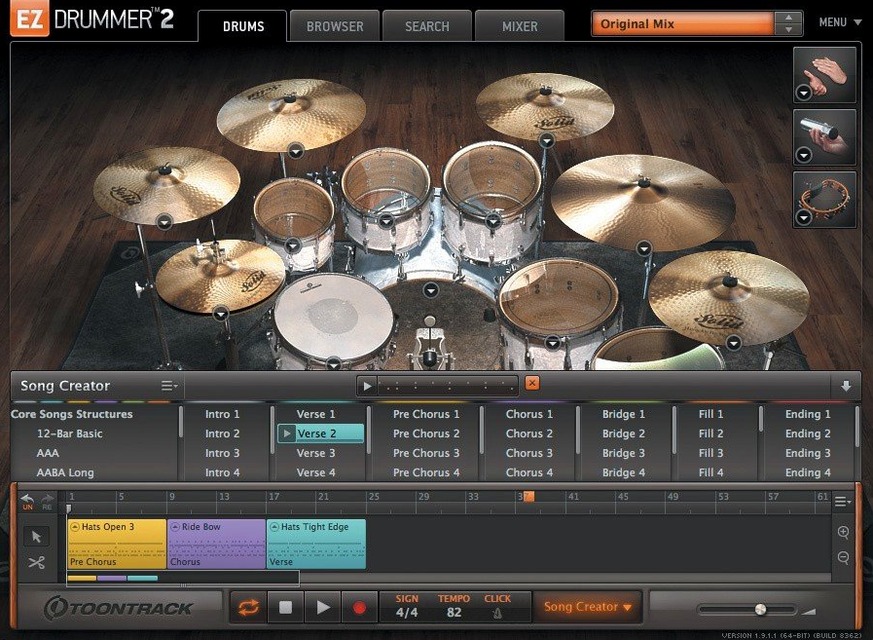
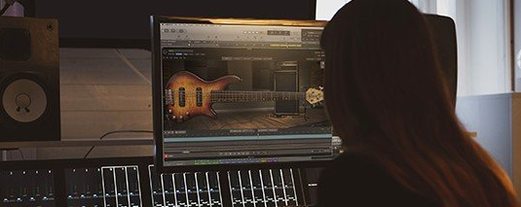
You drag a rough guitar riff into the timeline. Not a polished take—just a scratch recording to capture an idea. EZdrummer's Bandmate listens, chews on the transients and pitch content for a few seconds, then drops a groove into the song track that actually fits the energy of the part. That's the workflow this software is built around: getting from a musical fragment to a drum track you can edit without ever leaving the window.
Find beats by tapping a rhythm
- MIDI groove handling. The core library is searchable—Tap2Find lets you bang a rhythm on a key and pull up matching patterns, then you cut, copy, and rearrange parts on the song track.
- Building patterns from nothing. The built-in Grid Editor gives you a full piano roll for writing parts when the included grooves don't cover a section.
- Working with expansion packs. Version 3.1.2 is required for any EZX pack released from Q4 2025 onward. The internal improvements for Infinity Grid EZX hint at more detailed grid-based editing in newer expansions.
Bandmate needs good input to suggest good grooves
- It ships with seven core kits—plenty for writing, but the sonic range expands with EZX packs.
- Bandmate works from both audio and MIDI input, so the quality of the suggestion depends a lot on what you feed it.
- The version number matters. If you're on an older build, newer EZX packs won't load.
Download the library to a drive with enough space
Installation is straightforward: mount the .dmg and run the installer. The content—all seven kits, MIDI grooves and percussion samples—lives inside Toontrack's product manager. Point it at a drive with enough room before you start downloading. The core library isn't small.
After the first launch, spend ten minutes in the mixer tab. The mix-ready presets are genuinely usable, but they're starting points, not gospel. Solo each room mic and listen. The three rooms—Tight, Medium, and Ambient—shape the character more than any single effect. Lock in one room per project early; switching mid-arrangement changes the groove's feel more than you'd expect.
Next, open the MIDI groove browser and click through a few categories with Tap2Find turned off. You'll notice patterns that fit your usual tempo range. Star about twenty of them before you ever write a song. That small curated set becomes your quick-reference palette when Bandmate doesn't quite nail a suggestion.
One more thing: check that the Grid Editor's quantize setting matches your DAW's grid before you write a single note. The default is 16th-note triplets, which can lead to a frustrating first session if your project is straight eighths.
No text provided for this section
Hi-hat pedal CC drops during recording
Before version 3.1.2, CC messages for hi-hat pedal could drop out when recording into the song track. If you're on 3.1.2, that's fixed. If not, work around it by drawing the CC curve in the Grid Editor after recording instead of performing it live.
Bandmate gives you a pattern in the wrong time signature
Bandmate guesses the bar length from your audio or MIDI. A sloppy guitar take with an ambiguous downbeat can produce a 3/4 suggestion against your 4/4 project. Tighten the source—trim the audio to start cleanly on beat one, quantize the MIDI, or just tap the tempo manually first. The algorithm isn't psychic; it's working from transients.
MIDI grooves sound lifeless at low velocities
The factory grooves have baked-in velocity curves that expect a certain dynamic range. Dragging a groove to the song track and halving all velocities won't give you a ghost-note feel—it'll sound like a kit played through a pillow. Use Edit Play Style instead. The Amount knob in Power Hand mode can pull back the snare and kick intensity without collapsing the whole performance.
Mixer Solo and Mute recall gets confused
In builds before 3.1.2, toggling Solo on a channel could erase the stored Mute state of another, and vice versa. The fix in 3.1.2 addresses this at the recall level. If you're hearing channels you know you muted, toggle them once to reset the state.
A songwriter's morning: one idea to a full drum track in twenty minutes
Picture a guitarist-slash-producer who writes alone, doesn't own an electronic kit, and has no interest in programming drums from scratch. They have a verse riff and a chorus idea, both recorded as DI guitar into Logic. The goal is a drum part that sounds like a drummer reacting to the song, not a loop.
They open EZdrummer as a plug-in, drag the verse audio onto the Bandmate drop zone, and hit Suggest. The first result is close—right energy, wrong kick pattern on the turnaround. They tap the turnaround rhythm into Tap2Find, pull up three alternatives, and drag the best one onto the song track right over the offending bar. No MIDI editing, just a drag-and-drop replacement.
For the chorus, Bandmate leans too busy. They drop the suggestion anyway, open Edit Play Style, pull the Amount knob down to about 40%, and the pattern breathes. The overhead mics stay crisp; the snare just hits less often.
They map out the song structure in the song track—verse, chorus, verse, chorus, bridge—dragging and copying blocks. The bridge needs a half-time feel, so they pick a groove from their starred folder, drop it in, and use the Grid Editor to nudge the snare to beat three. Song Creator builds the rest of the arrangement around those choices. Total time from scratch guitar to printed drum track: under half an hour, no external MIDI packs, no YouTube tutorial breaks.
Building a pattern from silence: Grid Editor workflow
Sometimes the groove library doesn't have the exact feel, and Bandmate's suggestions are too far off to salvage. That's when you reach for the Grid Editor. Here's a linear workflow for a verse pattern with a specific hi-hat opening on the last 16th note.
- Open the Grid Editor on an empty block in the song track. Set the grid to 16th notes in the dropdown.
- Lay down kick on beats 1 and 3, snare on 2 and 4. Click them in—don't play them in. You want locked timing for the foundation.
- Add eighth-note hi-hats on every other grid line. Select all hi-hat notes, right-click, and set Velocity to a medium range (80–90).
- Open the hi-hat articulation menu, switch the last 16th note of bar four from closed to open. Drag that note's velocity up to 110 so the opening crack cuts through.
- Hold Option and drag snare hits slightly ahead of beat 2 in bars one and three. A few ticks early gives it a rushed, live feel. Do the same to the kick on beat 1 of bar two.
- Cycle the four-bar block. Open the mixer, push the room mics up 3 dB, and pull the close snare mic down 1 dB. The Grid Editor pattern now sounds like it belongs in the same kit as the Bandmate-generated chorus.
Export the MIDI block to your DAW's track or keep it inside EZdrummer's song track. Either way, the pattern is yours—no groove library credit required.
Bandmate can’t arrange or write fills
- Expecting Bandmate to write the song. Bandmate suggests a groove based on the audio or MIDI you feed it. It doesn't build an arrangement, vary intensity for a bridge, or write fills. That's Song Creator's job. Use Bandmate for the core groove, then switch to Song Creator for structure.
- Ignoring the three rooms. Switching from Tight to Ambient isn't just a reverb change—it's a different set of room mic recordings. A groove that sounds punchy in Tight can turn washy in Ambient. Commit to a room before you start tweaking individual mic levels.
- Skipping the starred-groove system. The full MIDI library is large enough to cause decision paralysis. Starring grooves as you audition them builds a personal vocabulary. Without it, every session starts from zero.
- Using the Grid Editor without listening to the mix. Writing patterns with the close mics soloed gives a false sense of the kit's tone. Always check with the room mics and overheads in the picture—especially the hi-hat, which changes dramatically between close and room perspectives.
- Forgetting the version dependency for new EZX packs. If you grab an EZX released after Q4 2025 and it won't load, check that you're running 3.1.2. Older versions won't recognize the pack at all. This catches people who installed EZdrummer once and never updated.
- Standalone and project icons updated to match the macOS Tahoe style.
- Internal work done to support Infinity Grid EZX.
- Fixed a bug where song-track CC recording and mixer Solo/Mute states wouldn't recall correctly.
- macOS 10.15 or later
- Apple Silicon and Intel native
$ man ezdrummer | grep -A2 "?"
How does Bandmate generate a drum part?
Bandmate analyzes dragged audio or MIDI to suggest matching drum grooves from the installed library.
Can I write my own patterns inside EZdrummer?
Yes, the built-in Grid Editor lets you sequence drum hits from scratch directly in the software.
What changed with EZX pack support in version 3.1.2?
Version 3.1.2 is a requirement for any EZX expansion pack released from the fourth quarter of 2025 onward.
Comments 0
Sign in or create an account to leave a comment.
No comments yet. A codec, a slice, a machine — they appear after moderation.