EZbass for macOS
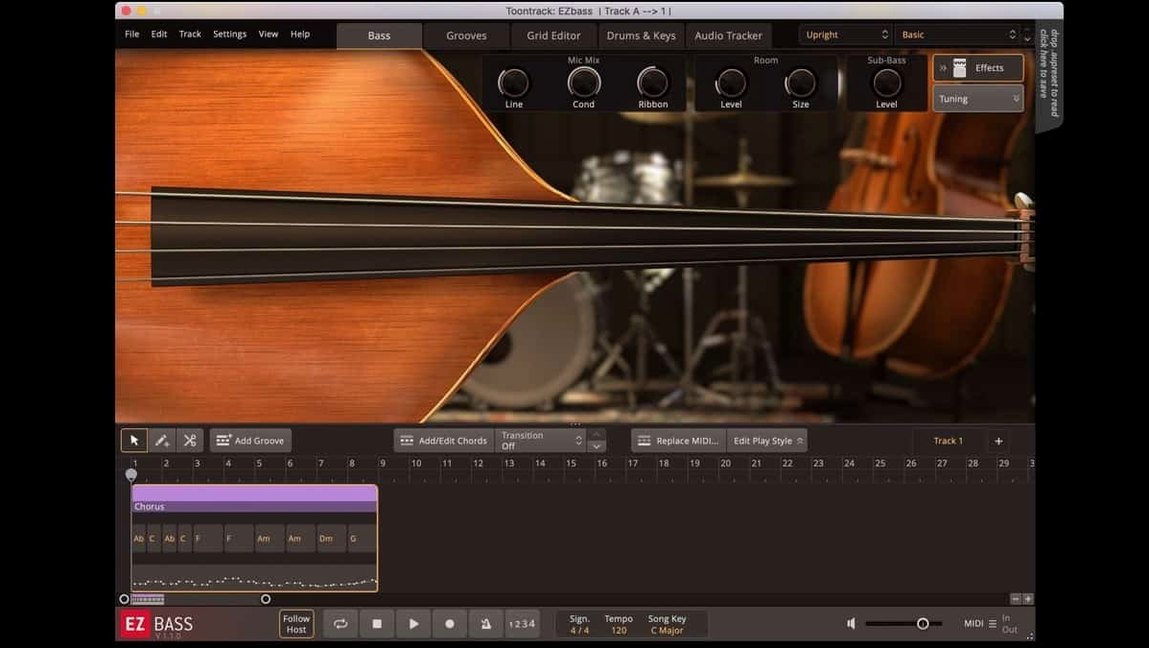
EZbass is Toontrack's virtual bass instrument that combines sampled guitars with a songwriting toolkit for building and tweaking bass parts. Here's what version 1.3.3 brings and what stayed the same.
What does the 1.3.3 update fix?
It resolves a menu click response issue that appeared in recent Apple host updates. You also get support for right-hand mute articulation from the Rock Legend EBX expansion and a new option to reassign keyboard shortcuts in Settings.
How does it generate basslines?
You can feed it drum or keyboard MIDI and it will suggest bass parts that fit. The software includes a large library of bass MIDI across many styles, and you can arrange, rewrite, and swap sections directly in the interface.
What audio can it convert to MIDI?
Its audio-to-MIDI conversion borrows the tracking engine from Superior Drummer 3. You drop in an audio file and the software extracts pitch and timing data to create a MIDI bass track from it.
What instruments are included?
Two sampled basses ship with the base software—one vintage model and one modern. The sound set expands through EBX packs, which add instruments, playing styles, and matching MIDI.
Your MIDI sounds robotic because of the default modern bass patch
One pattern I see constantly: people drag an audio file onto the tracker, get a MIDI part back, and immediately play it through the default modern bass patch. Then they wonder why it sounds robotic. The tracker captures pitch and timing, not articulation. A legato vocal line converted to MIDI will trigger legato-articulated samples that sound unnatural on a plucked bass. The fix is simple—open the Grid Editor, select the notes, and switch the articulation lane to finger or pick. Suddenly the part breathes.
Another early mistake: ignoring the velocity lane. EZbass maps velocity to sample layers, and the factory MIDI grooves use that lane extensively. If you step-record a line with a constant velocity of 100, you're leaving most of the instrument's character on the table. Spend ten minutes drawing a velocity curve that accents the downbeats. The difference is not subtle.
A third one: not telling the Song Track what key you're in. The transpose and chord-follow features need that information. If you leave it blank and then wonder why generated basslines drift into weird chromatic territory—that's why.
Let Tap2Find match grooves to your drum loop before writing a note
Start with the Tap2Find browser before you write a single note. Drop a drum loop into your DAW, open EZbass, click Tap2Find, and let it scan a few bars. It will pull up MIDI grooves that lock into the kick and snare pattern. Pick three variations, drag them onto the Song Track, and cut between them. That gets you a functional bassline faster than programming one from scratch.
Next, load the vintage bass and the modern bass side by side in two instances—even if you only keep one in the final mix. The vintage model has a rounder, softer transient that sits behind a vocal. The modern one punches through a dense rock mix. Comparing them on the same MIDI part teaches you which one your track actually needs.
On day two, open the Grid Editor and right-click any note. The articulation menu shows what's available for the loaded instrument. Spend half an hour auditioning slides, mutes, and harmonics. Knowing what the sampler can do makes you faster at fixing generated parts that sound "almost right."
Scarbee gives you more layers and round-robins per articulation
Native Instruments' Scarbee basses—Rickenbacker, MM-Bass, Pre-Bass—are deeply sampled Kontakt instruments with more velocity layers and round-robins per articulation. If you need the most detailed tone of a specific bass model and you're willing to program every note, Scarbee wins on pure sample depth. But Scarbee does not generate basslines for you. It has no audio-to-MIDI, no song structure tools, and no Tap2Find. It's a sound module, not a writing partner.
IK Multimedia's MODO Bass uses physical modeling synthesis instead of samples. That means no round-robin limits, tiny disk footprint, and continuous control over string age, pickup distance, and playing position. For a producer who tweaks every parameter, MODO Bass is more flexible at the synthesis level. The trade-off: the tone is synthetic in a way that sampled basses are not, especially in exposed passages. And like Scarbee, MODO Bass does not compose. It has zero MIDI generation features.
EZbass occupies the middle lane: less sample depth than Scarbee, less synthesis flexibility than MODO Bass, but neither of those products will write a bass part for you. For songwriters who need a complete bass performance in twenty minutes, the other two are not direct competition—they're tools you'd use after you already know what you want to play.
It closes the gap when you can hear a part but can't finger the frets
Songwriters with limited bass vocabulary. If you can hear the bass part in your head but your fingers can't find the frets, EZbass closes that gap. You hum the line, convert it to MIDI, and the Grid Editor shows you exactly which notes you imagined. The Song Track then helps you build a structure that moves with the chord changes.
Drum-first producers. People who program Superior Drummer or EZdrummer before anything else get an immediate advantage. Tap2Find reads the drum MIDI and pulls bass grooves that complement the kick pattern. The groove library includes variations matched to common drum styles, so the bass and drums sound like they were tracked in the same room.
Editors working against picture. Audio-to-MIDI conversion matters most when someone hands you a reference track and the clock is ticking. Extract the bass from a temp cue, grab the MIDI, and tweak it to fit the scene. It's not a finished part, but it's a start that keeps you in the chair instead of hunting for the right sample pack.
It's less essential for bassists who own a good DI box and prefer to track live. The sampled instruments are solid, but a well-recorded live take through a decent preamp still beats any virtual bass for feel. The value shifts entirely toward the MIDI generation tools—and if you don't need those, you're paying for features you'll never open.
- Added right-hand mute articulation support for Rock Legend EBX.
- Added the ability to change some keyboard shortcuts in Settings.
- Updated Mac icons to the macOS Tahoe style.
- macOS 10.15 or later
- Apple Silicon and Intel native
- Interface language: English
Comments 0
Sign in or create an account to leave a comment.
No comments yet. A codec, a slice, a machine — they appear after moderation.