Cymatics VOXITY for macOS
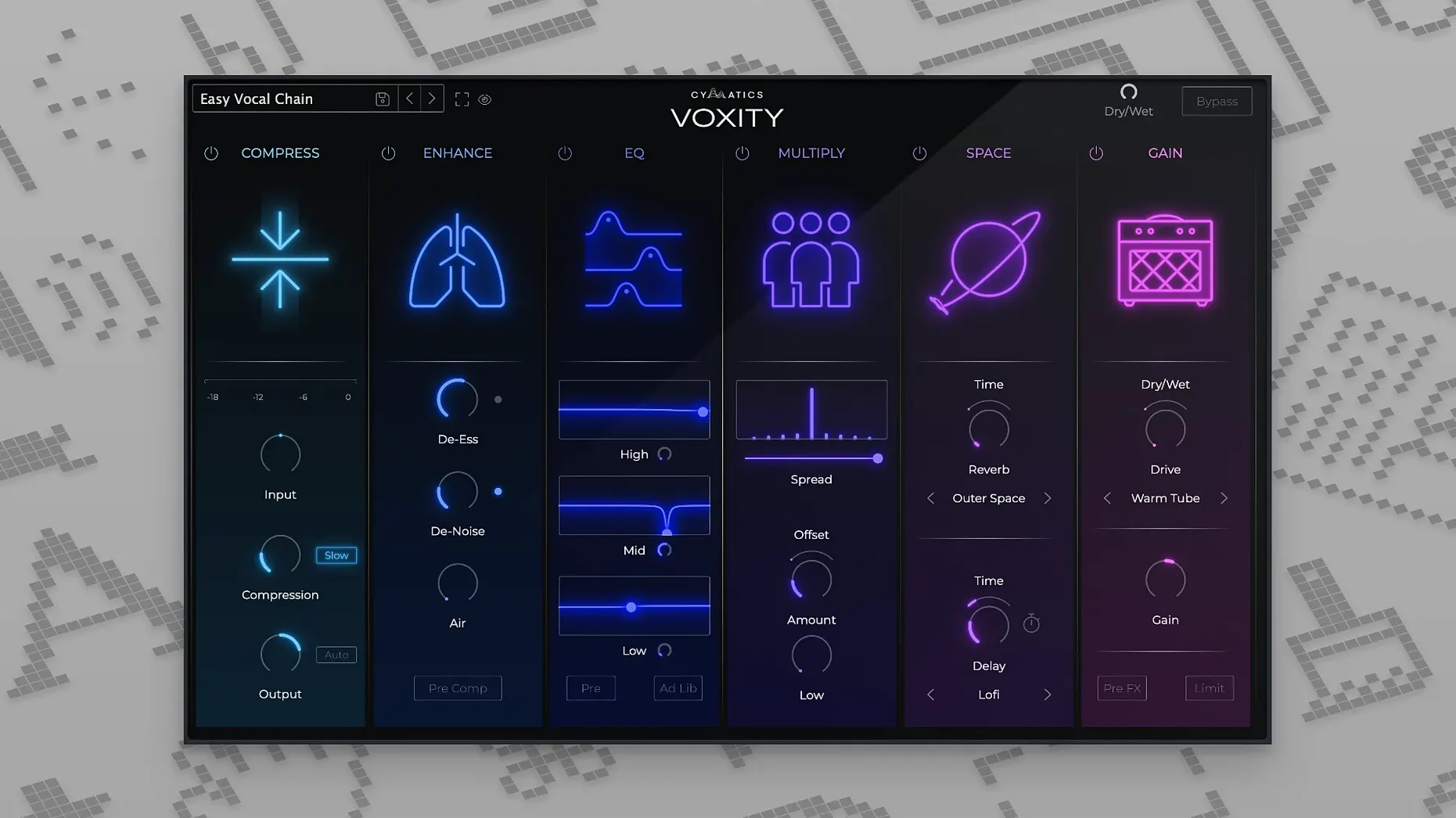
Raw vocal recordings often arrive with a familiar set of problems: sibilance that pierces the mix, low-end rumble from a shaky stand, and breaths that distract more than they humanize. VOXITY is Cymatics' take on an all-in-one processor that targets these issues before you even reach for a channel strip. Instead of chaining five separate plugins, you get a single window with mixing parameters purpose-built for shaping a vocal from rough to radio-ready.
| Detail | Info |
|---|---|
| Developer | Cymatics |
| Current Version | 1.0.0 |
| Architecture | Apple Silicon & Intel (64-bit) |
| Minimum macOS | 10.14 |
When you first open VOXITY, ignore the temptation to twist every knob. Start with the breath control to dial back noisy inhales without making the phrase endings sound surgical. Next, pull up the de-esser to soften sharp "s" and "t" sounds. The magic is in how these modules interact at modest settings—you're carving out what shouldn't be there rather than layering on a new tone. What emerges is a cleaner, more controlled vocal take that sits in a mix with far less corrective automation later.
Who clicks with VOXITY fastest?
VOXITY isn't trying to be a full channel strip with EQ curves and three compressor models. That narrowness is exactly why certain Mac users get more mileage from it than others. Songwriters recording at a desk with an untreated corner behind them benefit immediately from the breath control and low-end cleanup—the Bedroom and Vintage Warmth presets target exactly the boxiness and plosives those spaces introduce. Podcasters and voiceover artists working in Logic Pro find the de-esser and volume leveling shave hours off manual clip-gain edits, especially on long narration sessions where consistency matters more than character. Mix engineers who already have a go-to EQ and compressor often keep VOXITY first in the chain as a "grooming" stage—it handles the unmusical cleanup so their favorite processors receive a tamed signal. If your vocals arrive well-recorded in a treated room and you already enjoy building chains from scratch, VOXITY might feel like a shortcut you didn't need. For everyone else balancing imperfect recordings against deadlines, it earns its slot.
Start on a vocal bus with wet/dry as your safety net
A few habits make the first week smoother. Start by loading VOXITY on a vocal bus rather than individual tracks while you learn what each knob does to your material. The wet/dry mix control is your safety net—blend in processing at 40–50% and bypass repeatedly to check whether you're improving the source or just making it louder.
Second tip: the presets aren't marketing filler. Cycle through Clean Pop, Lo-Fi Edge, and Wide Chorus with a raw vocal soloed and watch which sliders jump. That teaches you what the plugin considers a "pop" sound versus a "lo-fi" sound faster than the manual does. Save your own starting-point preset once you find a de-esser and breath-control baseline that works for your microphone and room. Naming it after your mic—something like AT2020_Home_Base—saves you from re-dialing the same cleanup every session.
Third: if your DAW supports it, map the output gain to a MIDI knob. VOXITY's processing can shift perceived loudness enough that you'll want to ride the fader during playback, and a physical control makes that second nature.
From raw demo vocal to mixed verse in eight minutes
Imagine a typical indie session: the singer tracked a verse in a carpeted bedroom, and you've got a single mono WAV in Ableton Live. There's a low hum from the computer fan, three sharp esses, and the last line drops in volume because they leaned back.
- Drop VOXITY onto the track. Hit the
Clean Poppreset to zero the board to something sensible, then bypass the reverb and delay modules entirely—we want a dry vocal first. - Solo the track and loop the loudest phrase. Pull the breath-control slider until the inhale between lines softens but the consonant at the start of the word isn't clipped. On a condenser mic at six inches, that is usually around 25–35 on the dial.
- Find the ugliest sibilant moment. Reduce the de-esser threshold until the "s" stops slicing, then back it off by two clicks. The goal is natural, not lisped.
- Switch to the low-cut section and sweep the frequency up slowly until the hum disappears. On a male vocal, this often lands between 80 and 110 Hz; female vocals can tolerate a slightly higher corner before thinning out.
- Engage the volume leveler and watch the gain-reduction meter while the quiet line plays. Raise the makeup gain until the whispered phrase matches the loud one without peaking past -6 dB on the DAW meter.
- Now reintroduce the stereo-widen module at about 20% wet. Push the brightness slider just until the vocal opens up—usually a 1–2 dB bump, not a full crank. This late in the process, brightness accentuates what you cleaned, not the noise you removed.
- Add a short plate reverb from the built-in module, set the decay under one second, and mix it at 15%. The result is a vocal that sounds finished even before you reach for the channel EQ.
The whole pass takes under ten minutes once the moves become muscle memory. What you are left with isn't a mastered vocal, but it is one that plays nicely with a 2-bus compressor and doesn't embarrass itself on laptop speakers.
Does it run natively on Apple Silicon?
Does VOXITY work as an AU and VST3 on Apple Silicon, or only in Rosetta? The 1.0.0 build runs native on ARM and Intel in 64-bit. You will find Voxity.component in /Library/Audio/Plug-Ins/Components and Voxity.vst3 in the VST3 folder, both compiled as universal binaries. No Rosetta bridging is necessary on M-series machines running macOS 10.14 or later.
Is it a CPU hog when stacked across multiple vocal tracks? Each instance is fairly light—the processing pipeline is linear and doesn't involve convolution or linear-phase filtering. On an M1 MacBook Air, five instances with all modules active add about 8–10% to the session CPU load in Logic Pro. On older Intel machines from the 10.14 era, you will want to freeze or bounce tracks after dialing in settings, but that is true of most post-2020 plugins.
Can I use it on instruments, or is it vocal-only? Nothing in the architecture locks it to vocals. The de-esser is tuned for sibilance frequencies, and the breath control expects transient inhales, but the low-cut, brightness, stereo-widen, and reverb modules work on any source. Producers sometimes run a snare drum through it for the gated reverb and brightness combo, or slap it on a synth pad to widen the stereo field without a dedicated imager. The presets are voiced for vocals, so instrument use means dialing from scratch.
People searching for a voxity vocal mixing plugin often want to know whether it replaces their entire vocal chain. It does not—it replaces the first four or five cleanup plugins. You will still want a character compressor and a surgical EQ for the mix stage, but VOXITY means those tools receive a vocal that is already leveled, de-essed, and free of low-end garbage.
- macOS 10.14 or later
- Apple Silicon or Intel processor (64-bit only)
Comments 0
Sign in or create an account to leave a comment.
No comments yet. A codec, a slice, a machine — they appear after moderation.