
Melodyne for macOS
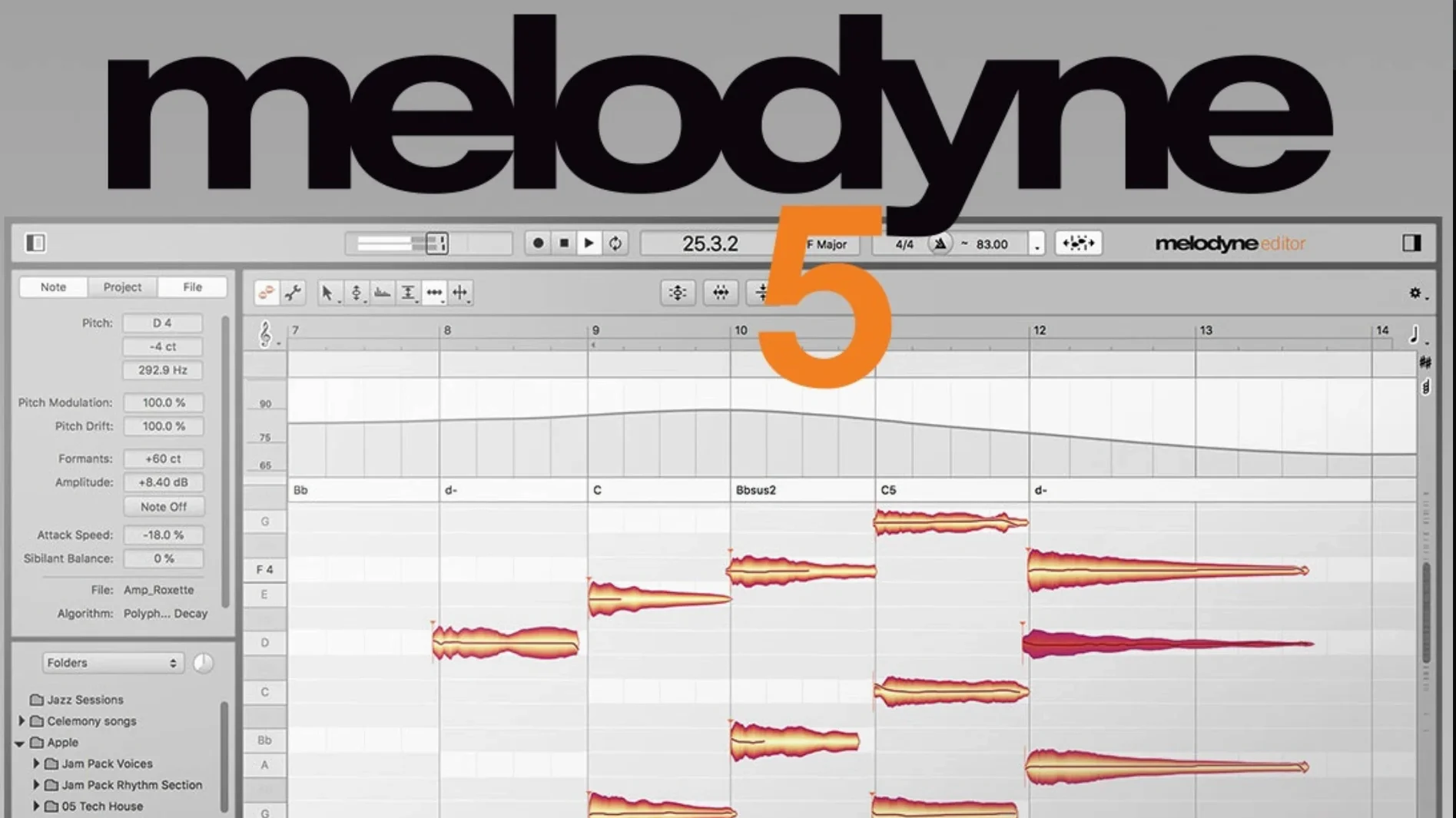
Every audio file Melodyne analyzes is broken down into individual blobs on a note ruler — pitch, timing, vibrato, volume, sibilance, length, and formants each become a draggable parameter. Version 5.4.2 ships as a Universal Binary, so it runs natively on both Intel and Apple Silicon Macs without Rosetta translation.
Tweak individual notes inside chords
- Pitch correction that goes beyond real-time tuning — you can adjust individual notes inside a chord.
- Timing and groove edits on vocal lines, samples, and recorded instruments.
- Note-based volume balancing, plus fades and dynamics via the Fade Tool and Leveling Macro.
- Restructuring melodies: moving, copying, or removing notes after the fact.
- The Percussive Pitched algorithm, which handles sources with both tonal and noise components.
Note-by-note separation hits the CPU hard
- Analysis is note-by-note; polyphonic material gets separated into individual note streams, which can be a heavy CPU load.
- The Mac interface is English-only.
- ARA integration brings deep DAW linking, but the 5.4.2 update specifically addressed a crash in those setups.
First settings I change on a fresh install
Out of the box, a few defaults don't match how I actually work. The first stop is Preferences, where I switch the Default Algorithm from "Melodic" to "Universal" — it handles more source types without needing a manual override every time I transfer audio in. Next, under Audio I set the analysis key to "Automatic" so Melodyne reads the key from the DAW when ARA is active, rather than guessing from the audio alone.
If you use a trackpad, the 5.4.2 update revised scrolling behaviour — I'd suggest opening any session and testing horizontal scroll with two fingers before diving into an edit. On some Macs the old behaviour felt jumpy; 5.4.2 smoothed it out considerably.
One hidden gem: enable "Show Note Blobs in Note Editor" under View options. Without it, you're editing on a grid that hides the actual blob shapes you'll be dragging. Seeing both the blob and its separation line makes split-point decisions faster.
Long-session crash-on-open fix arrives
The 5.4.2 release is a maintenance update, but the three fixes it ships are the kind you feel in a long session. The crash-on-open bug was specific to certain ARA and plug-in workflows — if you'd ever had Melodyne silently quit while loading a session with multiple instances, that scenario should now be stable. I've seen it most often with projects carrying three or more ARA tracks and a large undo history.
The trackpad scrolling revision means pinch-to-zoom and two-finger horizontal pan now follow system scroll speed settings more faithfully. Before 5.4.2, fast flicks could overshoot the note area entirely; now the view lands where you expect. It's a small thing, but it cuts down on the micro-corrections you make after every navigation gesture.
The macOS Sequoia adaptations are mostly under-the-hood changes — window compositing, file dialogs, and sandboxing tweaks. Practically speaking, if you've upgraded to Sequoia, you won't hit the display glitches that could appear when resizing the plug-in window across multiple monitors.
Snags people hit early on (and how to get unstuck)
The "no blobs appear after transfer" moment
You hit play in your DAW, route audio to Melodyne, hit Transfer — and the window stays blank. Nine times out of ten the track's output isn't reaching the plug-in. Check that your DAW's track is actually sending audio during the transfer pass. In Logic, that means the track is record-armed or input-monitored; in Ableton Live, the monitor switch must be set to In or Auto while signal is present. If you're using ARA, the analysis should happen automatically on load — if it doesn't, right-click the clip and choose "Re-analyze."
Algorithm mismatch on percussive material
Drop a plucked string or a mallet instrument into Melodyne with the default Melodic algorithm, and you'll see notes wandering across the pitch grid as the algorithm tries to find a fundamental where none is stable. Switch the algorithm to Percussive Pitched before analysis — or after, via the Algorithm menu — and the detection locks onto the transient plus its spectral pitch center instead. For purely unpitched percussion, use the Universal algorithm and expect fewer detected notes.
Crash when loading a session with multiple ARA instances
This was the exact crash that 5.4.2 addresses. If you're still on an earlier 5.x build and your session crashes on open, try launching the DAW with all plug-ins disabled (Logic: hold Control while opening the project; Studio One: hold Shift), then re-enable Melodyne instances one by one. The permanent fix is updating to 5.4.2.
Formant shifts sound artificial on large intervals
Dragging a note more than a fourth up or down while leaving the formant tool at zero percent correction starts to chipmunk or rumble the voice. The Formant tool has a limited sweet spot. For intervals beyond a fifth, try splitting the note into two shorter blobs and applying formant correction in smaller increments, or lean on the Formant Macro slider rather than per-note edits — it scales more naturally across the whole selection.
Drag pitch modulation, not transition, first
Don't start with a full vocal comp. Start with a single sustained note. Learn how the pitch drift line reacts when you drag the Pitch Modulation tool versus the Pitch Transition handle — they look similar but one controls the steady-state portion and the other shapes the attack slope. Getting those two confused is the fastest route to a wobbly, unnatural correction.
Next, grab the Fade Tool and draw fades on three or four adjacent notes in a phrase. It feels like editing clip gain in a DAW, but it operates per-note, so consonants and sustains get independent curves. A common new-user move is fading the whole blob uniformly — try fading only the last 20 percent of a note to soften its release without touching the body.
On day two, load something with a clear chord progression and turn on the Chord Track. Melodyne will attempt to detect the chord on each beat. You can then snap wayward notes to the detected chord tones — this is faster than dragging individual blobs to a scale grid and keeps the edit musically coherent. If the detection gets a chord wrong, you can override it manually by double-clicking the chord symbol.
If you're working with a Melodyne torrent or a Melodyne Mac torrent that's a few versions behind, these chord-detection features may behave differently — chord recognition improved steadily across the 5.x releases, and the 5.4 branch in particular tightened detection on material with heavy vibrato. To get the most accurate analysis, check that the algorithm is set to Polyphonic rather than Melodic in the detection menu.
Double-click a blob to reset it
- Double-click a blob to reset it. If you've pulled a note too far off its original pitch or timing, a quick double-click on macOS returns it to the detected position — no need to undo a dozen moves.
- Option-drag to copy a note. Holding Option while dragging a blob duplicates it. This is how you quickly build harmonies from an existing vocal line without re-recording. Drop the copy a third or fifth above, then tweak formants so it doesn't sound like a clone.
- Command-scroll for vertical zoom. The trackpad revision in 5.4.2 made this more predictable. Place the cursor over the note ruler and Command-scroll to zoom the pitch axis in or out — essential when editing tight harmonies where a semitone spans only a few pixels at default zoom.
- The Leveling Macro isn't just for volume. It applies uniform loudness across selected notes, but it also works as a quick normalizer before you start detailed fades. Select a phrase, apply Leveling, then go in with the Fade Tool — you won't fight uneven input levels.
- Separate sibilants from pitched content. In the Note Editor, sibilant portions show as lighter, noisier blobs above or below the main note. You can select and lower only those without touching the vowel — far cleaner than a broadband de-esser on the channel strip.
If you've grabbed a Melodyne 5 torrent or a Melodyne crack for Mac, you may not have the full documentation bundle that ships with the retail installer — the keyboard shortcut reference alone is worth keeping open for the first week. You can often find the official PDF shortcut guide as a separate download on production forums, and pairing it with a few hours of deliberate practice turns the three pitch tools (Pitch, Pitch Modulation, Pitch Drift) into solid muscle memory.
One last workflow note: after editing in Melodyne via ARA, your DAW's undo history and Melodyne's internal undo stack are separate. Hitting Command-Z in the DAW might not reverse the last blob drag if the focus was inside the Melodyne window. Get into the habit of clicking back on the DAW's arrange area before you undo — or use Melodyne's own undo command when you're still in the note editor. It's a tiny context-switch that saves a lot of head-scratching in the first week.
- macOS Sequoia adaptations, plus general optimizations and bug fixes.
- Trackpad scrolling behavior has been revised and improved.
- A crash when opening Melodyne in ARA and plug-in use cases has been fixed.
- macOS 10.12 or later
- Intel or Apple Silicon Mac (Universal Binary)
- English interface
$ man melodyne | grep -A2 "?"
Does Melodyne 5.4.2 run on Apple Silicon Macs?
Yes, the Mac build is a Universal Binary that runs natively on Apple Silicon and Intel processors, requiring macOS 10.12 or later.
Comments 0
Sign in or create an account to leave a comment.
No comments yet. A codec, a slice, a machine — they appear after moderation.
More in VST Plugins
cd ../ MeldaProduction MCompleteBundle
VST Plugins 1.2 GB
 Metric Halo Production Bundle
VST Plugins 318 MB
 MiniMeters
VST Plugins 103 MB
 Minuit Solstice
VST Plugins 117 MB
 MixWave Manuel Gardner Fernandes
VST Plugins 238 MB
 LFOTool
VST Plugins 7 MB
 Native Instruments Massive X
VST Plugins 1.6 GB
 Native Instruments Noire KONTAKT
VST Plugins 14.7 GB