
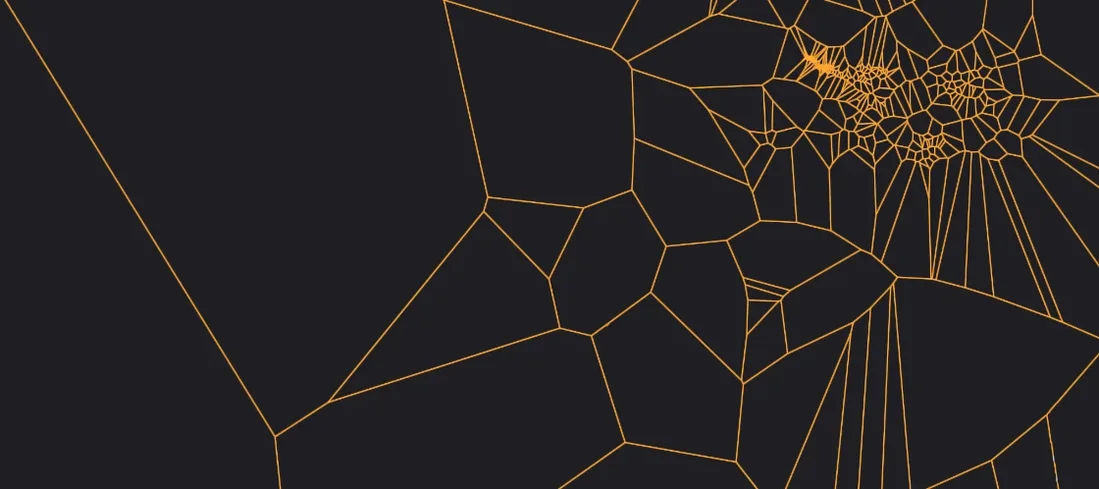
Minuit Solstice for macOS
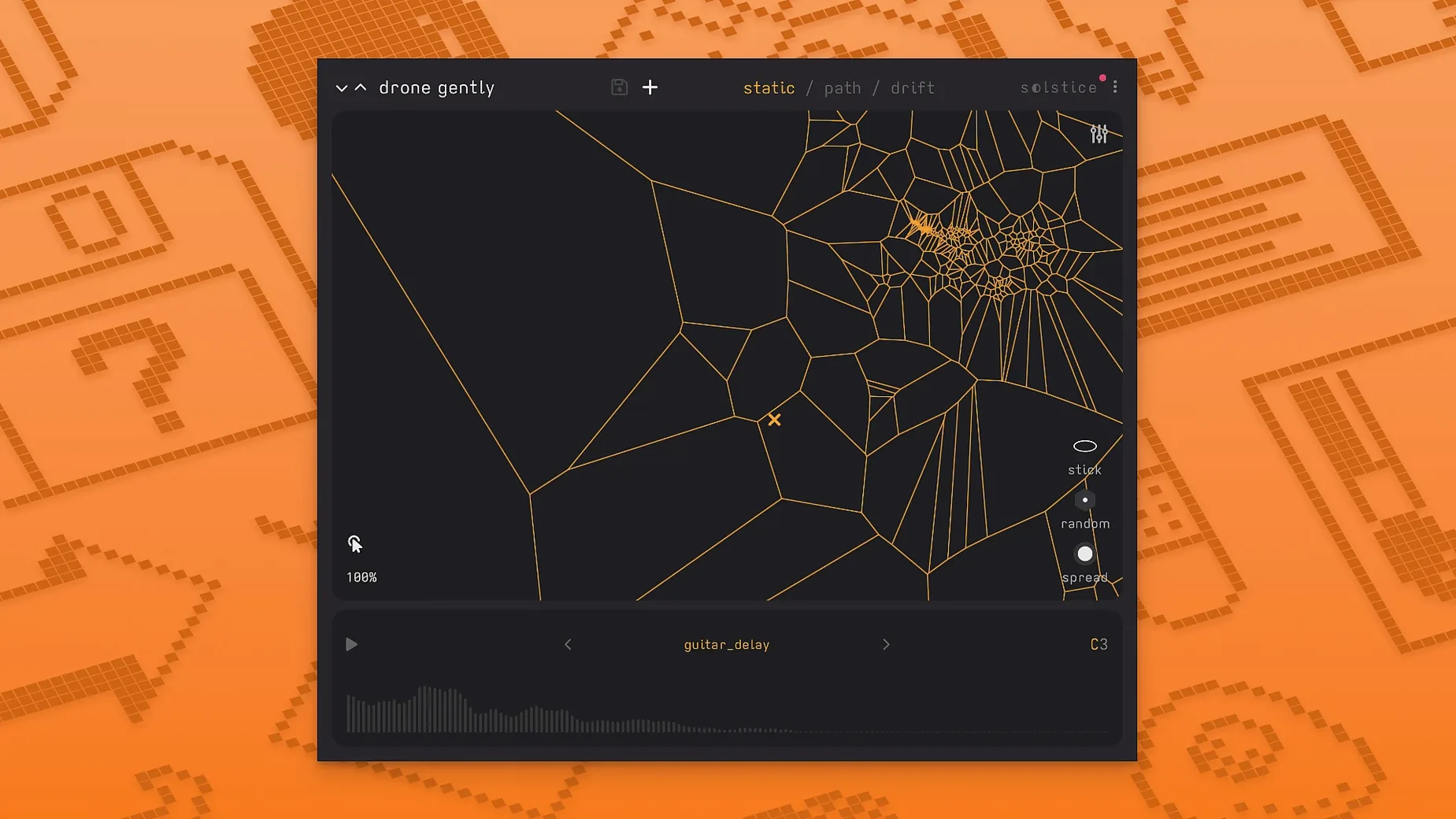
Where does it run?
Solstice opens on any Mac running macOS 12 or later, natively on both Intel and Apple silicon. The plug-in ships as a .dmg inside a ZIP; you will find AU and VST3 components inside. No standalone app — it lives inside a DAW.
How I drop it into a session
- Instrument track. Most of the time Solstice sits on its own instrument track. I load a short field recording — a bowed metal scrape or a piano tail — and it builds a two-dimensional timbre map from the spectral analysis.
- MIDI controller in. With MPE support in 1.2, pressing a key also sends per-note expression. Slide a finger and you drift across the map horizontally; pressure tilts the spectral tilt effect.
- Spectral effects chain. The five built-in effects — texture, tilt, flutter, stretch, and bloom — process the grain in real time. I usually run them inline on the same track rather than routing to a bus, because they react to map position.
- Automation lane. The map has an auto-drift mode. I set it loose, record the output to an audio track, and chop the unpredictable movements into one-shot textures later.
Where else it fits
On a return track, a frozen drone from Solstice fed through a heavy reverb — the 1.2 modulation control on the reverb tail works well here — becomes a moving backdrop for an ambient arrangement. It also works on a group bus when you want to run several instances into a shared spatialiser, but the real magic stays on the instrument track where the map responds to live MIDI gestures.
The spectral-morphing edge over Quanta and others
Solstice sits in a loose category of sample-exploration tools, but its approach is distinct. The closest cousins are granular synthesizers and spectral-morphing instruments, so I keep three comparisons in mind when someone asks where it fits.
Solstice vs. Quanta. Audio Damage Quanta is a straight-up granular synth with ten grains per voice, a multimode filter, and two envelopes. You dial in grain size, density, and position with knobs — it sounds lush and it is fast to operate. Solstice replaces those knobs with a spectral map. You are not telling it a grain position; you are navigating a terrain of timbres that the sample created. Quanta gives you surgical control; Solstice gives you discovery. For a predictable pad, Quanta wins on speed. For a texture you did not know the sample contained, Solstice pulls ahead.
Solstice vs. Borderlands Granular. Chris Carlson’s Borderlands also puts grains on a two-dimensional plane, but the metaphor is different. You place clouds of grains visually over a waveform and they loop, scatter, and overlap. Borderlands is about layering grain clouds in space; Solstice is about moving through a pre-analysed timbre landscape. Borderlands feels like a canvas. Solstice feels like a map with topology. If you want multiple independent grain streams, Borderlands is the pick. If you want a single evolving voice that morphs through the spectral character of the source, Solstice is the tool.
Solstice vs. Iris 2. iZotope Iris 2 also draws on spectral selection — you paint frequency zones on a spectrogram and play them back. Iris gives you four sample slots and a modulation matrix. Solstice gives you one sample but a continuous morph across its entire spectral identity. Iris excels at hybridising four static spectral snapshots. Solstice excels at traversing the space between them. Different philosophies, and the projects where I reach for one rarely overlap with the other.
A concrete walkthrough: found-sound pad from a rusty gate recording
I had a four-second iPhone recording of a rusty gate swinging shut — creaks, a low metallic groan, and a sharp clank at the end. The goal was a sustained pad that retained the gate’s metallic character but stretched it into something playable.
- Load and analyse. Dropped the
.wavinto Solstice on an instrument track in Logic. The analysis built a map where the initial squeak clustered top-left, the groan occupied a dense central blob, and the clank sat as an isolated island bottom-right. - Find the sweet region. Clicked around the central blob — the groan. Held a C3 on the keyboard and dragged the map cursor slowly. The grain engine traced a path through the groan’s harmonics, and the lower register of the sample bloomed into a warm, unstable tone.
- Apply spectral effects. Added bloom to soften the attack transients and stretch at about 40% to lengthen the grain envelope without turning it muddy. Engaged flutter lightly — just enough to introduce a subtle pitch waver that mimicked the original gate’s irregular vibration.
- Set auto-drift. Drew a small drift radius around the groan cluster. Set drift speed to slow. Solstice wandered inside that region, never hitting the clank or the squeak, so the pad stayed consistent in character but moved enough to avoid static looping.
- Shape with MPE. On a ROLI Seaboard, a gentle slide shifted the map position horizontally for brightness, and pressure brought in tilt — a spectral tilt that rolled off high frequencies under light touch and opened them up with more pressure. Recorded a two-minute pass.
- Post-processing. Froze the track, added convolution reverb with a short metal plate impulse, and the result sat under a piano part as an eerie, breathing bed. The gate was unrecognisable as a gate, but its metallic DNA was intact.
Loading a sample and finding no sound at all
Expecting a conventional sampler
Solstice does not map a sample across the keyboard in the usual sense. Loading a vocal phrase and hitting middle C does not play the phrase back. It plays a single grain positioned wherever the map cursor sits. The keyboard triggers notes; the map decides timbre. Grasping that split — pitch from MIDI, timbre from map position — is the first hurdle.
Feeding it the wrong samples
Short, static sounds with little spectral variation produce a sparse, uninteresting map. A single sine-wave pluck gives you one tight cluster and not much else. Samples that work best have evolving harmonics — bowed objects, vocal textures, field recordings with movement, synth sweeps. Give Solstice something with internal change, and the map fills with regions to explore.
Ignoring the drift controls
Beginners often click around manually, get an interesting sound, then wonder why it goes stale. The auto-drift is not a gimmick — it is the engine that turns a static grain into a living texture. Setting drift radius too wide, however, can jump the cursor into an unwanted region (that clank, in my gate example). Tighten the radius to the cluster you like, then let it wander.
Snags and how I unstick them
Plugin not showing up in the DAW
After installing the .dmg, the AU and VST3 components land in their usual folders. If Logic does not see the AU, a quick rescan in the Plug-in Manager sorts it. For Ableton Live, hold Option and click rescan in Preferences. Occasionally the component needs manual placement — ~/Library/Audio/Plug-Ins/Components/ for AU, ~/Library/Audio/Plug-Ins/VST3/ for VST3. If neither path works, the component likely ended up in the system Library instead; moving it to the user path fixes permissions oddities on macOS 13 and later.
Map analysis producing an empty or near-empty plot
Solstice relies on spectral variation. A sample that is effectively a single tone — a clean sine, a short click — yields a tiny map. Swap in something with frequency movement. Also, check that the sample is not clipped to silence at the head; a few milliseconds of silence can confuse the analysis. Trim the file to start right at the transient.
Grain artifacts on low notes
- MPE support — per-note pitch bend and timbre control across the map.
- MTS-ESP client support for microtuning workflows.
- Five spectral effects: texture, tilt, flutter, stretch, and bloom.
- macOS 12 or later
- Apple silicon or Intel processor
- AU or VST3 host
- MPE support — per-note pitch bend and timbre control across the map.
- MTS-ESP client support for microtuning workflows.
- Five spectral effects: texture, tilt, flutter, stretch, and bloom.
- macOS 12 or later
- Apple silicon or Intel processor
- AU or VST3 host
$ man minuit-solstice | grep -A2 "?"
What does the map actually show?
Solstice analyses the loaded sample's spectrum and projects the timbral content onto a 2D plane — similar-sounding grains sit close together, contrasting ones sit far apart. Clicking a point plays the grain at that position.
Can I control the tuning?
Yes, version 1.2 added MTS-ESP support, so Solstice follows microtuning tables set by an MTS-ESP master plug-in elsewhere in the session.
Comments 0
Sign in or create an account to leave a comment.
No comments yet. A codec, a slice, a machine — they appear after moderation.
More in VST Plugins
cd ../ MiniMeters
VST Plugins 103 MB
 MixWave Manuel Gardner Fernandes
VST Plugins 238 MB
 Metric Halo Production Bundle
VST Plugins 318 MB
 Melodyne
VST Plugins 97 MB
 MeldaProduction MCompleteBundle
VST Plugins 1.2 GB
 Native Instruments Massive X
VST Plugins 1.6 GB
 Native Instruments Noire KONTAKT
VST Plugins 14.7 GB
 Neural DSP Archetype Petrucci
VST Plugins 745 MB