

MixWave Manuel Gardner Fernandes for macOS
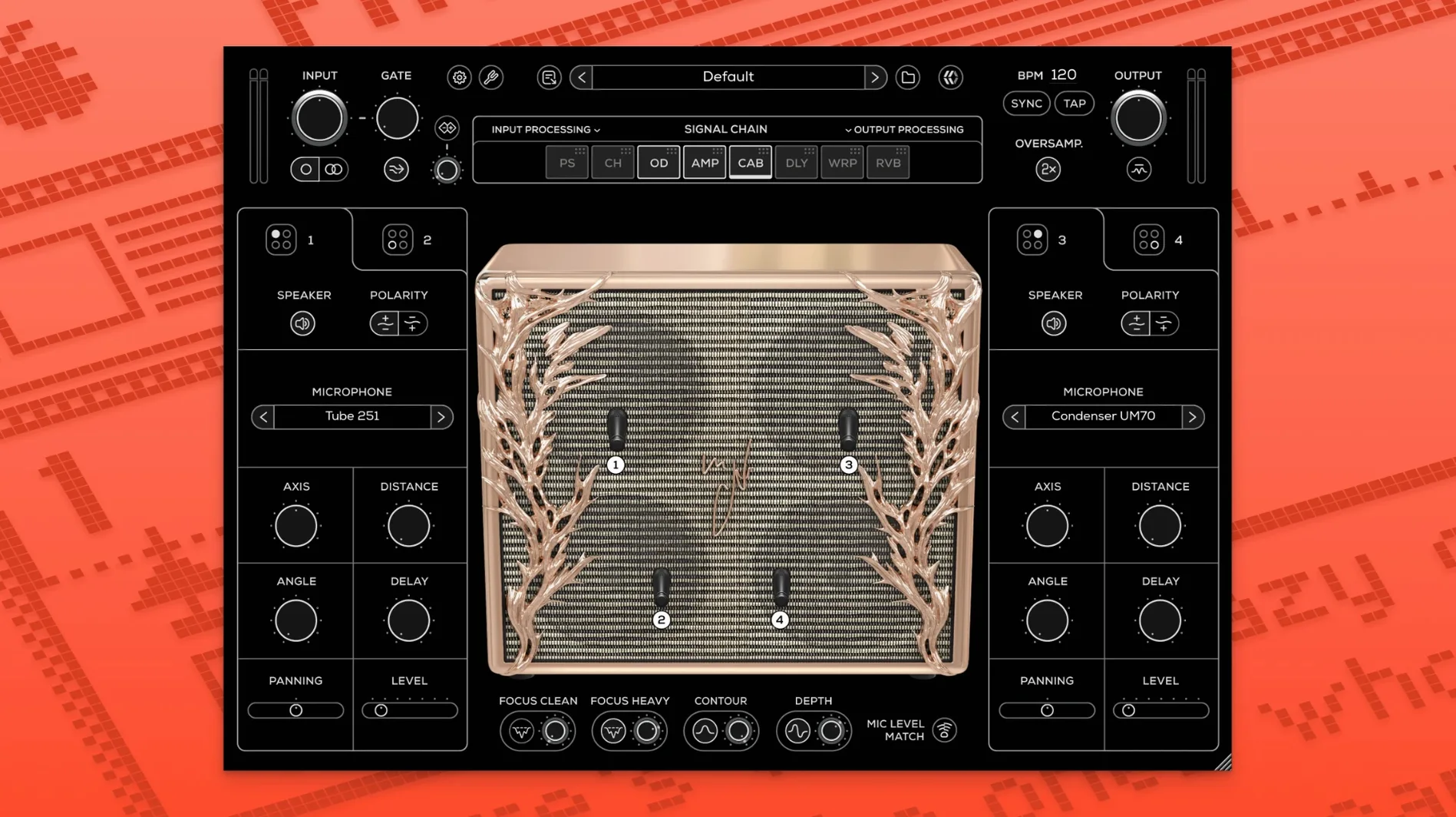
The transpose function is one of those "I'll just try it" features that quickly becomes a core part of patching. MixWave built this plugin around Manuel Gardner Fernandes's percussive, articulate playing style, and every module feeds into that. This initial 1.0.0 release lands as a universal binary for Intel and Apple Silicon Macs, running from macOS 10.13 through macOS 15.
Does it need an iLok dongle?
You get AU, VST3, and AAX plug-in formats, plus a standalone application. That covers Logic Pro, Ableton Live, Pro Tools, and any DAW that hosts modern plug-ins. An iLok License Manager account is required for activation, but no physical dongle is needed — the machine-based licensing works fine on a studio Mac. The installer ships inside a standard .dmg disk image; run the .pkg and follow the prompts.
Signal chain and cabinet control
The amp itself is voiced for a tight, dynamic response. Downstream, you hit a built-in compressor and EQ stage, then the 4×12 speaker cabinet module. Inside the cab section, microphone position, pan, and level are all adjustable — moving the mic off-axis changes the bite without touching the amp knobs. A Depth control shapes the low-end resonance, and the Contour knob provides a final broad-stroke EQ tilt before the output. A tuner sits at the front of the chain for quick checks between takes.
Does the 1.0.0 release affect everyday workflow?
Since this is the debut version, there isn't a "before and after" to compare — but that also means every design decision reflects the current Mac landscape. The universal binary loads natively on Apple Silicon without Rosetta translation, so plugin scanning in Logic Pro on an M1 or M2 finishes quickly. The standalone app is useful if you just want to plug in and practice without launching a full DAW session. One thing you'll notice: the Focus Clean and Focus Heavy tools aren't simple presets — they reshape the amp's gain staging and midrange response, so switching between them mid-session feels like swapping heads rather than nudging a knob.
Reordering modules you didn't know you'd move
The ability to drag modules around in the signal chain is easy to overlook. Most guitarists drop chorus before delay and call it done. But placing the pitch shift after the reverb, or warping a delayed signal, produces textures that suit hybrid electronic and guitar productions. If you're working on something rhythmic and staccato — the kind of part Manuel Gardner Fernandes is known for — try moving the compressor after the cabinet module. It tightens the percussive transients without squashing the amp's natural sag.
Plugin missing after install?
A few things trip people up in the first hour. Here's what I've seen and how to sort it.
- Plugin doesn't appear after installation. The
.pkginstalls components to the standard system folders — AU goes into/Library/Audio/Plug-Ins/Components, VST3 into/Library/Audio/Plug-Ins/VST3. If your DAW runs in native Apple Silicon mode, confirm you're not forcing Rosetta; MixWave is a universal binary and works better natively. Rescan the plugin folder, or in Logic Pro, toggle "Audio Units" off and on in the Plugin Manager. - iLok activation complaints. A machine-based license still needs the iLok License Manager app installed and signed in. If the plugin opens but shows a demo-mode nag, open License Manager, drag the activation to your computer (not the cloud), and restart your DAW.
- High latency when using the transpose function. Real-time pitch shifting is DSP-heavy. Lower your DAW's buffer size to 128 or 64 samples for tracking — the transpose circuit itself adds a few milliseconds, and a high buffer compounds it. For mixdown, flip the buffer back up and freeze the track.
Cabinet phase issues when stacking mics
The four-microphone setup in the cabinet module is powerful, but combining two close mics on the same speaker cone sometimes produces a hollow, comb-filtered sound. Panning them slightly apart helps, but the cleaner fix is to invert the polarity on one mic using the phase switch. You won't see a dedicated button — it's tucked into the mic channel settings. If you're blending a dynamic mic and a ribbon, a small delay on the ribbon channel (just a few samples) also aligns their arrival times without collapsing the stereo image.
How do you mute while tuning?
- The tuner mutes the output automatically when you open it — handy if you're tracking with headphones and don't want an open-string clang in your ears.
- Holding Option (⌥) while dragging any knob switches to fine-adjust mode. This matters on the Contour control, where a small nudge reshapes the entire midrange.
- The Warp effect isn't just a single algorithm — its character changes depending on where it sits in the chain. Before the amp, it tightens the attack; after the cabinet, it blurs transients into a pad-like smear. Both are useful, neither is "wrong."
- Standalone mode remembers your last input device, so closing and reopening the app picks up right where you left off. If you're switching between an audio interface and the Mac's built-in mic, the app reverts to the last saved device, not a default — check the audio preferences if you suddenly hear nothing.
- Initial public release with AU, VST3, AAX, and standalone formats.
- Universal binary for Intel and Apple Silicon Macs running macOS 10.13 through macOS 15.
- Includes the full amp, 4×12 cab module, compressor, EQ, transpose, and Contour control.
- macOS 10.13 or later
- Intel or Apple Silicon Mac
- iLok License Manager account (machine-based activation supported)
$ man mixwave-manuel-gardner-fernandes | grep -A2 "?"
Does the MixWave Manuel Gardner Fernandes plugin include a cabinet simulator?
Yes. The plugin includes a 4×12 speaker cabinet module with adjustable microphone position, pan, and level.
Comments 0
Sign in or create an account to leave a comment.
No comments yet. A codec, a slice, a machine — they appear after moderation.
More in VST Plugins
cd ../ Minuit Solstice
VST Plugins 117 MB
 MiniMeters
VST Plugins 103 MB
 Metric Halo Production Bundle
VST Plugins 318 MB
 Melodyne
VST Plugins 97 MB
 MeldaProduction MCompleteBundle
VST Plugins 1.2 GB
 Native Instruments Massive X
VST Plugins 1.6 GB
 Native Instruments Noire KONTAKT
VST Plugins 14.7 GB
 Neural DSP Archetype Petrucci
VST Plugins 745 MB