

Native Instruments Massive X for macOS
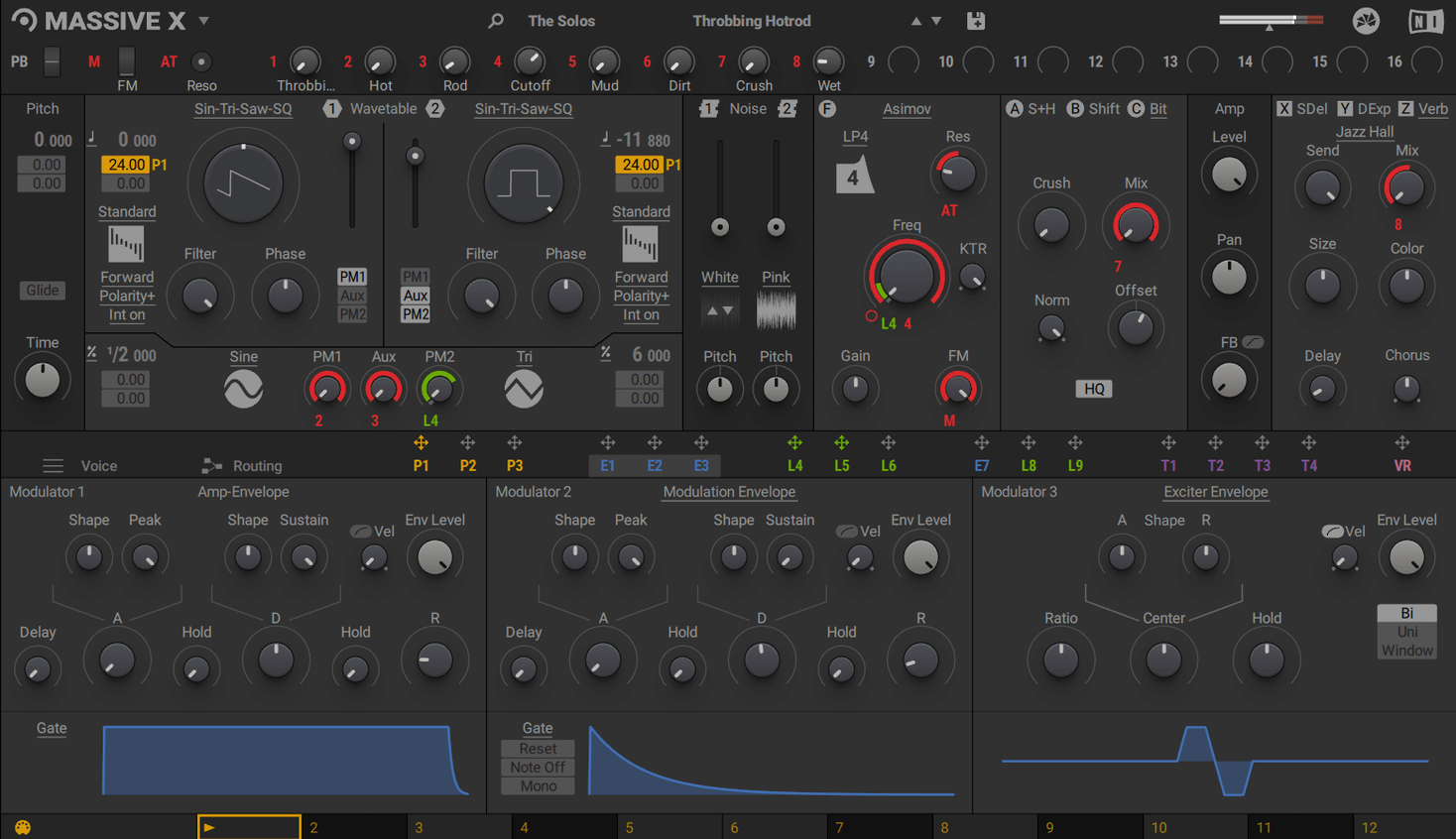
Sound designers and producers who live inside a DAW are the core audience for Massive X. It doesn't run standalone, so your workflow starts and ends inside Logic Pro, Ableton, or whatever host you call home. Think of it as a dedicated sound lab that coexists peacefully with the original Massive—you can keep old projects referencing Massive patches while building new ones from scratch here.
Designing a complex motion pad
The dual phase modulation generators are the key to movement that isn't just an LFO on a filter. Route one PM output to a wavetable position and the other to a filter cutoff, then set them to unrelated rates for an organic, shifting texture.
Building a rhythmic bass sequence
Instead of drawing MIDI notes for every sixteenth, use the Remote Octave control to trigger Performer patterns straight from your keyboard. It turns your left hand into a pattern selector, which changes how you audition riffs in a session.
Routing audio-rate modulation
The open routing system lets you connect any output to any input, which means you can send one oscillator's signal to modulate the phase of another. The 10 wavetable playback modes give you drastically different tonal results from the same wavetable—switch through them while the routing is active to find the sweet spot.
No standalone app, so where do the plug-in files land?
Massive X won't appear in your Applications folder or Launchpad because it has no standalone mode. After installation you'll find the plug-in files in the usual system locations: /Library/Audio/Plug-Ins/VST3/ and /Library/Audio/Plug-Ins/Components/ for AU. If you launch your DAW and don't see it listed, run a rescan—Logic users can do this in the Plug-In Manager, Ableton users under Preferences → Plug-Ins.
Beginners frequently miss that the routing page doesn't show connections between everything by default. You actually have to click a source slot, then click a destination slot to wire them up. A blank routing grid isn't broken—it just hasn't been patched yet.
Another early mistake: loading a preset, hearing silence, and assuming something crashed. Check the Voice section. Many patches ship with voice counts set high, and if your DAW is sending notes outside the playable range of the wavetable, you'll get nothing. The keyboard display at the bottom shows the active note range—if it's all grey, you're outside it.
On Intel Macs, the AVX requirement is non-negotiable. An older Xeon without AVX support will silently fail during scanning. This catches people upgrading from truly ancient machines who skipped reading the fine print.
Hybrid scoring with wavetables that sit under strings
Producers building hybrid orchestral and electronic scores get immediate mileage. The 780 factory presets lean cinematic, and the wavetable selection covers everything from glassy textures to distorted low-end that sits under string sections without masking them. If you score for games or film and need a sound that evolves over eight bars rather than eight beats, the dual phase modulation generators are the reason to reach for it over simpler synths.
Sound designers who treat a synth as raw material rather than a preset player will live in the routing page. The ability to send any output to any input means you can build feedback paths that don't exist in most fixed-architecture instruments. It rewards people who think in signal flow rather than knob positions.
Live performers using the Performer section with a controller benefit from the Remote Octave feature—it changes how you improvise because you can jump between completely different modulation patterns by shifting your left hand up or down the keyboard, without touching the mouse. That specific workflow doesn't exist in the original Massive.
Apple Silicon code tames CPU spikes during playback
Version 1.7.1 didn't ship with a flashy new oscillator model, but it tightened up the experience on Apple Silicon. Earlier versions under Rosetta could spike CPU when loading complex patches during playback; native ARM code in 1.7.1 keeps that spike shorter and less likely to cause a dropout in Logic at small buffer sizes.
Loading times for the factory library improved enough that browsing presets with the arrow keys feels snappy rather than stuttery. This matters more than it sounds—when you're auditioning 40 bass patches in a row, a 300-millisecond delay per patch adds up fast. The current build removes most of that friction.
The graphics pipeline also settled down. Early releases on certain Intel MacBook Pro models with integrated graphics could flicker when opening the modulation view. The update resolved that for machines with compliant OpenGL 2.1 support.
Building a one-finger riser with no automation lanes
This is a practical task you might tackle on day two or three, once the routing concept clicks. The goal: a one-finger riser that climbs in pitch, intensity, and stereo width over eight bars without any automation lanes in the DAW.
Start with an empty init patch. In the Oscillator section, load wavetable Cinematic Rise 04 and set playback mode to Formant—this gives the sweep a vocal, throaty character. Turn on oscillator two, load Noise Turbulence, and set its playback mode to Bend+. Balance them roughly 70/30 in the mixer.
Now open the Performer section. Draw a rising curve across the full 16 steps in lane one, then assign that lane to the pitch of oscillator one with a depth of 12 semitones. In lane two, draw a curve that starts low and ramps up over the last four steps only—assign this to the filter cutoff of a low-pass filter in the Insert section. Lane three gets a shallow sawtooth shape assigned to the pan of oscillator two, creating a width sweep that matches the intensity build.
Route one of the phase modulation generators to the wavetable position of oscillator one at a slow rate—around 0.3 Hz. This adds subtle timbral movement underneath the main pitch rise so it doesn't sound static as it climbs. Insert a distortion module after the filter and dial in about 40% drive; the rising cutoff feeds more harmonic content into the distortion gradually.
Set the Remote Octave to C3–C4 so your left hand can trigger the pattern. Play a single note with your right hand and hold it—the riser builds itself. Tap different keys in the Remote Octave range to restart or shift the pattern. When you're happy, bounce the eight-bar take to audio and reverse the first bar in your DAW for a sucked-in intro effect before the main rise.
- Updated to version 1.7.1.
- macOS 13 or later
- Apple Silicon or Intel processor (Intel Macs require AVX support)
- 4 GB RAM (6 GB recommended)
- Graphics card with OpenGL 2.1 or higher support
- Internet connection for download and activation
$ man native-instruments-massive-x | grep -A2 "?"
Can I open old Massive presets in Massive X?
No, Massive X has a completely new oscillator section and architecture, so it does not load original Massive presets. The two synths coexist on your system, so you can run the original Massive for older projects.
Does Massive X work as a standalone app?
It does not run in standalone mode. You need a DAW or other host that supports AU, VST3, or AAX plugins to use it.
Comments 0
Sign in or create an account to leave a comment.
No comments yet. A codec, a slice, a machine — they appear after moderation.
More in VST Plugins
cd ../ Native Instruments Noire KONTAKT
VST Plugins 14.7 GB
 Neural DSP Archetype Petrucci
VST Plugins 745 MB
 Neural DSP Archetype Rabea X
VST Plugins 742 MB
 Neural DSP Parallax X
VST Plugins 179 MB
 Neural DSP Soldano SLO-100 X
VST Plugins 340 MB
 noteGRABBER
VST Plugins 35 MB
 Nudist Audio Nudistort
VST Plugins 45 MB
 oeksound soothe2
VST Plugins 128 MB