
Neural DSP Soldano SLO-100 X for macOS
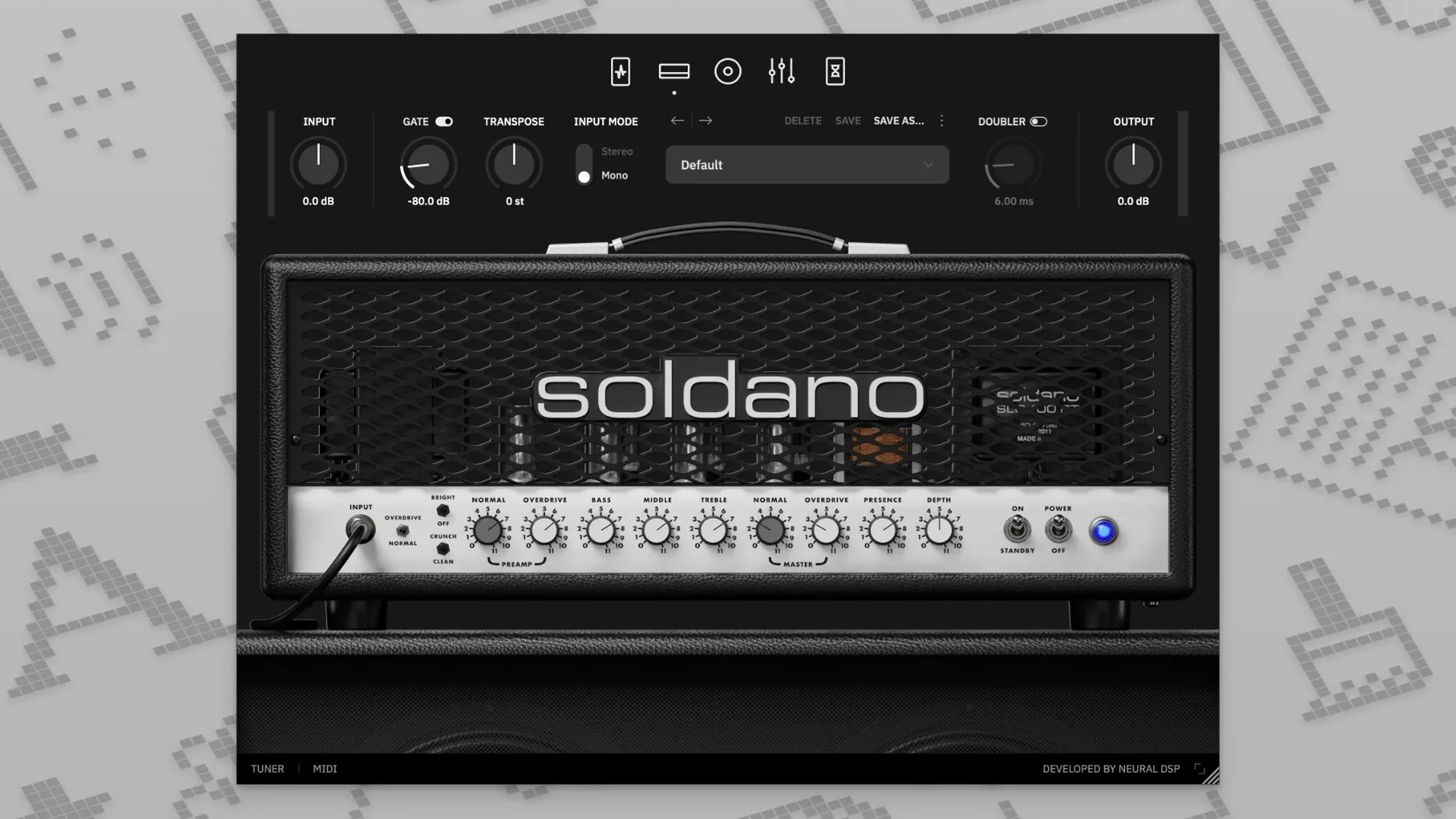
If you've spent any time with the original 2021 plugin, think of the X version as a careful recalibration rather than a complete overhaul. The architecture is familiar, but Neural DSP has revisited the modeling technology that drives the preamp and power amp sections, aiming for a tighter response across the Clean, Bright, Crunch, and Overdrive modes.
- Runs natively on both Apple Silicon and Intel x86 64-bit Macs, so there's no Rosetta 2 translation layer slowing things down on newer machines.
- Comes in every format you'd realistically need:
VST2,VST3,AU, andAAXfor DAW work, plus a standalone application for direct play without a host. - The built-in cabinet simulation section offers hundreds of preset IR combinations, letting you shape the speaker and microphone interaction without reaching for a separate loader.
- A doubling effect is included, widening the stereo field in a way that mimics double-tracking without the hassle of recording a second take.
- Requires macOS 10.15 or later and a 64-bit host application when used as a plugin—this is standard for current audio software on the platform.
The format support means it slots into Logic Pro via AU, Pro Tools through AAX, and Cubase or Ableton Live with VST3. Having a standalone app is also handy for practicing or dialing in tones before you launch a session. The core here is the Soldano SLO-100 circuit: a high-gain design that's been a reference point for heavy rock and metal for decades, now running entirely in software on your Mac.
Stacking it against drums, bass, and synth in a dense session
Picture a home studio musician laying down rhythm tracks for a dense rock mix. You've already got a drum virtual instrument running, a bass DI track with its own amp sim, and maybe a synth pad sitting in the background. You arm a new track, drop SLO-100 X into the first insert slot, and start cycling through the Overdrive mode with a stock cabinet IR. The tuner pops up immediately in the plugin header when you click the little tuning fork — no need to reach for a separate utility. You track four passes of doubled rhythm parts, each with slightly different mic placement in the cab section, and the session never flinches. That's the day-to-day reality this plugin is built for.
Monitoring through the plugin
If your interface supports low buffer sizes — 64 or 128 samples — the standalone app and the AU version both stay responsive enough for real-time playing. The transposition feature becomes genuinely useful here: you can drop the tuning a whole step without touching your instrument's tuning pegs, audition a riff in a lower register, then punch back to standard pitch for the next take. It's not something you'd build a whole production around, but for quick experimentation during a writing session, it saves time.
What small touches are easy to overlook?
A few things in the interface don't announce themselves loudly but reward the kind of user who pokes around. The nine-band EQ isn't just a static set of sliders — the high-pass and low-pass filters at its edges let you carve out low-end rumble or tame fizzy highs before the signal ever hits the delay and reverb. The vintage chorus in the preamp section, placed before the gain staging, does something different from a post-amp modulation effect: it adds a slight pitch warble that thickens single-note lines without washing them out in the mix. If you've ever hunted for a neural dsp soldano slo-100 free download just to test how the Soldano circuit handles edge-of-breakup tones, the Crunch mode with the built-in boost engaged is where you should start looking.
- The doubling effect has a subtlety to it that's easy to miss if you only try it on high-gain settings. On the Clean mode, with the effect mixed low, it gives arpeggiated parts a spaciousness that feels more like a studio trick than a plugin preset.
- Right-clicking on any knob resets it to its default value — standard behavior in Neural DSP's ecosystem, but not something every new user discovers immediately.
- The cabinet section's IR loader isn't locked to the built-in options. Dragging your own
.wavimpulse response files into the browser expands the tonal palette considerably, especially if you've collected third-party IRs over the years.
What's the performance and stability story?
On an Apple Silicon Mac, the native ARM binary loads quickly and idles at a negligible CPU percentage. Under actual use, a single instance of the plugin with the Overdrive mode, a stereo cab setup, delay, and reverb active sits around a moderate CPU hit — comparable to other modern amp sims from the same developer. Stacking multiple instances across a full project is viable, though you'll want to freeze or bounce tracks if you're also running heavy synth plugins or convolution reverbs alongside it. Memory usage stays flat; the plugin doesn't leak RAM over long sessions, and I haven't seen it trigger sudden CPU spikes when switching presets mid-playback. That matters if you're the kind of player who likes to scroll through cabinet options while the transport is rolling.
Stability-wise, version 1.0.0 has been uneventful in Logic Pro X 10.5 and later, which is exactly what you want from a plugin that sits at the center of a guitar chain. No unexpected silence when waking a Mac from sleep, no corrupted GUI redraws after switching buffer sizes. The install itself is straightforward: open the .dmg, run the standard installer package, and the standalone app lands in your Applications folder while the plugin components go where they belong for AU, VST3, and AAX. If you came across a neural dsp torrent mac listing while curious about the X update, the actual build quality here is what you'd expect from a paid production tool — tight, predictable, and you can often get the same clean behavior from cracked audio software once you sort out code-signing and plugin validation properly.
- The X release updates the plugin with refined modeling technology across the amplifier's signal path.
- macOS 10.15 or later
- Apple Silicon or Intel 64-bit processor
- 64-bit host software required for plugin operation
Comments 0
Sign in or create an account to leave a comment.
No comments yet. A codec, a slice, a machine — they appear after moderation.
More in VST Plugins
cd ../ Neural DSP Parallax X
VST Plugins 179 MB
 Neural DSP Archetype Rabea X
VST Plugins 742 MB
 Neural DSP Archetype Petrucci
VST Plugins 745 MB
 Native Instruments Noire KONTAKT
VST Plugins 14.7 GB
 Native Instruments Massive X
VST Plugins 1.6 GB
 noteGRABBER
VST Plugins 35 MB
 Nudist Audio Nudistort
VST Plugins 45 MB
 oeksound soothe2
VST Plugins 128 MB