

Nudist Audio Nudistort for macOS
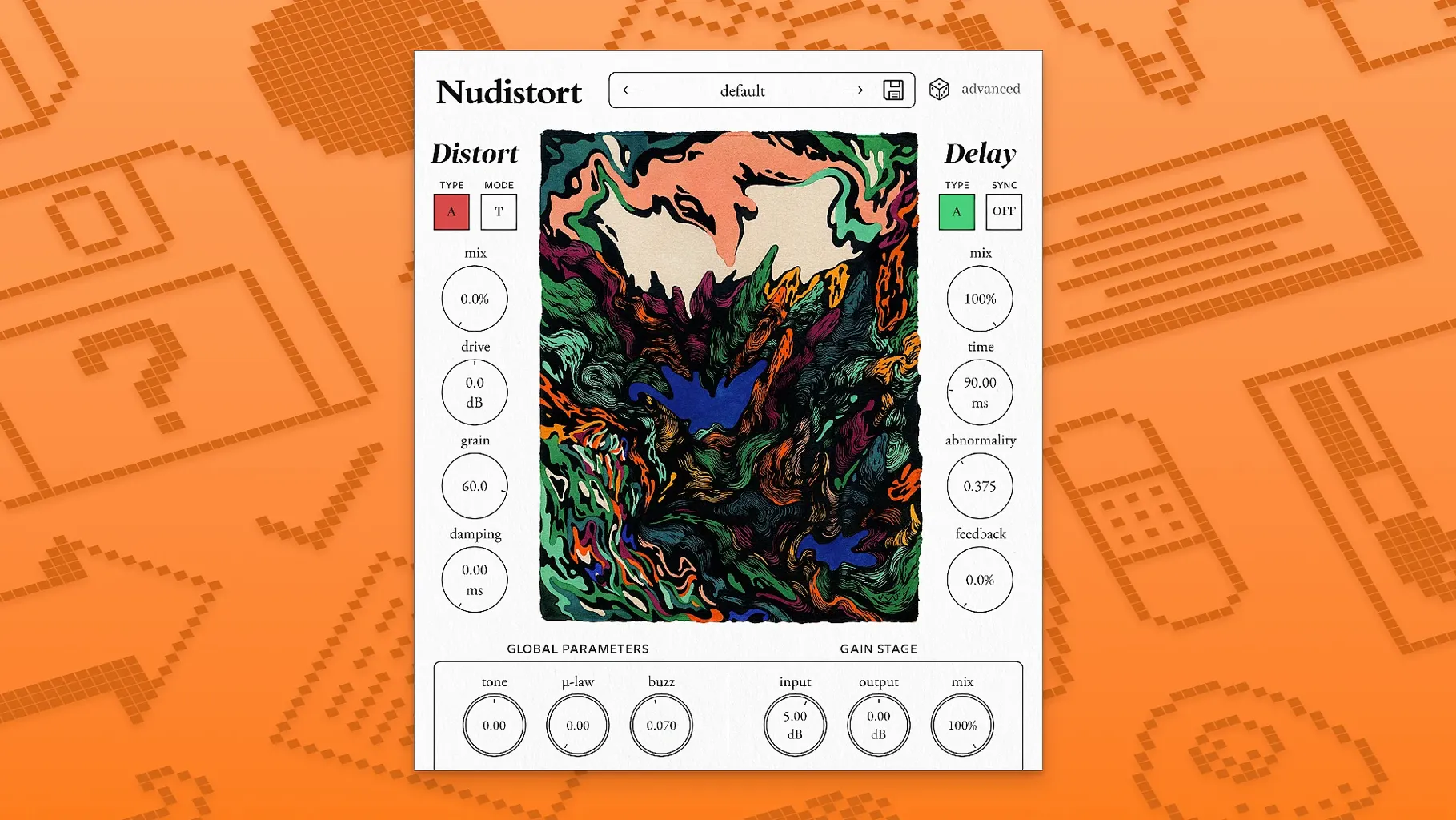
Version 1.2.5 ships with a fresh distortion algorithm. The change isn't cosmetic — it rewires how the plugin chews through a signal. At low drive it folds harmonics in a way that feels less like a stompbox and more like an unstable circuit, and when you push it, the breakup turns granular without collapsing into predictable fuzz.
Extreme sound design that stays articulate even when unrecognizable
- Extreme sound design — the algorithm stays articulate even when the waveform is barely recognizable.
- Expressive harsh sounds — drive and bias interact, letting you pull vocal-like grit out of sustained material.
- Radical timbre changes — small moves on the input trim can flip the character of a bass or pad entirely.
Narrow sweet spots reward precise gain staging
- Needs macOS 10.13 or later, Intel or Apple Silicon, and a DAW that hosts VST3, AU, or AAX.
- The English-only interface is simple, but the sweet spots are narrow — it rewards precise gain staging.
Disable automatic gain compensation first
Don't just slap it on a track and twist knobs randomly — a couple of prefs make a real difference. Open the plugin, click the gear icon, and do these three things right away.
- Disable automatic gain compensation. It's on by default and it masks what the algorithm is actually doing. Turn it off so you hear the raw output, then level-match manually at your interface or with a trim plugin afterward.
- Set the oversampling to 4x. The default 2x is fine for tracking, but at extreme drive settings aliasing folds back into the audible range and turns the top end into a metallic haze. 4x pushes that crud well above 20 kHz and keeps the grit in the mids where it belongs.
- Switch the bias curve from linear to asymmetric. Linear bias gives you symmetrical clipping — useful, but predictable. Asymmetric introduces a DC-like offset that makes the distortion breathe unevenly, which is where the "unstable circuit" character lives.
You'll find these three settings in the Preferences pane. They're not exposed on the main UI, which is probably intentional — the developer clearly wants you to commit to a sound before you start tweaking.
Workflow: turning a clean 808 into a textured low-end growl
Here's a repeatable chain for sub-bass that needs to cut through small speakers without losing weight. Start with a clean 808 sample — something dry, no saturation baked in.
- Insert Nudistort on the 808 channel. Reset all knobs to default by option-clicking the logo.
- Drop the Input Trim to -6 dB. The algorithm gets real grabby above -3 dB, and you want headroom for the bias interaction later.
- Set Drive to 11 o'clock. Crank Bias to 2 o'clock. You'll hear the fundamental start to hollow out — that's the asymmetric curve pulling the waveform off-center.
- Blend the Mix knob back to 65% wet. The dry signal anchors the sub; the wet signal adds a layer of odd-order harmonics that'll translate on phone speakers.
- Engage the High Cut at 800 Hz. Nudistort generates energy way up into the highs, and on an 808 you don't need any of it. The filter here is 12 dB/oct, so it's not surgical — just enough to keep the hats clean.
- Follow Nudistort with a stock compressor, fast attack, 4:1 ratio, knocking off 2–3 dB. The bias knob makes the output level swing, and the compressor tames those swings into something mix-ready.
The result: an 808 that still thumps but has a raspy upper-bass texture. It'll poke through earbuds without sounding like a separate layer.
How to avoid aimless knob-twisting in your first hour
The plugin passes no audio
Nine times out of ten, this is the Input Trim sitting at -∞. The knob has a huge range and it's easy to bump it to silence with a scroll wheel. Check that first. If it's not that, toggle the Bypass switch twice — early AU hosts sometimes initialize the plugin in a muted state after a session reload.
Latency spikes when you enable 4x oversampling
That's expected. 4x adds about 64 samples of lookahead. For tracking, drop back to 2x or disable oversampling entirely, then switch to 4x for the mixdown bounce. Logic Pro users can also enable Low Latency Mode in the transport bar, which temporarily bypasses the oversampling buffer.
Export hangs or the DAW beachballs
Happens in Ableton Live 11 on Apple Silicon when Nudistort runs inside a heavy project and the audio buffer is set to 128 samples or lower. Bump the buffer to 512 samples for the export pass. If it still chokes, render the offending track in place before the final bounce — Nudistort's algorithm runs a dense internal calculation that doesn't play well with Live's real-time offline render at small buffer sizes.
Sweep every parameter against a 100 Hz sine wave
The plugin rewards experimentation, but aimless knob-twisting gets old fast. Here's how to get productive quickly.
- Spend an hour with a sine wave. Load a simple oscillator at 100 Hz, no modulation, and sweep every parameter while watching a spectrum analyzer on the next insert. You'll see exactly where the harmonics pop up — especially the way Bias shifts energy from evens to odds. That mental map pays off every time you dial it in on a real source.
- Save three go-to presets. One for "just a little edge" (Drive 9 o'clock, Mix 40%, Bias linear), one for "speaker cone abuse" (Drive maxed, Bias asymmetric, High Cut off, Mix 100%), and one for "parallel crush" (everything dimed, Mix at 30%). You'll reach for these more than you think.
- Put a limiter after it at all times. The output can spike 12 dB above the input when you change Bias or Drive mid-automation. A brickwall limiter set to -0.3 dB is cheap insurance while you're still learning the gain structure.
- Try it on aux returns. Send a drum bus to a return with Nudistort 100% wet, then high-pass the return at 600 Hz and blend it underneath. You get all the aggression without sacrificing transient clarity — a trick sound designers use on cinematic impacts.
- Version 1.2.5 delivers a new core distortion algorithm — the same controls, a different kind of breakup.
- macOS: 10.13 or later
- Architecture: Apple Silicon, Intel
- Formats: VST3, AU, AAX
- Languages: English
Comments 0
Sign in or create an account to leave a comment.
No comments yet. A codec, a slice, a machine — they appear after moderation.
More in VST Plugins
cd ../ oeksound soothe2
VST Plugins 128 MB
 noteGRABBER
VST Plugins 35 MB
 Omnisphere
VST Plugins 205 MB
 Output Portal
VST Plugins 319 MB
 Neural DSP Soldano SLO-100 X
VST Plugins 340 MB
 Neural DSP Parallax X
VST Plugins 179 MB
 Neural DSP Archetype Rabea X
VST Plugins 742 MB
 Neural DSP Archetype Petrucci
VST Plugins 745 MB